
How to Prepare for System Design Interviews in 2026 (The Only Guide You Need)
Everything you need in one place: core concepts explained for beginners, the interview framework, 8-week study plan, company-specific strategies for Google/Amazon/Meta, and 10 practice problems.

What This Guide Covers
Explanation of what system design interviews are and why they exist
The exact 8-week roadmap from zero knowledge to interview-ready
Every core concept explained clearly with examples
The step-by-step interview framework: what to say in the first minute, the 15th minute, the 40th minute
How to practice solo without a study partner
Company-specific differences: Google vs Amazon vs Meta vs Apple
The scoring rubric interviewers actually use (with percentage weights)
10 practice problems organized from beginner to advanced
If you are reading this, you probably have a system design interview coming up and you are not sure where to start.
Maybe you have been building software for years but have never been asked to design a system from scratch in an interview setting.
Maybe you are a new grad and the phrase “design Twitter at scale” feels like being asked to build a rocket in 45 minutes.
Maybe you have failed a system design interview before and are trying to figure out what went wrong.
Wherever you are starting from, this guide will take you from that starting point to interview-ready. It is designed to be read in order, from top to bottom. Each section builds on the previous one.
If you follow this guide and put in the practice hours, you will walk into your interview prepared.
What Is a System Design Interview?
A system design interview is a 45 to 60 minute conversation where you design the architecture of a software system.
The interviewer gives you a broad prompt like “Design a URL shortener like Bitly” or “Design the backend for Instagram” and you spend the next 45 minutes deciding what components the system needs, how those components communicate, how data flows through the system, and what trade-offs you are making.
There is no single correct answer.
The interviewer is not checking your answer against a rubric of “correct” boxes.
They are evaluating how you think.
Can you break down a vague problem into specific requirements?
Can you identify what is hard about this particular system?
Can you make reasonable decisions and explain why you made them?
Can you recognize the trade-offs of your own design?
This is why system design interviews feel different from coding interviews.
In a coding interview, your code either passes the test cases or it does not.
In a system design interview, two completely different architectures can both be “correct” if the candidate can reason about why their choices make sense.
The interview typically follows a natural structure.
You spend the first 5 minutes understanding the problem.
You spend the next 10 minutes sketching a high-level architecture.
You spend 20 minutes diving deep into the hardest parts.
You spend the last 10 minutes discussing trade-offs, failure scenarios, and potential improvements.
Understanding this structure is the first step toward mastering the interview.
For an overview of how system design interviews changed in 2026 and what the new playbook looks like, start there before anything else.
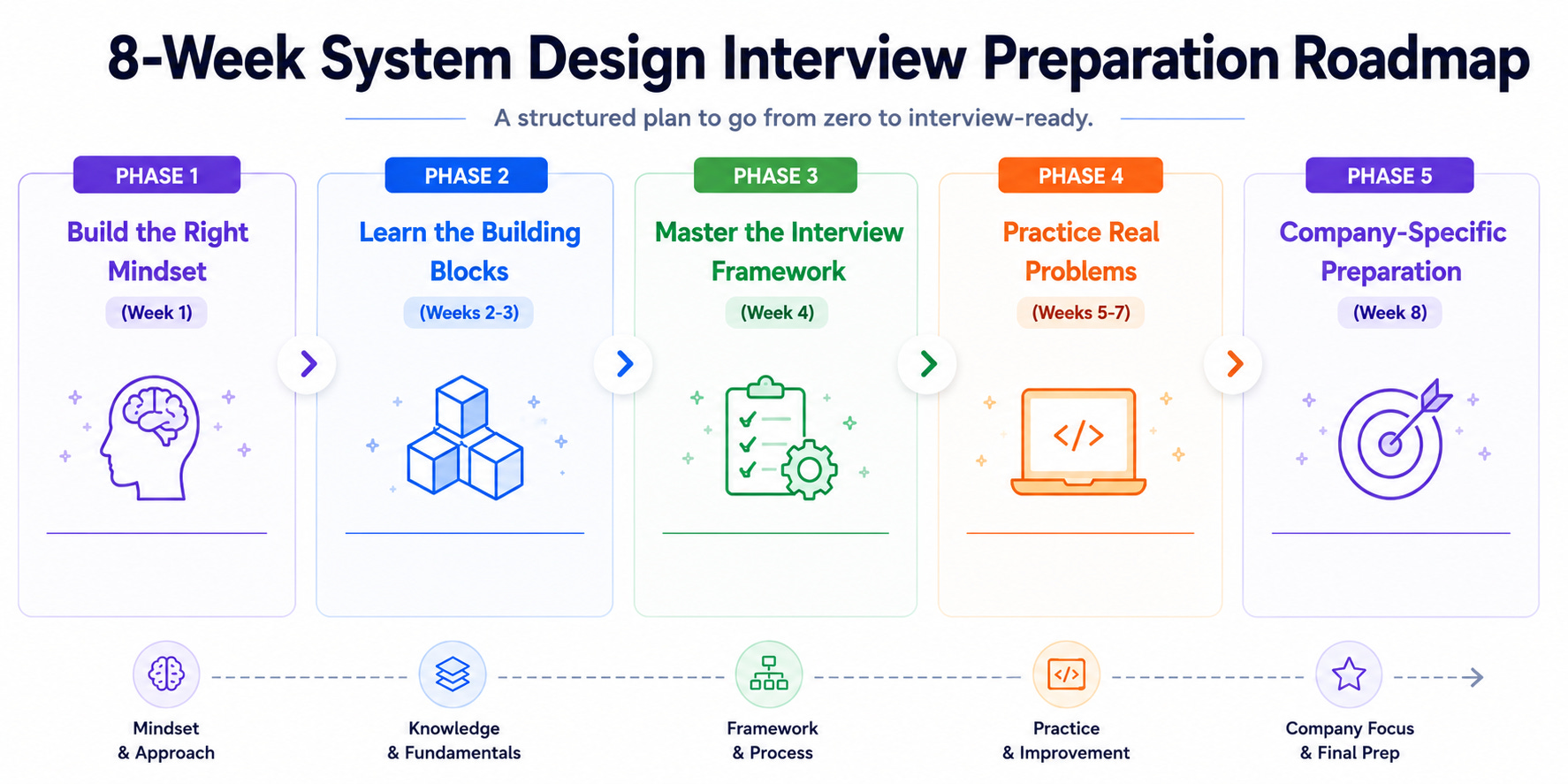
Phase 1: Build the Right Mindset (Week 1)
Before studying any technology, you need to understand what separates candidates who pass from candidates who fail.
This is not motivational advice. It is structural.
The way you approach preparation determines the outcome more than the number of hours you put in.
The Reasoning Trap
The most common failure mode is memorization.
Candidates memorize the architecture for “Design Twitter” from a blog post. They memorize that Twitter uses a fan-out-on-write approach for the timeline. They memorize that it uses Redis for caching and Kafka for messaging.
Then they walk into the interview and recite what they memorized.
This fails for two reasons.
First, the interviewer can tell. Memorized answers sound rehearsed. They lack the natural pauses, the “let me think about this,” the spontaneous exploration of alternatives that a candidate who is reasoning in real-time would produce.
Second, the interviewer will ask a follow-up that the memorized answer does not cover.
“What if we need to support 1 billion users instead of 100 million? What would change?”
If you memorized the architecture rather than understanding the reasoning behind it, you have no answer.
The fix is to study building blocks, not finished architectures.
When you understand what a load balancer does and why you would use one, you can include it in any design.
When you memorize that “Twitter uses a load balancer,” you can only include it in your Twitter answer.
I spent 6 months memorizing system design solutions and here’s why it was a waste is one candidate’s honest account of learning this lesson the hard way.
The alternative approach, learning the 10 building blocks that compose every system, is what actually works.
The Habits That Produce “Strong Hire” Signals
After watching hundreds of interviews, the patterns become clear.
Candidates who earn “strong hire” ratings share specific behaviors.
They start by asking clarifying questions instead of immediately drawing boxes. They explain their reasoning out loud as they design, saying things like “I am choosing PostgreSQL here because our access pattern is relational and we need strong consistency for financial transactions.”
They proactively discuss trade-offs: “The downside of this approach is higher write latency, but that is acceptable because our system is read-heavy.”
Candidates who earn “no hire” ratings also share specific behaviors. They jump straight to drawing boxes without understanding the requirements. They make decisions without explaining why. They use buzzwords without understanding the concepts behind them.
For all nine passing habits and the one habit that overrides everything, see 9 habits I see in engineers who pass the system design interview.
On the failure side, after conducting 100+ system design interviews, only 4 mistakes actually matter. These four account for the vast majority of rejections. Identifying whether you are making any of them is the fastest way to improve.
Understanding Your Level
System design interviews are calibrated to your experience level.
A new grad is not expected to produce the same answer as a staff engineer. But many candidates either under-perform (a senior engineer giving a junior-level answer) or over-reach (a junior engineer trying to sound like a staff engineer and getting lost in complexity).
Here is what each level generally requires.
At the junior level (L3/L4), you should demonstrate understanding of basic building blocks: databases, caches, load balancers, and APIs. Your high-level architecture should be reasonable, and you should be able to explain your choices.
At the mid-level (L5), you should additionally demonstrate depth on 2-3 components, discuss scalability trade-offs, and handle failure scenarios.
At the senior level (L6+), you should drive the conversation, proactively identify the hardest problems, discuss operational concerns like monitoring and deployment, and demonstrate breadth across the entire system.
For a detailed breakdown of what FAANG expects at each level from L3 through L6, including real answer comparisons, read that guide during Week 1.
Phase 2: Learn the Building Blocks (Weeks 2-3)
Now you study the technical concepts.
The temptation is to try to learn everything. Resist it.
There are roughly 50 concepts that could appear in a system design interview, but 8 core patterns and about 15 key concepts cover 80% of questions. Focus on these first.
The 8 Patterns
Every system design answer is a combination of a small number of recurring patterns.
When someone asks you to “Design Instagram,” you are really being asked to combine the read-heavy scaling pattern with the blob storage pattern with the feed generation pattern.
When someone asks you to “Design a chat system,” you are combining the real-time messaging pattern with the presence tracking pattern with the message storage pattern.
Once you learn to recognize these patterns, new questions stop being intimidating.
You stop thinking “I have never designed Instagram before” and start thinking “This is a read-heavy system with blob storage and a ranked feed. I know how to handle each of those.”
The 8 system design patterns that cover most FAANG interview questions breaks down each pattern with examples of which questions use it.
The Core Concepts Explained
Let me walk through the building blocks that appear in almost every system design interview. You need to understand what each one does, when to use it, and the trade-offs.
Load Balancers
When your system receives thousands of requests per second, a single server cannot handle them all.
A load balancer sits in front of multiple servers and distributes incoming requests across them.
Think of it as a traffic cop at a busy intersection.
The most common algorithms are round-robin (each server gets requests in turn), least connections (the server with the fewest active requests gets the next one), and weighted routing (more powerful servers get more requests).
Every system design answer that handles more than a few hundred users per second needs a load balancer.
Databases
This is the most-tested topic in system design interviews.
You need to understand two things: when to use SQL (relational) databases vs NoSQL databases, and how to scale databases when a single server is not enough.
SQL databases (PostgreSQL, MySQL) store data in tables with predefined schemas. They support complex queries, joins, and transactions.
Use them when your data is structured and relational (users, orders, products) and when you need strong consistency (financial systems, inventory management).
NoSQL databases (DynamoDB, Cassandra, MongoDB) store data in flexible formats: key-value pairs, documents, or wide columns. They scale horizontally more easily than SQL databases.
Use them when your access pattern is simple (get user by ID, store session data), when you need massive scale (millions of reads per second), or when your data does not have a fixed schema.
For a practical guide to the 6 databases every system design candidate should know cold, including when to choose each one, that post maps each database to the specific access patterns it serves best.
Two concepts that trip up candidates repeatedly are sharding and the CAP theorem.
Sharding means splitting your database across multiple servers so that each server holds a portion of the data.
This is how databases scale beyond what a single machine can handle.
If database sharding questions used to make you freeze, that mental model will fix it.
The CAP theorem states that a distributed database can provide at most two of three guarantees: Consistency (every read returns the most recent write), Availability (every request receives a response), and Partition tolerance (the system works even when network failures split it into disconnected groups).
Understanding the 10 ways candidates misuse the CAP theorem will keep you from making the same mistakes.
Caching
A cache is a fast storage layer (usually in-memory, like Redis) that sits between your application and your database.
When a user requests data, the application checks the cache first.
If the data is there (a cache hit), it returns immediately without touching the database.
If the data is not there (a cache miss), the application reads from the database, returns the data, and stores a copy in the cache for next time.
Caching is powerful but introduces a hard problem: cache invalidation.
When the data in your database changes, the cached copy becomes stale. Serving stale data can be worse than serving no cache at all.
The 5 cache invalidation bugs that cause your cache to serve stale data covers the specific failure modes and how to prevent each one.
Message Queues
A message queue (Kafka, RabbitMQ, SQS) decouples components of your system.
Instead of Service A calling Service B directly and waiting for a response, Service A puts a message on the queue and moves on.
Service B picks up the message and processes it whenever it is ready. This makes your system more resilient (if Service B goes down, the messages wait in the queue) and more scalable (you can add more instances of Service B to process messages faster).
CDNs (Content Delivery Networks)
A CDN stores copies of your static content (images, videos, CSS, JavaScript) on servers distributed around the world.
When a user in Tokyo requests an image, they get it from a server in Tokyo instead of your origin server in Virginia. This reduces latency from hundreds of milliseconds to single digits.
API Design
Every system design answer includes an API.
The interviewer wants to see that you can define clear endpoints.
“POST /api/v1/messages to send a message, GET /api/v1/conversations/{id}/messages to retrieve messages for a conversation.”
Good API design demonstrates that you understand the data model and the user flows.
The Numbers You Must Memorize
Every system design interview involves back-of-the-envelope math.
“If we have 100 million users and each user uploads 2 photos per day, how much storage do we need per year?”
You need to be able to do this math quickly, which means you need certain numbers memorized.
Here are the critical ones.
Reading 1 MB from memory takes about 250 microseconds.
Reading 1 MB from SSD takes about 1 millisecond.
Reading 1 MB over a network takes about 10 milliseconds.
A single server can handle roughly 10,000 to 50,000 concurrent connections.
A single PostgreSQL instance can handle roughly 10,000 queries per second.
Redis can handle 100,000 operations per second.
For the complete set of numbers and how to use them in capacity estimation, the numbers every engineer must memorize is your reference.
For the step-by-step estimation method, the 5-step capacity estimation worksheet walks you through a real calculation.
And RAM vs Disk vs Network: the numbers that change everything explains why these numbers matter for architecture decisions.
The One Diagram
Here is the most useful thing I can tell you about system design interviews: there is one architecture diagram that, with minor variations, applies to 80% of questions. It looks like this.
A user’s request hits a CDN or DNS. It passes through a load balancer.
The load balancer routes it to one of many application servers.
The application server checks a cache (Redis).
If the data is cached, it returns immediately.
If not, the application server queries the database.
For write operations, the application server may put a message on a queue for asynchronous processing.
Background workers consume from the queue and perform tasks like sending notifications, processing images, or updating search indexes.
That is the skeleton. Every specific system design (Instagram, Uber, Netflix, WhatsApp) is a variation of this skeleton with different emphasis on different components.
The one diagram that explains 80% of system design draws it out with annotations.
For the distributed systems extension, the one diagram that makes distributed systems click adds replication, sharding, and cross-region architecture.
Concepts That Separate Good from Great
Beyond the basics, five concepts appear so frequently and are evaluated so deeply that weak performance on any one of them is enough to drop your score a full tier.
These are consistent hashing (how to distribute data across nodes), replication strategies (how to keep data safe across multiple copies), rate limiting (how to protect your system from abuse), message ordering guarantees (how to ensure events are processed correctly), and consensus protocols (how distributed nodes agree on state).
The 5 system design concepts that separate FAANG offers from rejections goes deep on all five.
For rate limiting specifically, since it appears both as a standalone design question and as a component of larger systems, understanding how the token bucket algorithm works and how to implement it at scale gives you a strong answer for both scenarios.
Consistent hashing becomes intuitive once you see how DynamoDB actually uses it is the deep dive that makes the concept stick.
Phase 3: Master the Interview Framework (Week 4)
Knowing the concepts is like knowing the ingredients.
The framework is the recipe. It tells you what to do in the first minute, the 15th minute, and the 40th minute.
Minute 0-5: Requirements
When the interviewer says “Design Instagram,” do not start drawing.
Ask questions first.
“How many daily active users are we designing for? 100 million? 500 million?” This determines your scaling strategy.
“What are the core features? Photo upload, feed, stories, direct messages, or a subset?” This determines your scope.
“Is this read-heavy or write-heavy? What is the read-to-write ratio?” This determines your database and caching strategy.
“What is the latency requirement? Should the feed load in under 200ms?” This determines your architecture constraints.
“Do we need strong consistency or is eventual consistency acceptable?” This determines your replication strategy.
These questions accomplish two things. They show the interviewer that you think before you act.
And they give you specific constraints that guide every subsequent decision.
Minute 5-15: High-Level Architecture
Now draw the skeleton diagram from Phase 2, customized for this specific system. Walk the interviewer through each component as you draw it.
“Users connect through our mobile app or web client. Requests hit a load balancer that distributes traffic across our application servers. For photo uploads, we store the image in a blob store like S3 and store the metadata in our database. For the feed, we use a caching layer to serve pre-computed feeds with low latency.”
The key is to explain why as you draw.
Do not just draw a box labeled “cache.”
Say “I am adding a cache here because the feed is read-heavy, we expect a 100:1 read-to-write ratio, and caching the most recent feed entries in Redis gives us sub-10ms read latency.”
For the complete minute-by-minute playbook of the opening phase, the first 15 minutes of a system design interview gives you the exact script.
For the full 45-minute framework, the system design framework nobody teaches senior engineers covers the complete structure including how to handle the deep dive and closing sections.
Minute 15-35: Deep Dive
After the high-level architecture, the interviewer will say something like “Let’s go deeper on the database design” or “How would you handle the feed generation at scale?”
This is the deep dive, and it carries the most weight in scoring.
This is where your Phase 2 knowledge pays off.
If the interviewer asks about database design, you discuss your schema, your indexing strategy, whether you shard and how, and what consistency model you chose.
If they ask about caching, you discuss your caching strategy (cache-aside, write-through, write-behind), your eviction policy, and how you handle cache invalidation.
If they ask about scaling, you discuss where the bottleneck is, how you would identify it, and what specific change would address it.
The candidates who score highest are the ones who proactively identify the hardest part of the system.
“The interesting challenge in this design is the feed generation. We have two approaches: fan-out on write, where we pre-compute the feed when a user posts, or fan-out on read, where we compute the feed when a user opens the app. Let me walk through the trade-offs of each.”
Minute 35-45: Trade-offs and Edge Cases
In the final 10 minutes, discuss what could go wrong and what you would do about it.
“What happens if our primary database goes down? We have read replicas that can be promoted. What about data loss during the failover? We use synchronous replication for the primary replica to ensure zero data loss, accepting slightly higher write latency.”
“What if a celebrity with 50 million followers posts a photo? The fan-out-on-write approach would need to update 50 million feeds, which is too slow. For users with more than 100,000 followers, we switch to fan-out-on-read.”
This is also the time to discuss monitoring.
“I would set up alerts on database query latency, cache hit rate, and API error rate. If the cache hit rate drops below 90%, something is wrong with our invalidation logic.”
Drawing Better Diagrams
Your diagram is the primary artifact the interviewer evaluates, and most candidates draw diagrams that confuse rather than clarify.
The most common mistakes are using too many boxes, not labeling the data flow between components, and drawing “aspirational” architectures (what Netflix actually uses) instead of architectures that match the stated requirements.
Why your system design diagrams confuse interviewers covers the 5 most common diagram mistakes with before-and-after examples.
The deeper point is that drawing pretty diagrams is not enough. You need to justify every decision behind each box.
Phase 4: Practice Real Problems (Weeks 5-7)
You have the concepts. You have the framework.
Now you need repetition.
System design fluency comes from practicing complete designs under time pressure, just like a musician practices complete pieces rather than individual scales.
How to Practice Solo
Set a 45-minute timer. Pick a problem.
Talk through your design out loud as if the interviewer is sitting across from you.
Record yourself if possible.
After the timer ends, review:
Did you ask clarifying questions?
Did you draw a clear high-level architecture within the first 15 minutes?
Did you go deep on at least 2 components?
Did you discuss trade-offs?
After 10 practice sessions, you will notice that the framework becomes natural.
You stop thinking about what to do next and start focusing on the problem itself. That is fluency.
For a detailed solo practice method, how to practice system design interviews without a study group covers the complete approach.
The 20-Minute Daily Routine
If 45-minute sessions feel overwhelming, start with a lighter daily practice.
Spend 5 minutes reviewing capacity estimation numbers.
Spend 10 minutes on a three-layer reasoning drill: pick one concept (say, consistent hashing), explain what it is, explain why it exists, and explain when you would and would not use it.
Spend 5 minutes thinking through failure modes of a system you used today (what happens if Gmail’s spam filter goes down?).
This 20-minute routine builds system design thinking into your daily life.
After two weeks, you start seeing systems everywhere: the CDN that serves your streaming video, the message queue behind your food delivery notifications, the load balancer that keeps your banking app responsive.
For the complete routine with specific exercises for each day, the 20-minute daily routine that transforms your system design skills covers it.
The 30-Day Intensive Plan
If your interview is 30 days away and you need a day-by-day plan, how I would prepare for system design interviews in 30 days gives you the complete schedule.
Week 1 covers foundations and building blocks.
Week 2 covers design practice with guided walkthroughs. Week 3 covers advanced topics like distributed transactions and consensus. Week 4 covers polish, mock interviews, and company-specific preparation.
Practice Problems (Start Here)
Work through these in order. Each one teaches different concepts.
Do not skip the “easy” ones because they build the vocabulary you need for harder problems.
Beginner
Start with Design a URL Shortener (Bitly).
This teaches hashing, database choice (SQL vs NoSQL), and read-heavy scaling. It is the simplest complete system design and the one most frequently asked to junior candidates.
Then try Design Dropbox, which teaches file storage, chunking, sync protocols, and conflict resolution.
Then Design a Distributed Cache, which teaches caching strategies, eviction policies, and consistent hashing.
Intermediate
Design TikTok teaches video processing pipelines, content delivery, and recommendation systems.
Design a Key-Value Store like DynamoDB teaches partitioning, replication, eventual consistency, and conflict resolution.
Design Discord teaches real-time messaging with WebSockets, presence tracking, and message ordering.
Advanced
Design Netflix teaches adaptive bitrate streaming, CDN architecture, and content encoding pipelines.
Design Amazon S3 teaches object storage, durability guarantees (eleven 9s), erasure coding, and multi-tenant architecture.
For a complete ranked list of 30 questions organized by difficulty, with the key concepts each one tests, every system design question you’ll get at FAANG, ranked by difficulty is your reference.
Using AI for Practice (Without Sabotaging Your Learning)
AI tools like ChatGPT and Claude can accelerate your preparation, but they can also sabotage it if you use them wrong.
The wrong way: ask the AI to design a system, read the answer, and memorize it. This is just memorization with extra steps.
The right way: design the system yourself first.
Then ask the AI to critique your design.
“Here is my architecture for a URL shortener. What did I miss? What are the weaknesses?”
Also, use AI to generate follow-up questions: “Pretend you are a system design interviewer. Ask me 5 follow-up questions about my design.”
This gives you practice handling the probing questions that real interviewers ask.
For the complete AI-assisted workflow, why most candidates use AI wrong for system design prep and the workflow that actually works covers the right approach.
Phase 5: Company-Specific Preparation (Week 8)
Different companies evaluate different things.
A design that scores “strong hire” at Google might score “mixed” at Amazon because Amazon evaluates through the lens of their Leadership Principles.
Spend your final week tailoring your preparation to your target company.
Google
Google interviews emphasize depth over breadth.
The interviewer wants you to pick 2-3 components of your design and go deep. They care about the reasoning behind your choices more than the choices themselves.
If you say “I would use Cassandra,” they will ask “Why Cassandra instead of DynamoDB? What about the consistency model? How does Cassandra handle the partition you described?”
Be prepared to go three layers deep on any component.
What Google interviewers actually look for when you design a URL shortener reveals the specific evaluation lens.
Amazon
Amazon system design interviews are uniquely influenced by their Leadership Principles.
“Customer Obsession” means you should start with the user experience and work backward.
“Bias for Action” means you should make decisions and move forward rather than deliberating endlessly.
“Dive Deep” means you should be able to explain the internals of any component you use.
12 system design questions you’ll almost certainly get asked at Amazon covers the most common questions and how to frame your answers around Leadership Principles.
Meta
Meta has added an AI coding round alongside the traditional system design round.
The system design interview itself focuses on scale.
Meta operates at a scale that few other companies match (3 billion monthly active users).
If your design does not address what happens at billions of users, you are under-designing.
If I could redo my Meta system design interview, I would focus on these 5 concepts covers the specific concepts Meta weighs most heavily.
Apple and Non-FAANG Big Tech
Apple interviews have a unique focus on privacy and on-device processing.
Apple’s system design interview: what they ask and how it differs from Google and Meta covers these differences.
For Netflix and Stripe, how Netflix and Stripe interview for system design covers Netflix’s focus on streaming architecture and Stripe’s focus on payment infrastructure and financial correctness.
The Scoring Rubric (What Interviewers Actually Score)
Understanding the rubric transforms your preparation. You stop studying randomly and start optimizing for the dimensions that carry the most weight.
Requirements Gathering (15%): Did you ask clarifying questions before designing? Did you identify the right constraints (users, scale, latency, consistency)? Candidates who skip this lose 15% of their score before drawing a single box.
High-Level Architecture (25%): Did you draw the right components for this system? Did you explain the data flow? Did you include the necessary building blocks and explain why each one is needed?
Deep Dive (30%): This is the highest-weighted dimension. Can you go deep on 2-3 components? Can you discuss database schema, sharding strategy, caching policy, or message queue semantics in detail? This is where most candidates fall short and where the building block knowledge from Phase 2 pays off.
Trade-Off Reasoning (20%): Can you articulate the alternatives for each decision and explain why you chose the approach you did? “I chose PostgreSQL over DynamoDB because our access pattern requires joins across multiple tables, and the consistency guarantee is worth the scaling trade-off at our expected load of 10,000 QPS.”
Communication (10%): Can the interviewer follow your thinking? Do you think out loud? Do you respond to hints and adjust your approach? This is scored passively throughout the interview.
How to Know When You Are Ready
You are ready when you can consistently do five things across any system design problem.
First, you can draw a reasonable architecture within 8 minutes of hearing the problem. This means you are fluent with the building blocks and can assemble them quickly.
Second, you can go deep on any component the interviewer picks. If they say “tell me more about your database choice,” you can talk for 5 minutes about schema design, indexing, sharding strategy, and consistency trade-offs.
Third, you can estimate capacity. If asked “how much storage does this system need?” you can produce a reasonable number in 2 minutes.
Fourth, you can name the trade-off for every decision. For every box in your diagram, you can explain the alternative and why you chose this option.
Fifth, you can handle follow-up questions without freezing. “What happens when this server goes down? How would you scale this 10x? What if the requirements change to need strong consistency?”
Practice until you can do all five on 3-4 different problems. Then you are ready.
Your 8-Week Checklist
Week 1: Read this guide top to bottom. Study the passing habits, common mistakes, and level expectations. Understand what the interview evaluates before studying any technology.
Weeks 2-3: Learn the building blocks. Study the 8 patterns, the one diagram, and the core concepts (databases, caching, message queues, load balancers, CDNs, APIs). Memorize the capacity estimation numbers. Do the 20-minute daily routine every day.
Week 4: Master the framework. Practice the first 15 minutes of an interview (requirements, high-level architecture). Study how to handle deep-dive questions and follow-ups. Focus on diagram clarity and trade-off articulation.
Weeks 5-7: Practice real problems. Work through 8-10 design problems under time pressure, starting with Bitly and working up to Netflix. Record yourself. Review. Repeat.
Week 8: Company-specific preparation. Study the Google, Amazon, Meta, or Apple guide for your target company. Do 2-3 mock interviews with a friend or AI tool.
Interview day: Trust your preparation. Use the framework. Think out loud. Justify every decision. You are ready.
This guide links to over 40 deep-dive posts, each covering a specific aspect of system design interview preparation.
You do not need to read them all at once.
Follow the phase structure, read the linked posts for each phase as you reach it, and practice consistently.