
System Design Interview Question: How to Design Bitly in 45 Minutes
Understand the core engineering logic behind Base62 encoding and high volume network traffic management in modern web based backend systems.

Here is a detailed, step-by-step system design for a URL shortening service like Bitly.
1. Restate the problem and pick the scope
We are designing a URL shortening service. The core purpose of this system is to take a very long, cumbersome web address and map it to a short, easily shareable alias.
When a user visits this short alias, the system instantly redirects them to the original long URL.
There are two main user groups: creators who generate the short links, and consumers who click on those short links.
For this design, we will focus strictly on the core flows: generating the short link, reliably redirecting users to the original long URL, and tracking basic click counts.
We will intentionally scope out complex enterprise features like custom vanity domains, user billing tiers, and advanced demographic tracking.
2. Clarify functional requirements
Must have:
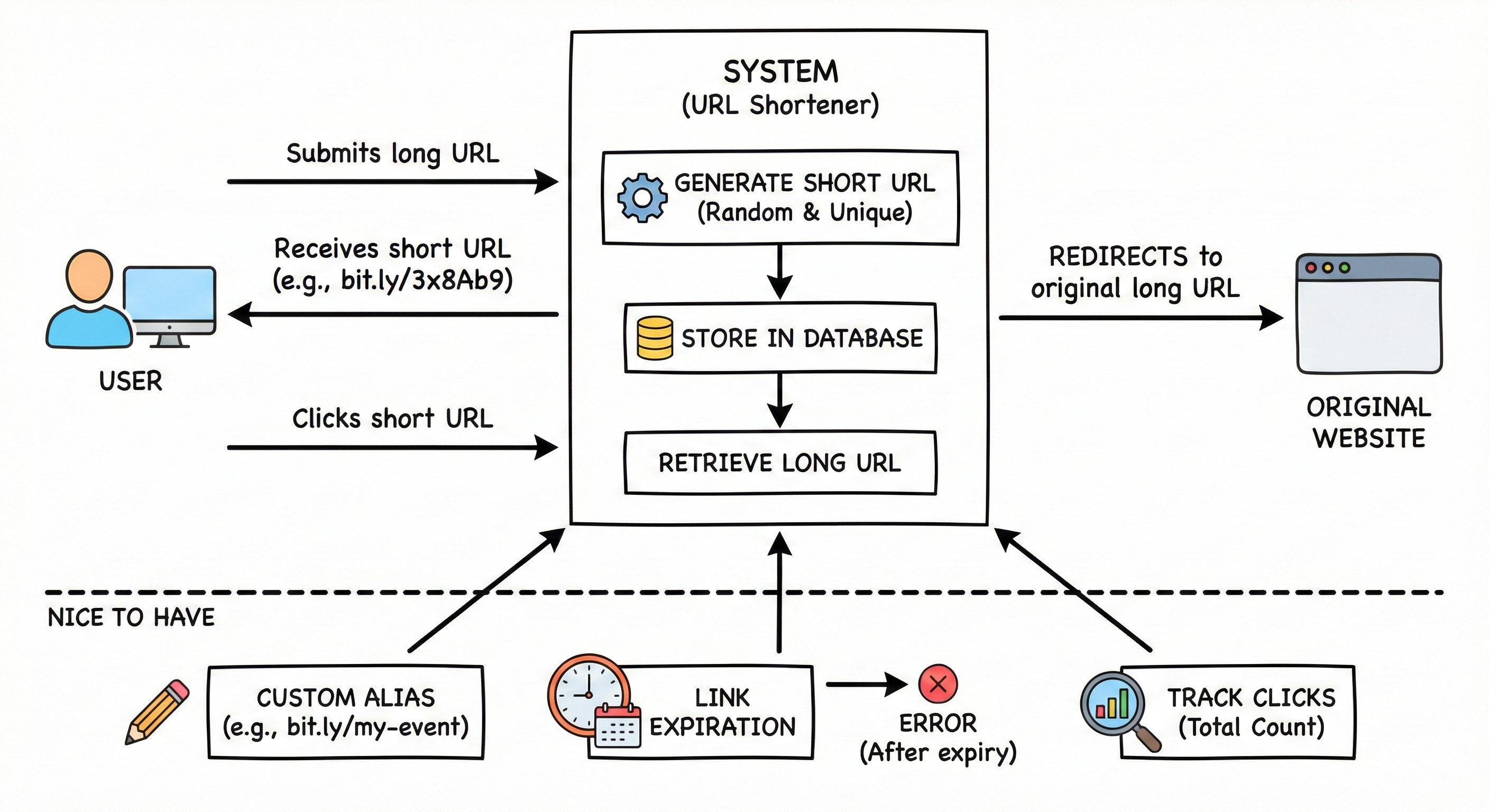
User can submit a long URL and receive a randomly generated short URL (for example,
bit.ly/3x8Ab9).User clicking the short URL is automatically redirected to the original long URL.
The system guarantees that all generated short links are strictly unique.
Nice to have:
User can specify a custom alias for their short URL (for example,
bit.ly/my-custom-event).Links can have an expiration date, after which they return an error instead of redirecting.
The system tracks the total number of times a short link is clicked.
3. Clarify non-functional requirements
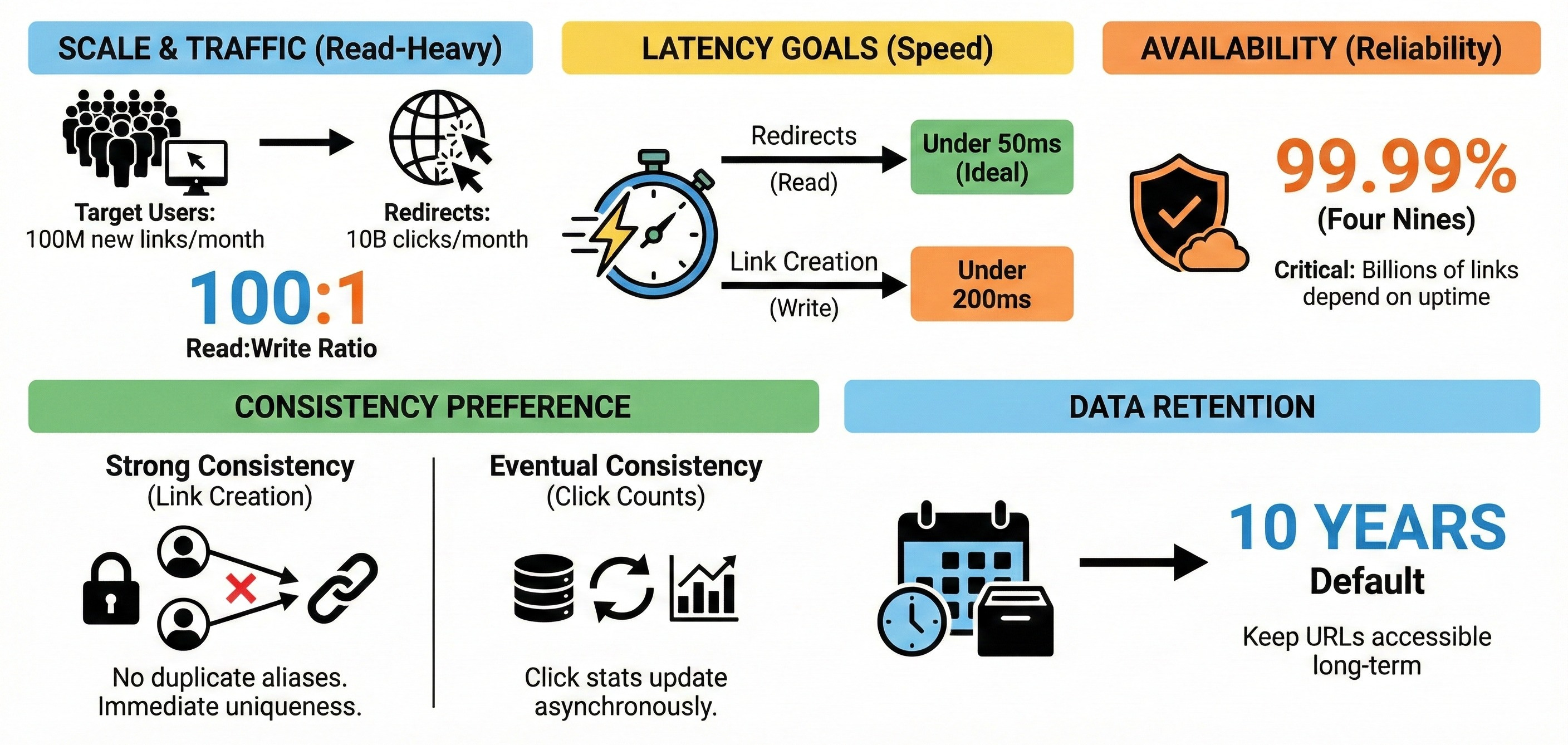
Target users: 100 million new short links created per month. 10 billion link clicks (redirects) per month.
Read and write pattern: This is an extremely read-heavy system. The read-to-write ratio is roughly 100:1.
Latency goals: Read requests (redirects) must be incredibly fast, ideally under 50ms, so the user does not notice the middleman. Writes (creating a link) should be under 200ms.
Availability targets: 99.99% (”four nines”). High availability is critical because if our system goes down, billions of links across the internet break.
Consistency preference: Strong consistency is required for link creation (we cannot issue the same custom alias to two different users). Eventual consistency is perfectly fine for updating click counts.
Data retention: Keep URLs for 10 years by default.
4. Back-of-the-envelope estimates
Let’s calculate the traffic and storage needs to understand the scale we are building for.
Estimate QPS for main operations:
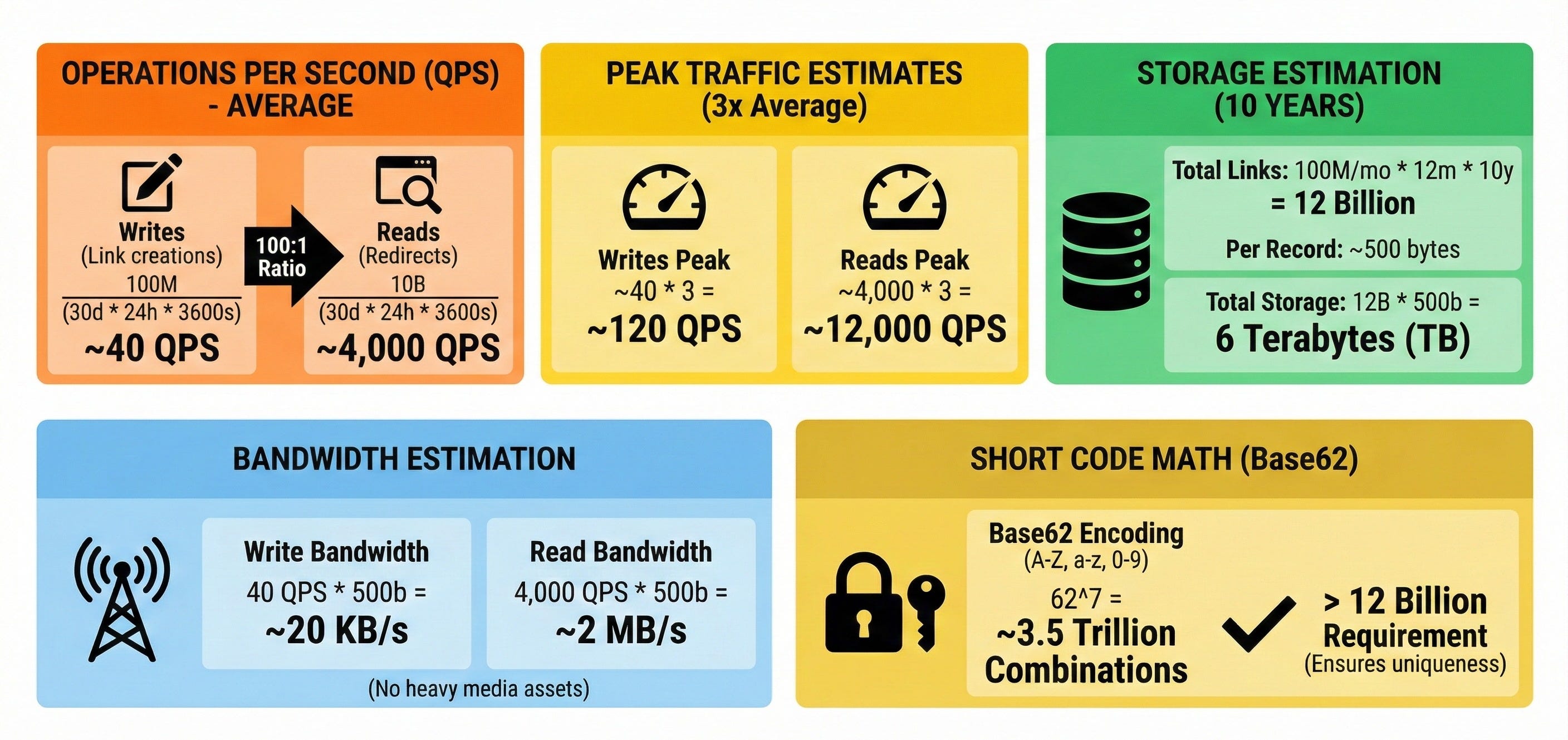
Writes (Link creations): 100 million / (30 days * 24 hours * 3600 seconds) = ~40 writes per second (QPS) on average.
Reads (Redirects): 10 billion / (30 days * 24 hours * 3600 seconds) = ~4,000 reads per second (QPS) on average.
Estimate peak traffic versus average:
Assuming peak traffic is roughly 3 times the average, we can expect peak writes of ~120 QPS and peak reads of ~12,000 QPS.
Estimate needed storage per day and per year:
Let us assume each database record (short URL, long URL, timestamps) takes roughly 500 bytes.
Links over 10 years: 100 million/month * 12 months * 10 years = 12 billion total links.
Total storage: 12 billion * 500 bytes = 6,000 billion bytes = 6 Terabytes (TB) of storage needed over 10 years.
Estimate rough bandwidth needs:
Write bandwidth: 40 QPS * 500 bytes = ~20 KB / second.
Read bandwidth: 4,000 QPS * 500 bytes = ~2 MB / second.
(Note: There are no heavy media assets in this system).
Short code math:
If we use Base62 encoding (A-Z, a-z, 0-9), a 7-character string gives us 62^7 = ~3.5 trillion possible combinations. This is vastly more than our 12 billion link requirement, ensuring we never run out of keys.
5. API design
We will expose a simple REST API over HTTPS to handle the core operations.
Endpoint 1: Create a short URL
HTTP method and path:
POST /api/v1/urlsRequest parameters (JSON):
long_url(string, required)custom_alias(string, optional)expires_at(timestamp, optional)
Response body:
short_url(string)created_at(timestamp)
Main error cases:
400 Bad Request(invalid URL format),409 Conflict(custom alias is already taken),429 Too Many Requests(rate limited).
Endpoint 2: Redirect to long URL
HTTP method and path:
GET /{short_url}Request parameters: None (the short URL is the path variable).
Response body: None.
Main behavior: Returns an HTTP
302 Foundstatus code with theLocationheader set to the original long URL.Note: We use 302 (temporary redirect) instead of 301 (permanent redirect). A 301 tells the browser to cache the redirect forever, which means future clicks bypass our server entirely and we cannot track analytics. A 302 forces the browser to hit our server every time.
Main error cases:
404 Not Found(link does not exist or has expired).
Endpoint 3: Get link analytics
HTTP method and path:
GET /api/v1/urls/{short_url}/statsRequest parameters: None.
Response body:
total_clicks(integer)
Main error cases:
404 Not Found.
6. High-level architecture
Here is the step-by-step path of data through our system components:
Client -> Load Balancer -> API Servers -> Cache -> Database
-> Message Queue -> Analytics Workers -> Analytics DB
Clients: Web browsers or mobile apps generating or clicking links.
Load Balancer: Distributes incoming API requests evenly across our stateless servers.
API Servers: Backend application servers that handle validation, routing, and HTTP responses.
Key Generation Service (KGS): A dedicated internal background service that pre-generates random 7-character strings. This prevents database lock contention during high-traffic link creation.
Keep reading with a 7-day free trial
Subscribe to System Design Nuggets to keep reading this post and get 7 days of free access to the full post archives.