
System Design Interview Question: How to Design TikTok in 45 Mins?
Discover the TikTok architecture secrets in 14 steps. From PostgreSQL replication to Cassandra partitioning, see how to build a read-heavy system that supports 50 billion daily views.

Here is a detailed, step-by-step system design for a short-form video platform like TikTok, tailored for a mid-level software engineer.
(If you are preparing for a system design interview, check my industry-standard course “Grokking the System Design Interview”.)
1. Problem statement and scope
We are designing a large-scale, short-form video platform where users can upload short clips and endlessly swipe through a highly personalized feed of content.
The platform has two main user groups: Creators, who care about fast, reliable video uploads and reaching an audience, and Viewers, who care about instant video playback and a highly relevant feed.
Because TikTok is a massive system, we will narrow the scope to the core loops.
We will focus on video uploading, asynchronous video processing, generating the home “For You” feed, and interacting with videos (liking).
We will not cover live streaming, direct messaging, user followers, comments, or the internal machine learning details of the recommendation engine.
2. Clarify functional requirements
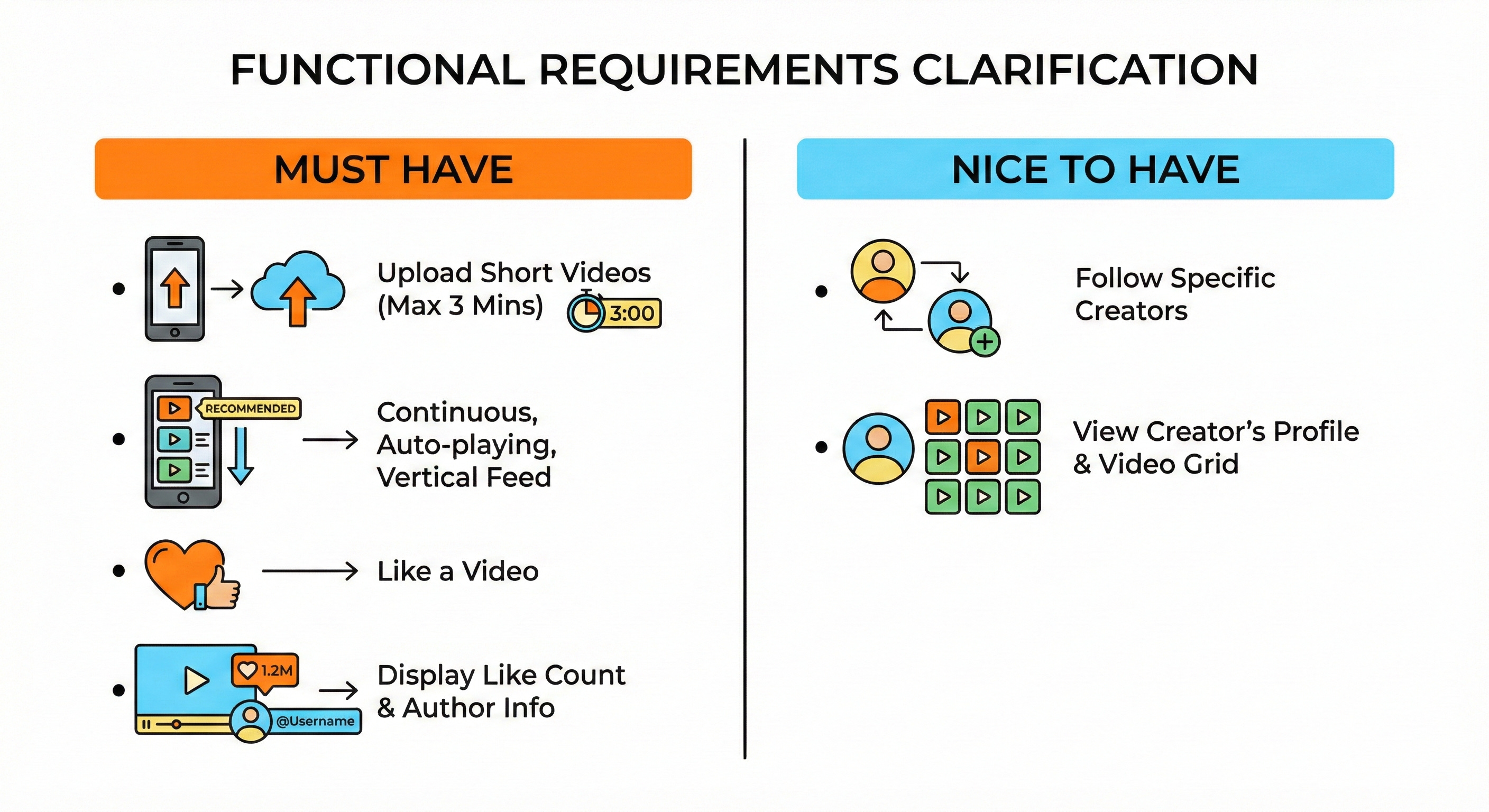
Must have:
Users can upload short videos (up to 3 minutes long).
Users can view a continuous, auto-playing, vertically scrolling feed of recommended videos.
Users can like a video.
The system displays the total like count and author information on each video.
Nice to have:
Users can follow specific creators.
Users can view a creator’s profile and see a grid of their past uploaded videos.
3. Clarify non-functional requirements
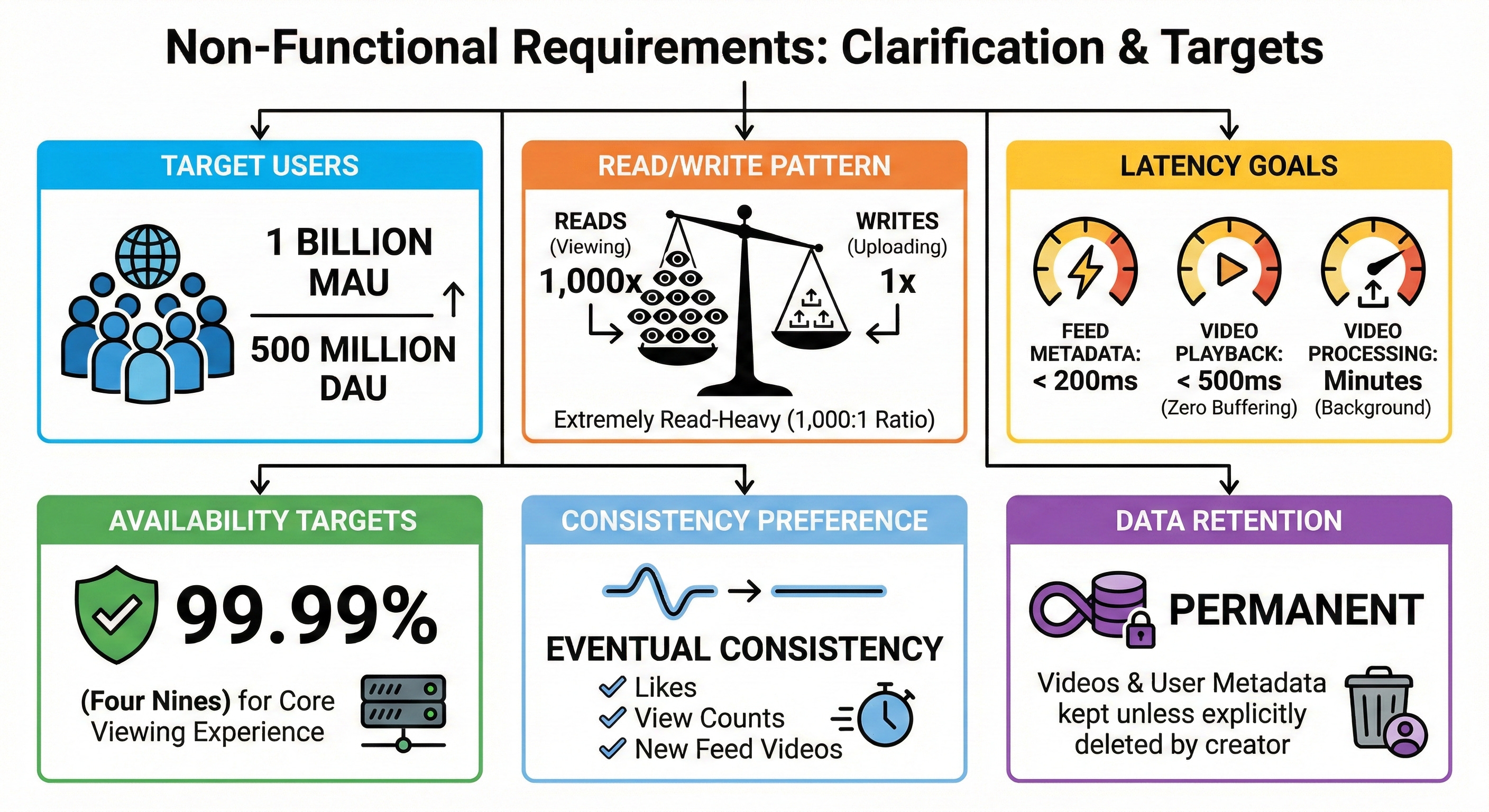
Target users: 1 billion Monthly Active Users (MAU) and 500 million Daily Active Users (DAU).
Read and write pattern: Extremely read-heavy. Users watch hundreds of videos for every single video uploaded. We will assume a read-to-write ratio of roughly 1,000:1.
Latency goals: Feed metadata must load in under 200ms. Video playback must start in under 500ms (zero buffering). Video uploads can take a few minutes to process in the background.
Availability targets: 99.99% (”four nines”) for the core viewing experience.
Consistency preference: Eventual consistency is perfectly fine for likes, view counts, and when new videos appear in feeds.
Data retention: Videos and user metadata are kept permanently unless explicitly deleted by the creator.
4. Back of the envelope estimates
Let us do some data math to understand the scale of our system.
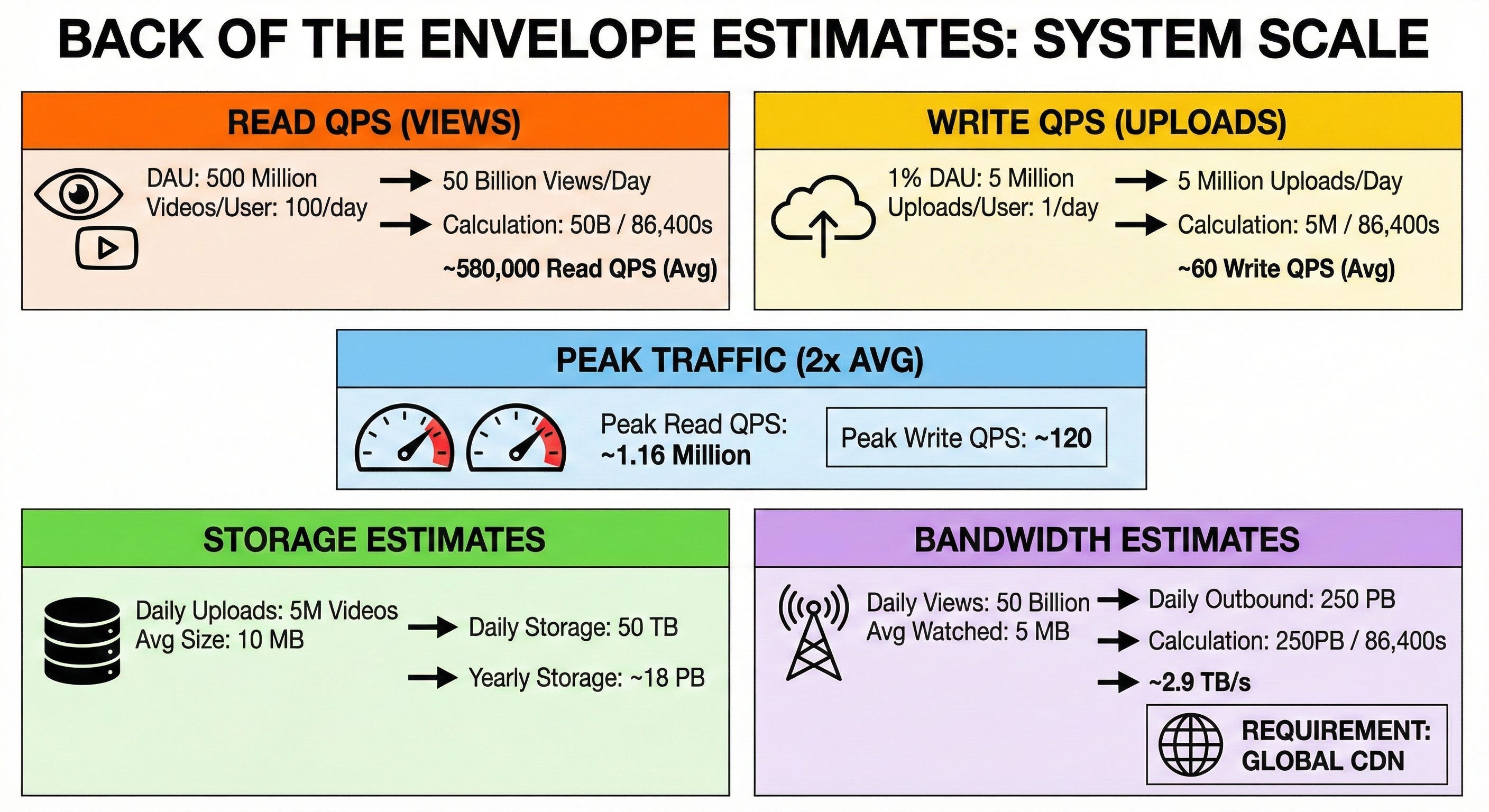
Estimate QPS for reads (views):
Assume each DAU watches 100 videos per day.
500 million DAU × 100 = 50 billion video views per day.
50,000,000,000 / 86,400 seconds = ~580,000 read QPS average.
Estimate QPS for writes (uploads):
Assume 1% of our DAU (5 million users) upload 1 video per day.
5,000,000 / 86,400 seconds = ~60 write QPS average.
Estimate peak traffic:
Peak traffic is usually double the average. Peak read QPS = ~1.16 million. Peak write QPS = ~120.
Estimate needed storage:
Assume an average compressed video is 10 MB.
5,000,000 videos × 10 MB = 50 Terabytes (TB) of new storage per day.
50 TB × 365 = ~18 Petabytes (PB) per year.
Estimate rough bandwidth:
Assume an average user watches about 5 MB of a video before swiping past it.
50 billion views × 5 MB = 250 PB of outbound data per day.
250 PB / 86,400 seconds = ~2.9 Terabytes per second (TB/s). This massive number proves we absolutely require a global Content Delivery Network (CDN).
5. API design
We will use a REST API over HTTPS for the core flows.
1. Request Upload URL
HTTP method and path:
POST /v1/videos/upload-urlRequest parameters:
file_size_bytes(integer),file_format(string).Response body:
video_id(string),upload_url(string - a secure URL for direct storage upload).Main error cases: 400 Bad Request (file too large), 401 Unauthorized.
2. Get “For You” Feed
HTTP method and path:
GET /v1/feedRequest parameters:
limit(integer, default 10),cursor(string, optional for pagination).Response body:
next_cursor(string),videos(an array of objects containingvideo_id,author_id,video_url,thumbnail_url, andlike_count).Main error cases: 500 Internal Server Error.
3. Like a Video
HTTP method and path:
POST /v1/videos/{video_id}/likeRequest parameters:
action(string, either “like” or “unlike”).Response body:
success(boolean).Main error cases: 404 Not Found (video deleted or hidden).
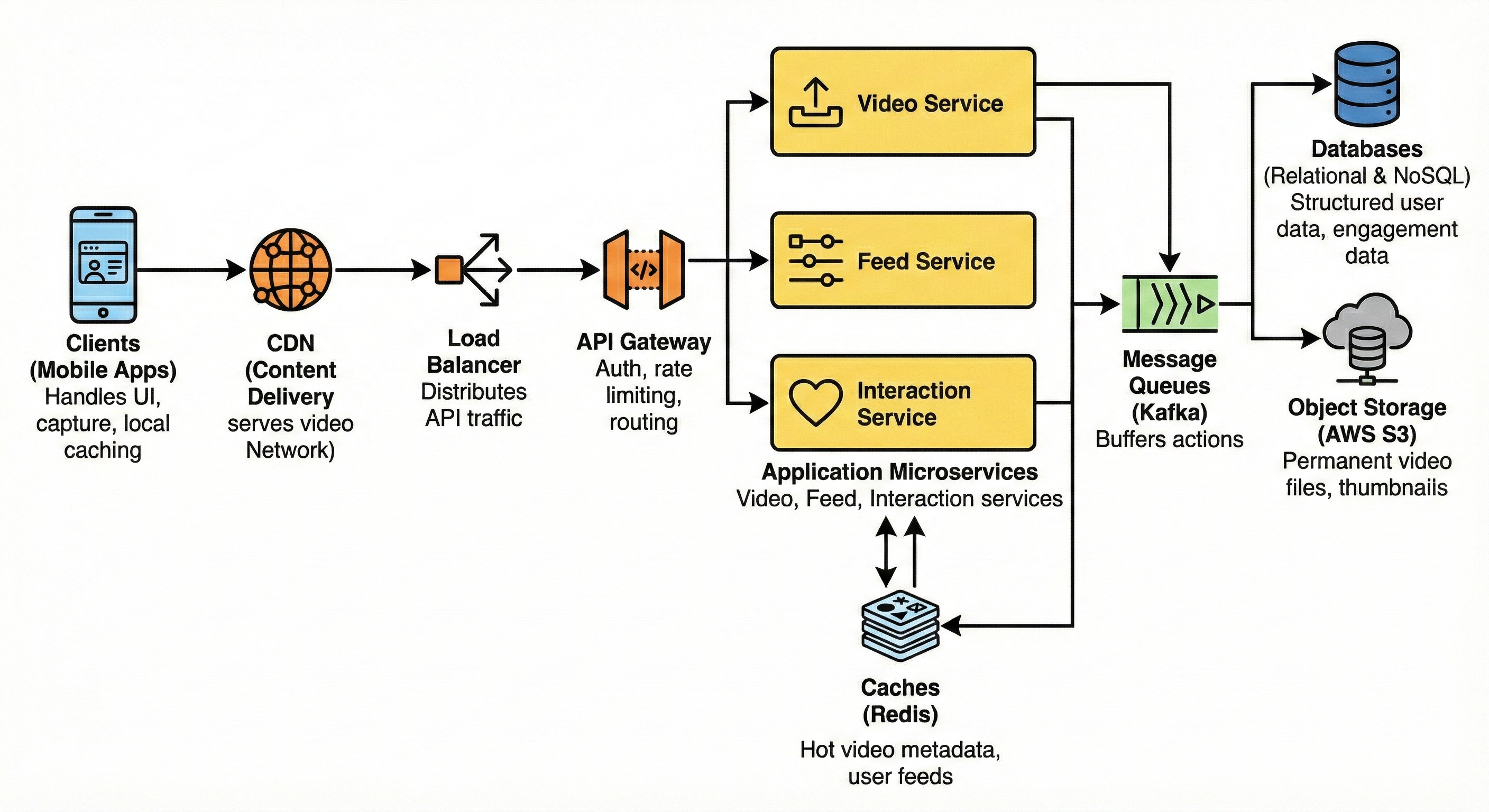
6. High-level architecture
Here is the step-by-step layout of our architecture from the client down to the storage:
Client -> CDN / Load Balancer -> API Gateway -> Microservices -> Cache -> Message Queue -> Database / Object Storage
Clients (Mobile Apps): Handles the UI, video capture, and local caching of upcoming videos for smooth swiping.
CDN (Content Delivery Network): Globally distributed edge servers that cache and serve heavy video files physically close to users.
Load Balancer: Distributes incoming API traffic evenly across our gateway servers.
API Gateway: Handles authentication, rate limiting, and routes requests to the correct internal microservice.
Application Microservices: Independent backend apps. We will have a Video Service (handles uploads), a Feed Service (serves timelines), and an Interaction Service (handles likes).
Caches (Redis): Fast in-memory storage holding hot video metadata and pre-computed user feeds.
Message Queues (Kafka): Buffers fast user actions (like uploading a video or tapping “like”) to be processed safely by background workers.
Databases: Relational DBs for structured user data and NoSQL DBs for massive-scale engagement data.
Object Storage (AWS S3): The permanent home for all raw and processed video files and thumbnail images.
7. Data model
We will use a mix of relational (SQL) and NoSQL databases to balance structure and massive read/write scales.
Relational Database (PostgreSQL)
We use SQL for user profiles and video metadata because this data requires clear relationships, updates less frequently, and needs structured queries.
Users Table:
user_id(Primary Key),username,email,created_at.Videos Table:
video_id(Primary Key),author_id(Indexed),s3_path,status(processing / ready),created_at(Indexed). We indexauthor_idso we can easily query “all videos by this creator” for profile pages.
NoSQL Database (Cassandra or DynamoDB)
We use NoSQL for likes and views because of the incredibly high write volume. NoSQL databases are excellent at handling millions of rapid write operations across distributed nodes.
Keep reading with a 7-day free trial
Subscribe to System Design Nuggets to keep reading this post and get 7 days of free access to the full post archives.