
System Design Interview Question: How to Design Dropbox in 45 mins
Discover the system design behind cloud storage applications. We explore data chunks and reliable database architecture for software engineers.

Here is a detailed, step-by-step system design for Dropbox, written to help you understand the core concepts and trade-offs clearly.
1. Problem statement and scope
We are designing a cloud-based file storage and synchronization service similar to Dropbox or Google Drive.
Users want to store files in a designated local folder that automatically backs up to the cloud and synchronizes those exact files across all their other devices (like a laptop, desktop, and phone).
The main user groups are individuals who care about having reliable, anywhere-access to their files without worrying about manual backups.
The main actions they care about are adding files, updating them, and seeing those changes reflect instantly everywhere.
To keep the scope manageable, we will focus strictly on the core file upload, download, and real-time synchronization engine for individual users.
We will not cover complex enterprise permission models, real-time collaborative document editing (like Google Docs), or billing systems.
2. Clarify functional requirements
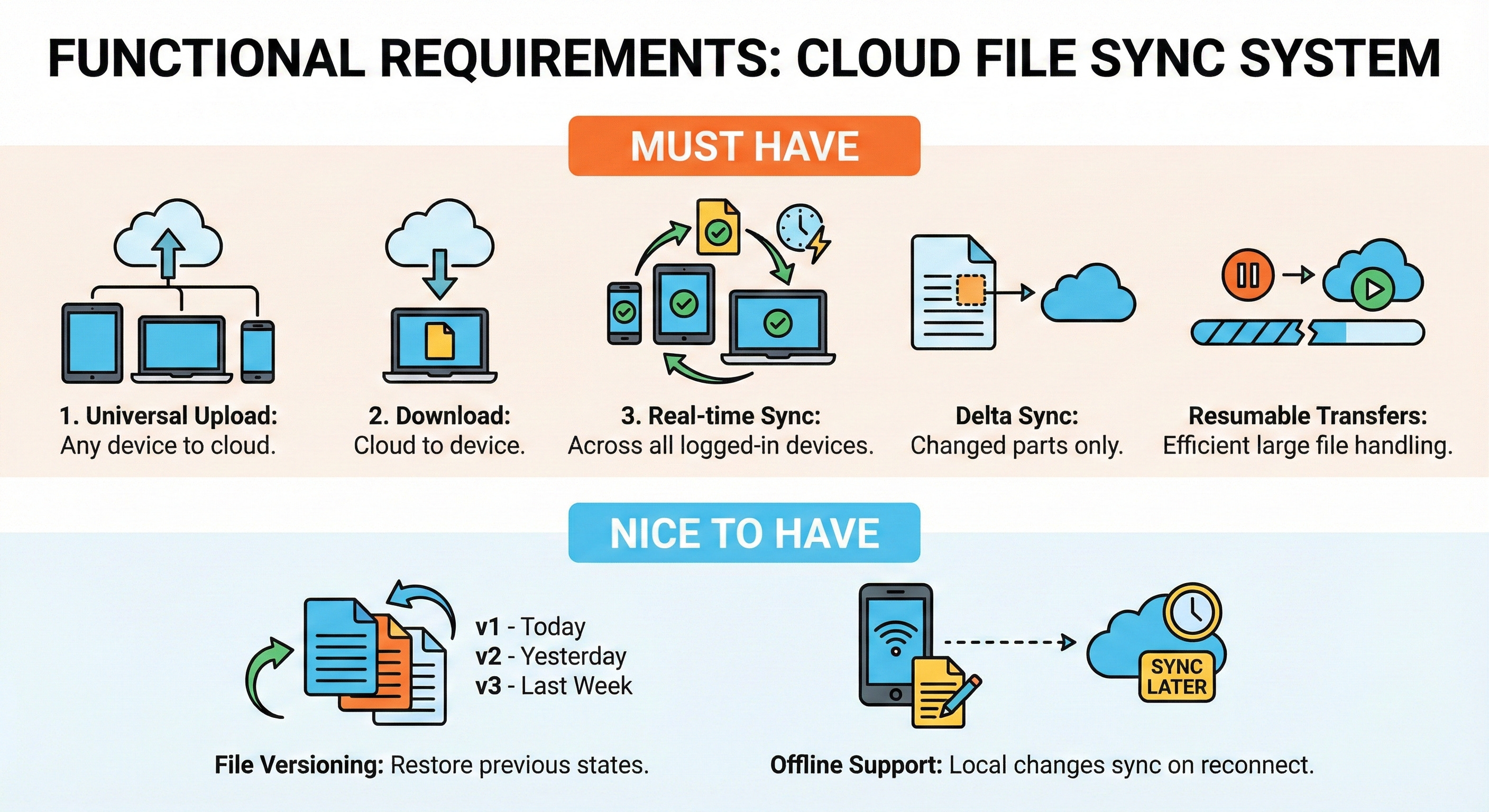
Must have:
User can upload a file from any device to the cloud.
User can download a file from the cloud to their device.
Files automatically synchronize across all of a user’s logged-in devices in near real-time.
System handles large files efficiently by only uploading the changed parts of a file (delta sync) and resuming interrupted transfers.
Nice to have:
File versioning so users can restore a previous state of a modified file.
Offline support, allowing users to make local file changes that automatically sync when the internet reconnects.
3. Clarify non-functional requirements
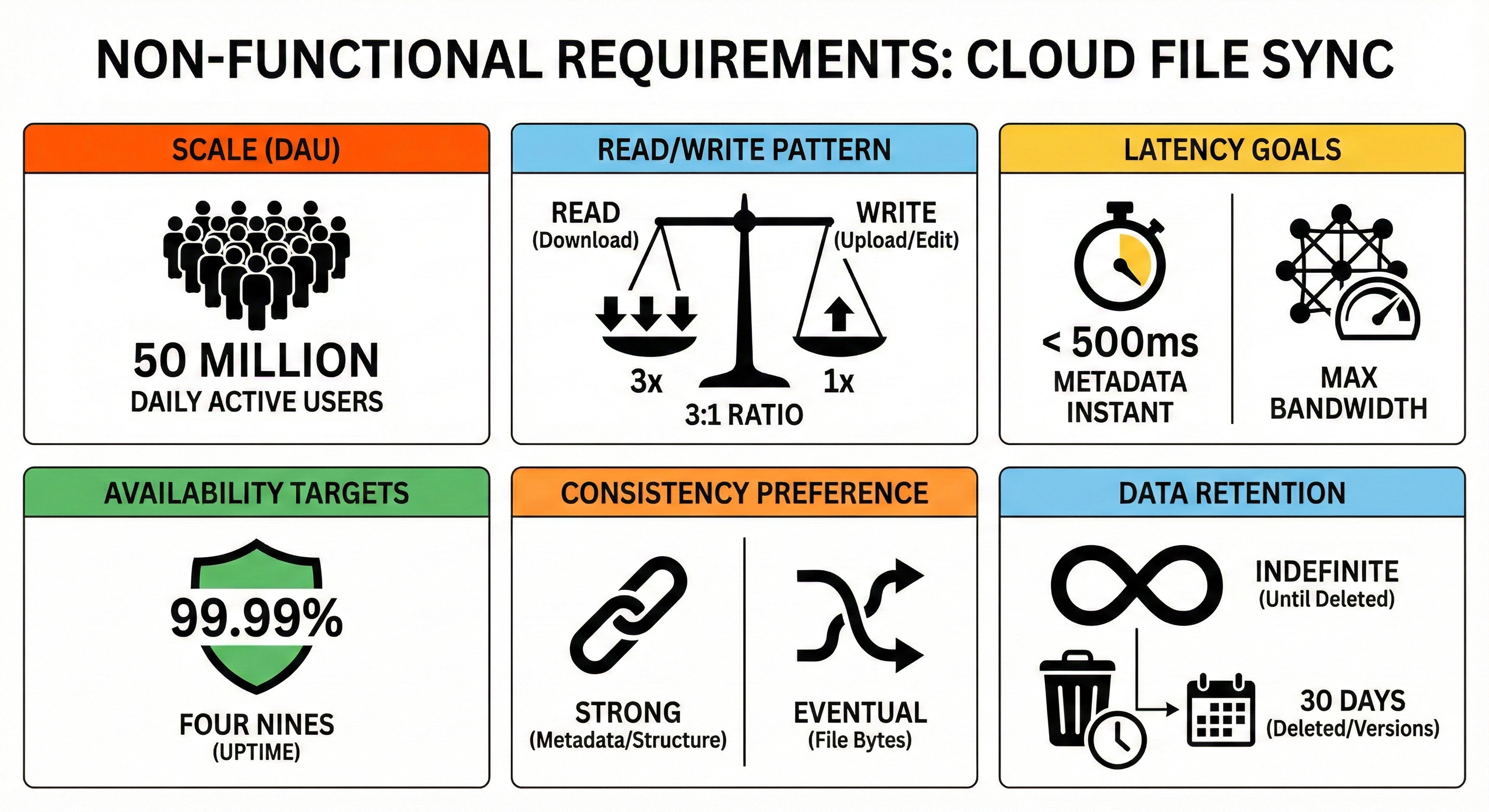
Target users: 50 million Daily Active Users (DAU).
Read and write pattern: Read-heavy overall. Users typically upload or edit a file once, which triggers automatic sync downloads on their other connected devices. Let’s assume a 3:1 read-to-write ratio.
Latency goals: Metadata updates (like renaming a file or moving a folder) should feel instant and reflect in under 500ms. File transfer latency is bound by the user’s network speed, but our system should maximize their available bandwidth.
Availability targets: High availability, targeting 99.99% (”four nines”) uptime for the core sync operations to ensure users can always access their backups.
Consistency preference: Strong consistency is strictly required for metadata (folder structures, file names). If a user renames a folder on their phone, their laptop must see the exact same state to avoid corrupted directories. Eventual consistency is acceptable for the actual file bytes.
Data retention: Files are kept indefinitely until explicitly deleted by the user. Deleted files and older versions are retained for 30 days.
4. Back of the envelope estimates
Let’s do some quick math to size our system.
Estimate QPS for main operations:
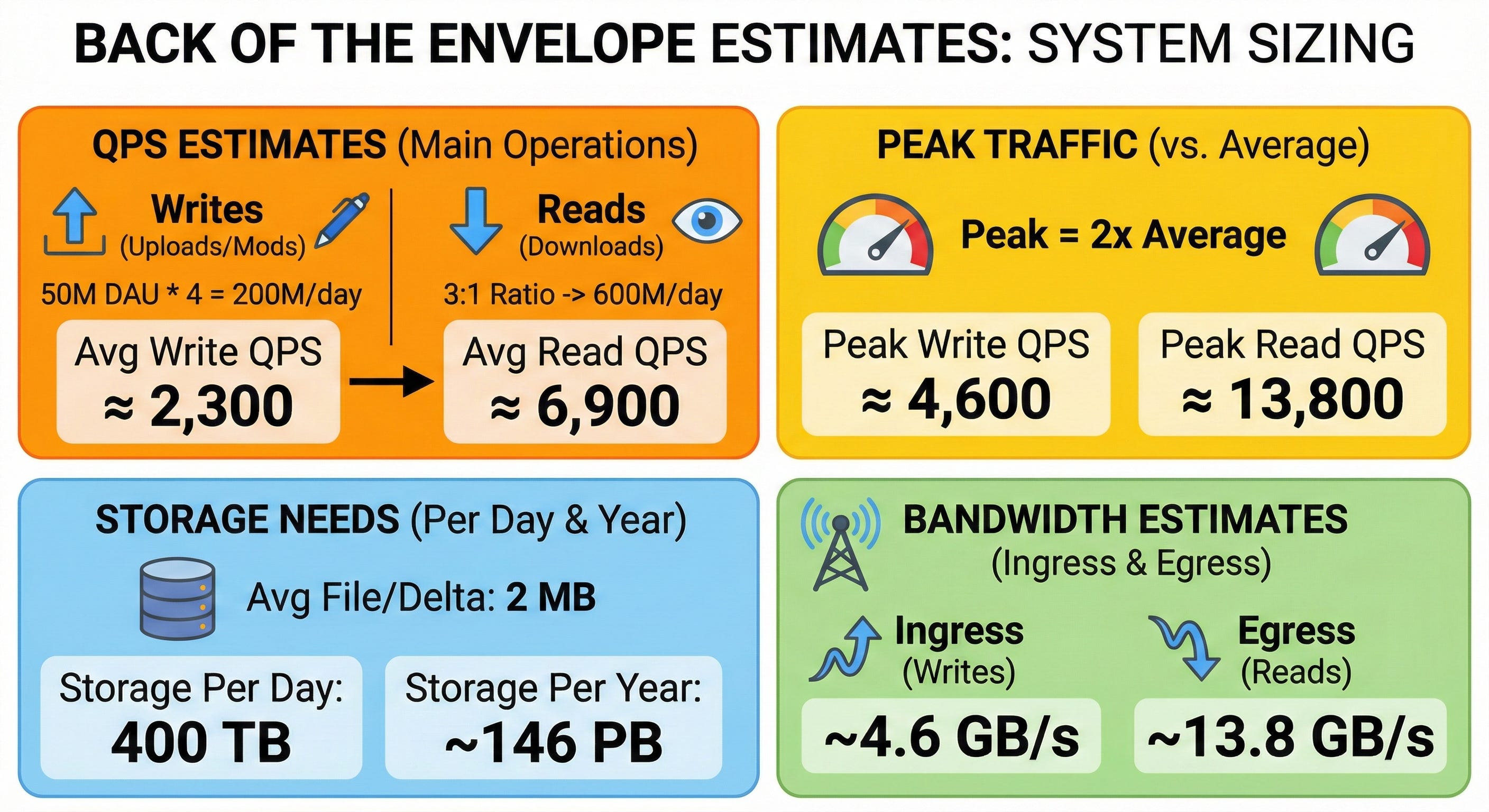
Assume 50 million DAU, and each active user uploads or modifies 4 files per day on average.
Write QPS: 50M * 4 = 200 million writes/day. 200M / 86,400 seconds ≈ 2,300 write QPS (average).
Read QPS: With a 3:1 ratio, we expect 600 million reads/day. 600M / 86,400 seconds ≈ 6,900 read QPS (average).
Estimate peak traffic versus average:
Assume peak traffic is double the average. Peak Write QPS ≈ 4,600. Peak Read QPS ≈ 13,800.
Estimate needed storage per day and per year:
Assume the average file size (or size of a delta update) is 2 MB.
Storage per day: 200 million files * 2 MB = 400 Terabytes (TB) of new storage per day.
Storage per year: 400 TB * 365 days = ~146 Petabytes (PB) per year.
Estimate rough bandwidth needs:
Ingress (Writes): 400 TB/day / 86,400 = ~4.6 Gigabytes/second (GB/s).
Egress (Reads): 1,200 TB/day / 86,400 = ~13.8 GB/s.
5. API design
We will use a REST API over HTTPS for standard metadata operations, and WebSockets for real-time sync notifications.
To handle large files efficiently, files are split into 4MB chunks (blocks) on the client before interacting with the API.
POST /v1/files/upload_request
Request parameters:
parent_folder_id(string),file_name(string),file_size(int),chunk_hashes(list of strings).Response body:
missing_chunk_hashes(list of strings),upload_urls(list of pre-signed S3 URLs).Main error cases: 400 Bad Request, 401 Unauthorized.
POST /v1/files/commit
Request parameters:
file_id,version_hash,chunk_hashes.Response body:
success(boolean),new_version_id(string).Main error cases: 409 Conflict (if another device modified the file at the same time).
GET /v1/files/metadata
Request parameters:
file_idorfolder_id.Response body:
file_id,latest_version,size,chunk_hashes.Main error cases: 404 Not Found.
WebSocket /v1/sync/notifications
A persistent connection where the server pushes JSON events. Example:
{ "event": "file_updated", "file_path": "/docs/resume.pdf" }.
6. High-level architecture
To handle this efficiently, we separate the heavy lifting of moving bytes (files) from the complex logic of managing folder structures (metadata).
Client -> Load balancer -> API Gateway -> Metadata Servers -> Cache -> SQL Database Client -> Object Storage (Direct upload/download) Metadata Servers -> Message Queue -> Notification Servers -> Client (WebSockets)
Clients: Desktop, mobile, and web apps. They monitor local folders, split files into chunks, calculate hashes, and talk to our backend.
Load balancers: Distribute incoming HTTP requests and WebSocket connections evenly across our servers.
API Gateway: Handles user authentication, rate limiting, and routes requests to the correct internal service.
Metadata Servers: Application servers that manage the folder hierarchy, file names, and versions. They read from and write to the SQL database.
Notification Servers: Maintain long-lived WebSocket connections with clients to instantly push “sync needed” alerts.
Cache (Redis): Stores frequently accessed folder contents and user profiles to reduce database read load.
Keep reading with a 7-day free trial
Subscribe to System Design Nuggets to keep reading this post and get 7 days of free access to the full post archives.