
What Beginners Get Wrong About Scalability (Almost Every Time)
Master system scalability. Learn why adding web servers isn't enough, and discover how to implement stateless architectures, database read replicas, sharding, caching strategies, and message queues.

This blog will explore:
Upgrading single servers eventually fails
Horizontal scaling needs stateless designs
Databases always become severe bottlenecks
Temporary caching introduces stale data
Synchronous tasks block web servers
Software systems often experience sudden and massive surges in network traffic.
An architecture designed for low traffic will inevitably collapse under a heavy load.
Server memory maxes out completely, and processing units reach total physical capacity. When hardware limits are reached, the system stops accepting new network connections entirely.
The application crashes completely, and users receive blank error pages.
Scalability is the exact engineering mechanism that prevents this total infrastructure failure. It ensures continuous performance regardless of how much user volume increases. Understanding scalability is an absolute requirement for modern software engineering.
A highly optimized algorithm will still fail if the server runs out of memory. Engineers must look at what happens behind the scenes of a network request.
A device sends a network request to a server over the Internet. The server allocates memory and processing power to handle that specific request.
Every single active connection consumes a fraction of the available server resources. When hundreds of thousands of connections occur simultaneously, those fractions add up instantly.
The server runs out of available memory to allocate and simply drops new connections. It might even shut down completely to protect itself from permanent damage.
Understanding Vertical Scaling
The first solution most developers reach for is called vertical scaling.
Vertical scaling means making the existing server stronger and faster. It involves adding more random access memory to the hardware. It also involves upgrading the central processing unit to a faster model.
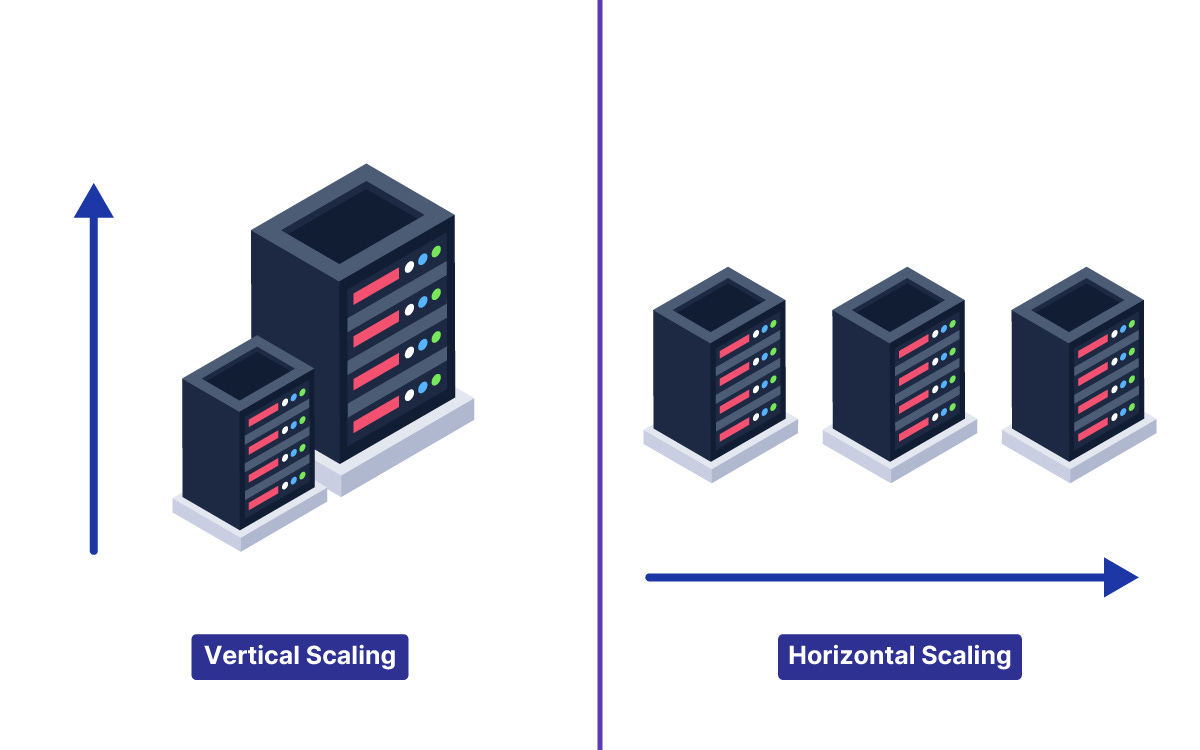
Vertical scaling is very easy to implement initially. It requires absolutely no changes to the actual application architecture or codebase. The software simply runs on a much more powerful machine.
However, vertical scaling has a strict physical limit that cannot be ignored.
The Hardware Limitations
A single motherboard can only hold a specific amount of memory.
A processor can only compute data at a certain maximum speed.
Eventually, the incoming network traffic will exceed the capacity of the largest server available.
Furthermore, incredibly powerful servers are exponentially more expensive to rent.
At a certain point, the cost of adding a little more hardware power becomes completely unreasonable.
This is where many junior engineers get stuck and confused. They rely entirely on a single massive machine to run their application. When that single machine inevitably fails, the entire application goes offline.
The Cost of System Downtime
Upgrading hardware also introduces the dangerous problem of mandatory system downtime.
To install a new processor or insert more memory chips, the server must be turned off. Taking an application offline simply to handle more users is unacceptable in modern software development.
Engineers need solutions that keep the system running continuously without any interruptions.
The Complexity of Adding More Machines
Shifting to Horizontal Scaling
To truly handle massive web traffic, an application architecture requires horizontal scaling.
Horizontal scaling means adding more servers to the overall system.
Instead of using one giant machine, the architecture uses ten smaller machines. In massive systems, it might use thousands of smaller machines.
This approach offers practically limitless capacity for growth.
If network traffic doubles, the engineering team simply activates more servers.
But horizontal scaling introduces entirely new technical challenges into the system. This is where system design becomes highly complex.
Distributing Network Traffic
When there is only one server, all network traffic goes to that exact address. When there are fifty servers, the system needs a way to distribute the incoming traffic. This requirement introduces an architectural component called a load balancer.
The load balancer sits directly in front of all the web servers. It acts as a central traffic director for the entire application. When a network request arrives, it hits the load balancer first.
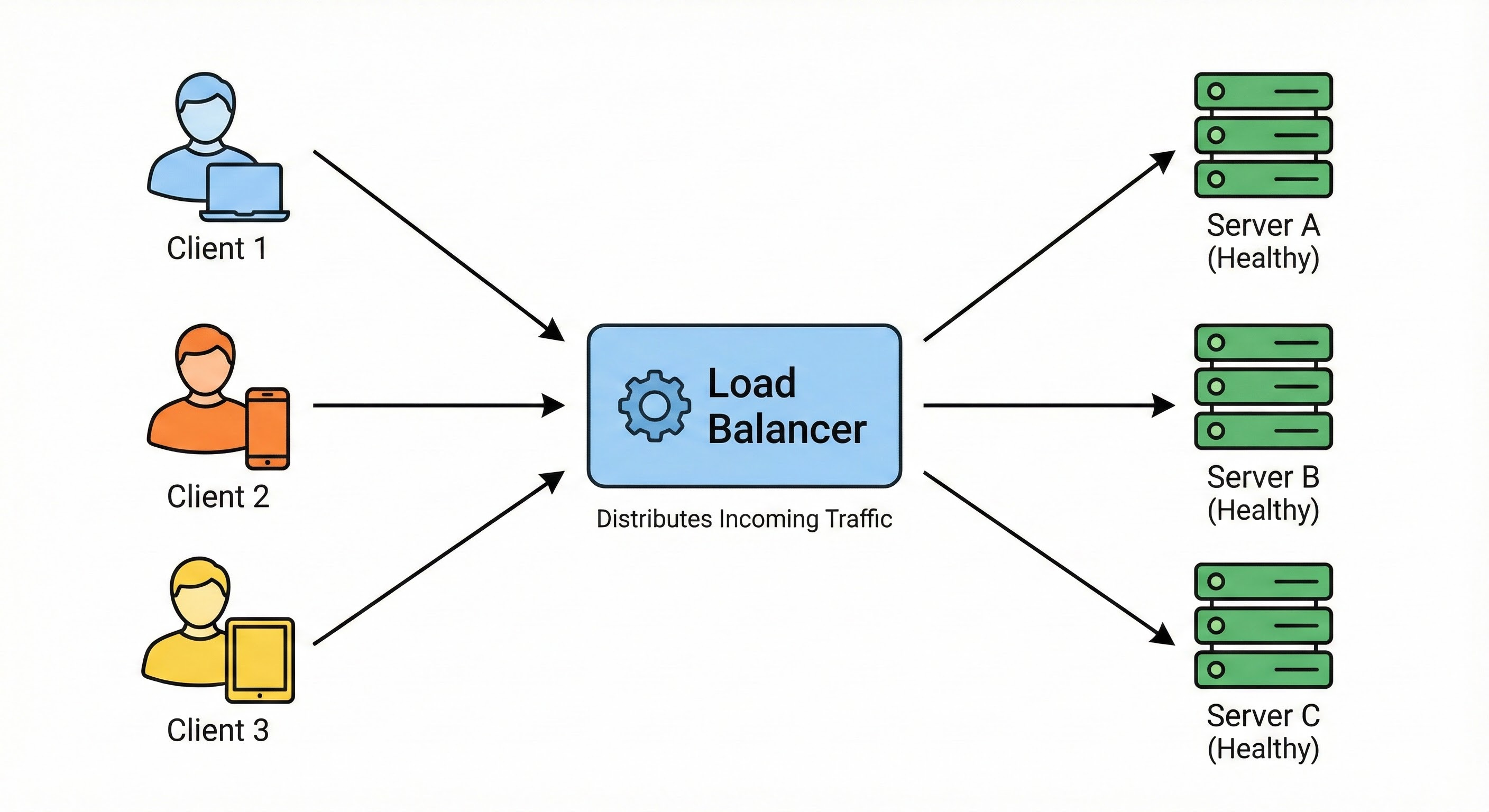
The load balancer then forwards the request to a server with available capacity.
Behind the scenes, the load balancer constantly monitors the health of every server. It sends tiny network requests to verify each server is active. These tiny automated requests are known as health checks.
If a server stops responding, the load balancer instantly removes it from the active rotation.
The Hidden Issue with System State
The Problem with Local Memory
Developers almost always make a critical mistake when they first implement multiple servers. They forget to manage the application state correctly across the network.
State refers to the temporary data stored during an active session.
A very common piece of state is the user login session.
On a single server, a login identifier is saved directly in the local memory. When the next request arrives, the server checks its own memory. It finds the identifier and keeps the secure session active.
Keep reading with a 7-day free trial
Subscribe to System Design Nuggets to keep reading this post and get 7 days of free access to the full post archives.