
From URL to Pixel: How Modern Browsers Actually Work
Master web performance by unlocking the browser's "black box." A technical deep dive into the Multi-Process Architecture, Critical Rendering Path, V8 JIT Compilation, and the CSSOM pipeline.


Web applications often suffer from performance issues like slow loading times, “janky” animations, or unresponsive interfaces. These problems frequently stem from code that fights against the internal logic of the execution environment.
Treating the browser as a “black box” that simply accepts code and outputs a visual result prevents developers from optimizing their software effectively.
To build high-performance web applications, one must understand the complex engineering pipeline that transforms text files into the interactive graphical experience displayed on the monitor.
This system is a sophisticated orchestration of networking, parsing, geometric calculation, and hardware-accelerated graphics.
Modern browsers function less like simple document viewers and more like distributed operating systems running locally on a device. They manage memory, isolate processes for security, and compile code dynamically to ensure efficiency.
Key Takeaways
Multi-process architecture ensures stability: Browsers separate the application state, rendering logic, and GPU operations into distinct processes so that a crash in one tab does not bring down the entire application.
The Critical Rendering Path is the bottleneck: The sequence of parsing HTML, building the DOM, calculating styles, and determining layout must complete before the user sees any content.
Compositing optimizes visual updates: Modern browsers separate page elements into layers that the GPU can manipulate independently, allowing for smooth scrolling without triggering expensive layout recalculations.
JavaScript uses JIT compilation: Engines like V8 parse code into bytecode and then dynamically compile frequently used “hot” functions into optimized machine code during execution.
Site Isolation enforces security: By forcing different websites into separate renderer processes, browsers prevent malicious code from accessing data belonging to other open sites.
The Multi-Process Architecture
Early web browsers operated as single-process applications.
In that model, the user interface, the networking stack, and the rendering of web pages all occurred within the same memory space.
If a single web page encountered an error that caused an infinite loop or a memory leak, the entire browser would become unresponsive or close.
Modern browsers adopt a multi-process architecture to solve this.
This design resembles a distributed system where different components communicate via Inter-Process Communication (IPC).
The Browser Process
The Browser Process is the central coordinator. It manages the application state that persists across all tabs, such as the address bar, bookmarks, and history. It is also responsible for privileged operations like writing files to the disk or managing network cookies.
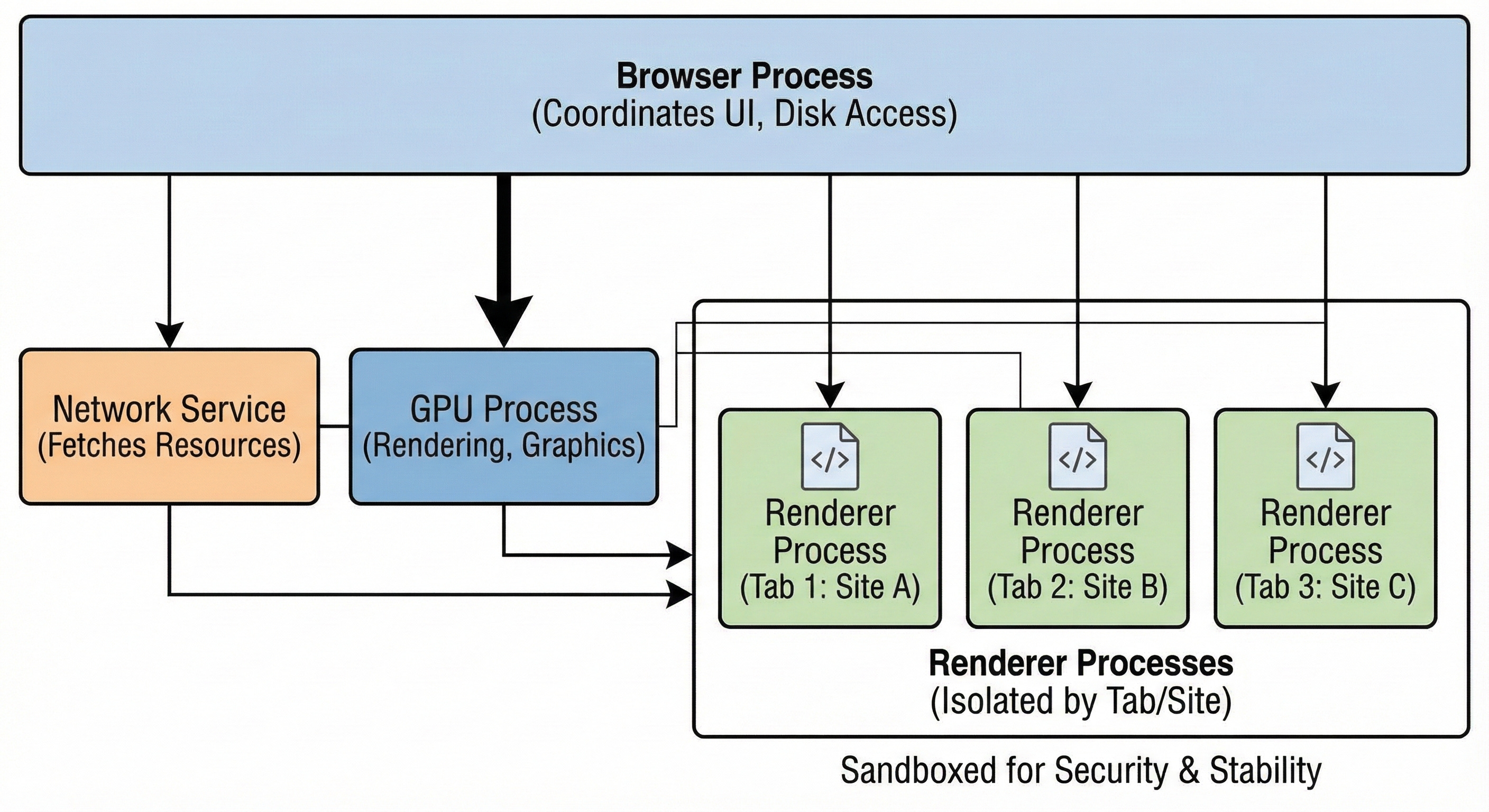
When the application launches, this process starts first and spawns the others.
Keep reading with a 7-day free trial
Subscribe to System Design Nuggets to keep reading this post and get 7 days of free access to the full post archives.