
How to Scale Your App from 50 to 50 Million Users: A System Design Handbook
How do Netflix and Google handle billions of requests? Explore Distributed Systems, scaling, load balancing, sharding, and the CAP theorem.

Imagine you have just built the next big social media app.
Let’s call it “PetGram,” a place where people post photos of their dogs and cats.
You write the code, set up a database, and host it on a single server (a computer that runs your code) in your basement. You launch it, and your friends love it. You have 50 users. Everything is fast, smooth, and running perfectly.
But then, a celebrity tweets about PetGram.
Suddenly, you go from 50 users to 500,000 users in one hour.
What happens next?
Your server crashes. The app stops loading. Users get angry.
You try to restart the computer, but it crashes again immediately because too many people are trying to connect at once.
This is the nightmare scenario for every successful startup. It is also the specific problem that Distributed Systems are designed to solve.
Let me break it down.
In this guide, we are going to move away from textbook definitions. We will look at how systems actually grow, why we break them apart, and the messy reality of making different computers talk to each other.
What is a Distributed System?
A distributed system is just a group of computers working together to appear as a single computer to the end-user.
When you use Google, you aren’t connecting to one super-computer in California. You are connecting to one of thousands of computers spread across the world.
One server might fetch the search results, another processes the images, and another logs your data for ads.
But to you? It feels like one seamless experience.
Think of it this way:
Imagine you own a pizza shop with one chef.
The chef takes the order, kneads the dough, adds toppings, bakes the pizza, and boxes it.
If you have 10 customers, one chef is fine. But if you have 1,000 customers, that one chef will collapse.
A distributed system is like hiring 50 chefs. They all work in the same kitchen (or different kitchens), communicating with each other to get those 1,000 pizzas made on time.
So, how do we actually build this? It starts with the most fundamental concept in system design: Scaling.
Part 1: The Art of Scaling
When your app starts getting slow, you have two choices to fix it.
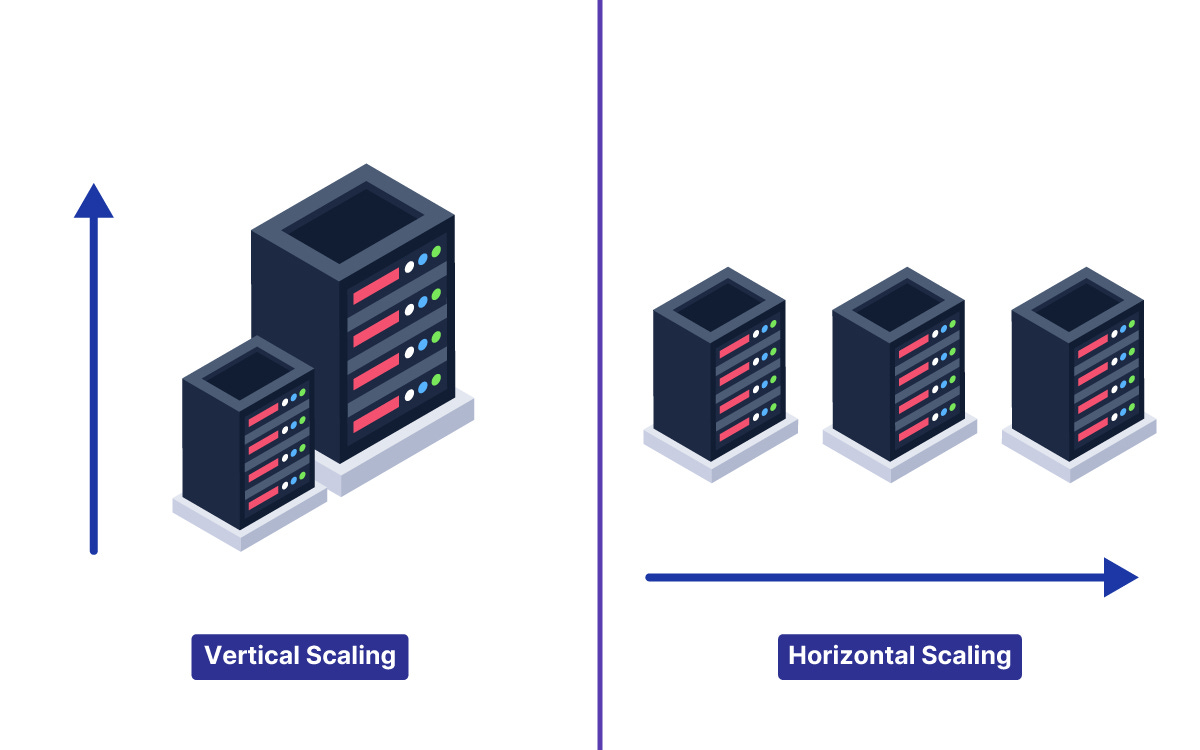
1. Vertical Scaling (Scaling Up)
This means making your single computer stronger. You buy more RAM, a faster processor, or a bigger hard drive.
In our previous example, this is like sending your one chef to the gym and giving them energy drinks so they can work faster.
The Pros: It is easy. You don’t have to change your code.
The Cons: There is a limit. You can only buy so much RAM. Eventually, you hit a wall. Plus, if that one super-computer breaks, your whole app dies.
2. Horizontal Scaling (Scaling Out)
This means adding more computers.
Instead of one expensive machine, you buy ten cheaper ones.
This is like hiring more chefs.
Here’s the tricky part: Horizontal scaling is almost always better for large systems because it is limitless. You can just keep adding more servers. However, it introduces complexity. Now you have to manage ten computers instead of one. You need to figure out which chef does what.
Part 2: Load Balancers
If you have ten servers running your app, how does the user know which one to connect to?
If User A connects to Server 1, and User B connects to Server 2, who decides that? You cannot expect the user to type www.petgram-server-5.com.
You need a Load Balancer.
A Load Balancer sits between your users and your servers. It acts like a receptionist. When a request comes in (like someone trying to open PetGram), the Load Balancer looks at your servers and says, “Okay, Server 1 is busy, but Server 2 is free. Go to Server 2.”
This ensures that no single server gets overwhelmed while others sit idle.
Load balancers use different strategies (algorithms) to pick a server:
Round Robin: It just goes down the list. Server A, then B, then C, then back to A.
Least Connections: It sends the user to the server that is currently doing the least amount of work.
IP Hash: It uses the user’s IP address to ensure that a specific user always goes to the same server (useful if you are saving their shopping cart data on that specific machine).
Part 3: Latency vs. Throughput
Before we go deeper, we need to clarify two terms that you will hear constantly in interviews. People often confuse them.
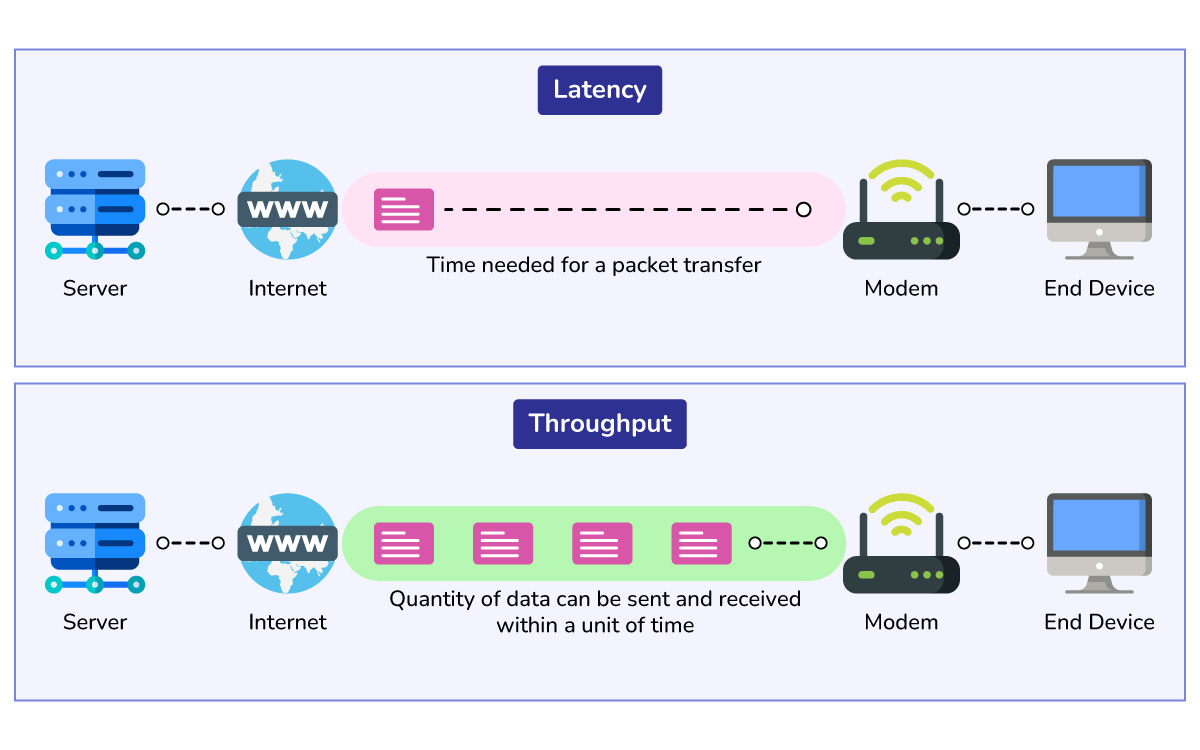
Latency is the time it takes to handle a single request. It is about speed. (e.g., “It takes 200 milliseconds to load the home page.”)
Throughput is the number of requests you can handle at the same time. It is about capacity. (e.g., “We can handle 5,000 requests per second.”)
Think of it this way:
Imagine a highway.
Latency is how fast a Ferrari can drive from Point A to Point B.
Throughput is how many cars can fit on the highway at once without a traffic jam.
If you want low latency, you optimize your code to run fast.
If you want high throughput, you add more servers (horizontal scaling) to widen the highway.
Part 4: The Database Dilemma
Scaling the application code (the logic) is actually the easy part. You just run the code on more machines.
Scaling the data is much harder.
State (your data) is heavy.
If you have 50 application servers, they all need to talk to a database to save and retrieve the user profiles.
If they all talk to one single database, that database becomes a bottleneck. It will slow down and eventually crash.
So, how do we scale a database?
Database Replication (Primary-Replica)
In this setup, we have one main database called the Master (or Primary) and several copies called Slaves (or Replicas).
The rule is simple: You can only write data (save new items) to the Master. However, you can read data (view items) from any of the Slaves.
Since most applications have way more reads than writes (think about Twitter: you read 100 tweets for every 1 you post), this works very well.
The Master copies the new data to the Slaves continuously so they stay updated.
Let me tell you why this is risky.
There is a tiny delay between the data hitting the Master and it being copied to the Slaves.
This is called “replication lag.”
This leads to a concept called Eventual Consistency.
It means that if you update your profile, the Slaves might show the old profile for a second or two.
But eventually, they will all have the correct data.
Sharding (Partitioning)
What if you have so much data that it doesn’t fit on one hard drive?
Imagine PetGram now has 1 billion users. You cannot store 1 billion user profiles on one machine.
This is where Sharding comes in.
Sharding means splitting your database into smaller pieces based on some logic.
Think of it this way:
Imagine a library. If you have too many books for one shelf, you split them up.
Shelf 1: Authors A-M
Shelf 2: Authors N-Z
In a database, we do the same:
Server 1 holds User IDs 1 to 1,000,000.
Server 2 holds User IDs 1,000,001 to 2,000,000.
This allows you to store virtually infinite amounts of data. However, sharding is a headache to manage.
What if a user on Server 1 wants to be friends with a user on Server 2?
Now your software has to talk to two different databases to make that happen. This is why we usually try to avoid sharding until it is absolutely necessary.
