
The Only System Design Cheat Sheet You’ll Ever Need [2026 Edition]
A complete 2026 system design cheat sheet with the essentials - scalability, caching, load balancing, SQL vs NoSQL, and a clean 7-step interview framework.


You’ve got 45 minutes to design YouTube. What do you do?
If your brain immediately screamed “start with a load balancer!” — you’re not alone.
System design interviews are a whole different beast.
They’re open-ended, fast-paced, and test how well you can think like an architect, not just a developer.
And while there’s no single “right” answer, there is a right way to approach them.
That’s where a system design cheat sheet becomes your secret weapon. It filters out the fluff and gives you the core building blocks, frameworks, and thought patterns that interviewers expect — all in one place.
Consider it your quick reference guide to system design fundamentals, common interview questions, and proven techniques.
Let’s get to it.
Key Concepts at a Glance
These fundamental ideas are the backbone of almost every modern system.
If you truly understand these five concepts, you can handle 70 percent of common interview questions with confidence.
1. Scalability
Scalability means your system keeps working smoothly as more users join, more traffic arrives, and more data gets generated.
Vertical scaling adds more power to a single machine, which is simple but limited.
Horizontal scaling means adding more machines, which feels more complex but is the real path used by companies at global scale.
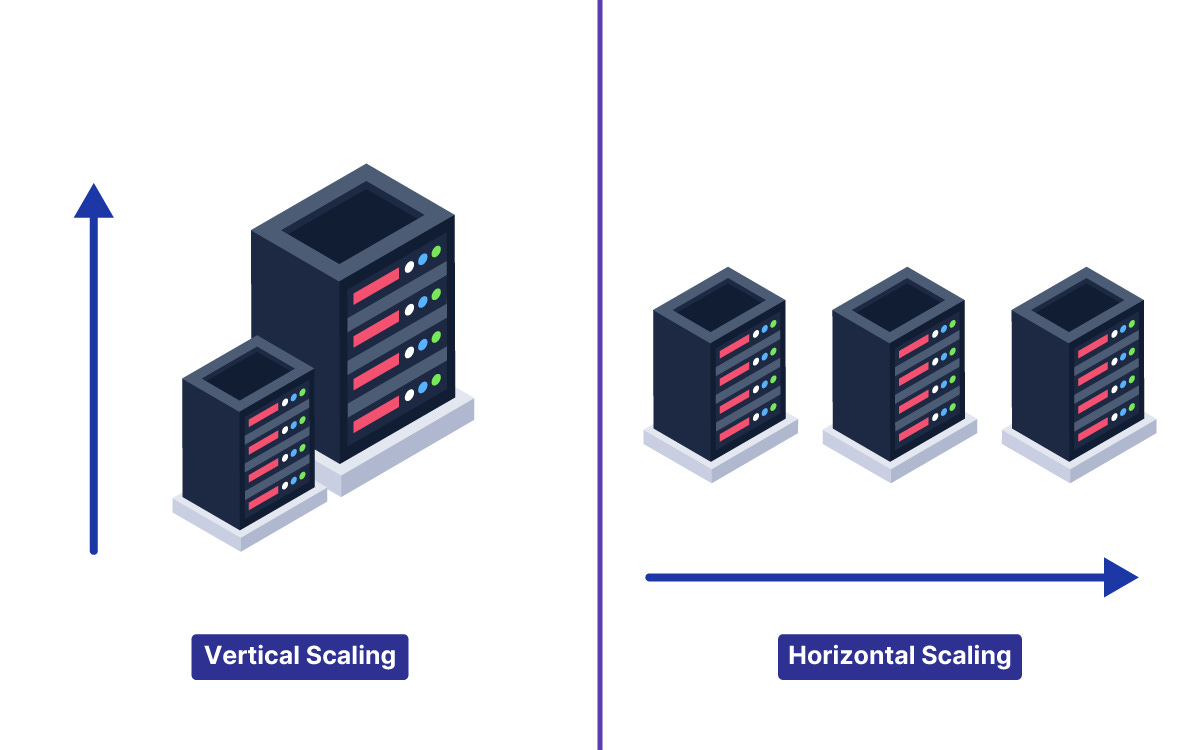
In interviews, showing awareness of when and why you would choose one over the other demonstrates maturity.
For example, if your system starts with thousands of users, vertical scaling might be enough.
But if you expect millions of daily users, you need a design that can spread load across multiple servers right from the start.
2. CAP Theorem
Distributed systems are tricky because machines can fail, networks can break, and messages can get delayed.
CAP theorem forces you to choose between consistency and availability when a partition happens.
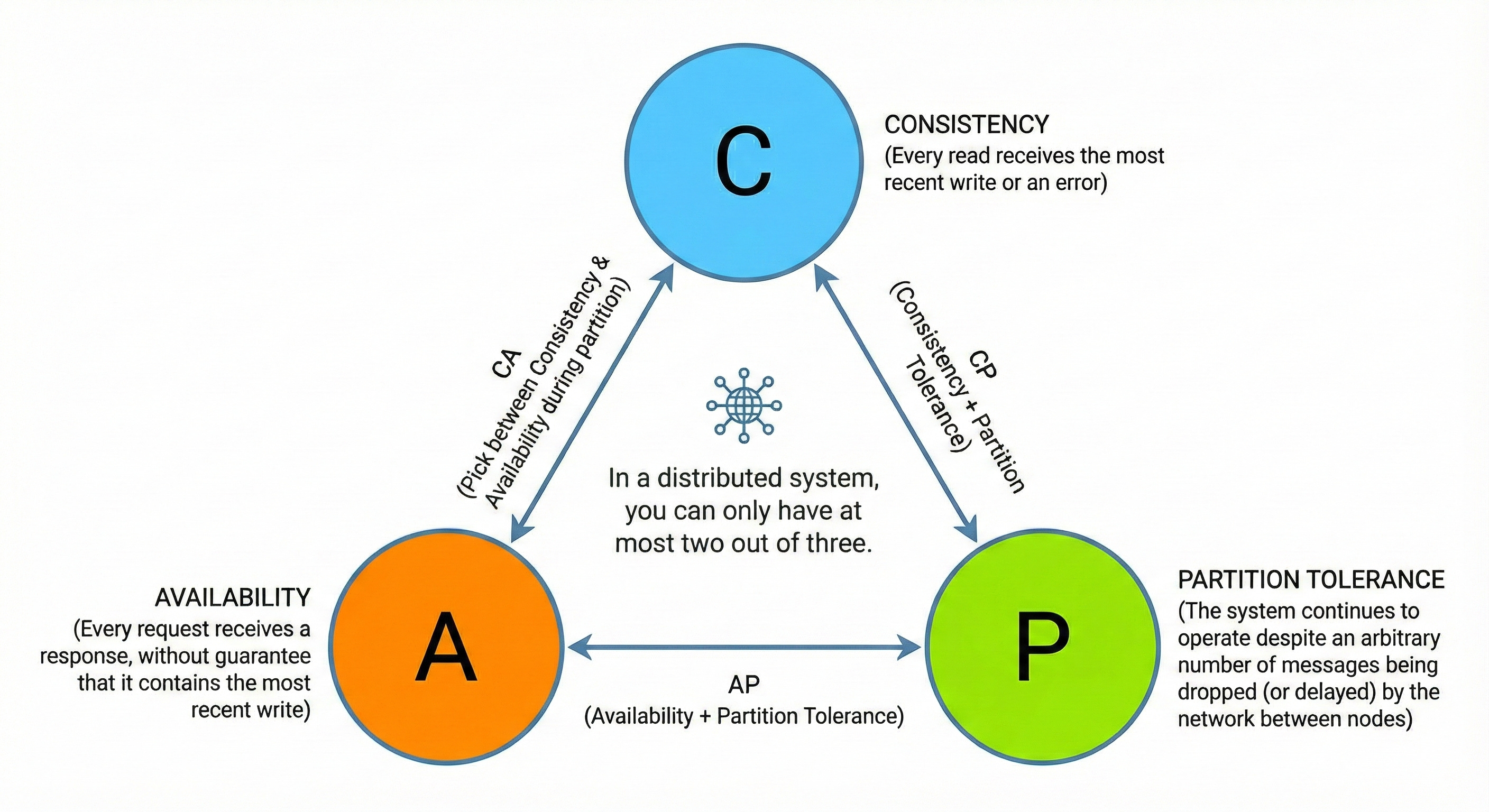
Interviewers love this topic because it tests your ability to reason about real-world trade-offs.
For example, an international messaging app might choose availability because users expect messages to be sent even if the exact ordering is temporarily off.
On the other hand, a banking system would prioritize consistency even if it means occasional delays.
The key is not just naming CAP, but explaining how your design behaves during failures.
3. Caching
Caching makes slow operations fast by storing frequently used data in memory. It reduces pressure on your database and dramatically improves latency. But caching comes with responsibility.
You must think about when to invalidate cached values, how to avoid stale reads, and where to place the cache for maximum benefit.
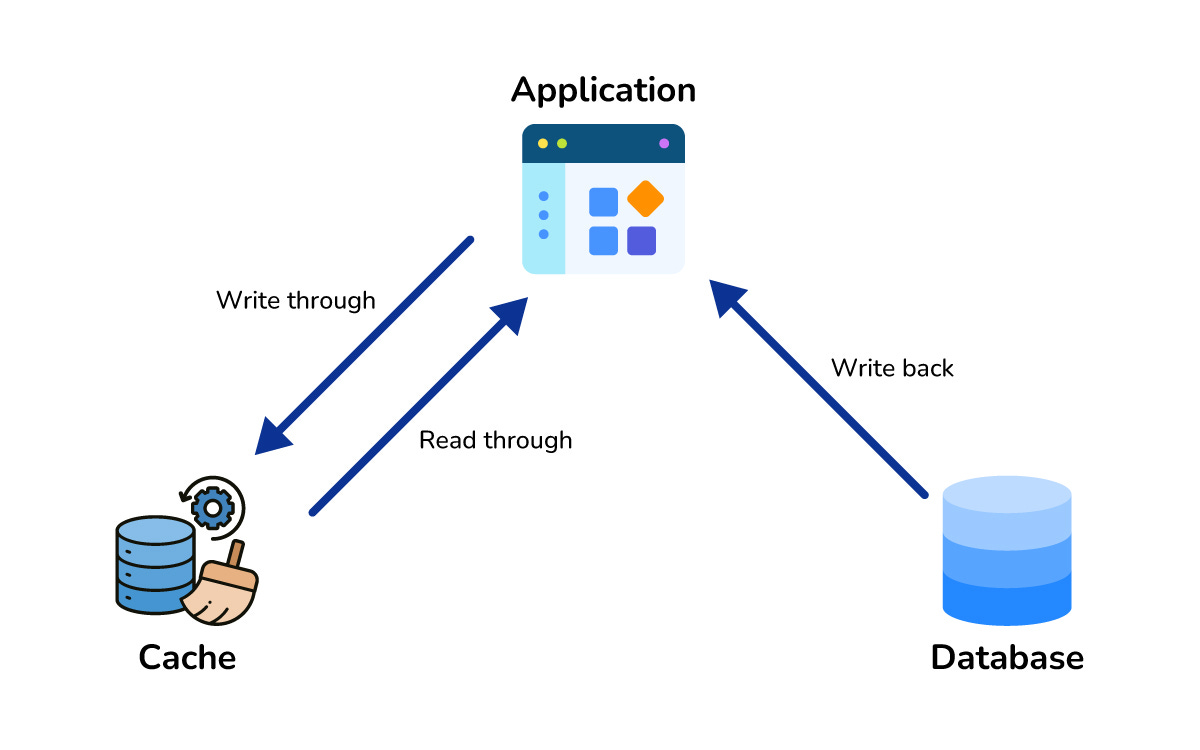
For example, a feed system might cache timelines for a few seconds to reduce recomputation.
A product catalog might cache item details because they rarely change. When you explain caching in interviews, always mention freshness, eviction, and hit ratios.
4. Load Balancing
Load balancers sit in front of your servers and distribute traffic so no single machine becomes a bottleneck. This helps with both availability and performance.
Interviews often expect you to mention simple strategies like round robin or more nuanced ones like least connections.
A good load balancer makes scaling horizontally possible, but the magic comes from how it deals with failing servers, partial outages, and health checks. Emphasize how load balancing helps your architecture survive sudden spikes or uneven workloads.
5. SQL vs NoSQL
SQL databases shine when your data has structure, needs strong consistency, or requires complex relational queries.
NoSQL databases shine when scale is more important than structure, or when you need to store massive amounts of semi-structured data.
Interviewers do not want you to blindly choose one.
They want to see you reason.
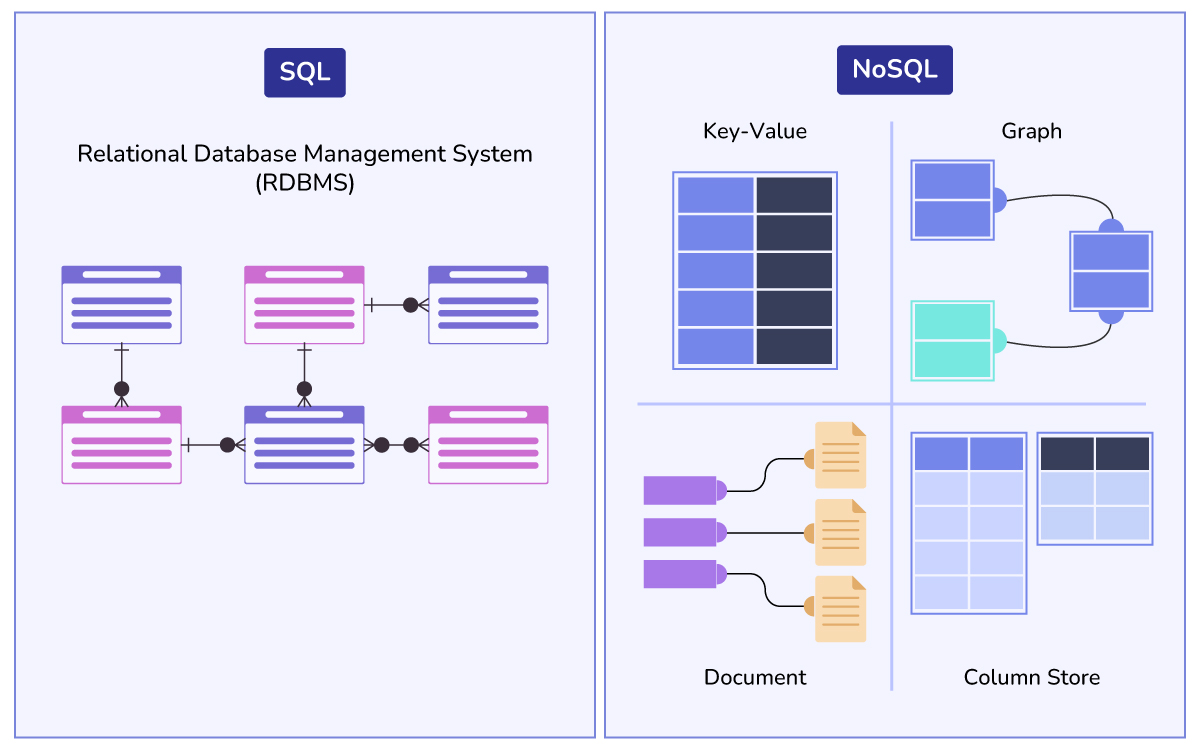
For example, if you are building a messaging system, you might prefer NoSQL for flexible schemas.
If you are building an ordering system, SQL might be the safer choice.
Justify your choice based on the problem’s needs.
The Mindset Interviewers Want You to Have
Most candidates think system design interviews are about naming components. They rush to load balancers, message queues, caches, or microservices.
But interviewers want something else.
They want to see:
How you think, not what you memorize
Whether you can break ambiguity into clarity
How do you make trade-offs
How well you communicate under pressure
Whether your design fits real-world constraints
A strong candidate doesn’t jump into solutions.
They slow down, ask crisp questions, define the problem, and only then propose an architecture.
This shows maturity and engineering discipline.
Common Mistakes Candidates Make
Most engineers lose points not because their design is terrible, but because they fall into predictable traps.
Jumping straight into architecture
Not asking clarifying questions
Overdesigning with too many components
Picking databases without justification
Ignoring failure scenarios
Forgetting caching invalidation
Not mentioning trade-offs
Avoid these and your performance jumps immediately.
A Repeatable 7 Step Framework
A strong system design answer does not come from knowing every component. It comes from following a clean framework that keeps you calm, structured, and in control while the interviewer throws a huge problem at you.
These seven steps work for every question, from URL shortener to YouTube.
Step 1: Clarify Functional Requirements
The very first thing you do is slow everything down.
Ask what the system must do.
Get clarity on the core features, optional features, and features you can safely ignore.
Candidates who rush into architecture without understanding the problem almost always fail.
Interviewers love it when you take a moment to list out the basics, like create, read, update, delete, search, upload, feed generation, or notifications.
This step shows maturity and saves you from designing something the interviewer does not even need.
Step 2: Clarify Non-Functional Requirements
Once you know the features, understand what the system should optimize for.
Ask about scale, expected traffic, latency targets, consistency needs, security rules, and availability expectations. This step matters because your design changes depending on what the interviewer values.
For example, strong consistency leads to different database choices.
Ultra-low latency leads to caching.
High availability leads to replication and failover. Interviewers want to see you think about these before drawing anything.
Step 3: Estimate Scale
This is where you make simple approximations.
How many users?
How many requests per second?
How much data stored daily?
What percentage of reads and writes?
You do not need perfect math.
Interviewers want to see if you can reason about load in a practical way.
These numbers help you decide early whether vertical scaling is enough or whether the system needs horizontal scale, sharding, caching, CDNs, or queues. This step also prevents unrealistic systems.
Step 4: Draw a High-Level Design
Now sketch the big picture.
Keep it clean: clients, load balancers, app servers, database, cache, object storage, queues if needed.
Do not dive into details.
Just show how data flows from users into the system and back.
Explain this slowly and clearly.
A simple, well-structured high-level diagram gives your interviewer confidence that you understand how large systems are built.
And it sets the foundation for the next steps.
Step 5: Deep Dive into Key Components
You cannot explain every single piece in a short interview.
Instead, choose one or two parts that matter most for the specific question.
If it is YouTube, talk about video upload, encoding, and storage.
If it is Twitter, talk about feed generation and caching.
If it is WhatsApp, talk about messaging delivery and storage.
Walk through how the component works internally, how data is stored, how reads and writes are handled, and how it scales. This is the section where strong candidates shine.
Step 6: Discuss Bottlenecks and Failure Scenarios
Real systems fail all the time.
Servers crash.
Databases slow down.
Traffic spikes suddenly.
Show how your design handles these.
Mention replication, leader-follower setups, retries, health checks, rate limiting, backpressure, and graceful degradation.
If you identify bottlenecks early and discuss how to fix them, interviewers immediately recognize senior-level thinking.
This step also proves that you are not blindly assembling components but designing for the real world.
Step 7: Summarize and Wrap Up
Bring the entire design together in a clear, confident summary.
Highlight your decisions, the trade-offs, and how the system meets the requirements.
A strong summary makes you look organized and shows that you can communicate tech decisions clearly.
Interviewers often decide your final score in this last minute, so end with clarity, not confusion.
This seven-step flow acts like a safety net. Even if you get stuck or forget something, following this structure keeps your answer coherent and strong.
A Mini Example: Designing a Simple Rate Limiter
Here is an expanded version of the earlier mini example so readers truly understand how to apply the framework during interviews.
Imagine the interviewer asks you to design a rate limiter.
You are not building a full product.
You are building one focused component.
Even then, the same structured approach applies.
Clarifying Requirements
You need to limit how many requests a user can make within a certain time window.
The system should block abusive users, return clear error messages, and avoid slowing down other customers.
You should also ask whether limits apply per IP, per user account, per token, or globally. This makes the design more precise.
Understanding Constraints
Rate limiters need to work extremely fast because they sit at the edge of your system. They also need to handle bursts of traffic.
And they cannot become a single point of failure because the entire service depends on them working reliably.
High-Level Design
Most rate limiters sit at the API gateway.
Requests first hit the gateway, which checks whether the user has exceeded their limit.
If not, the request is forwarded to downstream services.
If yes, the gateway blocks it and returns a message telling the user to retry later.
Choosing the Storage
Redis is a popular choice because it offers in-memory speed and built-in TTL support.
You can store counters for each user and let Redis expire them automatically.
If the user makes a request, you increment their counter.
If the counter goes above the allowed limit, you block the request.
Algorithms
You might choose a fixed window algorithm for simplicity, or a sliding window for more accuracy.
You could also use a token bucket algorithm if you want to allow short bursts while still enforcing a long-term rate.
Handling Scale
If traffic grows too large for a single Redis instance, you can shard Redis by user ID.
You can also run multiple API gateways, each pointing to consistent Redis shards. This setup prevents hotspots and ensures that no single node becomes overloaded.
Handling Failures
If Redis is down, you must decide how the system behaves.
A common strategy is to fail open and allow requests temporarily.
Another is to have a small in memory fallback counter inside each gateway so the system can still enforce basic limits.
Final Output
A clean, simple design that handles traffic efficiently, scales horizontally, and remains resilient under failures. This is the level of depth interviewers expect in your deep dive.
How to Approach a System Design Interview
The secret is not about knowing every component.
It’s about following a clear, logical process that guides the conversation and signals strong engineering instincts.
1. Clarify Requirements
Never jump into designing before knowing what you are designing.
Ask questions like:
What are the core features?
How many users?
What level of latency is acceptable?
Should we prioritize availability or consistency?
Many candidates lose points here because they assume without asking.
Interviewers love candidates who slow down, think, and get clarity. It shows discipline. It shows leadership.
2. Outline High-Level Design
Once you understand the problem, sketch the major building blocks and explain how data flows between them.
Keep this step simple.
You don’t need perfect details here.
Just a clear, understandable structure that gives your interviewer confidence that you know how large systems are shaped.
Use boxes, arrows, and simple labels.
This step sets the stage for deeper discussions.
3. Dive into Key Components
Interviewers expect you to zoom into a couple of important areas, not every part.
If you are designing a social media feed, you might dive deep into how posts are stored, how timelines are generated, or how caching improves feed performance.
Choose the most critical part of the problem.
Show how it works.
Explain why you designed it this way.
Use simple, easy-to-follow examples.
4. Discuss Trade-offs
System design interviews are not about right answers. They are about justified decisions.
If you choose SQL, mention why NoSQL could also work and what trade-offs you accepted.
If you use caching, talk about stale data risks.
If you apply sharding, explain the complexity it introduces.
Interviewers want to see the thinking behind your choices.
Great candidates think in options, not absolutes.
5. Address Non-Functional Needs
This is where senior-level thinking becomes visible.
Every system should be evaluated for scalability, reliability, availability, security, and maintainability.
For example,
How does your system handle traffic spikes?
What happens if a server crashes?
How do you ensure user data stays safe?
What monitoring do you add?
Addressing these shows real-world understanding, not just textbook knowledge. It signals that you are designing systems that can survive beyond the interview whiteboard.
6. Practice with Real Questions
Theory will take you only halfway.
The real growth comes from actually solving questions, even if your first attempts feel messy.
Start with beginner-friendly problems like designing a URL shortener, a newsfeed, or a chat app. These problems teach the fundamentals: request flow, caching, storing metadata, managing writes, and scaling horizontally.
As you get comfortable, move to medium difficulty problems like designing a comments system, a marketplace, or a file storage service.
These introduce more complex interactions, data models, and trade-offs.
Once you feel ready, take on advanced scenarios like distributed queues, real-time video streaming, or designing a large-scale notification system. These challenges mimic the level of companies like Netflix, Amazon, and Meta.
They test whether you can think on a global scale, understand hot partitions, and manage high write volumes.
Exploring these harder questions before your interview makes actual interview problems feel easy.
The more you practice articulating your decisions, drawing clean diagrams, and thinking aloud, the faster you grow.
Final Thoughts
System design is broad, but with the right preparation, it becomes manageable.
By focusing on core concepts and practicing a structured approach, you’ll steadily improve.
Keep this cheat sheet handy as a refresher, and over time you’ll notice many systems share common patterns and building blocks.
Pick one concept from this cheat sheet and try designing a simple system around it as practice. If you found this guide helpful, share it with a friend who’s also prepping for interviews.
Good luck!
Impressive
Good one Arslan.