
The Beginner’s System Design Interview Roadmap: 12 Short Lessons
Twelve Short, Beginner-Friendly Lessons That Cover the Core System Design Concepts Every Software Engineer Should Understand Before Diving Into Advanced Topics


Welcome to the Starter Kit
System design is one of those subjects that feels overwhelming at first. You search for resources and find articles full of jargon, diagrams with dozens of components, and advice aimed at engineers with years of experience designing systems at massive companies. If you are just starting out, it is hard to know where to begin.
This guide is where to begin.
Twelve short lessons, each covering one foundational concept, each written for someone who has never studied system design before. No jargon without explanation. No assumption that you already know what a load balancer or a cache or a database replica is. Just clear, direct explanations that build on each other from the ground up.
By the end of these twelve lessons you will have a solid mental model of how large software systems are built, how they handle millions of users, and how they stay up when things go wrong. That mental model is the foundation for everything more advanced that comes after it.
Work through the lessons in order the first time. Each one builds on the previous ones. After that, come back to individual lessons whenever you want to revisit a specific concept.
Subscribe to System Design Nuggets to unlock system design deep dives, guides, and interview prep resources delivered straight to your inbox. This starter kit is free. Everything that follows goes deeper.
Lesson 1: What Is System Design?
System design is the process of deciding how to build software that works for many users at once, stays available when things go wrong, and can grow as demand increases.
When you write a simple program, you think about logic.
What should this function do?
What data structure should I use?
System design asks different questions. How do we make sure this feature works for ten million users simultaneously?
What happens when one of our servers crashes at 3am?
How do we store a billion records without the database falling over?
These are engineering problems that only appear at scale, and they require a different set of tools than the ones most engineers learn when they first start coding.
System design is important for two main reasons.
First, as a software engineer your career will eventually require you to make architecture decisions that affect how systems perform and scale. The earlier you understand these concepts, the better equipped you are to make those decisions.
Second, system design interviews are a standard part of the hiring process at most technology companies, and they test exactly this knowledge.
The good news is that system design is learnable. The concepts are not mathematically complex. They are ideas that, once explained clearly, make intuitive sense. This guide starts building that intuition right now.
The one thing to remember from this lesson: System design is about making software work reliably for many users at once, not just for one user at a time.
Lesson 2: Clients and Servers
Every application you use is built on a simple model: a client asks for something and a server provides it.
The client is the software on your device. Your web browser, your mobile app, your desktop application. When you open Instagram on your phone, that app is the client.
The server is a computer (or many computers) somewhere else, usually in a data center. When you open Instagram, your app sends a request to Instagram’s servers asking for your feed, your messages, your notifications. The servers receive that request, process it, and send back the data your app needs to display.
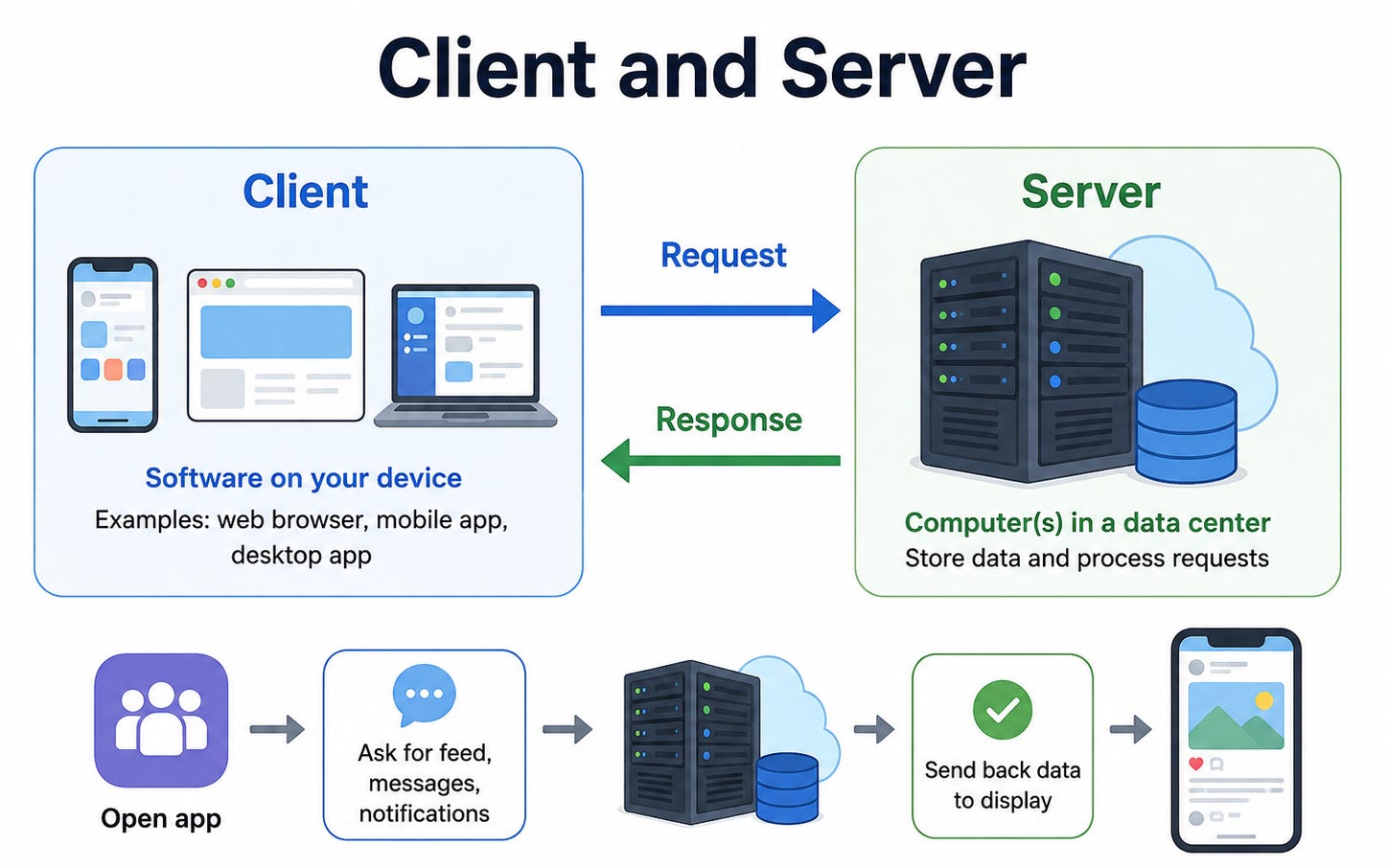
This request and response cycle happens many times per second across every app you use. When you scroll through Twitter, your client is constantly sending requests asking for more content and the servers are constantly responding with it.
The network between client and server is what makes this model distributed.
The request travels from your device over the internet to a server that might be thousands of kilometers away. This journey takes time, which is one of the fundamental constraints in system design.
Understanding the client-server model is important because most system design problems are really about designing the server side.
How do we make the server handle millions of clients at once?
How do we make sure the server responds quickly?
What happens if the server crashes?
The one thing to remember from this lesson: Every application is a client asking for things and a server providing them. System design is mostly about building better servers.
Lesson 3: What Happens When You Type a URL
Before a request reaches a server, something important happens first.
The client needs to find out where the server is.
When you type google.com into your browser, your browser does not actually know where Google’s servers are. It knows the name google.com but computers communicate using IP addresses, which are numerical identifiers like 142.250.80.46.
The process of translating a domain name into an IP address is called DNS, which stands for Domain Name System.
Think of DNS as the internet’s phone book. Your browser asks a DNS resolver (usually provided by your internet provider or a service like Google’s 8.8.8.8) to look up the IP address for google.com.
The resolver finds it and returns it. Now your browser knows where to send the request.
Once your browser has the IP address, it opens a connection to the server at that address using a protocol called TCP.
TCP is a set of rules for sending data reliably between two machines. It handles breaking data into packets, ensuring they all arrive, and reassembling them in the right order.
Finally, over this TCP connection, your browser sends an HTTP request, which is the standard format for web requests.
The server receives the request, processes it, and sends back an HTTP response containing the page content.
This entire process, DNS lookup, TCP connection, HTTP request and response, happens in milliseconds every time you visit a website.
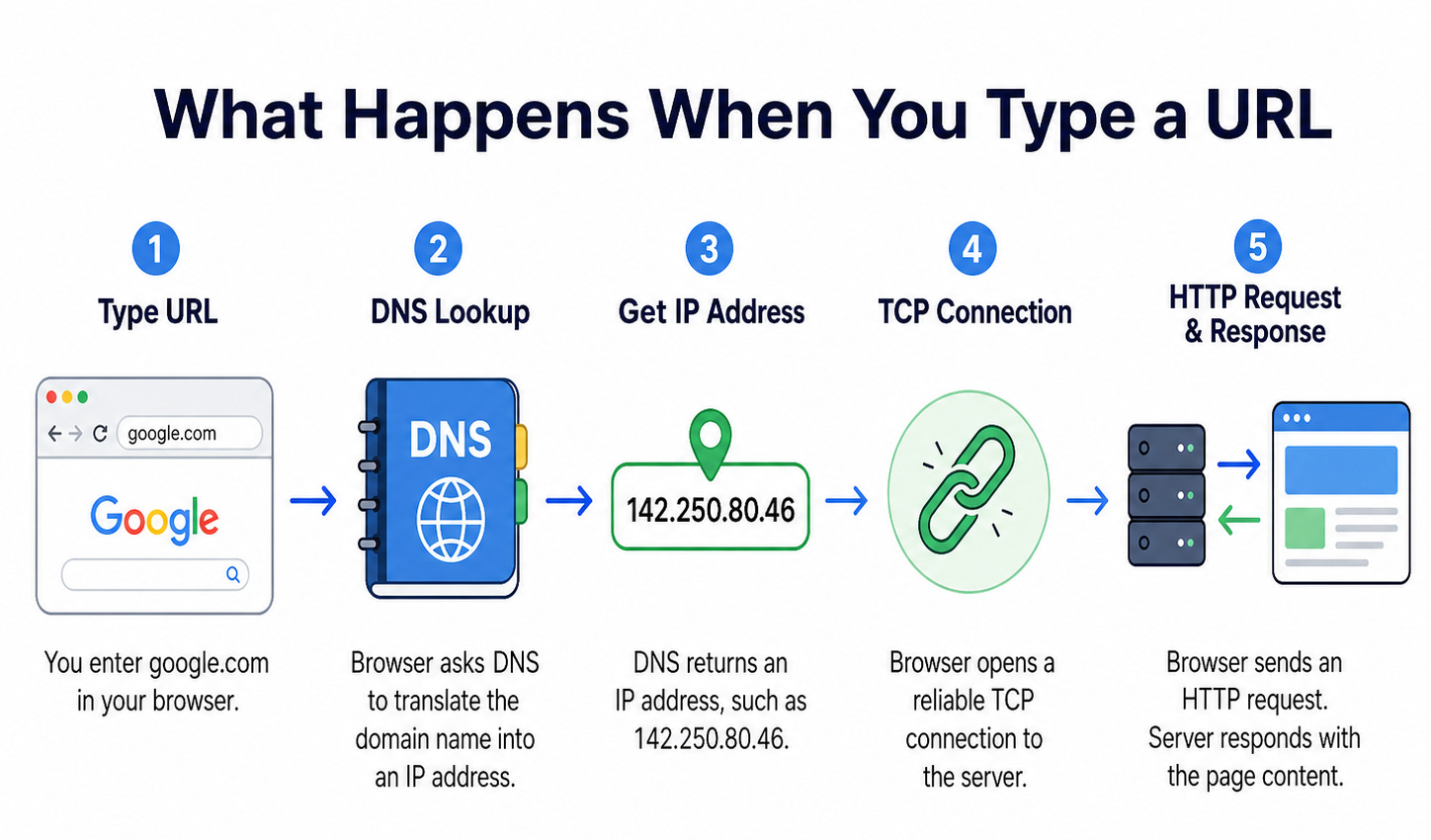
The one thing to remember from this lesson: Before a request reaches a server, DNS translates the domain name to an IP address, TCP establishes a reliable connection, and HTTP carries the actual request and response.
Lesson 4: Scaling Up and Scaling Out
One server can handle a certain number of requests per second before it gets overwhelmed. When your application grows beyond what one server can handle, you need to scale.
There are two ways to do this.
Vertical scaling means making the one server more powerful. You give it more CPU cores, more memory, faster storage. This is simple because nothing about your application needs to change. But it has limits. There is a maximum size for any single computer, and a single server is always a single point of failure.
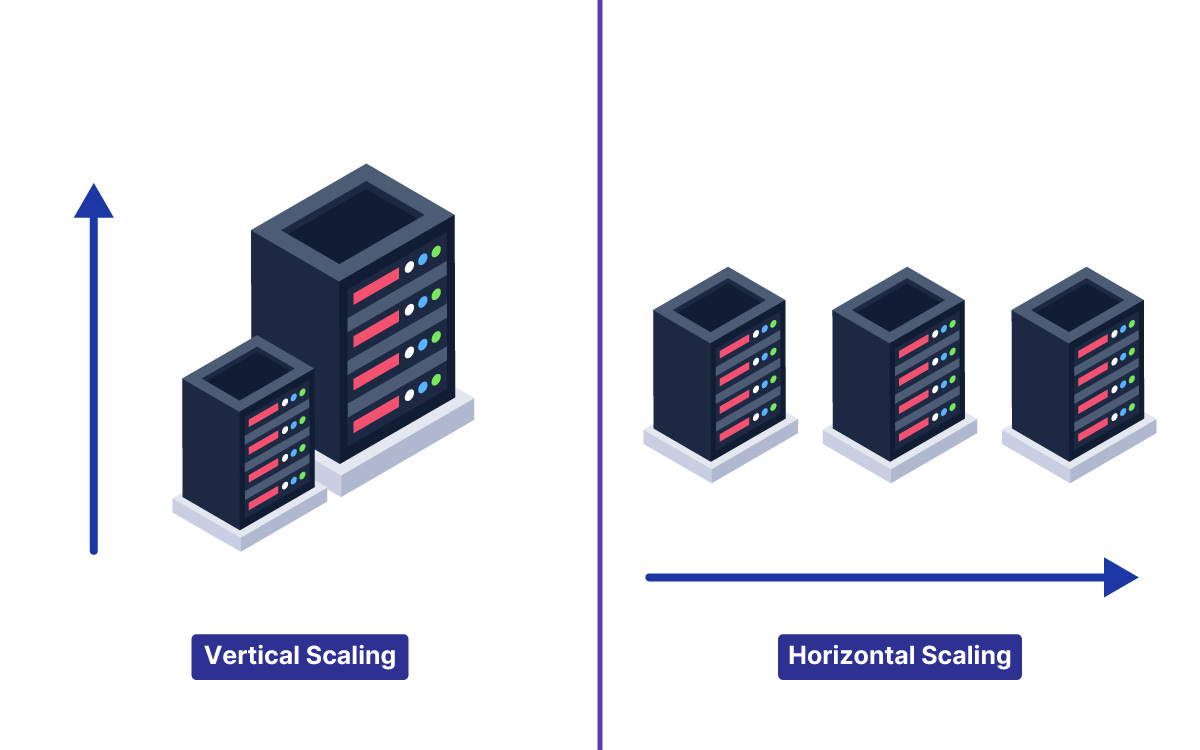
Horizontal scaling means adding more servers. Instead of one powerful server, you run many ordinary servers and spread the traffic across them. This approach has no ceiling in principle because you can keep adding servers. It also adds resilience because the failure of one server in a fleet of ten only affects a fraction of capacity.
Horizontal scaling requires one important thing: the servers must be stateless. This means they do not store any information between requests. Every request contains all the information the server needs to handle it, so any server can handle any request.
If servers held information between requests (called state), you would have to ensure each user’s requests always went to the same server, which destroys the flexibility that makes horizontal scaling work.
When applications grow, the typical progression is to start with vertical scaling (simpler, no code changes) and switch to horizontal scaling when vertical scaling hits its limits.
The one thing to remember from this lesson: Vertical scaling makes one server bigger. Horizontal scaling adds more servers. Horizontal scaling requires stateless servers so any server can handle any request.
Lesson 5: Load Balancers
When you have multiple servers, you need something to decide which server handles each incoming request. That something is a load balancer.
A load balancer sits in front of your servers. Every request from every client goes to the load balancer first.
The load balancer looks at its list of available servers and picks one to send the request to. The server handles the request and sends the response back through the load balancer to the client.
From the client’s perspective, there is one address to talk to. From the system’s perspective, many servers are sharing the work.
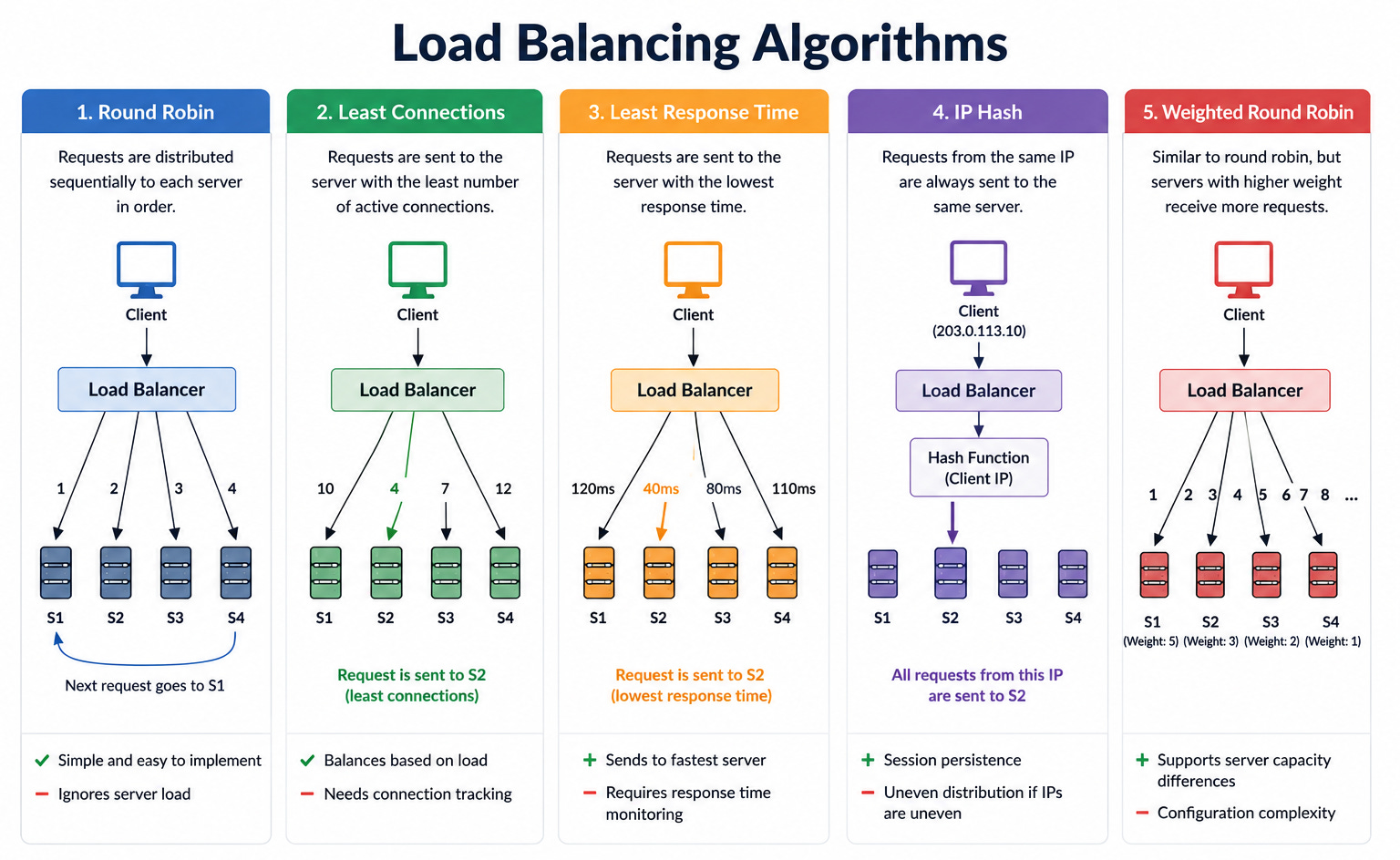
Load balancers use different strategies to decide which server to pick.
Round robin cycles through servers in order, sending the first request to server one, the second to server two, and so on.
Least connections sends each new request to whichever server is currently handling the fewest active requests, which works better when requests vary in how long they take to process.
Load balancers also perform health checks. They periodically test each server to make sure it is responding correctly.
If a server stops responding, the load balancer automatically stops sending traffic to it. This is what makes a fleet of servers resilient: when one fails, the load balancer routes around it without any manual intervention.
An important detail: the load balancer itself can be a single point of failure.
If there is only one load balancer and it goes down, all traffic is cut off. Production systems run multiple load balancers with automatic failover between them.
The one thing to remember from this lesson: A load balancer distributes requests across multiple servers and automatically routes around failures, making the system resilient to individual server failures.
Lesson 6: Databases
Every application needs to store data that persists beyond a single request. That is what databases are for.
A database is a system for storing, organizing, and retrieving data reliably. When you post a tweet, it gets written to a database. When you load your feed, the application reads from a database.
The database is the part of the system that holds everything that matters in the long term.
There are two main families of databases, and understanding the difference between them is one of the most important foundations in system design.
Relational databases (also called SQL databases) store data in tables with rows and columns, like a spreadsheet. They enforce relationships between tables, support complex queries that join multiple tables together, and provide strong guarantees that operations either complete fully or not at all. PostgreSQL and MySQL are the most widely used examples.
Relational databases are the right choice when your data has clear relationships, when you need transactions (operations that must succeed or fail together), and when you need to run complex queries.
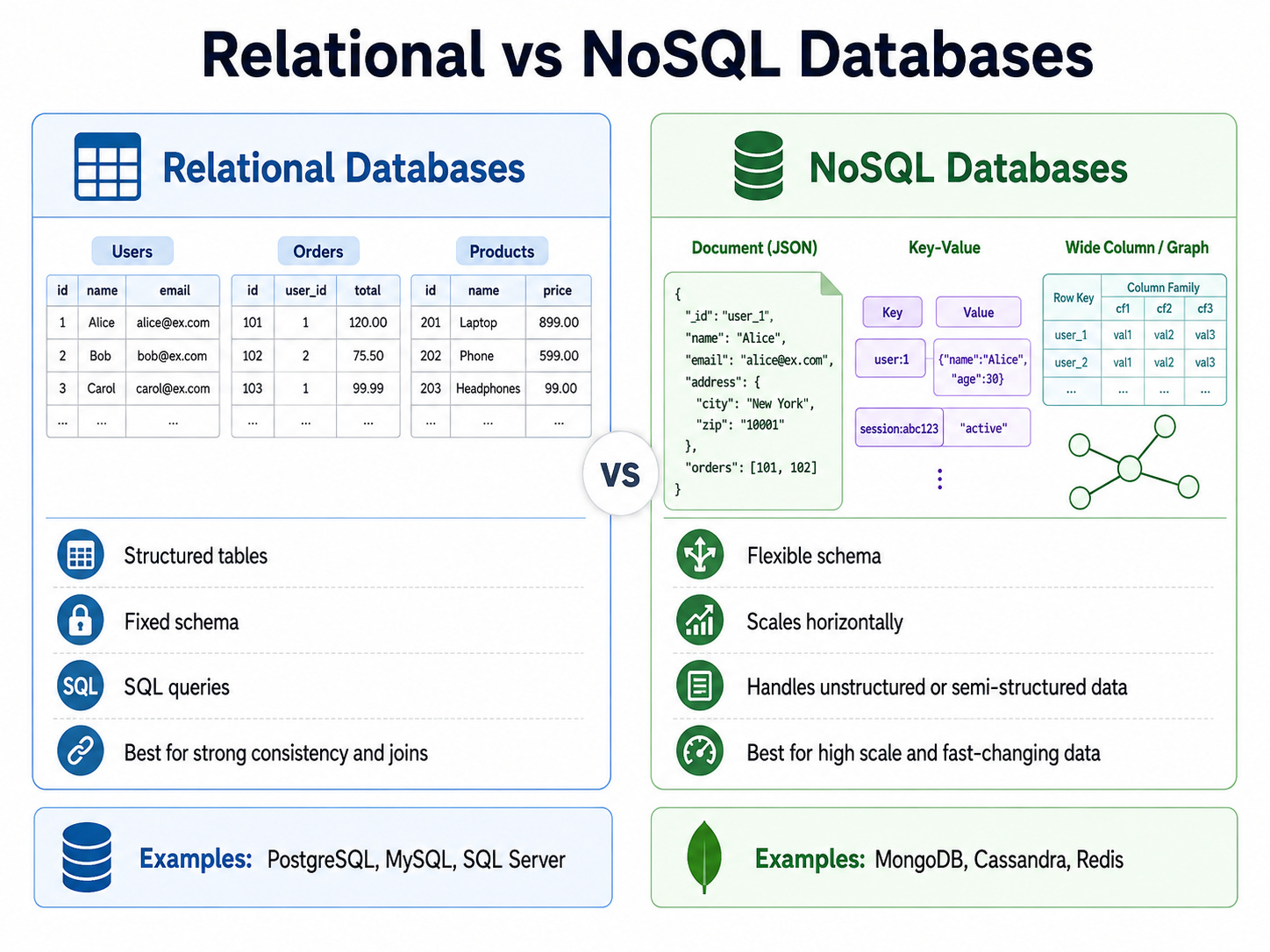
NoSQL databases take a different approach, trading some of the structure and guarantees of relational databases for different advantages like higher write speed, horizontal scaling, or flexible schemas.
Key-value stores, document stores, and wide-column stores are different types of NoSQL databases, each optimized for specific kinds of data and access patterns. Redis and MongoDB are common examples.
For most applications starting out, a relational database is the right choice. It handles a wide range of needs well and is straightforward to work with.
The one thing to remember from this lesson: Databases store data persistently. Relational databases organize data in tables with relationships and support complex queries. NoSQL databases trade some of that structure for specific advantages at scale.
Lesson 7: Caching
Reading from a database takes time.
If the same data is requested frequently, reading it from the database every time wastes time and puts unnecessary load on the database.
Caching solves this by storing frequently accessed data in a fast, temporary storage layer so it can be served without touching the database.
The most common caching setup puts a cache like Redis between the application servers and the database.
When the application needs data, it checks the cache first.
If the data is there (a cache hit), it returns immediately without touching the database.
If the data is not there (a cache miss), the application reads from the database, stores the result in the cache, and returns it. The next time the same data is requested, it comes from the cache.
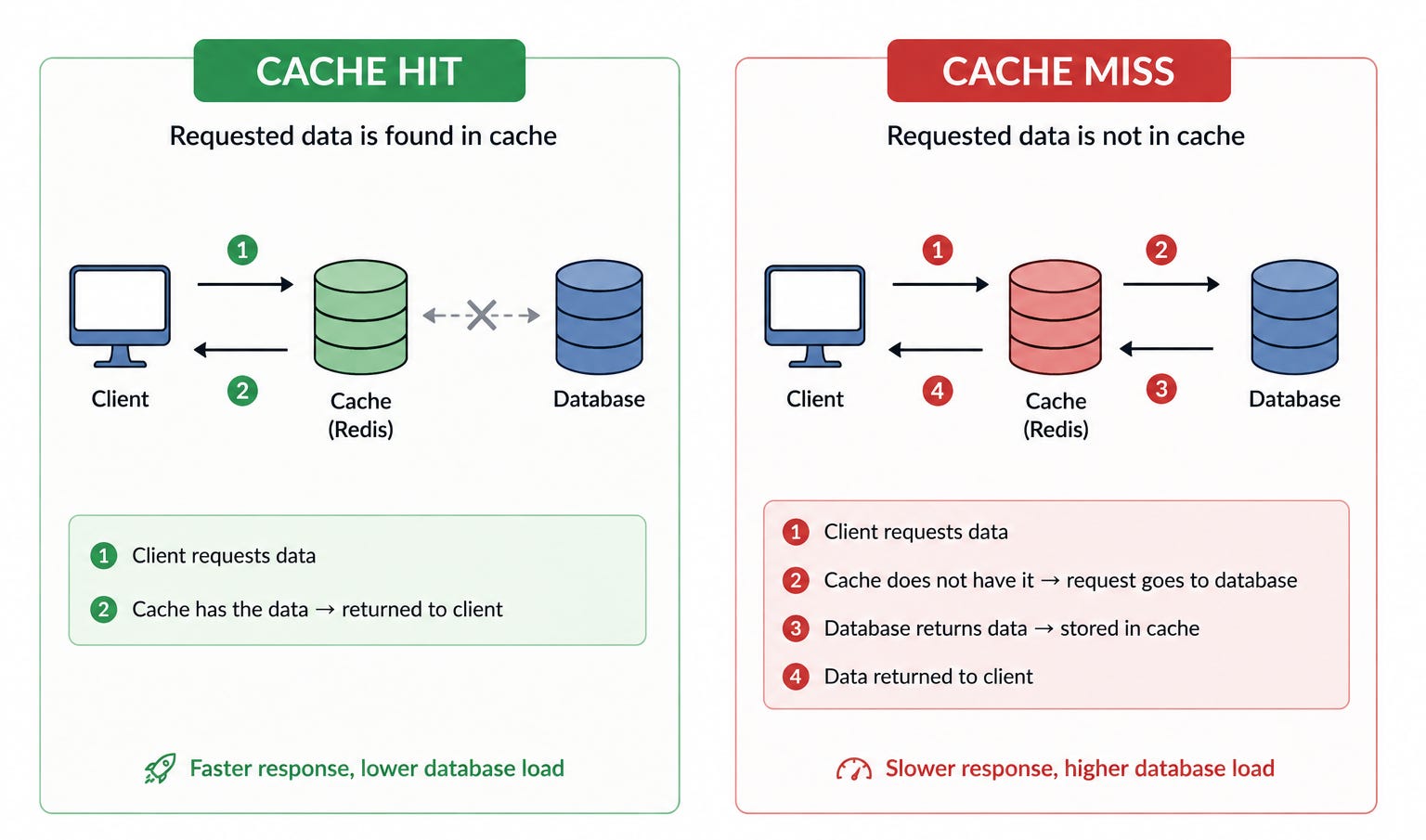
Caches store data in memory (RAM) rather than on disk, which is why they are so much faster than databases. Reading from memory takes microseconds. Reading from disk takes milliseconds. The difference sounds small but at high request volumes it is enormous.
The main limitation of caching is staleness.
The data in the cache is a copy made at a specific moment.
If the original data in the database changes, the cached copy might be out of date. Managing when cached data expires and how it gets refreshed is called cache invalidation and it is one of the famously hard problems in computer science.
Caches also have limited capacity. Because they store data in memory, they cannot hold everything.
When the cache fills up, it must evict something to make room. The most common strategy is LRU (least recently used), which evicts whatever data has not been accessed for the longest time.
The one thing to remember from this lesson: Caches store frequently accessed data in fast memory to avoid slow database reads. Cache hits are much faster than database reads but cached data can become stale.
Lesson 8: Replication and Sharding
As a system grows, a single database machine becomes a bottleneck. There are two different techniques for scaling the database layer, and they solve different problems.
Replication creates copies of the database on multiple machines.
One machine, called the primary, handles all writes. The other machines, called replicas, hold copies of the data and serve reads. This helps when read traffic is high because read requests can be distributed across many replicas rather than all going to one machine.
Replication also adds resilience.
If the primary fails, one of the replicas can be promoted to become the new primary. The system keeps running.
The important caveat with replication is replication lag.
When data is written to the primary, it takes a small amount of time to be copied to the replicas.
During this window, reading from a replica might return slightly stale data.
For most applications, this is acceptable.
For applications where reading your own recent write must be correct (like checking your bank balance immediately after a transfer), special handling is required.
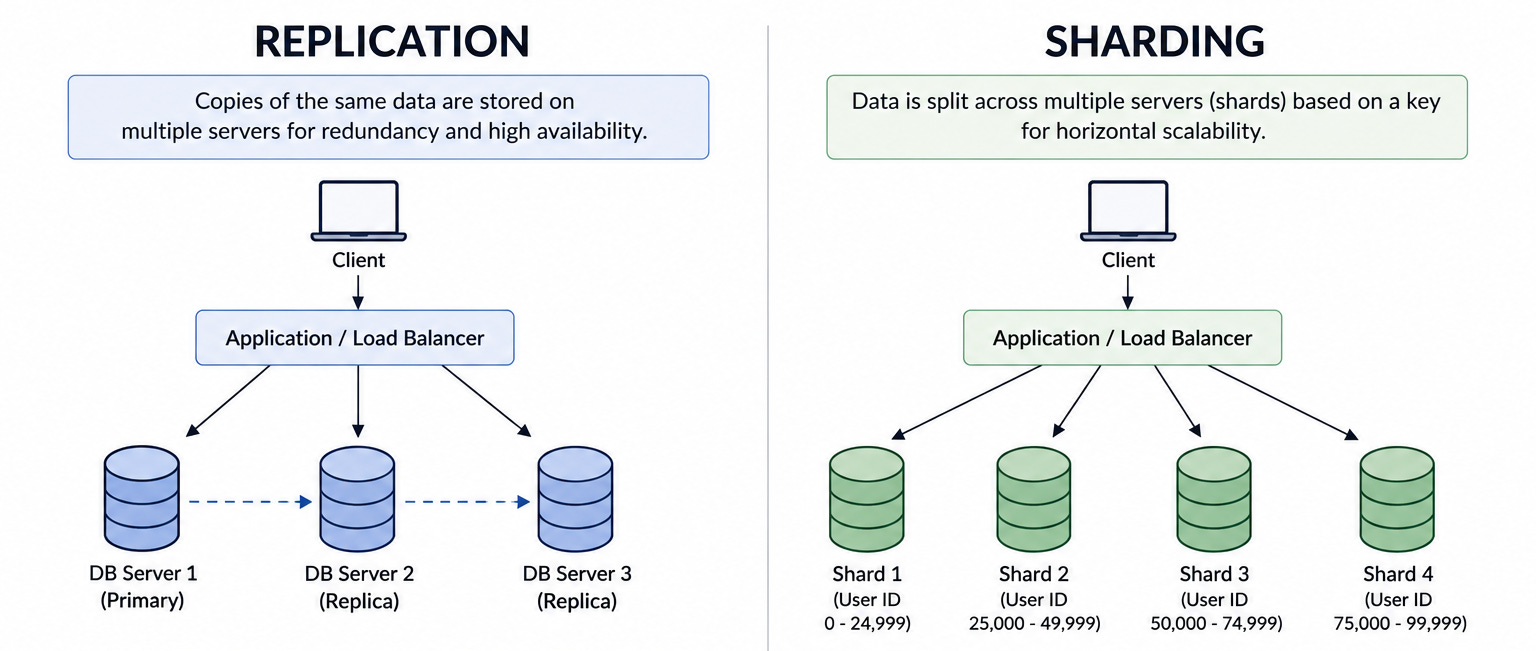
Sharding is different from replication.
Instead of copies of the same data on multiple machines, sharding splits the data itself across multiple machines. Each machine holds a different portion of the data. This scales both write capacity and storage capacity, because the load is divided across many machines rather than all going through one primary.
The tricky part of sharding is choosing how to split the data.
If you split it badly, one machine might receive most of the traffic while others sit idle. Choosing the right split (called the shard key) is one of the most important decisions in sharding.
The one thing to remember from this lesson: Replication copies data to multiple machines to scale reads and add resilience. Sharding splits data across machines to scale writes and storage. They solve different problems.
Lesson 9: Message Queues
In a straightforward system, when one component needs another component to do something, it calls it directly and waits for a response. This works fine until the component being called is slow, unavailable, or getting overwhelmed with requests.
Message queues solve this by introducing a buffer between the component asking for work (the producer) and the component doing the work (the consumer).
Instead of calling the consumer directly, the producer drops a message into the queue and moves on immediately.
The consumer reads from the queue at its own pace and processes each message.
This simple change has several important benefits.
The producer does not have to wait.
If sending a confirmation email takes two seconds, the user should not have to wait two seconds for their order to complete.
The order service drops a message into the queue saying send a confirmation email to this user and returns immediately.
The email service processes that message in the background.
The consumer can handle bursts. If the producer suddenly generates ten times its normal volume of messages (maybe there is a sale and orders spike), the queue absorbs the excess.
The consumer keeps processing at its normal rate without being overwhelmed.
The system is more resilient.
If the consumer goes down temporarily, messages accumulate in the queue rather than being lost. When the consumer comes back up, it picks up where it left off.
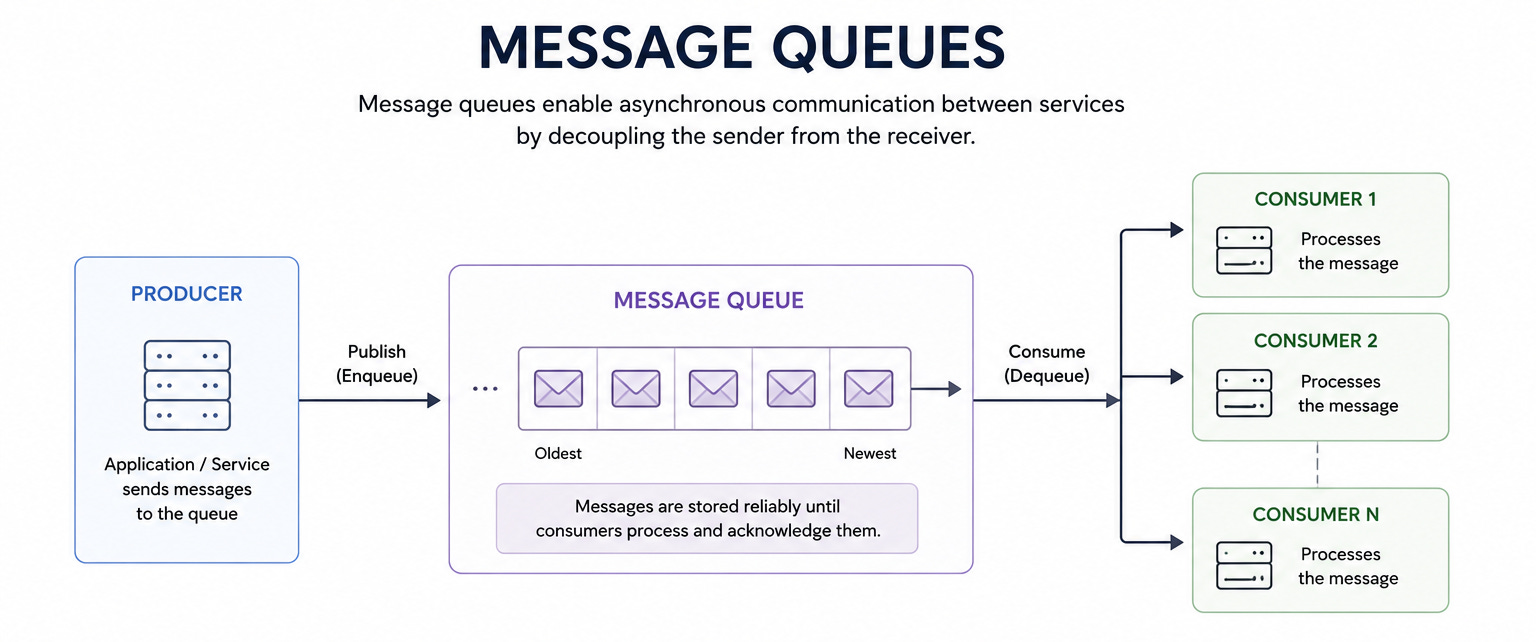
Kafka and RabbitMQ are the most widely used message queue systems. They differ in important ways, but both provide the fundamental benefit of decoupling producers from consumers through a durable buffer.
The one thing to remember from this lesson: Message queues let producers send work without waiting for it to be done, absorb traffic spikes, and protect consumers from being overwhelmed.
Lesson 10: Content Delivery Networks
When a user requests a web page, images, videos, or other files from your server, those files travel over the internet from your server to the user’s device.
If your server is in the United States and the user is in Japan, that journey takes a significant amount of time. Every request has to cross the Pacific Ocean.
A Content Delivery Network, or CDN, solves this by caching copies of your content on servers distributed across many geographic locations around the world. When a user requests content, they get it from the CDN server nearest to them rather than from your central server thousands of kilometers away.
CDNs are particularly effective for static content, meaning content that is the same for every user and does not change per request. Images, videos, CSS stylesheets, and JavaScript files are ideal CDN candidates.
A product image on an e-commerce site is identical for every visitor.
There is no reason every visitor should fetch it from a server on the other side of the world when a copy can be served from a server in their own city.
The first time a user in Tokyo requests an image, the nearest CDN edge node might not have it yet. It fetches it from the origin server, stores a copy, and serves it to the user. Every subsequent user in Tokyo gets it from the CDN node directly, with no trip to the origin required.
CDNs reduce latency for users, reduce load on the origin server, and can handle enormous traffic spikes because the load is distributed across thousands of edge nodes globally.
The one thing to remember from this lesson: CDNs cache copies of content near users globally so that requests travel a short distance to a nearby server instead of a long distance to the central origin.
Lesson 11: How Systems Stay Up
Every component in a system will fail eventually. Servers crash, hard drives fail, networks go down, software has bugs.
The goal of reliability engineering is not to prevent all failures, it is to design systems that keep working even when individual components fail.
The foundational technique is redundancy: running multiple copies of every critical component so the failure of one does not bring down the whole system. If you have one server and it fails, your system is down.
If you have ten servers and one fails, your system loses ten percent of its capacity but keeps running.
Redundancy is the reason every production system runs multiple instances of everything important.
Health checks are how systems detect failures. A load balancer periodically sends a test request to each server and checks whether it responds correctly. If a server stops responding, the load balancer marks it as unhealthy and stops sending traffic to it automatically. No manual intervention required.
Timeouts are how systems avoid being frozen by a failing dependency. If service A calls service B and service B is slow or unresponsive, service A could wait forever, using up resources and failing to serve its own users. A timeout says if you do not hear back within two seconds, assume it failed and move on. Timeouts are one of the most important and most commonly forgotten reliability practices.
Circuit breakers extend this idea. If service B is failing consistently, a circuit breaker stops service A from even trying to call it for a period. This prevents service A from wasting resources on calls it knows will fail and gives service B time to recover without being bombarded with failing requests.
Graceful degradation means the system keeps working in a reduced form when something fails. If the recommendation service is down, the app still loads, just without personalized recommendations. Partial availability is almost always better than complete unavailability.
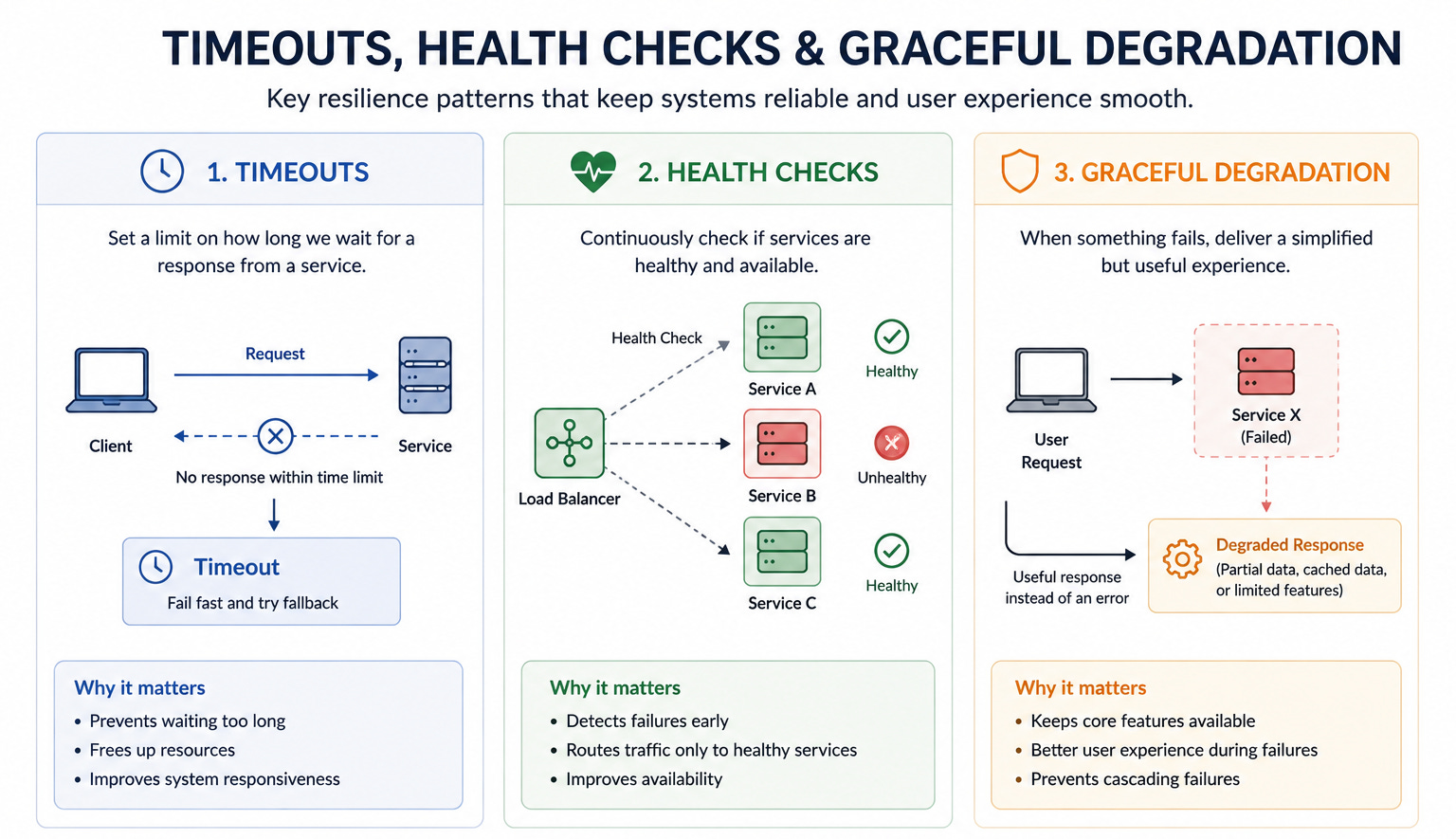
The one thing to remember from this lesson: Reliable systems use redundancy, health checks, timeouts, and graceful degradation to keep working even when individual components fail.
Lesson 12: Putting It All Together
The eleven lessons above covered the fundamental building blocks of system design. This final lesson shows how they connect into a coherent picture.
Imagine you are designing a simple social media application. Here is how the concepts from each lesson apply.
The application has clients, which are the mobile apps and web browsers users interact with (Lesson 2). When a user opens the app, their client sends a request to a domain name that DNS resolves to an IP address, then connects via TCP and sends an HTTP request (Lesson 3).
That request hits a load balancer, which distributes it to one of several stateless application servers (Lessons 4 and 5). The servers are stateless, meaning they hold no user-specific information between requests.
When the server needs to load a user’s profile or posts, it checks the cache first (Lesson 7). If the data is there it returns immediately. If not, it queries the database (Lesson 6).
As the application grows, the database gets read replicas to handle more read traffic. When the data grows too large for one machine, sharding splits it across multiple machines by user ID (Lesson 8).
When a user posts something, the server does not immediately deliver it to all their followers. It drops a message into a queue saying deliver this post to all followers and returns immediately. A worker service processes the queue in the background (Lesson 9).
Images and videos uploaded by users are served through a CDN so users around the world get them from nearby servers (Lesson 10).
The whole system is designed for resilience. Every component has multiple instances. Health checks detect failures automatically. Timeouts prevent slow services from cascading. If the recommendation service goes down, the feed still loads (Lesson 11).
This is a simplified picture of how a real social media application is built. Every concept in this starter kit appears in every large system you can think of, from the database that stores your messages to the CDN that delivers your videos to the queue that processes your notifications.
Where to go from here: This starter kit gave you the foundations. The next step is going deeper on each concept, understanding the trade-offs within each one, and learning how to apply them to specific system design problems. Every post on System Design Nuggets is the next step.
Key Takeaways
System design is the practice of building software that works reliably for many users at once, which requires a different set of tools than building software for one user.
The client-server model is the foundation of every application. Clients request, servers respond. System design is mostly about building better servers.
DNS, TCP, and HTTP are the chain of protocols that turn a domain name into a response on your screen.
Vertical scaling makes one server bigger. Horizontal scaling adds more servers and requires stateless services.
Load balancers distribute traffic across multiple servers and route around failures automatically.
Relational databases store structured data with relationships. NoSQL databases trade some structure for specific advantages at scale.
Caches store frequently accessed data in fast memory to avoid slow database reads.
Replication copies data across machines to scale reads. Sharding splits data across machines to scale writes and storage.
Message queues decouple producers from consumers, absorb traffic spikes, and keep the system resilient when components fail.
CDNs cache content near users globally so requests travel short distances rather than crossing the world.
Reliability comes from redundancy, health checks, timeouts, and graceful degradation, not from preventing all failures.
All eleven concepts connect: every real system uses all of them together, and understanding each one makes the whole picture make sense.
System design is not something you learn in one sitting. It is something you build understanding of over time by reading, practicing, and designing.
This starter kit is the foundation. Everything that follows is the building.