
How RAG Works: A System Design Interview Guide for Software Engineers
Learn how Retrieval-Augmented Generation (RAG) works step by step. Covers ingestion, chunking, embeddings, vector databases, and retrieval for beginners.

Large Language Models are impressive. They can write code, summarize reports, and answer questions on almost anything.
But here is the thing. They have a knowledge cutoff. They do not know about your company’s internal docs. They have never read your private notes.
And sometimes, they just make stuff up with full confidence.
This is a real problem.
If you are building any application where accuracy matters (and let’s be honest, when does it not?), you cannot just rely on the LLM’s built-in knowledge.
You need a way to feed it the right information at the right time.
That is exactly what Retrieval-Augmented Generation (RAG) solves. It connects your LLM to an external knowledge base so it can look things up before answering.
Instead of guessing, the model retrieves relevant documents and generates a response grounded in actual data.
RAG has quickly become one of the most important patterns in modern AI engineering.
Whether you are building a customer support bot, an internal search tool, or a coding assistant, chances are high that RAG is part of the architecture.
And the best part? The core idea is not that complicated once you break it down.
What is RAG?
Retrieval-Augmented Generation is a two-step process.
First, you retrieve relevant information from a knowledge base. Then, you pass that information to an LLM along with the user’s question so it can generate an informed answer.
Think of it this way.
The LLM is the brain, but it has limited memory.
RAG gives it access to an entire library of notes, documents, and data. When someone asks a question, the system first searches through that library, pulls out the most relevant pieces, and hands them to the LLM.
The LLM then crafts a response using both its own knowledge and the retrieved context.
Without RAG, the LLM answers from memory alone.
With RAG, it answers with evidence.
This is why RAG is so popular. It is cheaper than fine-tuning a model on your data. It is easier to update (just add new documents).
And it dramatically reduces hallucinations because the model has actual source material to reference.
The RAG Pipeline: Step by Step
Let’s walk through the entire pipeline.
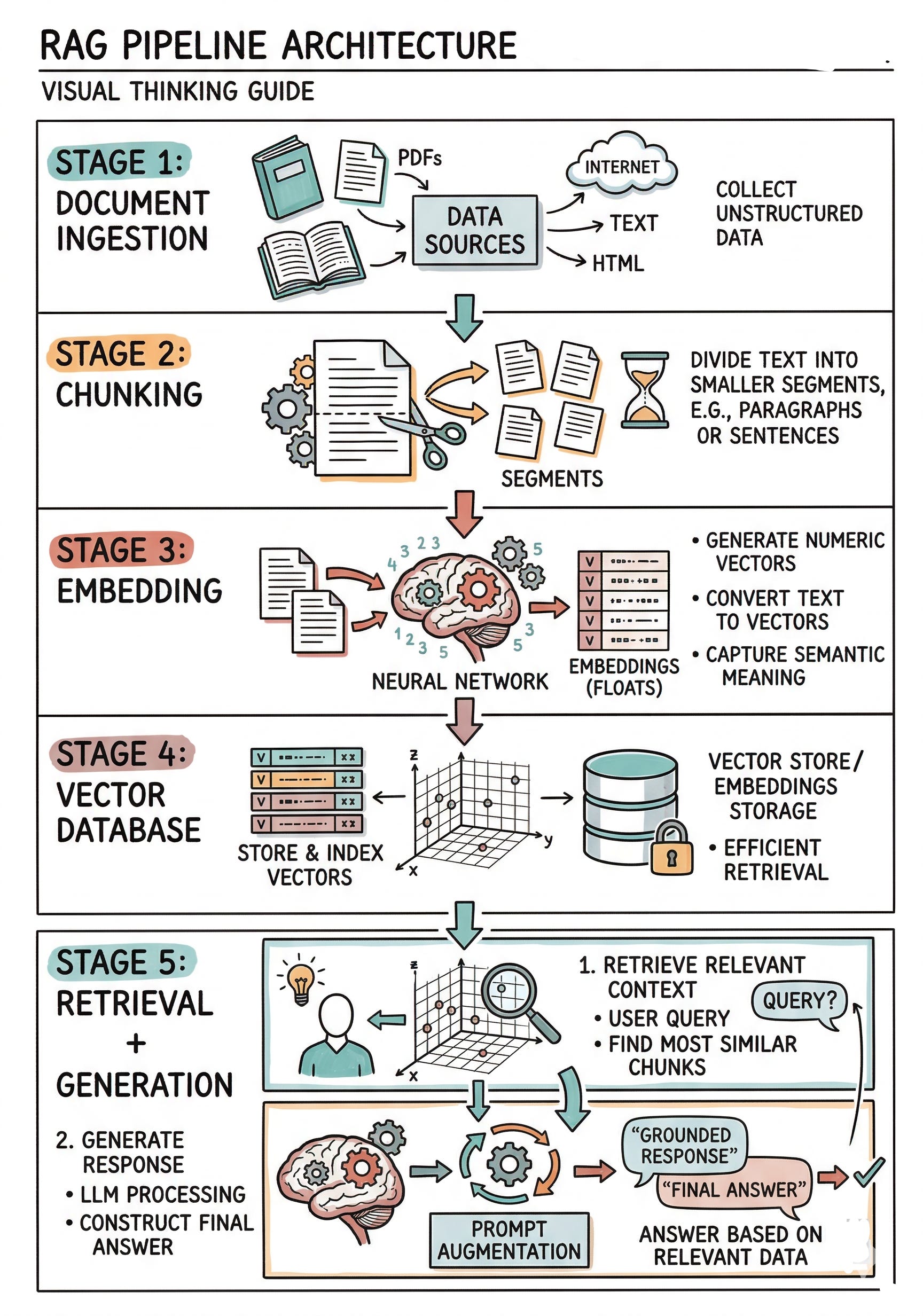
Every RAG system has roughly the same five stages, and understanding each one will give you a solid mental model of how the whole thing works.
Step 1: Document Ingestion
Before anything can be retrieved, you need to get your data into the system. This is the ingestion phase.
Your knowledge base might consist of PDFs, Word documents, web pages, Markdown files, database records, or even Slack messages.
The first job is to load all of this content and convert it into plain text that your system can process.
This sounds simple, but it is where a lot of early mistakes happen.
PDFs can have weird formatting.
HTML pages have navigation bars and ads mixed in with actual content. Scanned documents need OCR (Optical Character Recognition, which means converting images of text into actual text).
Key takeaway: Garbage in, garbage out. If your ingestion step produces messy or incomplete text, everything downstream suffers. Spend time getting this right.
Step 2: Chunking
Once you have clean text, the next step is chunking. This means splitting your documents into smaller pieces.