
The 8-Week System Design Interview Series: Week 1 - Scalability, Latency, and Load Balancing
Week 1 of the 8-Week System Design Series: Scalability, Latency, and Load Balancing Explained Simply and in Depth

A Note Before We Start: The 8-Week Series
Something a little different is happening with this post. This is the first installment of an eight-week series called From Foundations to FAANG-Ready, and it is designed to take any engineer from the very beginning of system design all the way through to complete, interview-ready fluency.
Here is the full plan for what is coming:
Week 1: System Design Fundamentals: Scalability, Latency, and Load Balancing (you are here)
Week 2: Distributed Systems Fundamentals: Consistency, Replication, Sharding, and Queues
Week 3: API Design for System Design Interviews: REST, GraphQL, gRPC, and How to Choose
Week 4: Data Modeling and Database Design: SQL vs. NoSQL and How to Choose the Right One
Week 5: How to Draw a High-Level System Architecture That Impresses Interviewers
Week 6: Detailed System Design: How to Go Deep, Find Bottlenecks, and Discuss Trade-offs
Week 7: System Design Case Studies: Design a URL Shortener and Design a Twitter Feed
Week 8: System Design Case Studies: Design a Chat System and Design a Rate Limiter
Each week builds on the previous one. The first four weeks establish the concepts and vocabulary that weeks five through eight apply to real problems.
If you follow this series from start to finish, by week eight you will have the foundation to walk into any system design interview with genuine confidence rather than hoping the right question comes up.
This week covers the three concepts that underlie almost everything else in system design: scalability, latency, and load balancing. Every other topic in the series assumes you understand these, so starting here is not arbitrary. These are the roots.
Most engineers preparing for system design interviews make the same mistake. They jump straight to the interesting stuff: distributed databases, message queues, microservices.
They spend weeks on advanced patterns while skipping the fundamentals, and then they walk into an interview and draw a box labeled “scalable backend” without being able to explain what scalable actually means or how the scaling would work.
Interviewers notice this immediately.
A candidate who uses the word scalable correctly but cannot explain the difference between vertical and horizontal scaling, or who proposes adding servers without knowing what makes that possible, sounds less credible than one who understands the foundations and builds from there.
The engineers who give the strongest system design answers are not always the ones who know the most advanced concepts. They are the ones whose understanding of the basics is so solid that every more complex decision flows naturally from it.
When you truly understand what latency is and where it comes from, caching becomes an obvious tool rather than a remembered trick.
When you understand why statelessness matters, horizontal scaling makes intuitive sense.
The fundamentals are not the boring part you get through to reach the interesting stuff. They are the foundation that makes the interesting stuff make sense.
This week covers three foundational concepts: scalability, which is how systems handle growth. Latency and throughput, which are the measures of how well they perform. And load balancing, which is the primary mechanism for distributing traffic across a system that has grown to need more than one server.
What Is Scalability
Scalability is the ability of a system to handle growth without breaking down. Growth can mean more users, more data, more requests, or more geographic reach.
A scalable system handles that growth by expanding its capacity in a way that keeps performance acceptable.
The reason scalability is foundational is that almost every interesting system design problem is a scalability problem in disguise.
Design a chat system means design a chat system that works for ten million users.
Design a URL shortener means design one that handles a billion redirects per day.
The problem statement mentions the product but the design challenge is always about how that product performs as the numbers grow.
There are two fundamental approaches to scalability and understanding both is where this concept starts to become useful.
Vertical Scaling
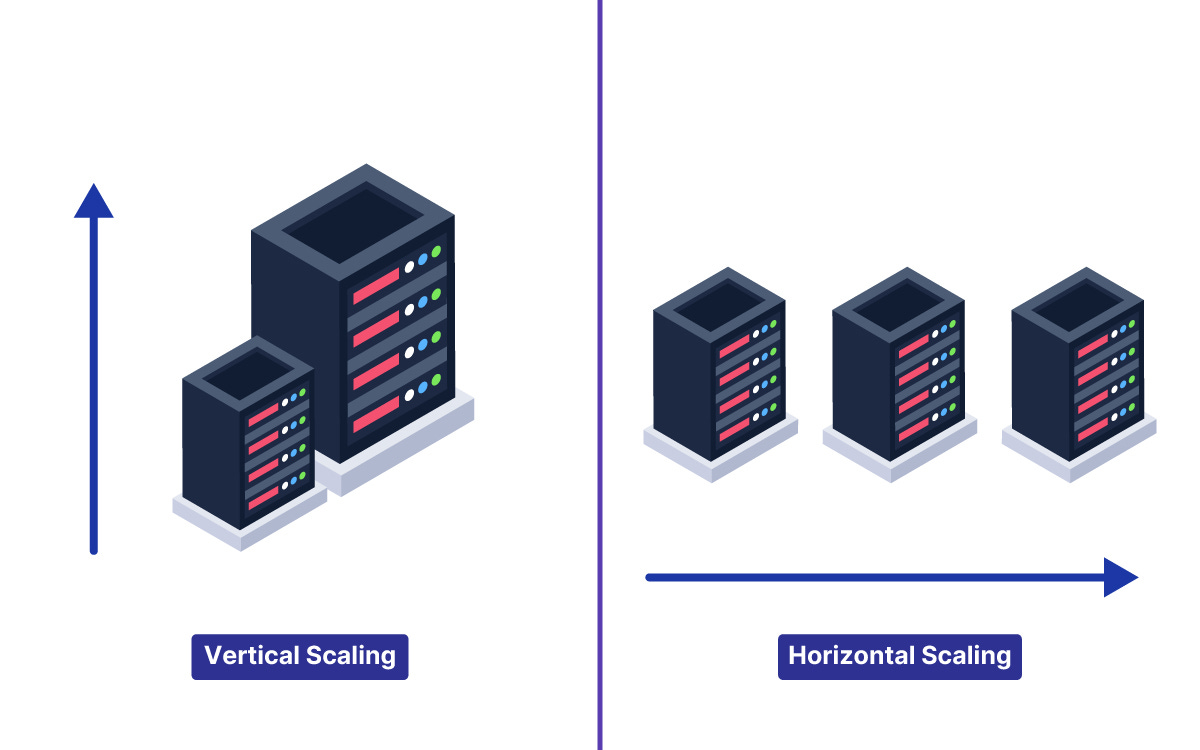
Vertical scaling means making one machine more powerful. When the system needs more capacity, you upgrade the server: more CPU cores, more memory, faster storage, a better network interface.
The application does not change, the server just gets bigger.
Vertical scaling is attractive because of its simplicity. There is no architecture to change, no new components to add, and no code to rewrite. You pay for a larger server and the system handles more load. For many systems at moderate scale, vertical scaling is the right first answer.
The limitations of vertical scaling are real and hard.
The first is a physical ceiling. There is a maximum size for any single machine, and at some point you simply cannot buy a bigger server.
The second and more important limitation is that a single machine, regardless of how powerful it is, is a single point of failure.
When it goes down, the entire system goes down. A vertically scaled system has no redundancy at the server level, which means any hardware failure or operating system crash takes the whole system offline.
Vertical scaling is the right answer when the system is early, the team is small, the scale is modest, and operational simplicity matters more than ultimate capacity. It is the wrong answer when the system must be continuously available or when the load exceeds what any single machine can handle.
Horizontal Scaling
Horizontal scaling means adding more machines rather than making one machine bigger. When the system needs more capacity, you run more copies of the server, each handling a portion of the traffic.
Instead of one powerful server, you have ten modest servers sharing the load.
Horizontal scaling removes the ceiling that vertical scaling hits, since you can keep adding machines as load grows. It also adds redundancy, since the failure of one server in a fleet of ten reduces capacity by ten percent rather than causing a complete outage.
The requirement for horizontal scaling to work is statelessness.
If each server holds information specific to particular users, incoming requests must always return to the same server that holds their information. This sticky routing makes load distribution inflexible and means the failure of one server loses the state of all the users connected to it.
Stateless servers hold no user-specific information between requests.
Every request carries all the information the server needs to handle it, and any state that must persist between requests lives in a shared external store: a database, a cache, or a distributed session store. This is what allows any server in the fleet to handle any request, which is what makes true horizontal scaling possible.
The shift from stateful to stateless servers is one of the most important architectural decisions in system design, and understanding why it enables horizontal scaling is what makes that decision feel like reasoning rather than memorization.
Scalability in Practice
Real systems usually combine both approaches. They run multiple servers for horizontal scale and redundancy, and they choose servers with appropriate hardware specifications for the workload.
The art is in recognizing when to add servers, how to distribute load across them, and when the next constraint is not the servers but the database or the network.
Scalability also applies to every component in the system, not just the application servers.
A horizontally scaled application tier connected to a single database has simply moved the bottleneck rather than removed it.
True scalability means each layer of the system can expand to meet the load it receives, which is why the topics of this series build on each other rather than standing alone.
Latency and Throughput
If scalability describes a system’s ability to handle growth, latency and throughput describe how well it performs. They are related but distinct, and confusing them leads to designing for the wrong thing.
What Is Latency
Latency is the time between a user making a request and receiving a response. It is the delay experienced by a single request.
When a user clicks a button and nothing happens for three seconds, that is high latency.
When the response comes back in fifty milliseconds, that is low latency.
Latency matters because user experience is directly tied to it.
Research across multiple platforms has consistently shown that response time affects user behavior. Pages that load slowly get abandoned.
Transactions that feel sluggish lose conversions. In competitive products, the faster one wins even when the slower one has more features.
Latency has multiple components that stack on top of each other.
Network latency is the time for a request to travel from the client to the server and the response to travel back. This is governed by physics: signals travel at the speed of light, and longer distances mean longer delays.
A request from London to a server in New York takes roughly seventy milliseconds just for the round trip, before any processing happens.
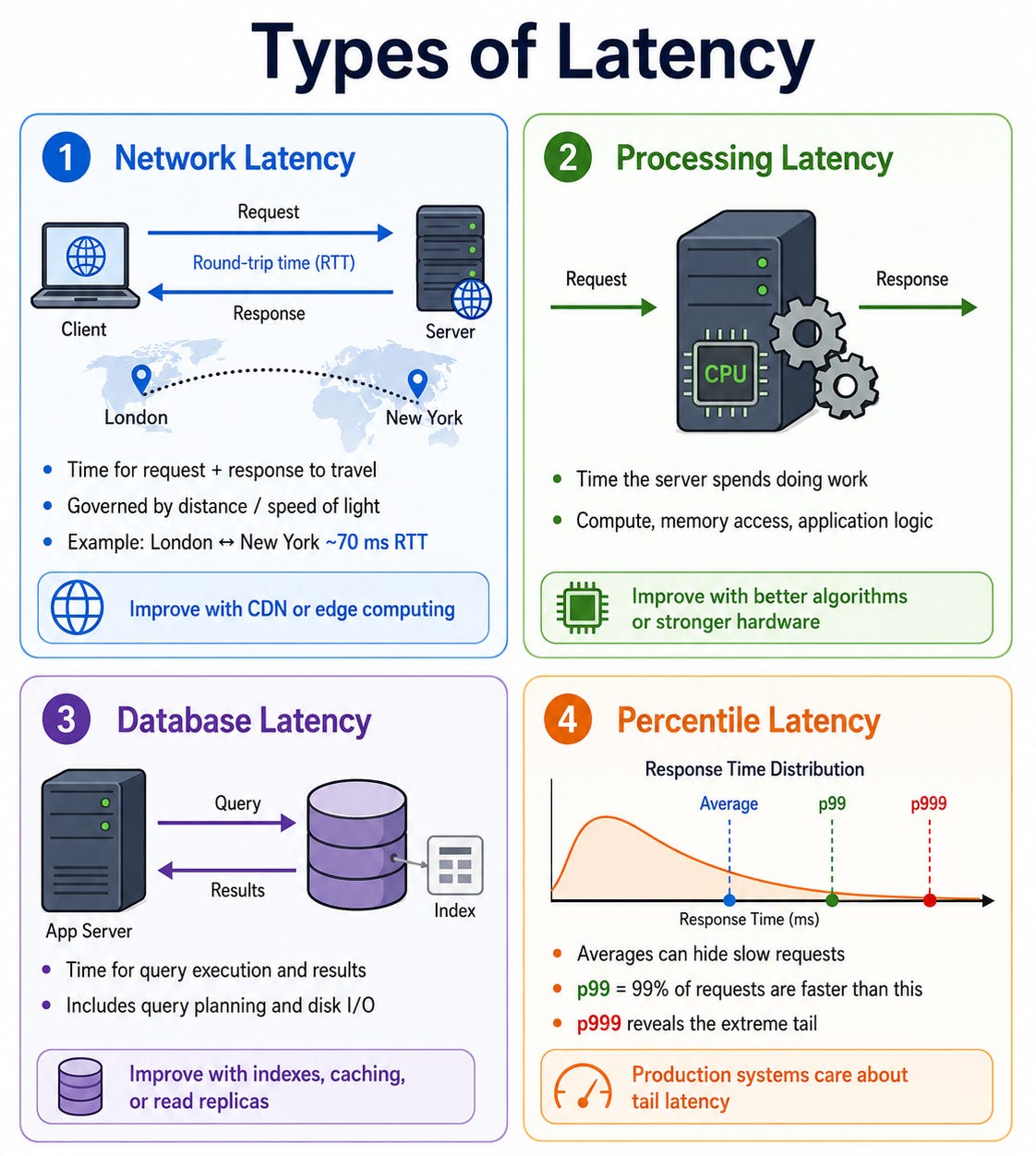
Processing latency is the time the server spends doing work on the request: computing, reading from memory, querying a database.
Database latency is the time a query takes to execute and return results, which includes disk I/O and query planning.
Understanding where latency comes from is what points toward the right optimization.
A system with high network latency can be improved with a CDN or edge computing.
A system with high processing latency can be improved with more efficient algorithms or more powerful hardware.
A system with high database latency can be improved with indexes, caching, or read replicas. Treating latency as one undifferentiated thing leads to random optimization rather than targeted improvement.
Percentile latency is how production systems actually measure this. Averages are misleading because a few very slow requests drag up the mean without revealing the distribution.
The p99 latency, the latency that ninety-nine percent of requests fall under, is more meaningful because it shows the worst-case experience for almost all users.
The p999, the latency that all but one in a thousand requests fall under, reveals the extreme tail.
Designing to a latency target means designing to a percentile target, and the specific percentile should match the user experience requirement.
What Is Throughput
Throughput is the amount of work a system completes in a given period. It is usually measured in requests per second, transactions per second, or bytes per second depending on the workload.
Throughput describes the system’s capacity for work, while latency describes the speed of individual requests.
The relationship between latency and throughput is subtle and worth understanding precisely.
Low latency and high throughput are both desirable but they are not the same thing and sometimes they pull in opposite directions.
A system can have low latency for each individual request but low throughput if it can only process one request at a time.
A system can have high throughput but high latency if it batches many requests together before processing them, which improves efficiency at the cost of each request waiting longer.
Little’s Law describes the relationship between the three variables: the average number of requests in the system equals the average arrival rate multiplied by the average time each request spends in the system. This has practical implications for understanding queue behavior.
If requests arrive faster than they are processed, the queue grows, waiting time increases, and latency climbs.
Throughput is bounded by the slowest component in the critical path, and improving throughput means identifying and removing that bottleneck.
In interviews, the distinction between latency and throughput matters when the requirements specify one more than the other.
A real-time chat system has a strict latency requirement: a message must arrive in milliseconds.
An analytics ingestion pipeline has a throughput requirement: it must process a million events per second regardless of how long each one takes. Designing for the wrong one produces a system that technically works but misses the point.
The Latency Reference Numbers Worth Knowing
These rough figures are worth having in your head because they make back-of-the-envelope estimates grounded.
Reading from memory (L1 cache) takes about one nanosecond.
Reading from main memory (RAM) takes about one hundred nanoseconds.
Reading from an SSD takes about one hundred microseconds.
Reading from a spinning disk takes about ten milliseconds.
A network round trip within the same data center takes about half a millisecond.
A network round trip across continents takes roughly one hundred milliseconds.
These numbers span eight orders of magnitude from the fastest to the slowest. The practical implication is that every design decision about where data lives is a decision about which tier of this hierarchy a read falls into.
A cache hit that serves data from memory is ten thousand times faster than a database read that hits disk. This is not a small difference. It is what justifies the entire discipline of caching.
Load Balancing
A system that has grown beyond one server needs a way to decide which server handles each incoming request.
Load balancing is the mechanism that makes this decision, and understanding it in depth is essential for any design that involves horizontal scaling.
What a Load Balancer Does
A load balancer sits in front of a group of servers and distributes incoming requests among them. Every request from a client goes to the load balancer first.
The load balancer selects a server based on an algorithm, forwards the request, and returns the response to the client. From the client’s perspective, there is one address to talk to. From the system’s perspective, many servers are sharing the work.
The load balancer does more than just distribute traffic. It performs health checks on the servers behind it, periodically verifying that each one is functioning correctly.
When a server fails a health check, the load balancer stops sending traffic to it automatically, removing it from the pool without requiring manual intervention.
This is what turns a fleet of servers into a fault-tolerant system: individual servers can fail without affecting users because the load balancer routes around them.
The load balancer also handles SSL termination in many configurations, decrypting HTTPS traffic at the balancer and forwarding plain HTTP to the servers behind it.
This offloads the CPU-intensive decryption work from the application servers and centralizes certificate management at the load balancer.
Load Balancing Algorithms
The algorithm the load balancer uses to select a server shapes the distribution of traffic and has real implications for system behavior under different conditions.
Round Robin cycles through the available servers in order, sending the first request to server one, the second to server two, the third to server three, and then back to server one. It assumes all requests are roughly equal in cost and all servers are equally capable. It is simple, predictable, and works well when those assumptions are true. When requests vary significantly in how long they take, round robin can lead to uneven loading where one server handles ten long requests while another handles ten short ones.
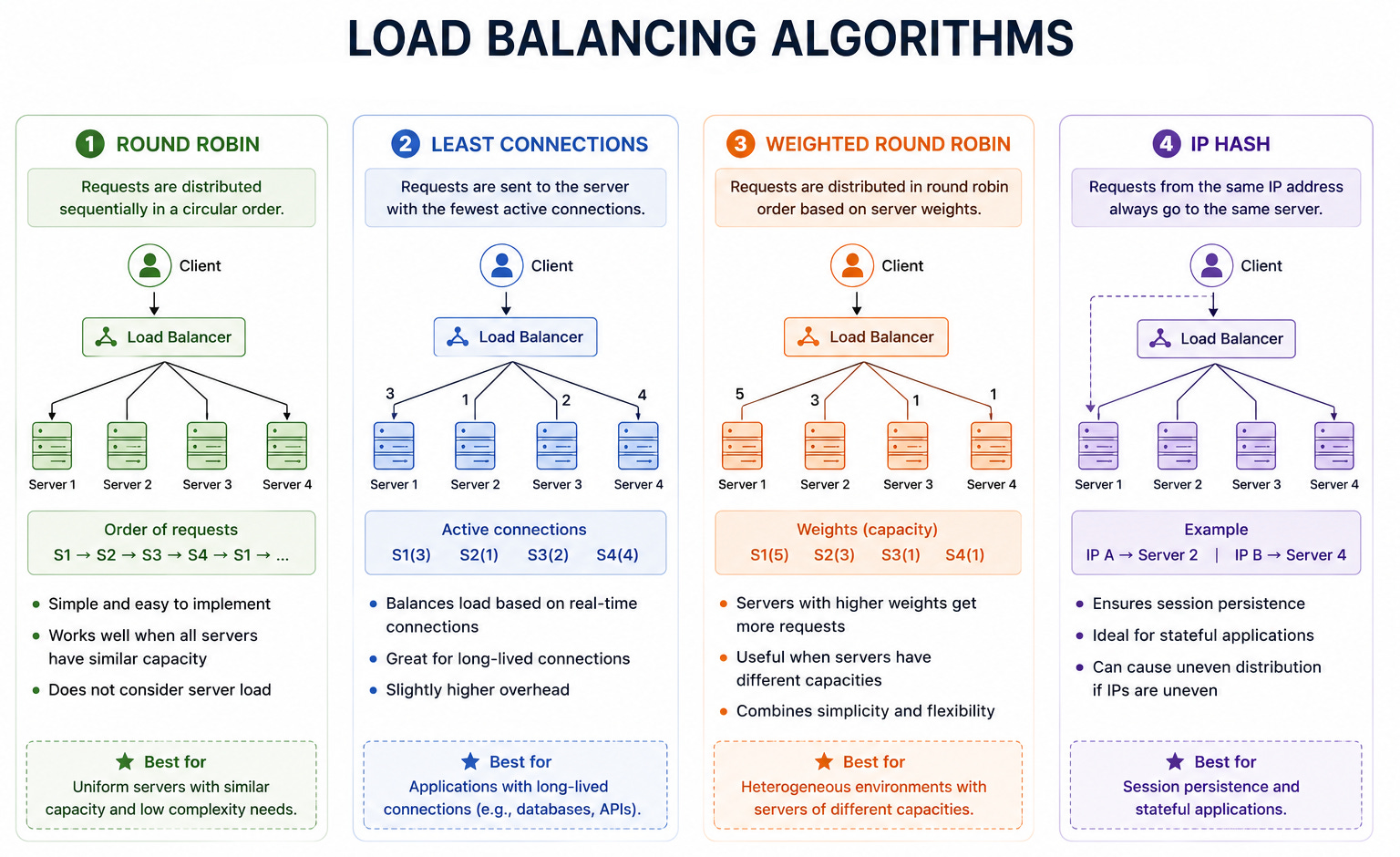
Least Connections sends each new request to the server currently handling the fewest active connections. This distributes load more evenly when requests vary in duration, because a server that finishes requests quickly accumulates fewer active connections and receives more new ones. It is a better choice than round robin for workloads with high variance in request duration, such as systems that mix fast cache hits with slow database queries.
Weighted Round Robin and Weighted Least Connections are variations that assign different weights to servers, allowing more powerful servers to receive proportionally more traffic. This is useful when servers in a fleet have different hardware specifications or when some servers are reserved for specific workloads.
IP Hash uses a hash of the client’s IP address to always route the same client to the same server. This provides sticky sessions, ensuring a client’s requests always reach the same server. It is useful when sessions cannot be fully externalized but comes at the cost of uneven distribution when client traffic is skewed and reduced resilience when a server fails since its clients must be redistributed.
Consistent Hashing routes requests based on a hash of some attribute, typically a user ID or a resource key, in a way that minimizes redistribution when servers are added or removed. It is the standard algorithm for distributed caches where the same key should always map to the same cache server to maximize cache hit rates.
Layer 4 vs Layer 7 Load Balancing
Load balancers operate at different layers of the network stack and the distinction matters for understanding what they can and cannot do.
Layer 4 load balancers operate at the transport layer and make routing decisions based on network information: source and destination IP addresses and ports. They do not inspect the content of the traffic. Because they need to do less work per request, they are fast and can handle very high throughput. They are appropriate when the routing decision is simple, such as distributing TCP connections across a pool of servers.
Layer 7 load balancers operate at the application layer and make routing decisions based on the content of the request: the HTTP method, the URL path, headers, and cookies. This allows much more sophisticated routing. Requests for images can be routed to servers optimized for serving static files.
API requests can be routed differently from web page requests. Users in specific regions can be routed to specific servers.
The trade-off is that inspecting request content is more expensive than looking at network headers, so layer 7 load balancers have lower raw throughput than layer 4 ones.
Most modern systems use layer 7 load balancing because the routing flexibility it provides is worth the cost, and the hardware available today makes the cost manageable.
The Load Balancer as a Single Point of Failure
An important and often overlooked point is that a single load balancer is itself a single point of failure.
If everything routes through one load balancer and it goes down, the entire system becomes unreachable regardless of how healthy the servers behind it are.
The fix is running multiple load balancers with automatic failover between them, often using a technique where multiple load balancers share a virtual IP address and one takes over seamlessly if another fails.
Cloud providers handle this automatically in their managed load balancing services, but understanding the problem is what allows a candidate to raise it proactively in an interview rather than be caught by it as a follow-up.
Health Checks and Automatic Failover
Health checks are what make load balancing dynamic rather than static.
A load balancer that routes to a fixed list of servers regardless of their health would send traffic to failed servers and cause user-facing errors. Health checks prevent this.
A passive health check observes the responses to actual traffic. If a server returns errors or times out too frequently, the load balancer marks it as unhealthy and removes it from the pool. This is simple but reactive: users may see errors before the server is removed.
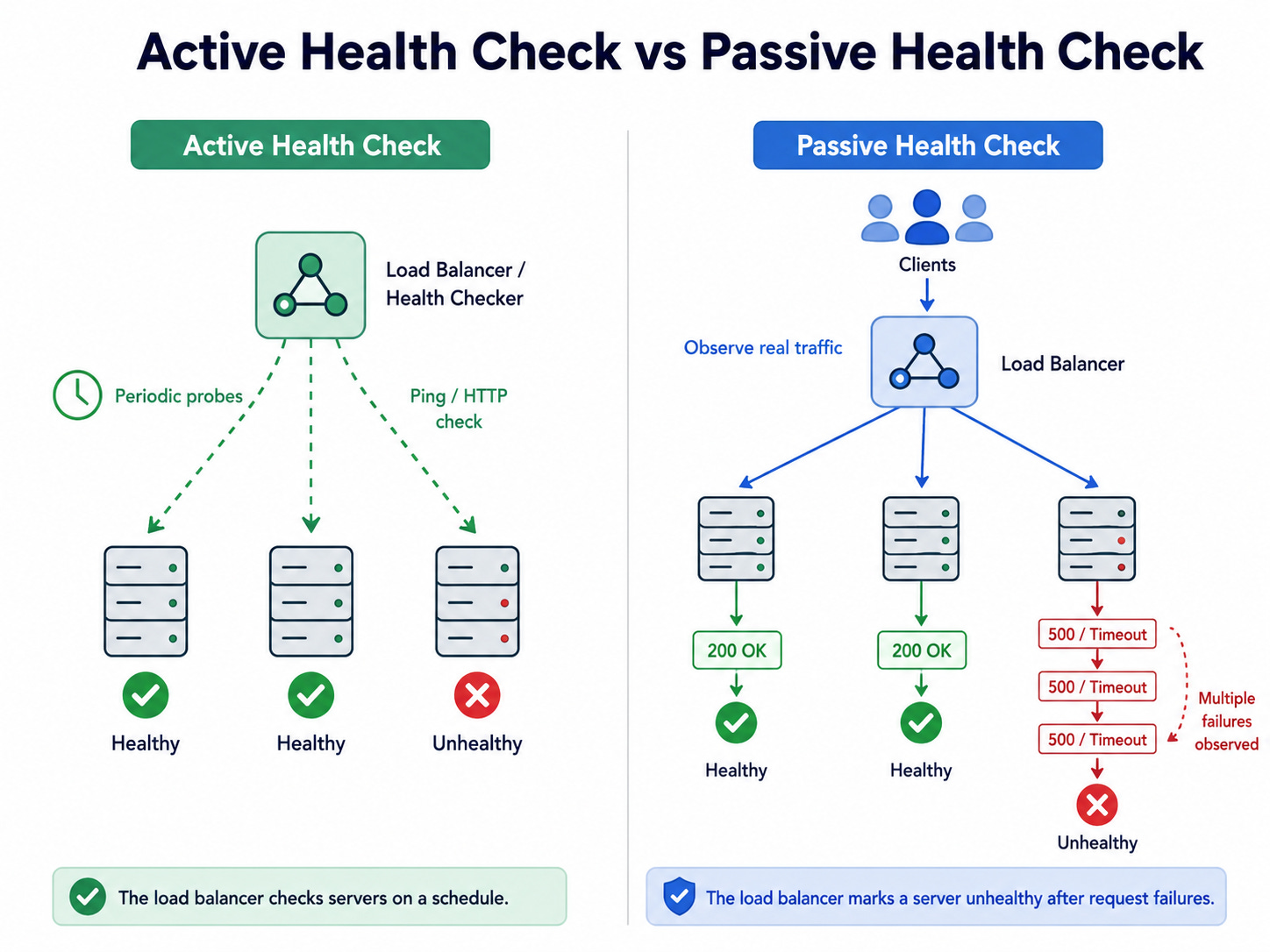
An active health check sends dedicated test requests to each server on a regular interval. If a server fails to respond correctly to the health check, it is removed before it fails real user traffic.
Active health checks are more proactive and more reliable.
The configuration of health checks involves trade-offs.
A health check that fires every second with a one-failure threshold responds to problems very quickly but may remove servers due to transient glitches.
A health check that fires every thirty seconds with a three-failure threshold is more conservative but allows unhealthy servers to serve traffic longer before being removed. Tuning these parameters requires understanding the normal failure patterns of the specific system.
How These Concepts Fit Together in an Interview
These three concepts are not separate topics. They are interconnected, and understanding how they fit together is what allows you to use them naturally in an interview rather than reciting them as isolated facts.
When you clarify requirements at the start of a system design problem, you are gathering the information you need to make scalability, latency, and load balancing decisions.
The number of users tells you the scale the system must reach. The latency requirements tell you which components must be fast and how fast. The read-to-write ratio tells you where the scaling pressure will concentrate.
When you estimate the scale, you are quantifying the scalability challenge.
How many requests per second?
How much data?
How many concurrent users?
These numbers determine whether one server is sufficient, what kind of load balancing is needed, and where the bottlenecks will appear.
When you draw the high-level architecture, the load balancer appears as a natural consequence of horizontal scaling rather than a component you remembered to add. The latency targets drive the caching decisions and the geographic distribution.
The scalability requirements determine how many layers need to scale and how.
The strongest system design answers do not name-drop these concepts. They use them as the reasoning behind every decision. “I’d use horizontal scaling here because the read volume is too high for a single server and we need redundancy for availability.
To distribute traffic across the servers, I’d put a layer 7 load balancer in front using least connections since request duration varies.
The servers must be stateless so any server can handle any request, with session data in Redis. This keeps latency low by allowing the load balancer to route to the nearest available server.”
That paragraph is what these three concepts sound like when they are internalized rather than memorized.
Key Takeaways
Scalability is the ability to handle growth, achieved through vertical scaling (bigger machines) or horizontal scaling (more machines), with horizontal scaling being the foundation of large systems due to its lack of ceiling and built-in redundancy.
Statelessness is the prerequisite for horizontal scaling, since servers that hold no user-specific state can handle any request, allowing the load balancer to route freely and allowing any server to be added or removed without disrupting users.
Latency is the time for a single request, throughput is how much work the system completes per second, and they measure different things with different optimization strategies even though they are related.
Latency has multiple components that stack: network latency, processing latency, and database latency each require different solutions, and understanding which dominates is what makes optimization targeted rather than random.
Load balancing distributes traffic across servers using algorithms ranging from simple round robin to latency-aware least connections, and it provides automatic failover by removing unhealthy servers from the pool through health checks.
The load balancer itself can be a single point of failure, which requires running multiple load balancers with automatic failover, a detail worth raising proactively in any interview.
These three concepts are the foundation of every other topic in this series, and they appear as the reasoning behind design decisions in every system design interview rather than as standalone facts.
Next week in Week 2, we go one layer deeper into the distributed systems concepts that scale individual components beyond single machines: consistency models, replication, sharding, and message queues.
These are the topics that build directly on the scalability foundation established this week and that interviewers probe most heavily when they ask follow-up questions about how the system handles growth and failure.
If you found this useful, subscribe so Week 2 lands in your inbox when it publishes.
The series is designed to be followed in order, and each week assumes the previous one.
This is really good, is this a free series?
Kindly make it free series. Love it