
System Design Interview Survival Guide: 5 Patterns to Scale Any App
Learn the tools senior architects use to scale applications. A guide to Load Balancing, Caching, Sharding, Replication, & Asynchronous Processing to take your software from startup to enterprise.

Growth is the ultimate goal of any software project.
You spend months coding, testing, and refining your application.
You launch it, and for a while, everything is quiet.
Then, something incredible happens.
Your user base starts to grow. You go from 100 users to 1,000, then to 10,000. This is the moment every developer dreams of.
However, this success brings a specific type of danger.
The code that worked perfectly for 100 users will often crumble under the weight of 1 million.
This happens because most initial applications are built to run on a single computer. But physical computers have limits. They only have so much processing power and memory. When you exceed those limits, you have to change your strategy.
You have to stop thinking about a single computer and start thinking about a system of computers working together.
This is what we call Scalability.
Scalability is not just about adding more hardware. It is about designing your software so that it can handle more work simply by adding more resources. It is the art of ensuring your application stays fast and reliable, even when the whole world is trying to use it at the same time.
In this guide, we will look at 5 foundational patterns that enable systems to scale. These are the tools that senior architects use every day.
By the end of this post, you will understand not just what they are, but exactly how they save your application from crashing.
1. Load Balancing
Imagine you run a grocery store.
When you first open, you have very few customers, so you only need one cashier. This works fine until the holiday season hits.
Suddenly, you have hundreds of people trying to check out at once. The line for that single cashier wraps around the block.
People get angry and leave.
To fix this, you hire ten more cashiers.
But now you have a new problem.
Customers don’t know which line is the shortest. Everyone rushes to the first register, leaving the others empty. You need someone at the front of the store to direct people to the open registers.
In system design, that person is the Load Balancer.
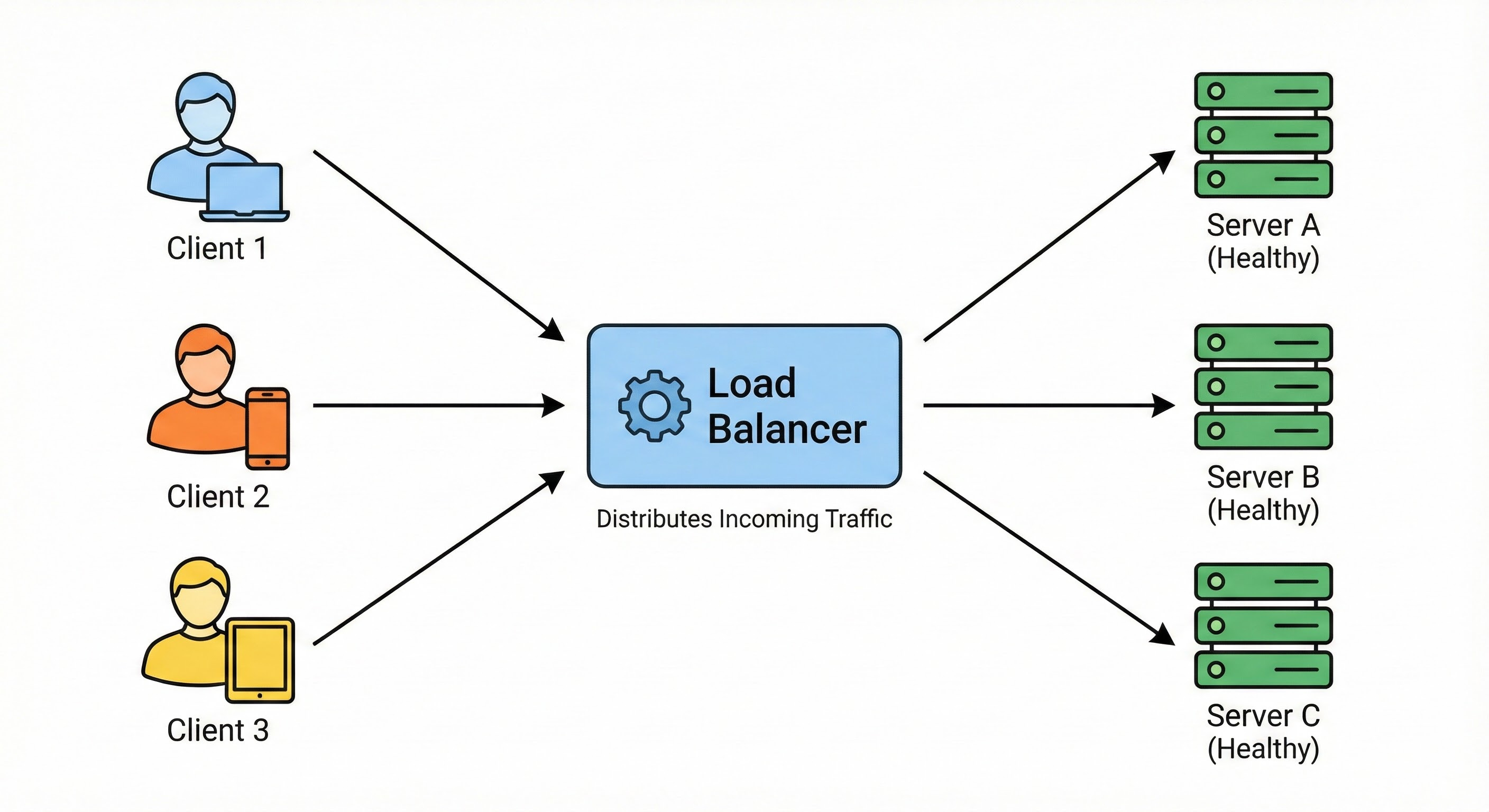
What it is: A Load Balancer is a server (or a piece of hardware) that sits between your users and your application servers. Its only job is to distribute incoming network traffic across multiple servers.
How it works behind the scenes: When a user visits your website, they are not connecting directly to your main server. Instead, they connect to the Load Balancer.
The Load Balancer looks at its list of available servers. It asks, “Who is free right now?” It then forwards the user’s request to a server that isn’t too busy.
There are different strategies the Load Balancer uses to make this decision:
Round Robin: This is the simplest method. It sends requests in a circle. Request 1 goes to Server A. Request 2 goes to Server B. Request 3 goes to Server C, and then it starts over at A.
Least Connections: The Load Balancer checks which server is currently handling the fewest active users and sends the new person there.
Without a Load Balancer, you have a “Single Point of Failure.”
If your one server crashes, your whole app goes down.
With a Load Balancer, you can have five servers.
If one crashes, the Load Balancer notices it is dead (using a “Health Check”) and simply stops sending traffic to it. The users never even know that something went wrong.
2. Caching: The Cheat Sheet
Let’s say you are taking a very difficult math exam.
Every time you need to solve a complex equation, you have to open a massive textbook, find the right page, and read the formula. This takes a long time.
If you are smart, you will write the most common formulas on a piece of paper and keep it right next to you.
Now, when you need a formula, you look at your paper first.
It is instant. You only open the heavy textbook if the answer isn’t on your paper.
In this analogy, the textbook is your Database, and the piece of paper is your Cache.
What it is: Caching is the practice of storing copies of frequently used data in a temporary storage location that is very fast to access. Usually, this storage is the computer’s RAM (Random Access Memory).
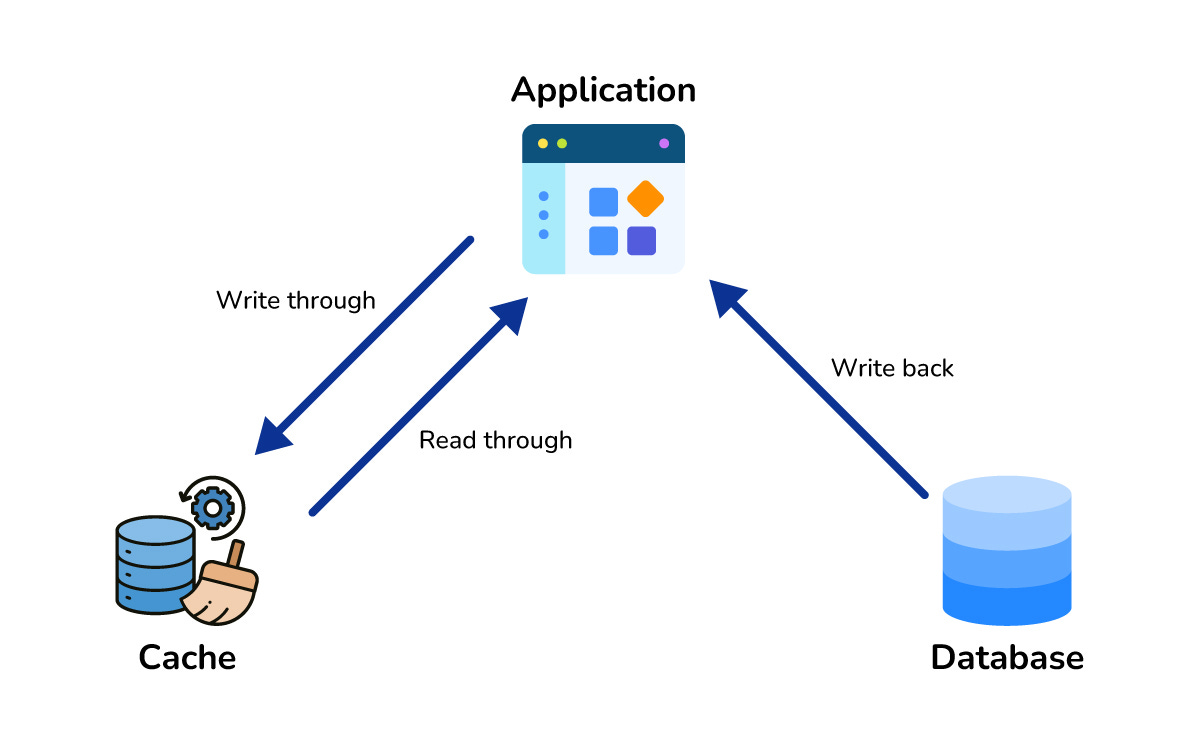
How it works behind the scenes: Databases save data to the hard drive (disk). Hard drives are reliable, but they are slow compared to RAM. Reading from a hard drive is like walking to the library. Reading from RAM is like remembering a thought in your brain.
Here is the flow when you use a cache:
The user asks for a user profile.
The application checks the Cache first.
Cache Hit: If the data is there, it returns it instantly. This takes milliseconds.
Cache Miss: If the data is not there, the application queries the slow Database.
The application sends the data to the user and saves a copy in the Cache for next time.
Most applications are “Read-Heavy.” This means people look at data much more often than they change it.
Think about Twitter.
You might tweet once a day (write), but you scroll through hundreds of tweets (read).
If every single scroll required your database to work hard, it would crash.
Caching takes the pressure off your database. It handles the repetitive requests so your database can focus on the important stuff, like saving new data.
