
System Design Interview Guide for Beginners (2026 Edition)
A simple, practical beginner’s guide to system design interviews. Learn core concepts, must-ask clarifying questions, and a clear step-by-step framework to design systems with confidence.

You’ve nailed the coding rounds: LeetCode, done.
Projects, solid.
Recruiter emails are finally rolling in.
Then comes the curveball: “The system design interview round.”
But wait, what even is that?
Is it something that requires a strong backend experience?
No.
System design is not just for senior devs.
It’s a skill you can learn. Step by step.
Even if you’re a beginner.
In this guide, I’ll walk you through how to approach system design interviews with confidence, from understanding core concepts like caching and load balancing to structuring your answers like an engineer who’s built systems at scale.
If system design interviews have ever felt out of reach, this blog is for you.
Let’s break it down together.
What Is a System Design Interview?
A system design interview is a discussion-based technical interview round where you’re asked to design a software system or architecture for a given problem.
Instead of writing code on a whiteboard, you’ll be sketching out the high-level design for an application or feature.
For example, an interviewer might say, “Design Instagram” or “How would you build an online bookstore like Amazon?”
You then have to talk through how you’d build it – describing components, data flows, technologies, and so on.
When do these interviews happen?
Typically, system design rounds appear for mid-level or senior software engineering positions (after you’ve passed initial coding tests).
Companies like Google, Meta, Amazon, and others include at least one system design session in their on-site interviews for roles such as backend engineer, full-stack engineer, or tech lead.
Sometimes, even junior candidates get a simplified design question to test basic architectural thinking.
What are interviewers looking for?
They care more about how you approach an open-ended problem than about getting a “perfect” design.
Specifically, interviewers want to see:
Clarification and thinking: Do you break down a vague problem into smaller pieces? Do you ask good clarifying questions to nail down the scope and requirements before jumping in?
Structured approach: Can you organize your thoughts and propose a logical design? This means identifying major components (clients, servers, databases, etc.) and describing how they interact.
Trade-off analysis: Every design involves choices. Interviewers look for your ability to discuss trade-offs – for instance, SQL vs NoSQL databases, or prioritizing speed vs consistency. Can you explain why you made certain decisions and what the consequences might be?
Fundamental knowledge: Are you familiar with core system design concepts like scalability, caching, load balancing, database partitioning, etc.? You don’t need to be an expert on all of them, but showing awareness of these concepts (and using them appropriately in your solution) is a big plus.
Communication: Can you clearly communicate your ideas and thought process? System design interviews are interactive. You’re essentially collaborating with the interviewer. Explaining your design step-by-step, listening to feedback, and adjusting your approach shows that you can work well in a team setting.
At its heart, a system design interview is a chance for you to demonstrate that you can think like an architect.
It’s less about specific tools or strict correctness, and more about problem-solving at scale and reasoning through trade-offs.
Why Are These Interviews Challenging for Beginners?
It’s no secret that system design interviews can feel daunting, especially when you’re new to them.
If you’re feeling nervous, remember that’s normal.
Here are a few common reasons beginners struggle:
No fixed answer: There’s no single “correct” solution, which can be paralyzing if you’re unsure what the interviewer expects.
Broad scope: The problems are intentionally vague and open-ended, so it’s easy to feel overwhelmed or not know where to start.
You have to lead: Unlike a coding test where you follow prompts, here you are expected to drive the discussion. That can feel unfamiliar and intimidating.
Limited design experience: Many candidates haven’t designed large-scale systems before. It’s new territory, so naturally you might not have an established approach on hand.
Interview pressure: The high-pressure interview setting can cause even well-prepared people to blank out or forget things under stress.
The good news is that all these challenges can be overcome.
With some guidance and practice, you can turn these weaknesses into strengths – which is exactly what we’ll cover next.
Master the Fundamentals: Key System Design Concepts
You don’t need to know every technology out there, but you should be comfortable with a set of core system design concepts.
Think of these like the building blocks of large-scale systems.
When you understand them, discussing and reasoning about designs becomes much easier.
Here are some key concepts to focus on:
Scalability & Load Balancing
Understand how systems scale.
Scaling vertically means using a bigger machine; scaling horizontally means using more machines.
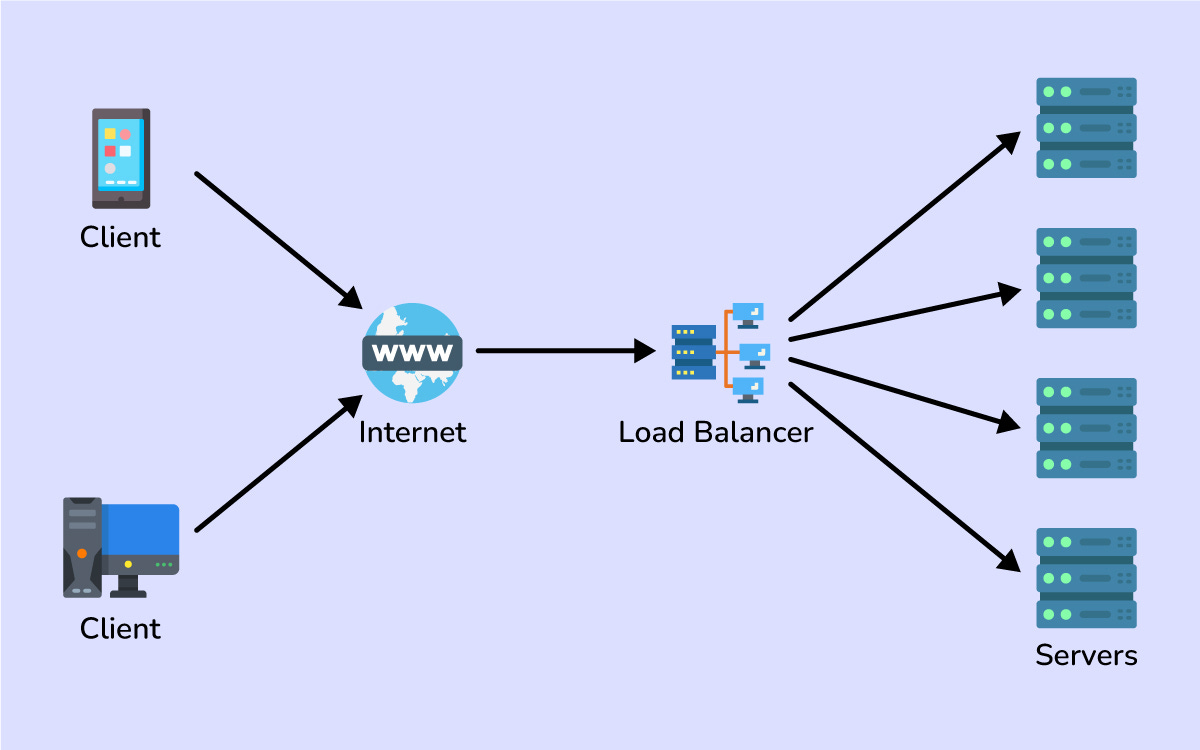
Load balancers distribute user requests across multiple servers to prevent any single server from becoming a bottleneck.
Caching & CDNs
Caching means storing frequently accessed data in memory (or closer to the user) so you can fetch it faster.
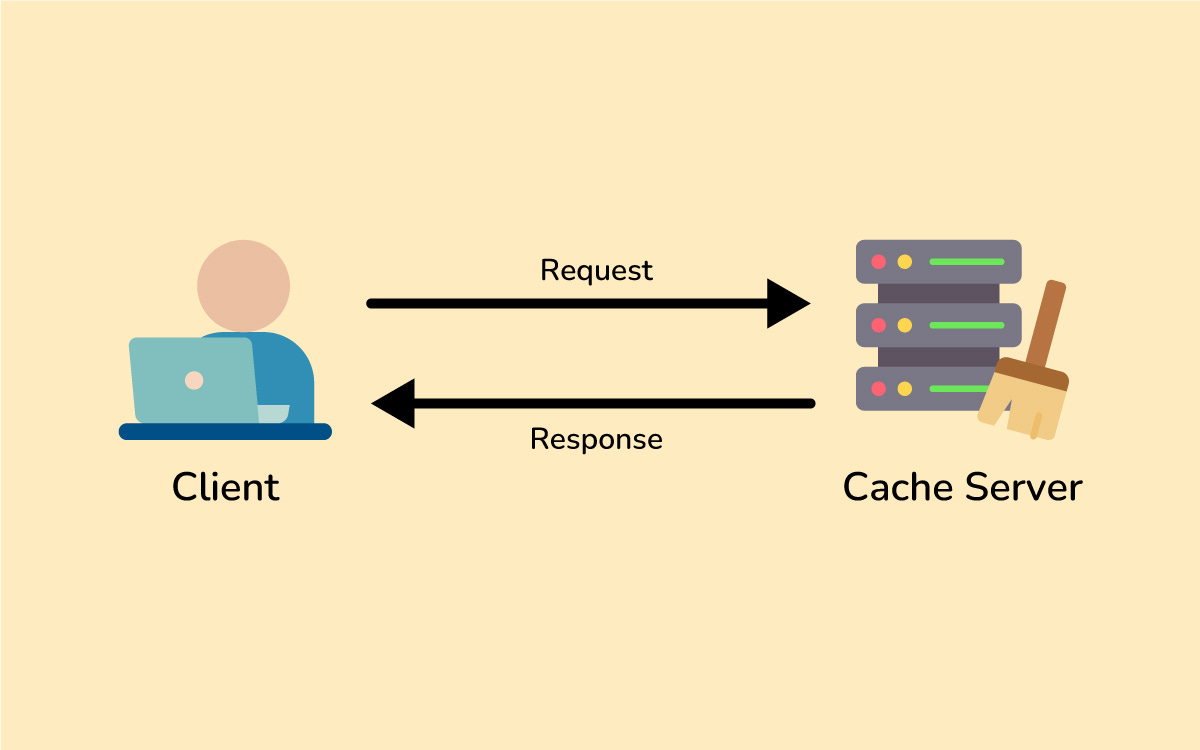
Likewise, Content Delivery Networks (CDNs) cache and deliver static content (images, videos, etc.) from servers that are geographically closer to users, which reduces latency.
Databases (SQL vs NoSQL)
Relational databases (SQL) are great for structured queries and transactions, while NoSQL databases (like key-value or document stores) offer flexible schemas and easy horizontal scaling.
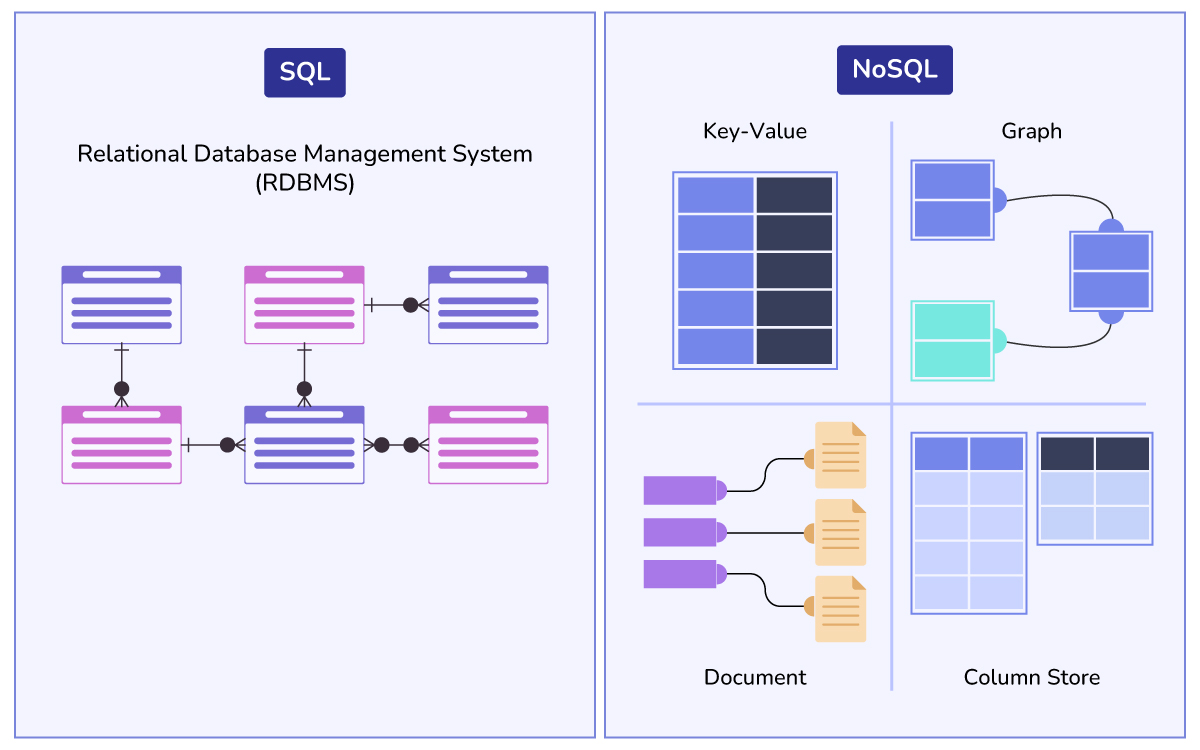
Each has trade-offs: SQL provides strong consistency and complex querying, whereas NoSQL sacrifices some consistency to achieve high throughput and scalability.
Data Partitioning (Sharding)
This is about splitting data across multiple databases or servers so that no single machine handles everything.
For example, you might split your user database by regions or by user ID ranges, so that each shard handles only a subset of users or data.
Sharding greatly increases capacity and throughput at the cost of added complexity in data management.
Async Processing & Messaging
Not every operation needs an immediate response.
Using things like message queues (e.g. RabbitMQ or Kafka), a system can defer certain work to be done asynchronously.
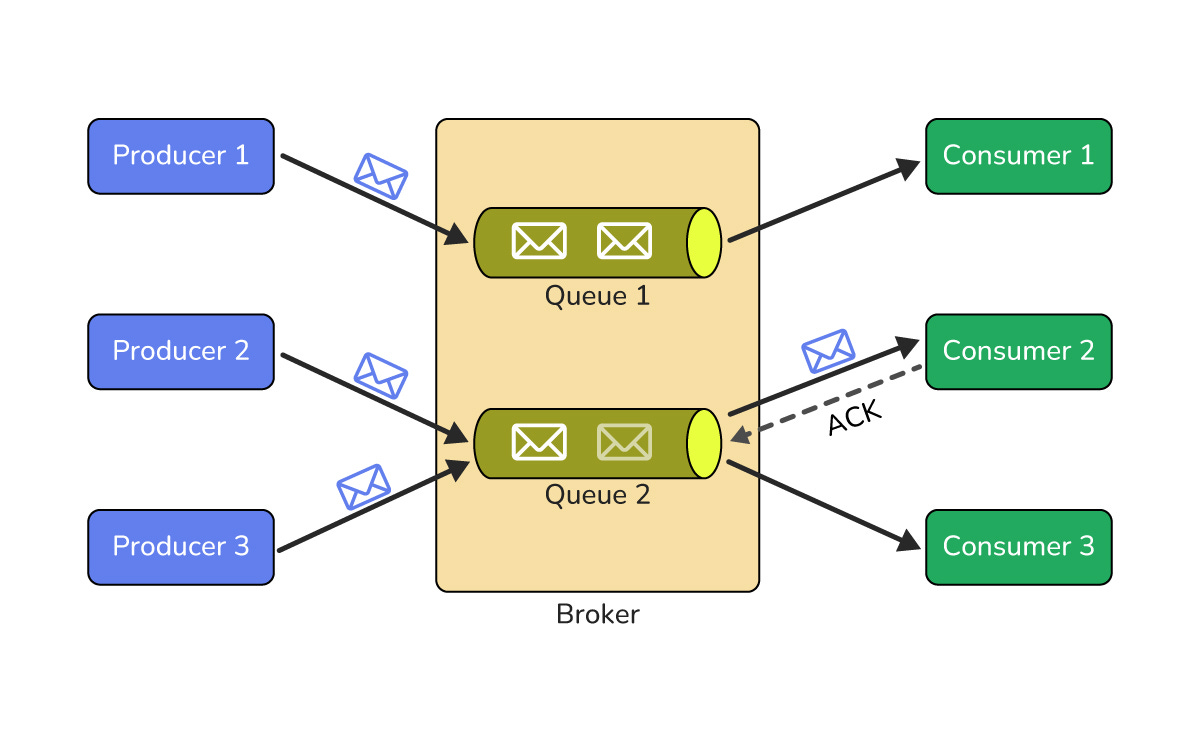
For instance, when a user uploads a photo, the server can quickly acknowledge the upload and then process (resize, store, etc.) the photo in the background. This keeps the main workflow fast and decouples components for better scalability.
Redundancy & Fault Tolerance
Design for failures.
Machines will go down eventually, so have backups and replicas.
By adding redundancy (multiple servers, replicated databases, etc.), you ensure there’s no single point of failure.
If one component crashes, others can take over and keep the system running.
This is key for building highly available systems (systems that stay up 99.99% of the time).
If some of these terms sound new to you, that’s okay—everyone starts somewhere.
Building up your knowledge of these fundamentals is one of the best investments you can make in your interview prep.
A Step-by-Step Approach to Solving System Design Problems
Having a clear game plan for tackling system design questions can make a world of difference. It ensures you cover all important points methodically instead of getting lost or overwhelmed.
While different experts might have their own twists, most approaches include similar steps.
Here’s a straightforward framework you can follow in an interview:
Clarify requirements: Don’t rush into designing. First, make sure you truly understand the problem. Ask clarifying questions to define the scope and goals of the system. What exactly should it do? Who will use it? What are the key features and constraints (e.g. security needs, expected load, latency requirements)? This step shows you’re thoughtful and prevents you from solving the wrong problem.
Estimate scale (ballpark figures): Do a quick reality check on the system’s expected scale. How many users or requests are we talking about? How much data might be generated per day? Rough numbers (even very approximate) will guide your design decisions. For instance, a system for 10,000 daily users might be designed differently than one for 100 million users. Estimations help you justify choices like how many servers you might need or whether you should distribute data.
Outline a high-level design: List the major components of the system and how they interact – for example, client apps, one or more servers, a database, a cache, etc. Outline how data flows between these components (user requests go to the server, which reads/writes to the database, and so on). Mention your chosen data storage or technologies (SQL vs NoSQL, etc.) and briefly explain why. Also define key APIs or endpoints the system would provide.
Dive deeper into key components: Pick one or two critical components of your design and explain them in detail. You might say, “I’ll focus on this part since it’s crucial.” For example, if it’s a social network, you could dive into how the news feed is generated or how the database is structured for posts and relationships. Detailing these pieces shows depth and proves you can handle the complex core of the system.
Identify bottlenecks & trade-offs: Look at your design and identify potential weak points. What could become a bottleneck or single point of failure? Bring these up and discuss how you’d address them (add caching, more replication, etc.). Also mention the trade-offs of your decisions (for example, why you chose one database or architecture over another). Acknowledging trade-offs shows maturity in design.
Summarize and suggest improvements: Finally, briefly recap your design and why it meets the requirements. Then suggest any improvements you’d make with more time. This might include adding a feature we skipped or strengthening the system (better monitoring, more backups, multi-region support, etc.). Ending with future ideas shows you think beyond just the basics.
By following these steps, you’ll approach any system design problem in an organized way.
It helps you demonstrate a mix of big-picture planning (what components are needed) and detail-oriented thinking (how specific parts work), all while managing your time effectively.
Preparation Strategies to Ace Your System Design Interview
Knowing the theory is one thing; putting it into practice is another. To truly be ready, you’ll want to prepare and build your confidence actively.
Here are some tips to help you structure your study and practice:
Master the Basics First
Make sure you’re comfortable with core concepts and terminology.
It’s much easier to design a system when you don’t have to pause and wonder what a term like “cache” or “sharding” means.
If you discover any gaps in your knowledge, take some time to fill them with study or a focused course.
Study Common Design Questions
Certain system design scenarios come up frequently in interviews – for example, designing a URL shortener, a social media news feed, an e-commerce website, or a ride-sharing app.
Practice thinking through these examples.
Sketch out how you would handle each one at a high level.
This will help you spot recurring themes (almost every large system needs a way to handle users, store data, manage traffic, etc.) and prepare you for unexpected questions by building a toolkit of patterns.
Practice Thinking Out Loud
Get used to explaining your thought process as you go. You can pick a system design prompt and talk through your solution by yourself, as if an interviewer were there. It might feel odd at first, but it’s great for improving your clarity. You’ll learn to organize your thoughts and not leave long stretches of silence. Plus, it highlights where you get stuck so you can address those areas.
Do Mock Interviews if Possible
There’s no substitute for a practice run.
If you have a friend or colleague who can conduct a mock system design interview with you, do it.
You can also use online services or communities to find practice partners.
The experience of thinking on your feet and responding to someone’s questions is invaluable.
Afterwards, take notes on what you could do better (maybe you forgot to clarify the requirements initially, or you realized you need to brush up on how CDNs work).
Learn from Others’ Designs
Finally, accelerate your learning by seeing how experienced engineers approach design problems.
Read blog posts or books on system architecture.
Watch YouTube videos of system design interview walkthroughs.
You’ll pick up different ways to structure answers, how to visualize the system (like drawing diagrams), and clever solutions to common problems.
Every bit of practice makes a difference.
As you prep, you’ll start noticing that your answers become more structured and your ideas come to you faster.
What once seemed overwhelmingly complex will begin to feel manageable.
Conclusion
System design interviews may always feel a bit challenging, but they become far less scary once you’ve prepared.
The more you practice the fundamentals and apply a structured approach, the more your initial anxiety will turn into confidence.
As you gear up for your interviews, keep our key tips in mind: clarify the requirements, think out loud, cover the basics, and discuss trade-offs and bottlenecks.
Don’t worry about coming up with a “perfect” design (there isn’t one) – instead, focus on showing a clear thought process and an ability to reason through problems.
Interviewers appreciate thoughtfulness more than any single technical detail.
With the right preparation, you’ll be able to walk into your system design interview much more confidently.
Who knows – you might even find yourself enjoying the challenge.