
System Design Deep Dive: Client-Side vs. Server-Side Service Discovery
Why can't you hardcode IP addresses in the cloud? We explain the core concepts of Service Registries, Heartbeats, and Virtual IPs.


One of the most frustrating moments for a junior developer is deploying code that works perfectly on a local machine but fails immediately in a cloud environment.
You might have your backend API running on port 8080 and your database on port 5432. You write these numbers into your configuration files, and everything communicates seamlessly.
But when you move to a production environment built with microservices, this static world disappears.
You are no longer dealing with a single server that stays online for months. You are dealing with a dynamic, shifting landscape where servers are created and destroyed automatically to handle changes in user traffic.
In this environment, “where” a service lives is constantly changing. A service that was at IP address 10.0.0.5 five minutes ago might crash, be restarted, and reappear at 10.0.0.99.
This creates a critical engineering problem: If the IP addresses change every time a service restarts, how does Service A know where to send a request to Service B?
You cannot hardcode the IP address. You cannot manually update a text file every time a server spins up. You need a system that handles this automatically.
This concept is called Service Discovery.
Understanding Service Discovery is a major milestone in moving from basic coding to large-scale system architecture. It is a favorite topic in System Design Interviews and a fundamental requirement for any distributed system.
In this guide, we will explore the core mechanics of how services find each other. We will compare the two dominant patterns, Client-Side Discovery and Server-Side Discovery, and help you understand which one to use and why.
The Service Registry
Before we look at the different patterns, we need to understand the database that powers the entire system. This component is called the Service Registry.
The Service Registry is the “source of truth” for your network. It is a highly available database that contains a live list of every active service instance and its current location (IP address and port).
The lifecycle of a service in this system involves three key steps:
1. Registration
When a new instance of a microservice starts up (let’s call it the Order Service), it knows it needs to be reachable.
The first thing it does is send a network request to the Service Registry.
It essentially says: “Hello, I am a new instance of the Order Service. You can reach me at IP address 192.168.1.50 on port 8080.”
The Service Registry saves this entry in its database. It doesn’t just save the IP; it often saves metadata, such as the version of the code running (e.g., v1.2), the region it is in, or specific tags like “production” or “canary.” This metadata becomes crucial later when we want to do advanced routing.
2. The Heartbeat (Health Check)
In a distributed system, things break all the time.
If the Order Service crashes unexpectedly, it cannot politely tell the registry that it is leaving. It just disappears.
If the registry keeps the old IP address, other services will try to send requests to a dead server, resulting in errors.
To prevent this, the Order Service must send a periodic signal to the registry, usually every few seconds. This is called a Heartbeat.
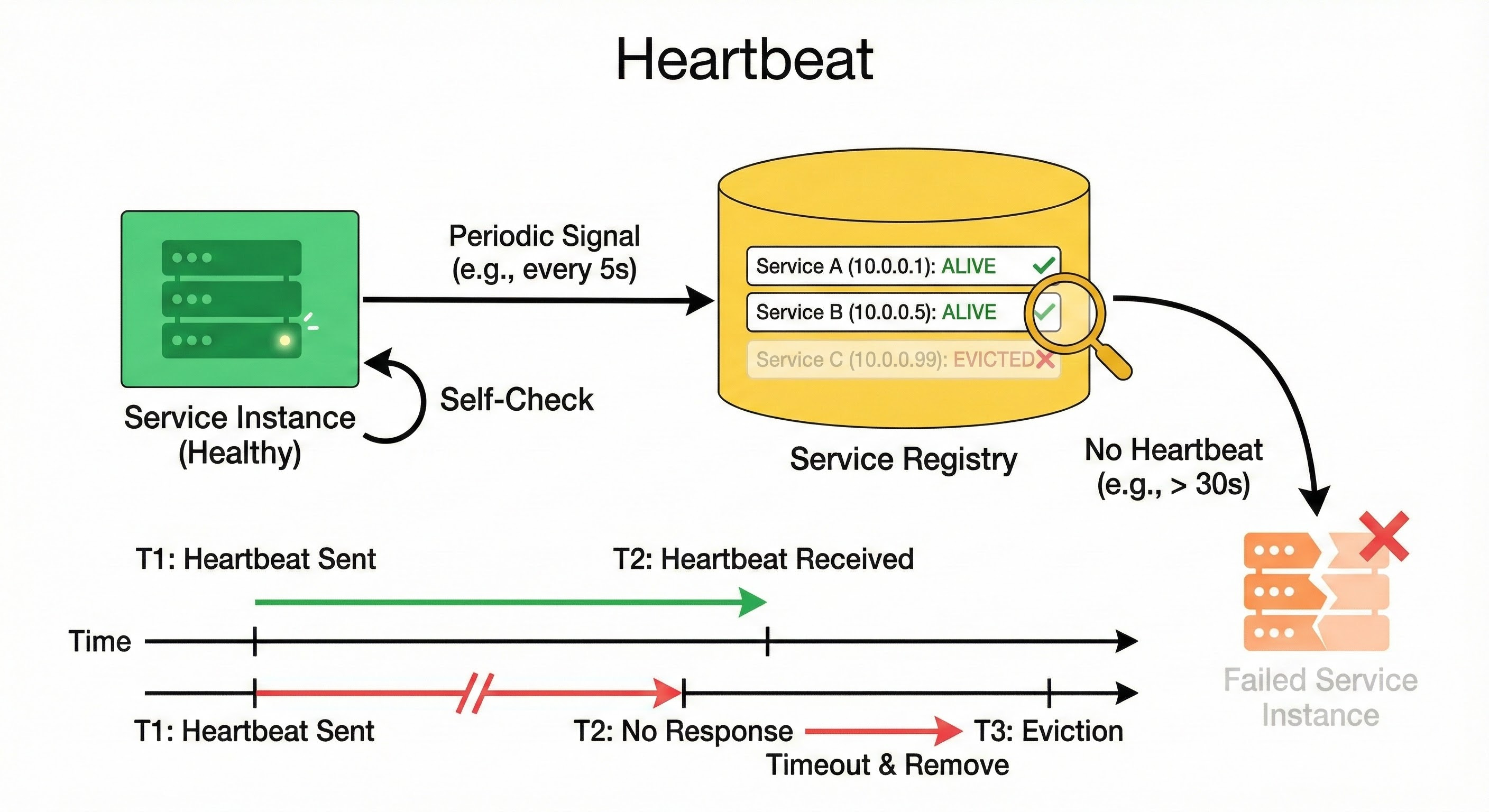
As long as the heartbeats keep coming, the registry knows the service is alive.
3. Deregistration and Eviction
If the registry stops receiving heartbeats from a specific instance for a set period (often 30 to 90 seconds), it assumes the instance has failed.
The registry automatically deletes that IP address from its list. This process is called eviction.
This ensures that traffic is only ever routed to healthy, living servers.
Now that we have a central list of available services, we need to decide who looks at this list. This decision splits our architecture into two distinct paths.
Pattern 1: Client-Side Discovery
In the Client-Side Discovery pattern, the responsibility for finding the destination lies with the service making the request.
In microservices architecture, the “Client” is rarely a user’s laptop.
The “Client” is usually another backend service.
For example, if the Checkout Service needs to talk to the Payment Service, the Checkout Service is the Client.
