
System Design Concepts You Can Learn in One Hour
System Design Made Simple: Learn the Core Concepts Fast


System design sounds intimidating when you’re just starting out.
Maybe you’ve heard terms like “load balancer,” “replication,” or “sharding” tossed around in meetings or interview prep groups and thought, Do I really need to know all this?
Thanks for reading! Subscribe for free to receive new posts and support my work.
But the best part is that you don’t need a PhD—or even a full weekend—to start making sense of it.
In fact, give me one focused hour, and I’ll walk you through the foundational system design concepts that power apps like Instagram, Amazon, and Netflix.
This post is for you if:
You’re a beginner trying to understand the concepts or crack tech interviews
You’ve built apps and want to understand how to scale them
Or you just want to stop nodding awkwardly during system design convos
Let’s get started!
What Is System Design?
Simply put, system design is planning the architecture of a software system so it can scale and be reliable under heavy use.
It’s about how different parts of a system (databases, servers, networks, etc.) work together to serve lots of users efficiently.
Understanding system design helps you anticipate bottlenecks, optimize app performance, and maintain smooth operation even when components fail.
It’s also a must-have skill for many tech interviews (which is why courses like Grokking System Design Fundamentals focus on teaching these basics).
1. Scalability: Vertical vs. Horizontal Growth
Scalability is the ability of a system to handle a growing amount of work (more users, more requests, more data) without degrading performance.
Imagine your favorite app suddenly gets featured on primetime news, and a million new users join overnight.
Can the system “scale up” to handle the surge, or will it crash?
Scalability is about planning for that big jump in demand.
There are two ways to scale a system:
Vertical Scaling (Scaling Up): Increase the power of a single server by upgrading its CPU, RAM, or storage. It’s like upgrading from a sedan to a sports car: one machine gets faster. This can boost capacity, but there’s a limit (you can only make one machine so powerful, and it can get expensive).
Horizontal Scaling (Scaling Out): Add more servers to share the load. Instead of one super-car, you have a fleet of cars. Spreading traffic across multiple machines means you can handle more users by just adding servers, which is how most web giants scale.
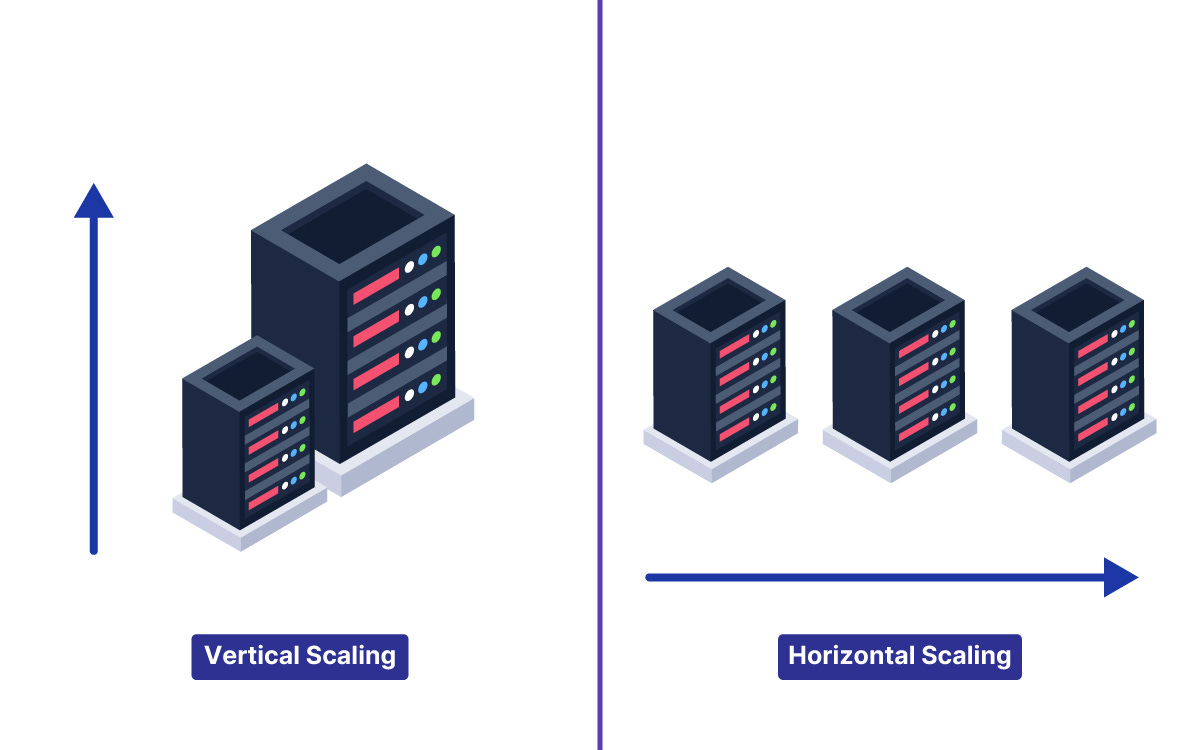
Horizontal scaling is what big web systems rely on, because you can keep adding servers as your user base grows.
For example, Netflix uses horizontal scaling to distribute streaming traffic across servers worldwide.
If one server can handle X users, ten servers can handle roughly 10X.
The system is designed so new servers can be added behind the scenes without users even noticing.
2. Load Balancing: Distributing the Workload
When you have multiple servers (thanks to horizontal scaling), you need a way to spread user requests among them.
That’s where a load balancer comes in.
A load balancer is like a traffic cop for your system: it sits in front of your servers and directs each incoming request to one of them, ensuring no single server gets overwhelmed.
Load balancers keep your system running smoothly by preventing any one machine from becoming a bottleneck.
They use various load balancing algorithms to decide where each request goes.
Two common examples are:
Round Robin: send each new request to the next server in line, cycling through all servers evenly.
Least Connections: send each request to the server with the fewest active connections (i.e. the one that’s least busy at the moment).
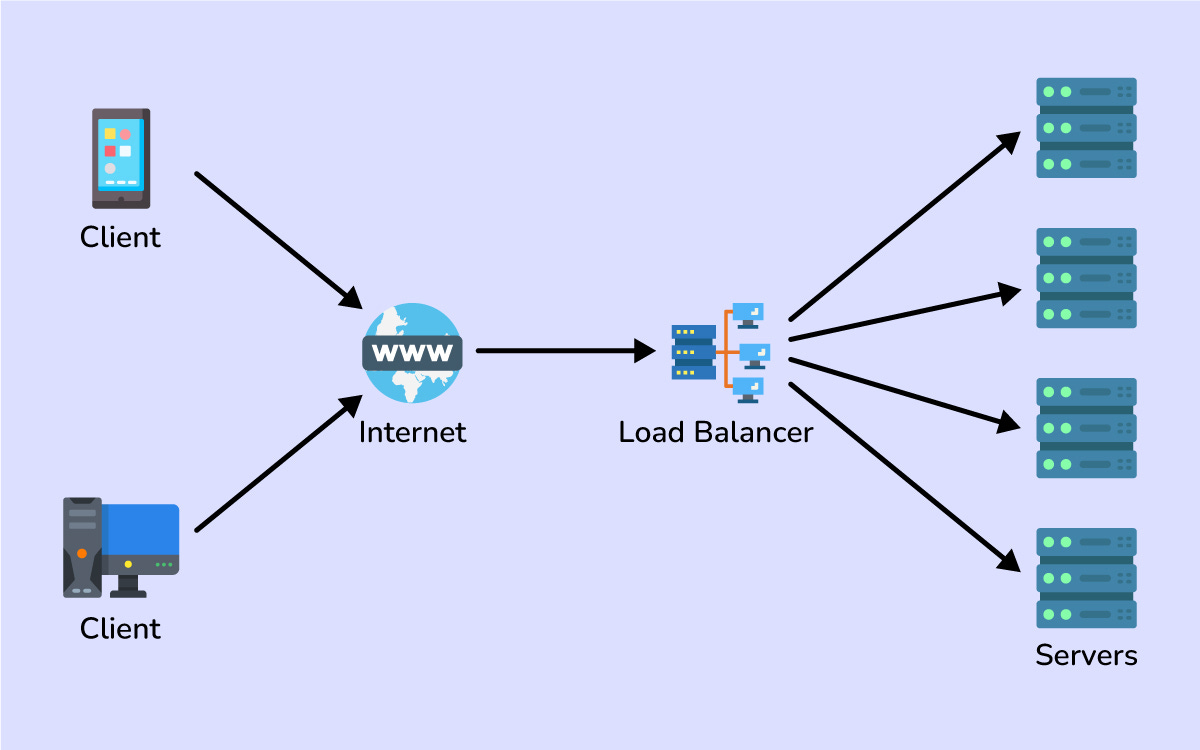
Real-world services rely on load balancing constantly.
When millions of people shop on Amazon, load balancers spread the traffic across many servers so everyone gets a fast response.
Essentially, a good load balancer makes a cluster of servers act like one giant server to the outside world.
3. Caching: Speeding Up Repeated Requests
Have you ever revisited a website and noticed it loads faster the second time?
That’s often thanks to caching.
Caching means storing frequently used data in a quickly accessible place so you don’t have to fetch it from the slower source every time.
Imagine you run a blog that gets thousands of hits on the same popular article.
Without caching, every time someone requests that article, your server would query the database and rebuild the page from scratch.
With caching, you store the article’s content in memory (or another fast storage) the first time it’s requested, then serve that cached copy for subsequent requests.
This makes responses lightning fast for repeat reads and takes a huge load off your database.
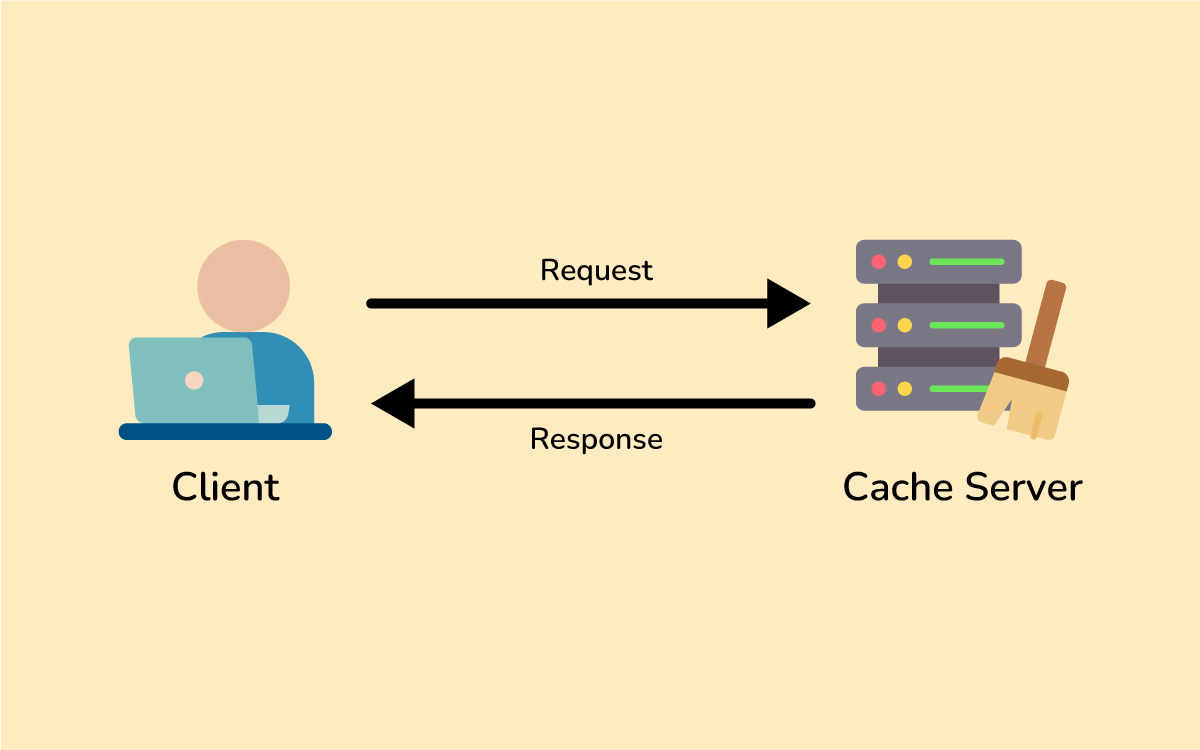
Common places to use caching include:
In-memory caches (like Redis or Memcached) to keep data in RAM for super quick access.
A classic example: think of a Twitter or Instagram feed.
The list of posts for a popular hashtag or user can be cached.
If hundreds of people are checking the same trending feed, the backend can serve a cached result instead of hitting the database each time.
This drastically improves the app’s response time and reduces unnecessary database queries.
The key benefit of caching is speed. It trades some extra memory/storage for a lot less computation and database access.
The main challenge is keeping the cache updated when the original data changes (cache invalidation is famously hard), but that’s a topic for another day.
For now, just remember: caching is one of your best friends for making systems fast and scalable by reusing work that’s already been done.
4. Database Partitioning (Sharding): Divide and Conquer Data
If your application’s data grows huge, even the most powerful single database might struggle to keep up.
Database partitioning, also known as sharding, is a way to break a large database into smaller pieces (called shards) and spread them across multiple machines.
It’s like splitting a big pizza into slices so a group of people can each have a piece — many servers each handle a portion of the data instead of one server handling it all.
There are a couple of ways to partition a database:
Horizontal Partitioning (Sharding): Split the rows of your data into different databases. For example, you might put users whose last name starts with A–M on one database server and N–Z on another. Each shard contains a subset of the rows (but all the columns for those rows).
Vertical Partitioning: Split the columns of your data into different databases. For instance, store user profile info in one database and user posts in another. Each database has fewer columns, which can make certain queries faster.
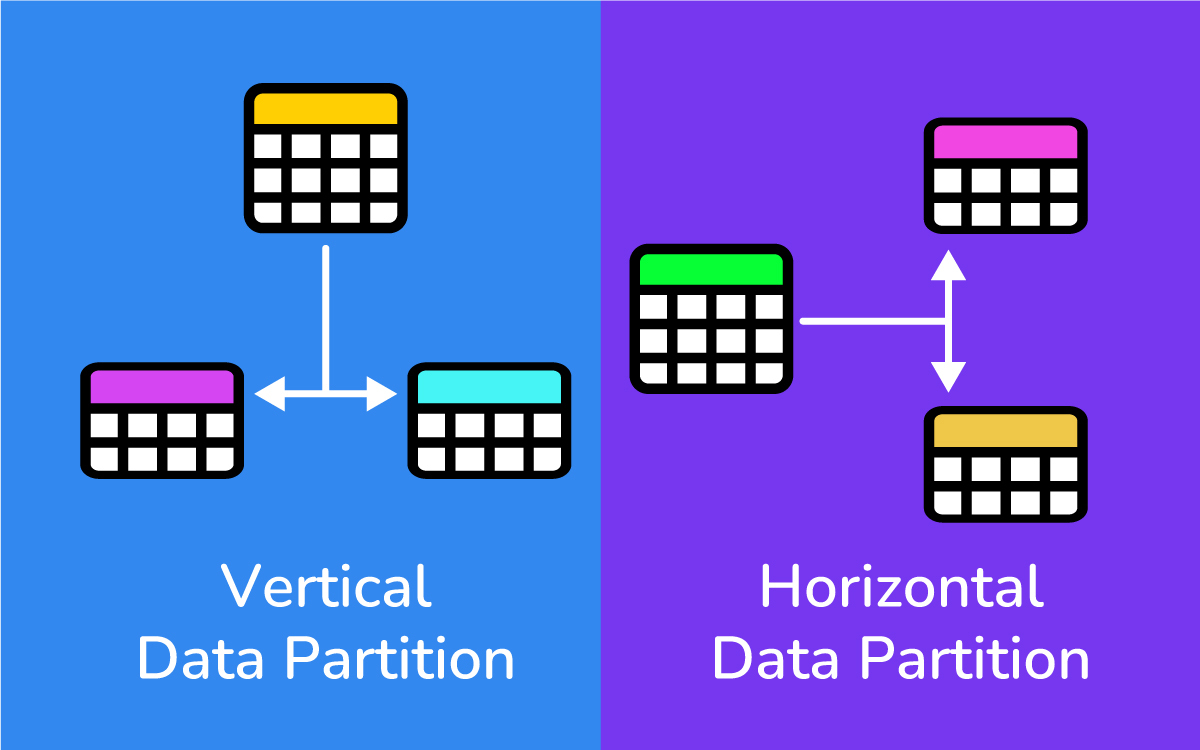
Sharding helps with scalability because your data and query load is distributed.
Instead of one database handling 100% of the queries, maybe each shard handles about 1/2 or 1/10 of the load.
This means you can store more data and serve more users by adding database servers.
Big applications like Facebook or Twitter use sharding so that no single database server has to handle everything.
One challenge with sharding is deciding how to split the data.
Often a hashing scheme or a key-based strategy (like based on a user ID or region) is used to decide which shard stores a given piece of data.
The goal is an even distribution so one shard isn’t overloaded while others sit mostly idle.
Sharding adds complexity (you need logic to route each query to the right shard), but it becomes essential once you reach a certain scale.
5. Replication and Redundancy: Copies for Reliability
Replication means having multiple copies of the same data on different machines.
If partitioning is about splitting data into pieces, replication is about duplicating data for safety and speed.
In system design, we often replicate databases (and other services) to achieve high availability and fault tolerance.
Why replicate?
A few big reasons:
Fault Tolerance: If one database server crashes, another server with the same data can take over immediately, so the system stays up and no data is lost.
Improved Read Throughput: You can spread read requests across multiple replicas. Instead of all users querying one database, you might have three copies of the database handling reads. This way, your system can handle a higher volume of read traffic. (Usually one copy is the “primary” for writes, which then propagates changes to the replicas.)
Geographical Distribution: You can put replicas in different regions so users connect to a database closer to them. This reduces latency for distant users and shares the read load globally.
An everyday example of replication is how your phone’s photos sync to the cloud and to your other devices.
You have the same photo stored in multiple places (phone and cloud server, for instance).
If your phone dies, you can still get your photos from the cloud backup.
That’s replication ensuring reliability.
Similarly, in a server setup, a primary database might constantly replicate its data to a backup database; if the primary goes down, the backup can step in with up-to-date information.
In summary, replication adds a bit of complexity (you have to keep data in sync), but it provides major gains in reliability and read performance.
Almost all large-scale systems use replication so they aren’t crippled by a single point of failure.
6. Content Delivery Networks (CDNs): Bringing Content Closer to Users
Ever wonder how a website on the other side of the world can still load quickly on your phone?
Often that’s thanks to a Content Delivery Network (CDN).
A CDN is a network of servers around the globe that cache and deliver content (like images, videos, and other files) from locations closer to the user.
In other words, a CDN brings the data to your region so you don’t have to fetch everything from the website’s origin server, which might be far away.
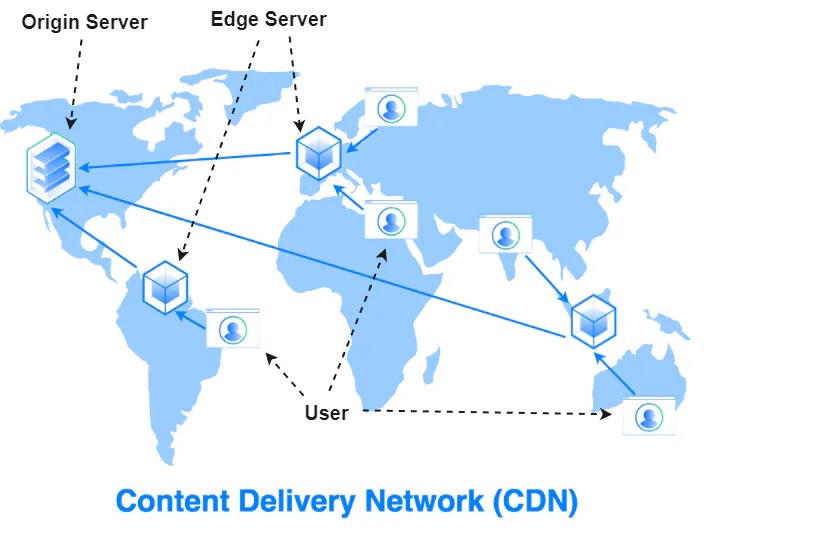
Here’s a simplified look at how a CDN works:
A website (say, example.com) is set up to use a CDN. The first time someone from London requests a particular image or file from example.com, the CDN will fetch it from the site’s origin server (maybe in the US) and save a copy on a London CDN server.
The next time a user in London (or nearby) requests that same file, the CDN serves it directly from the London server’s cache instead of making the long trip back to the US. The content loads much faster because it’s delivered locally.
The CDN periodically checks back with the origin server. If the file has changed on the main server, the CDN will refresh its cached copy. This ensures that users eventually get updates, while still enjoying speedy delivery.
The result is lower latency (less waiting) and less strain on the origin servers.
Sites with global audiences almost always use CDNs.
It’s like having warehouses in multiple cities: customers get their packages faster, and the central warehouse isn’t overwhelmed.
One-Hour Wrap-Up: Next Steps
In roughly one hour of reading, you’ve covered a lot of ground:
Scalability: designing systems that can grow (vertical vs. horizontal scaling).
Load Balancing: distributing traffic so no single server melts down.
Caching: reusing data to speed up repeated requests.
Data Partitioning (Sharding): splitting big databases into smaller pieces.
Replication: duplicating data/services for reliability and capacity.
CDNs: caching content globally to reduce wait times.
These concepts are foundational.
With them under your belt, you’ll have a much easier time understanding more advanced system design topics or tackling design challenges in interviews.
There’s always more to learn—system design can get very deep—but the principles you just learned will pop up again and again in real systems.
If you’re excited to keep learning, there are great resources to guide you.
For a structured, beginner-friendly deep dive into system design fundamentals, check out Design Gurus’ Grokking System Design Fundamentals course, which uses analogies and real-world examples to make concepts easy to grasp.
Next, develop system design understanding with Grokking the System Design Interview course which provides a proven step-by-step method for tackling design interview questions and explains core concepts (from caching and load balancing to database sharding and queueing) with practical examples.
Both can help solidify your knowledge.
Thanks for reading!
I hope this crash course made system design a bit less mysterious and a lot more approachable.
Feel free to leave a comment with any questions or thoughts.
What system design topic would you like to explore next?
Let me know — and happy designing!
Thanks for reading!
Subscribe for free to receive new posts and support my work.
Great for revising concepts right before the interview.