
System Design Case Study: How to Design ChatGPT
Learn how to design ChatGPT in a system design interview. Step-by-step guide covering architecture, streaming, GPU scaling, caching, and data modeling.

Every time you type a prompt into ChatGPT and watch the response stream in word by word, there's a massive distributed system working behind the scenes: routing your request through load balancers, queuing it for a GPU cluster, streaming tokens back over Server-Sent Events, and persisting the conversation to a sharded database.
Designing this kind of system from scratch is one of the most interesting architecture challenges in modern software engineering because it flips the traditional bottleneck: it's not your database that struggles, it's your GPU fleet.
In this post, we walk through the complete system design of a ChatGPT-like product in 14 step-by-step sections, covering everything from back-of-the-envelope math and API contracts to scaling strategies and failure handling.
1. Restate the Problem and Pick the Scope
We are designing a large-scale AI conversational system similar to ChatGPT.
The product lets users type natural language prompts and receive AI-generated responses that stream back token by token. Users can hold multi-turn conversations, revisit past chats, and share conversations with others.
Main User Groups
Free-tier users: casual users exploring the AI for general questions, writing help, brainstorming, and learning.
Paid subscribers: power users who need faster responses, longer context windows, access to premium models, and higher rate limits.
API developers: engineers integrating the model into their own products via a programmatic API.
Scope for This Design
We will focus on the consumer web and mobile chat experience: sending prompts, streaming AI responses, conversation history, and the model-serving infrastructure.
We will not cover fine-tuning workflows, plugin or tool-use orchestration, the model training pipeline, or the API developer platform in detail.
2. Clarify Functional Requirements
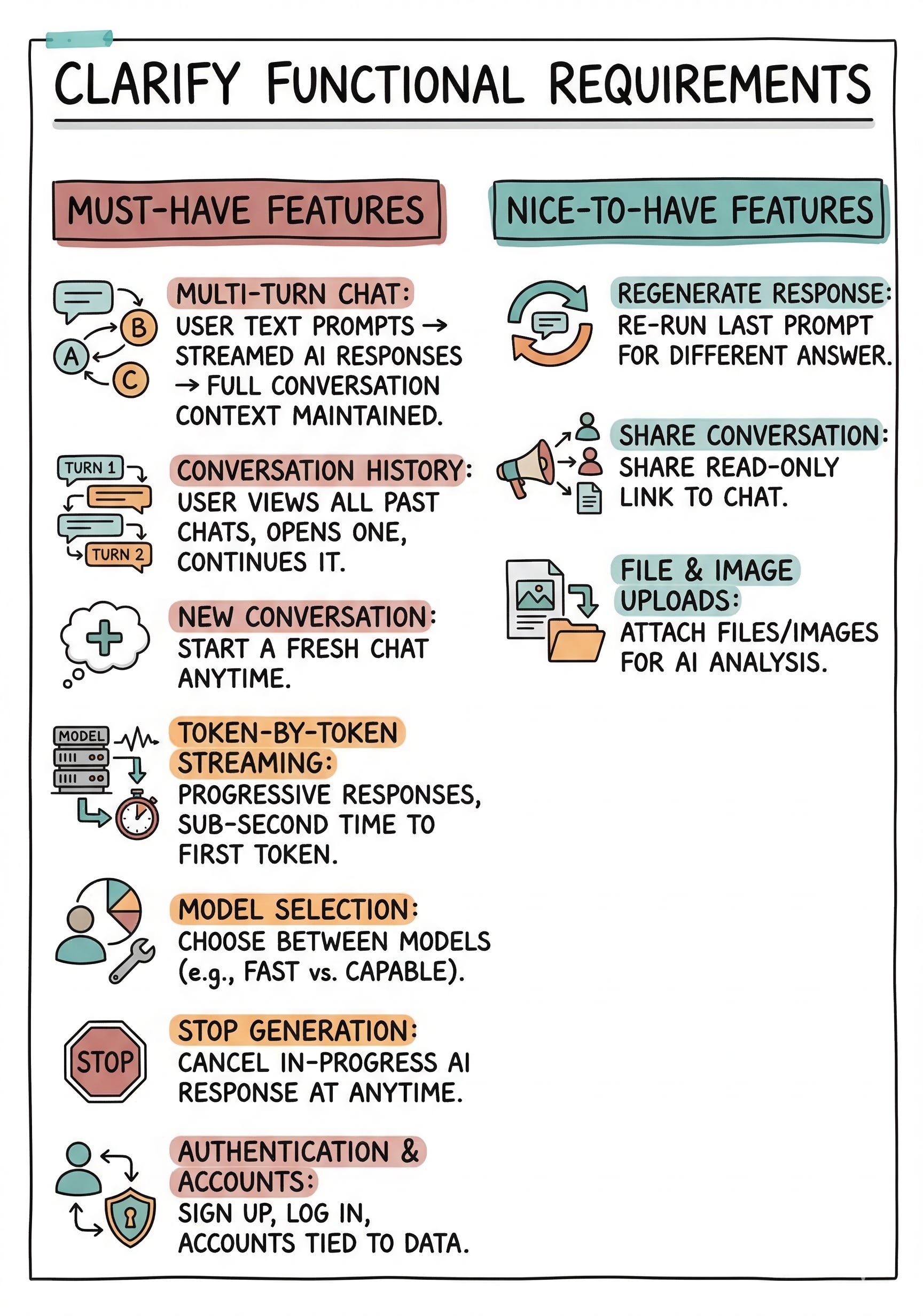
Must-Have Features
Multi-turn chat: User can send a text prompt and receive a streamed AI response, with full conversation context maintained across turns.
Conversation history: User can view a list of all past conversations, open any one, and continue it.
New conversation: User can start a fresh conversation at any time.
Token-by-token streaming: Responses appear progressively as the model generates them, with sub-second time to first token.
Model selection: User can choose between available models (e.g., a fast model vs. a more capable model).
Stop generation: User can cancel an in-progress response at any time.
Authentication and accounts: Users sign up, log in, and have their data tied to their account.
Nice-to-Have Features
Regenerate response: Re-run the last prompt to get a different answer.
Share conversation: Generate a shareable link to a read-only view of a conversation.
File and image uploads: Attach files or images to a prompt for the model to analyze.
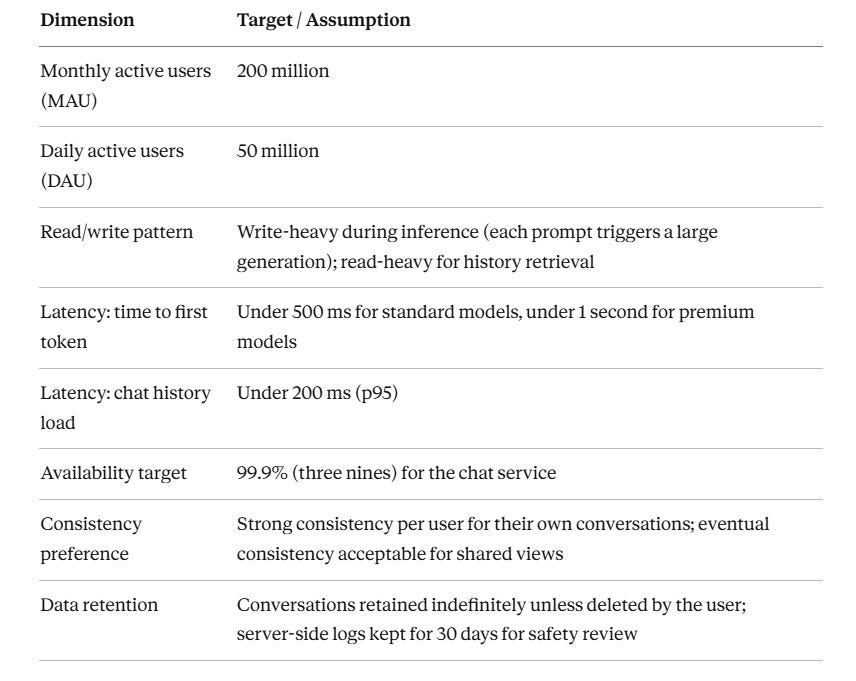
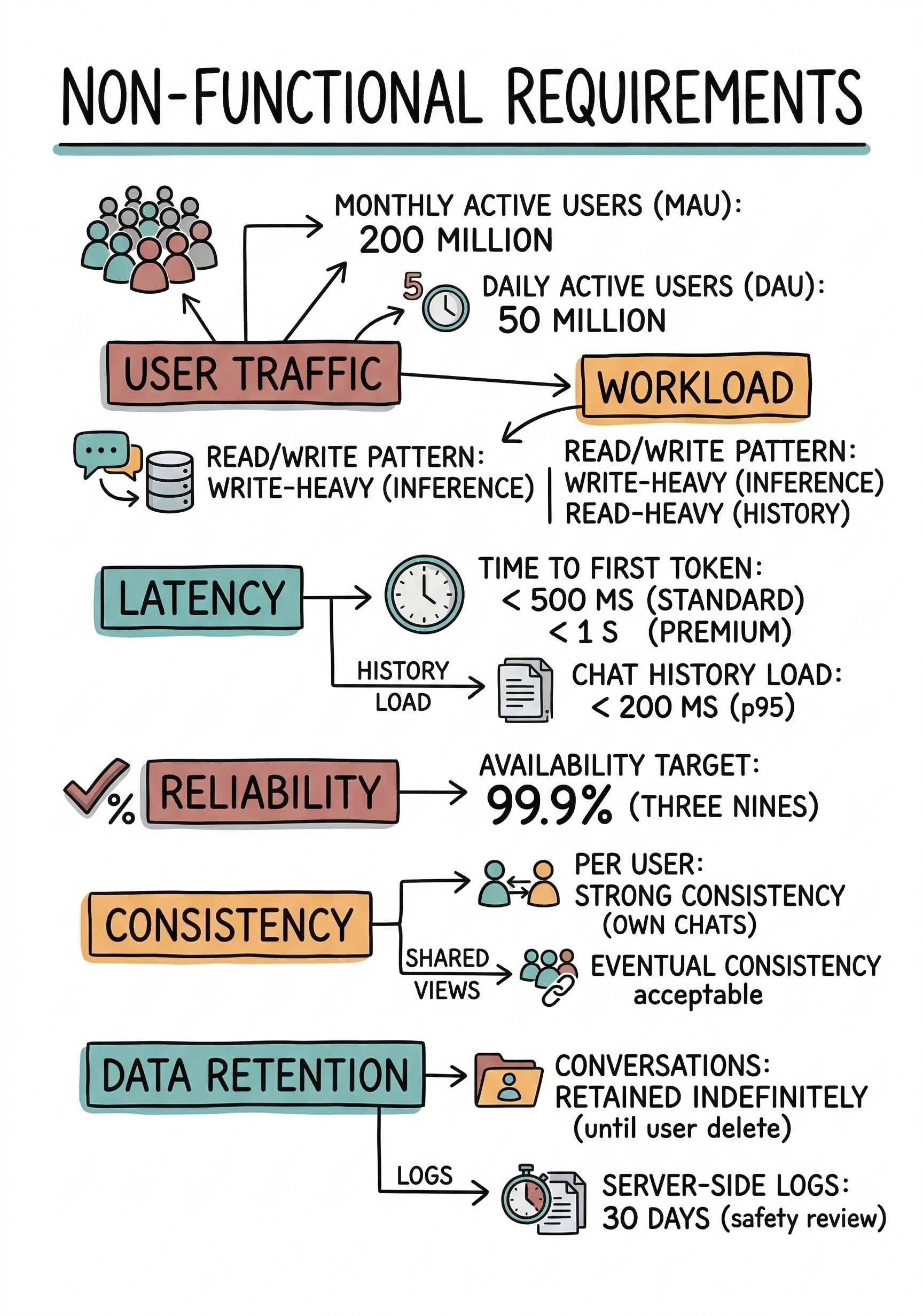
3. Clarify Non-Functional Requirements
4. Back-of-the-Envelope Estimates
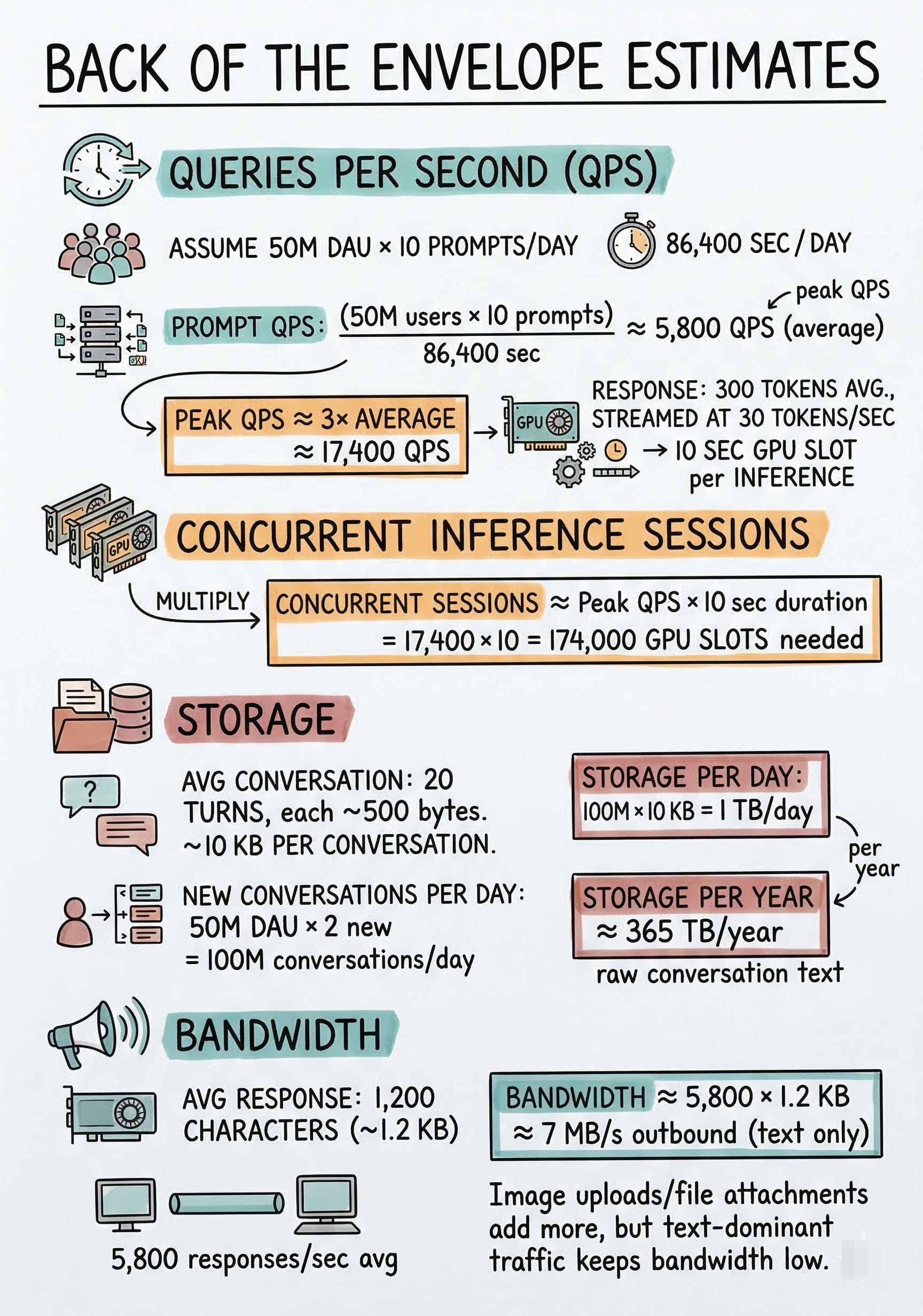
Queries Per Second (QPS)
Assume each DAU sends an average of 10 prompts per day.
Prompt QPS = 50M users × 10 prompts / 86,400 sec ≈ 5,800 QPS (average)
Peak QPS ≈ 3× average ≈ 17,400 QPS
Each prompt generates a response averaging 300 tokens, streamed at about 30 tokens per second, so each inference call occupies a GPU slot for roughly 10 seconds.
Concurrent Inference Sessions
Concurrent sessions ≈ Peak QPS × 10 sec duration = 17,400 × 10 = 174,000 concurrent GPU slots needed
Storage
Average conversation: 20 turns, each turn about 500 bytes of text (prompt + response combined). That is roughly 10 KB per conversation.
New conversations per day = 50M DAU × 2 new conversations = 100M conversations/day
Storage per day = 100M × 10 KB = 1 TB/day
Storage per year ≈ 365 TB/year of raw conversation text
Bandwidth
If average response is 1,200 characters (about 1.2 KB) and we serve 5,800 responses/sec on average:
Bandwidth ≈ 5,800 × 1.2 KB ≈ 7 MB/s outbound (text only, very manageable)
Image uploads and file attachments would add more, but text-dominant traffic keeps bandwidth low.
5. API Design
Streaming Protocol
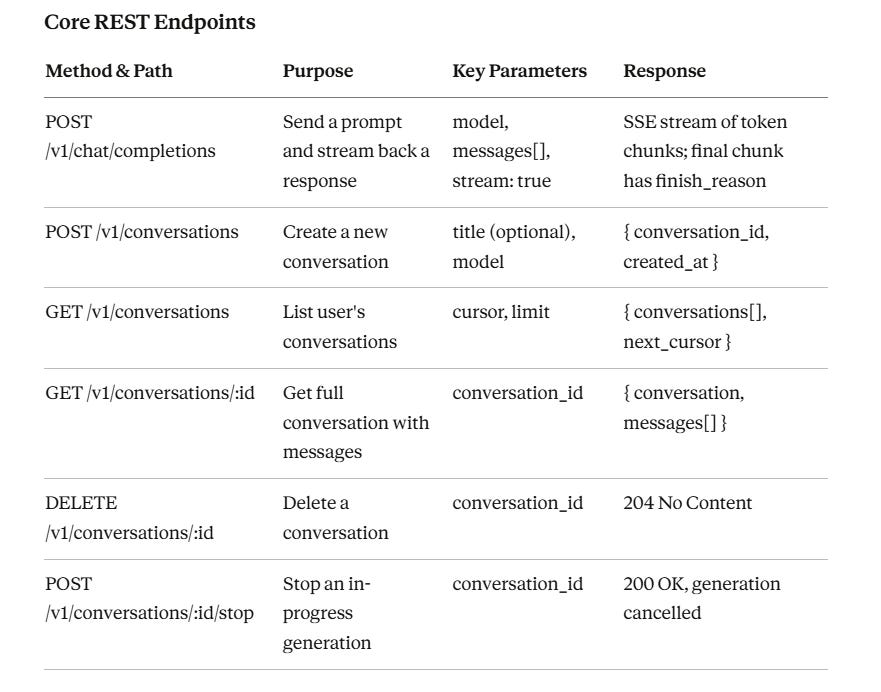
The main chat completions endpoint uses Server-Sent Events (SSE). The client opens an HTTP connection with Accept: text/event-stream. The server pushes data events, each containing a JSON chunk with a delta field holding the next few tokens.
When generation is complete, the server sends a final event with finish_reason: stop and closes the stream.
This lets users see words appear in real time.
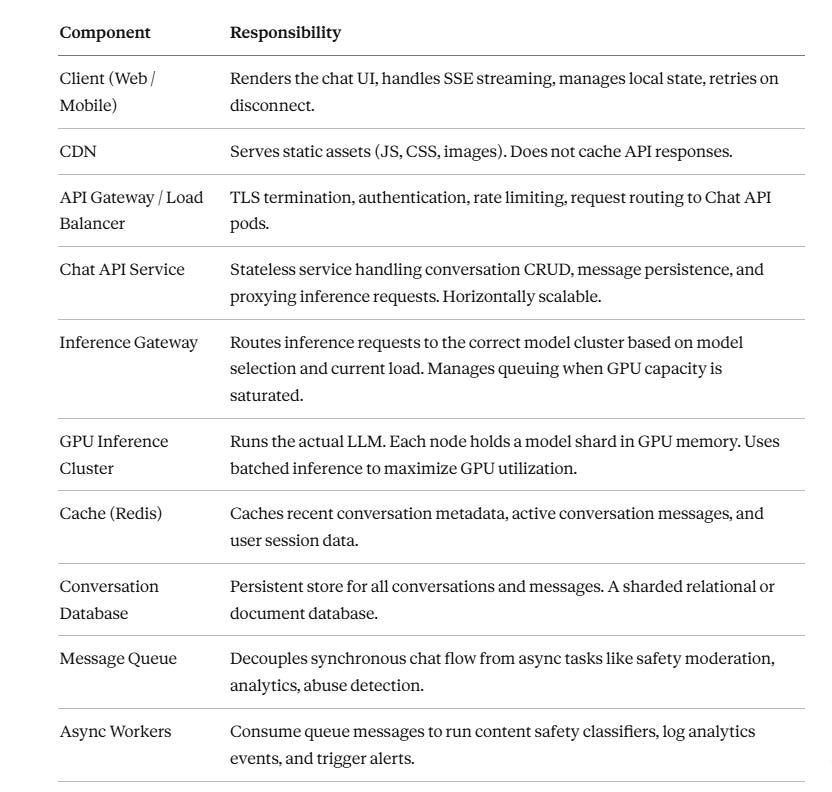
6. High-Level Architecture
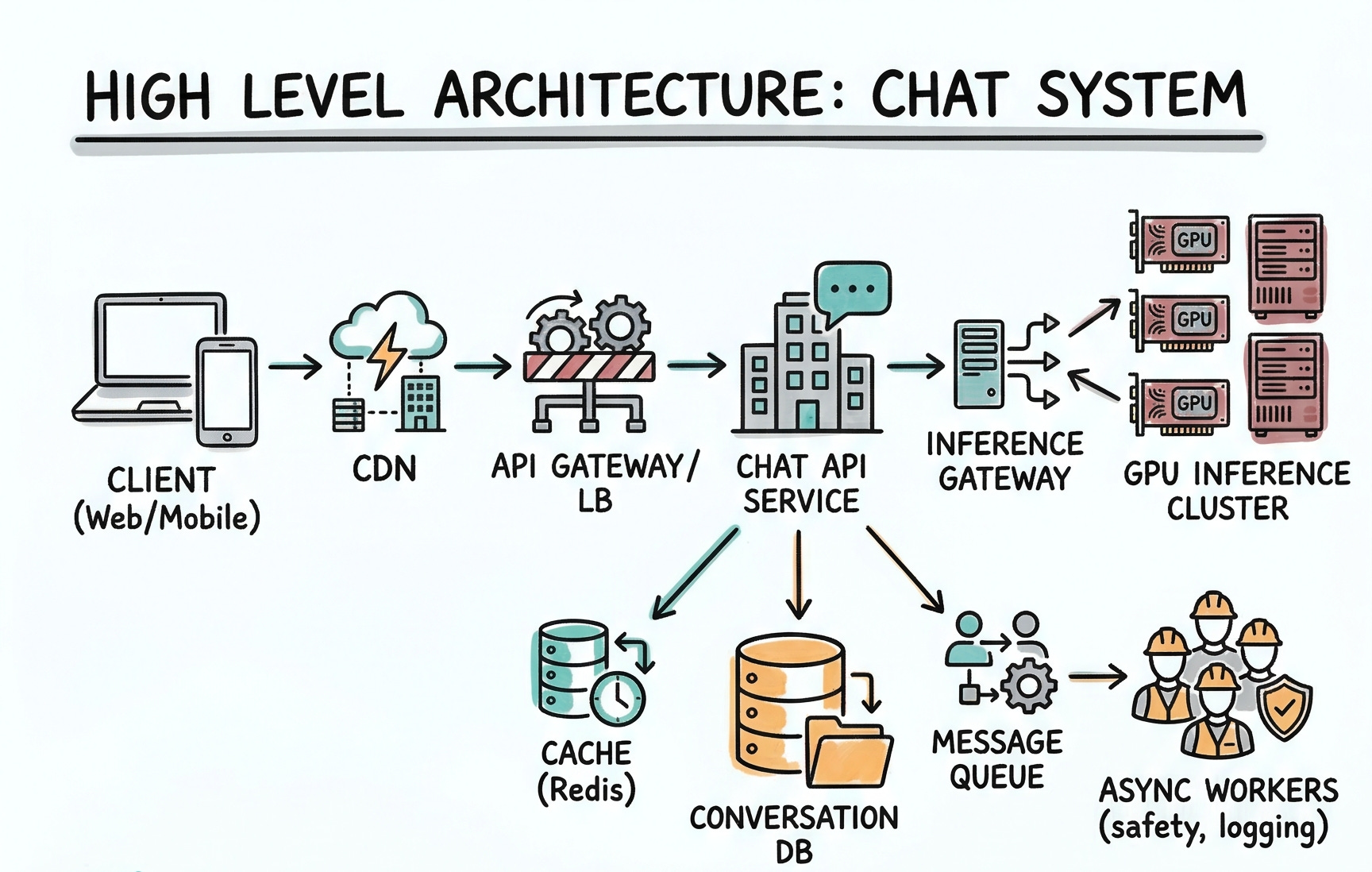
Client (Web/Mobile) → CDN → API Gateway / LB → Chat API Service
Chat API Service → Inference Gateway → GPU Inference Cluster
Chat API Service → Cache (Redis) → Conversation DB
Chat API Service → Message Queue → Async Workers (safety, logging)
Component Responsibilities
7. Data Model
Database Choice
We use a sharded relational database (PostgreSQL) for conversations and messages. Relational works well because conversations have a clear structure (a conversation has many messages in order), we need strong consistency per user, and we can shard by user_id so all of one user’s data lives on the same shard. For the conversation list and message retrieval, SQL queries with proper indexes are efficient and well understood.
Keep reading with a 7-day free trial
Subscribe to System Design Nuggets to keep reading this post and get 7 days of free access to the full post archives.