
Probabilistic Data Structures: When to Use Bloom Filters and HyperLogLog
Why do big tech companies use probabilistic data structures? Understand how to check username availability and count unique visitors without crashing your memory.


Processing data at a massive scale introduces challenges that simply do not exist in smaller applications.
When an application grows from handling thousands of requests to processing millions or billions of data points, standard approaches to data storage often fail.
The hardware resources required to maintain perfect accuracy become prohibitively expensive, and the latency introduced by fetching massive datasets slows systems to a crawl.
Engineers must eventually make a difficult decision. They must choose between being one hundred percent accurate or saving massive amounts of memory and time.
This is where probabilistic data structures become essential tools.
These structures allow systems to handle massive datasets with a tiny memory footprint. The cost for this efficiency is a small, controlled margin of error.
Understanding how to navigate this trade-off is a hallmark of a skilled backend engineer. It is also a frequent topic during System Design Interviews.
This guide will walk through the mechanics of two specific structures that solve the most common scaling problems. We will look at Bloom Filters for checking membership and HyperLogLog for counting unique items.
The Problem with Standard Data Structures
To understand why we need these algorithms, we must first look at why standard tools fail when data volume explodes.
Consider the problem of checking if a username is already taken during a signup process. In a small application, you might use a Set or a Hash Map. These structures store every single username in memory to provide a fast lookup.
If the username exists in the Set, the lookup returns “true.”
If it does not, it returns “false.”
This works perfectly when you have a few thousand users. However, consider a system with one billion users.
If every username is roughly 15 bytes and you have one billion of them, you need to store 15 gigabytes of raw data.
This does not account for the overhead of the data structure itself, which can easily double or triple the memory requirement. Storing 30 to 40 gigabytes of data entirely in RAM for a simple “exists” check is inefficient and costly.
Fetching this data from a hard drive for every check is too slow. Disk I/O is the bottleneck of performance. We need a way to answer the question “is this username taken?” without storing every character of every username in memory. We need a solution that is fast, small, and mostly accurate.
Bloom Filters: Efficient Membership Testing
A Bloom Filter is a space-efficient probabilistic data structure. It is used to test whether an element is a member of a set.
It provides a very specific type of answer.
When you ask a Bloom Filter if an item exists, it will tell you one of two things:
The element is definitely not in the set.
The element is probably in the set.
Notice the uncertainty in the second point.
A Bloom Filter can generate false positives. It might tell you a username is taken when it is actually free. However, it will never generate a false negative.
If it says a username is free, it is definitely free.
How It Works Under the Hood
A Bloom Filter does not store the actual data. You cannot ask it to give you a list of all users.
Instead, it uses a large array of bits.
A bit is the smallest unit of data and can be either a 0 or a 1.
When the filter is created, every bit in this array is set to 0.
To add an item, the system uses hash functions.
A hash function takes an input (like a username string) and converts it into a number. For a Bloom Filter to work effectively, we need multiple independent hash functions.
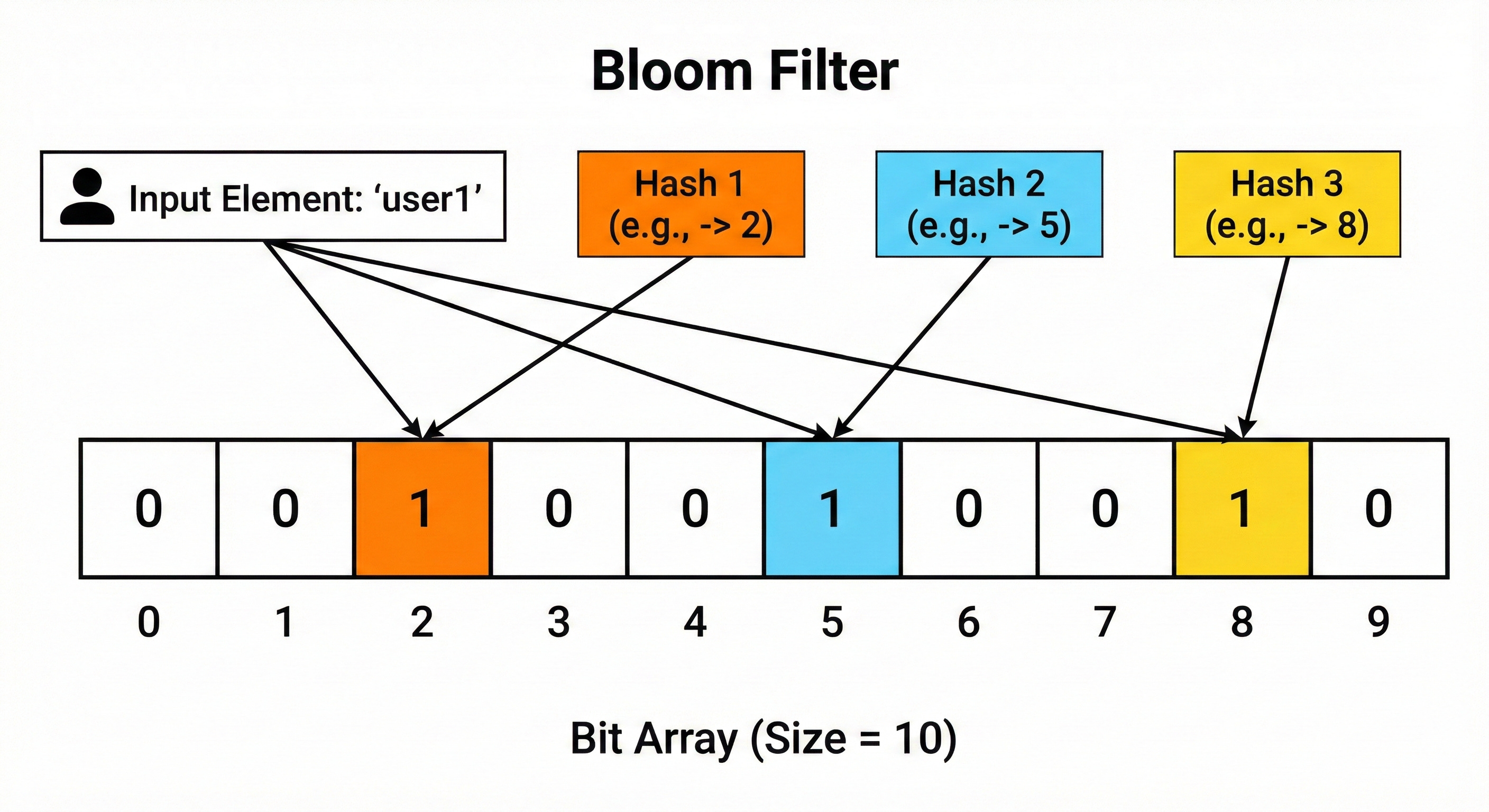
Let us look at the process of adding an item, step by step:
Input: We have a username, “UserA”.
Hashing: We pass “UserA” through three different hash functions.
Function 1 outputs 10.
Function 2 outputs 45.
Function 3 outputs 92.
Flipping Bits: The system looks at the bit array at indices 10, 45, and 92. It changes the bits at those positions to 1.
The username “UserA” is now “stored” in the filter, but only as a pattern of ones at specific locations.
Checking for Existence
To check if an item is already in the set, the system repeats the hashing process.
Keep reading with a 7-day free trial
Subscribe to System Design Nuggets to keep reading this post and get 7 days of free access to the full post archives.