
Kubernetes for Absolute Beginners: Deploy Your First App in 2026
Master the basics of Kubernetes architecture. Learn how the Control Plane and Worker Nodes interact, understand core objects like Pods, Deployments, & Services, & trace the 7-step deployment workflow.

What this blog post will cover:
Container orchestration fundamentals explained
Cluster control plane architecture
Declarative configuration logic defined
Pod and service networking
Automated reconciliation loop mechanics
Modern software development requires a robust infrastructure to handle increasing user demands.
Applications today rarely run as a single process on a solitary server. They consist of multiple services that must communicate, scale, and recover from failures without human intervention.
This shift creates a need for systems that can automate the placement and management of software across a fleet of computers.
Kubernetes has established itself as the standard solution for these operational challenges, acting as the logic layer that governs modern computing resources.
The Need for Automated Orchestration
To understand why Kubernetes exists, one must examine the limitations of previous deployment methods.
Historically, organizations deployed applications directly onto physical servers.
This approach caused resource conflicts; if one application consumed too much memory, it degraded the performance of other applications on the same machine.
Virtualization improved this by allowing multiple Virtual Machines (VMs) to run on a single physical CPU. However, VMs are heavy, requiring a full operating system for each application instance. Containers emerged as a lightweight alternative, packaging code and dependencies into a standard unit that shares the host operating system.
While containers solved the portability issue, they introduced a management complexity problem. In a production environment, an application might require thousands of containers running across dozens of servers. Managing this manually is impossible. Engineers cannot monitor every specific server to check if a container has crashed or manually decide which server has enough memory to host a new instance. This is where Container Orchestration becomes necessary.
Orchestration automates the operational effort required to run containerized workloads. It handles the scheduling of containers onto machines, manages their health, and ensures the network connects them correctly.
Kubernetes is an open-source orchestration engine that provides these capabilities by abstracting the underlying hardware into a unified API.
High-Level Architecture: The Cluster
Kubernetes operates on a cluster architecture.
A Cluster is a set of node machines for running containerized applications. It functions as a single computing resource, even though it may be made up of many individual servers.
The cluster hierarchy is divided into two strict functional areas: the Control Plane and the Worker Nodes.
The Control Plane
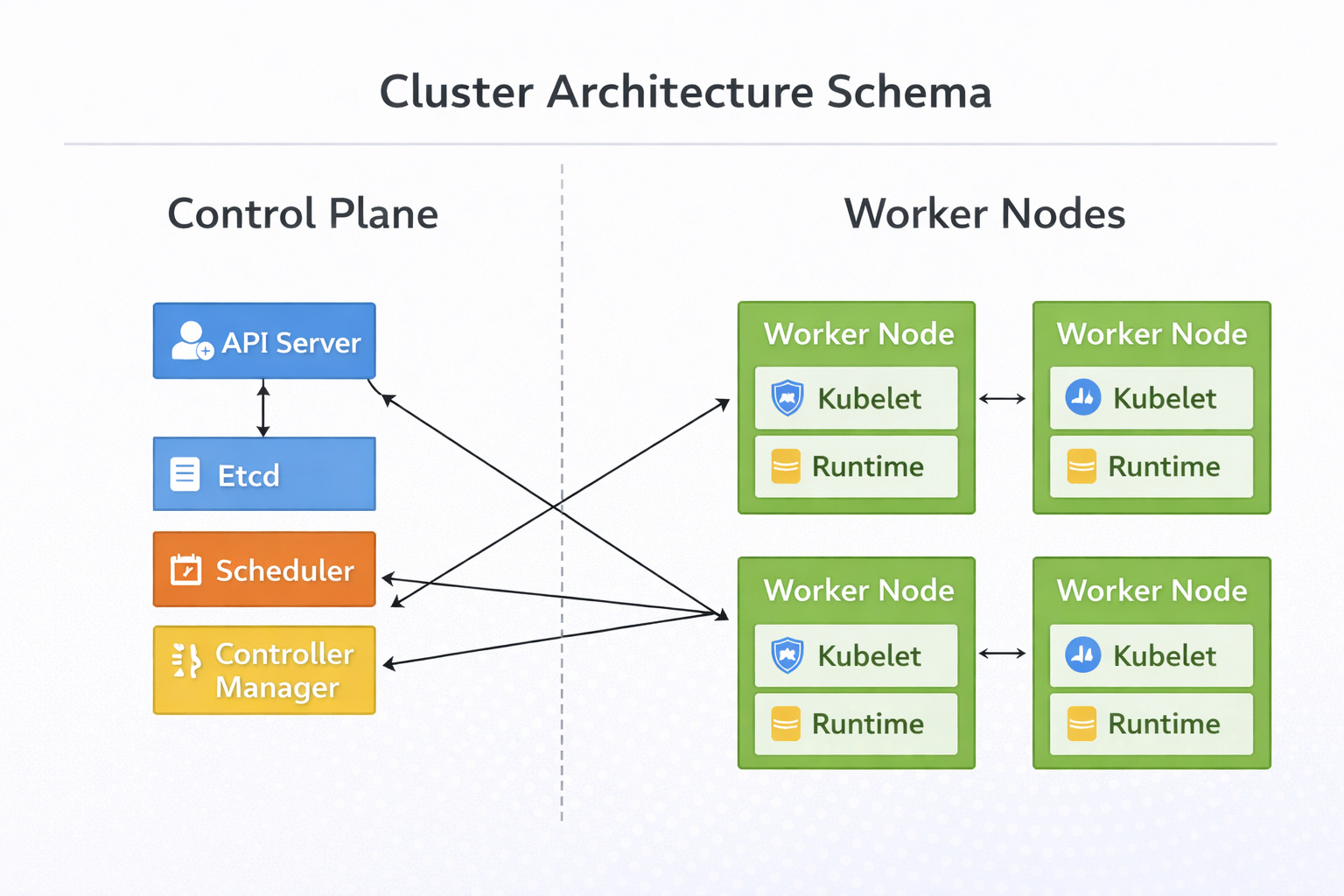
The Control Plane is the decision-making intelligence of the cluster. It manages the global state of the system. It does not run the actual application workload; rather, it coordinates where and how that workload runs. It consists of four critical components.
1. The API Server
The API Server is the central management entity. It serves as the primary interface for all internal and external communication.
When a user interacts with the cluster to deploy an application, the request goes to the API Server. It validates the request to ensure the configuration is formatted correctly and the user has the necessary permissions.
Once validated, it processes the data and updates the cluster state. It is the only component that interacts directly with the data store.
2. Etcd
Etcd acts as the backing store for all cluster data. It is a consistent and highly-available key-value store.
This component persists the configuration data and the status of every object in the cluster. It represents the “truth” of the system.
If the Control Plane crashes, Etcd ensures the state is preserved for recovery.
3. The Scheduler
The Scheduler watches for newly created workloads that have no assigned node. It analyzes the resource requirements of the workload, such as CPU and memory usage, and filters the available nodes. It assigns the workload to the best suitable node based on resource availability and constraints. It ensures efficient distribution of work across the hardware.
4. The Controller Manager
The Controller Manager runs controller processes. These are background loops that watch the state of the cluster through the API Server. Their logic is simple: compare the current state to the desired state.
If a node becomes unreachable, the Node Controller detects the issue and changes the status.
If a set of pods crashes, the Replication Controller notices the deficit. It triggers the necessary actions to correct the state.
The Worker Nodes
The Worker Nodes are the machines that run the application.
