
How to Use an API: A Step-by-Step Guide
Master API integration for your next system design interview. Learn the HTTP request-response cycle, endpoint anatomy, stateless authentication (OAuth/Tokens), and how to build fault-tolerant systems.

Software applications cannot function in isolation.
In the early days of computing, programs were often standalone units that contained all the data and logic they needed internally.
However, as the internet evolved, this model became impossible to sustain.
No single server can hold all the world’s weather data, financial records, and social graphs simultaneously.
Consequently, modern software development faces a critical challenge: how to access data and functionality that resides on a different server, controlled by a different organization, often written in a different programming language.
The solution to this fragmentation is the Application Programming Interface (API).
An API provides a structured way for one software application to access the services of another.
For a junior developer or a candidate preparing for a system design interview, understanding this concept is not just about writing code; it is about understanding how distributed systems communicate. It allows developers to build complex, feature-rich applications by assembling existing services rather than engineering every component from scratch.
Key Takeaways
Standardized Exchange: APIs provide a rigorous set of rules that allow disparate software systems to exchange data without exposing their internal code or databases.
Documentation Dependence: Successful integration relies entirely on reading and adhering to the technical specifications (documentation) provided by the API creator.
Stateless Authentication: Because HTTP is stateless, every API request must independently prove its identity using credentials like API Keys or Tokens.
Isolation Testing: Validating requests with tools like Postman before writing code decouples network configuration issues from programming logic errors.
Resilient Error Handling: Production-grade code must anticipate failure, managing HTTP status codes and rate limits to prevent application crashes.
Understanding the Core Concept
To use an API effectively, one must first understand the underlying architecture of web communication.
APIs typically operate over HTTP (Hypertext Transfer Protocol), the same protocol that powers the web browser.
The process is governed by a Request-Response Cycle.
The software initiating the communication is the Client. The software receiving the communication is the Server.
The Request: The client constructs a message containing specific instructions. This includes the target address (URL), the type of action to perform (Method), and any necessary data (Payload or Parameters).
Processing: The server receives the message. It verifies that the client is allowed to make the request. It then performs the action, such as retrieving a record from a database or performing a calculation.
The Response: The server sends a message back to the client. This message contains the requested information (usually structured as JSON) and a status code indicating whether the operation was successful.
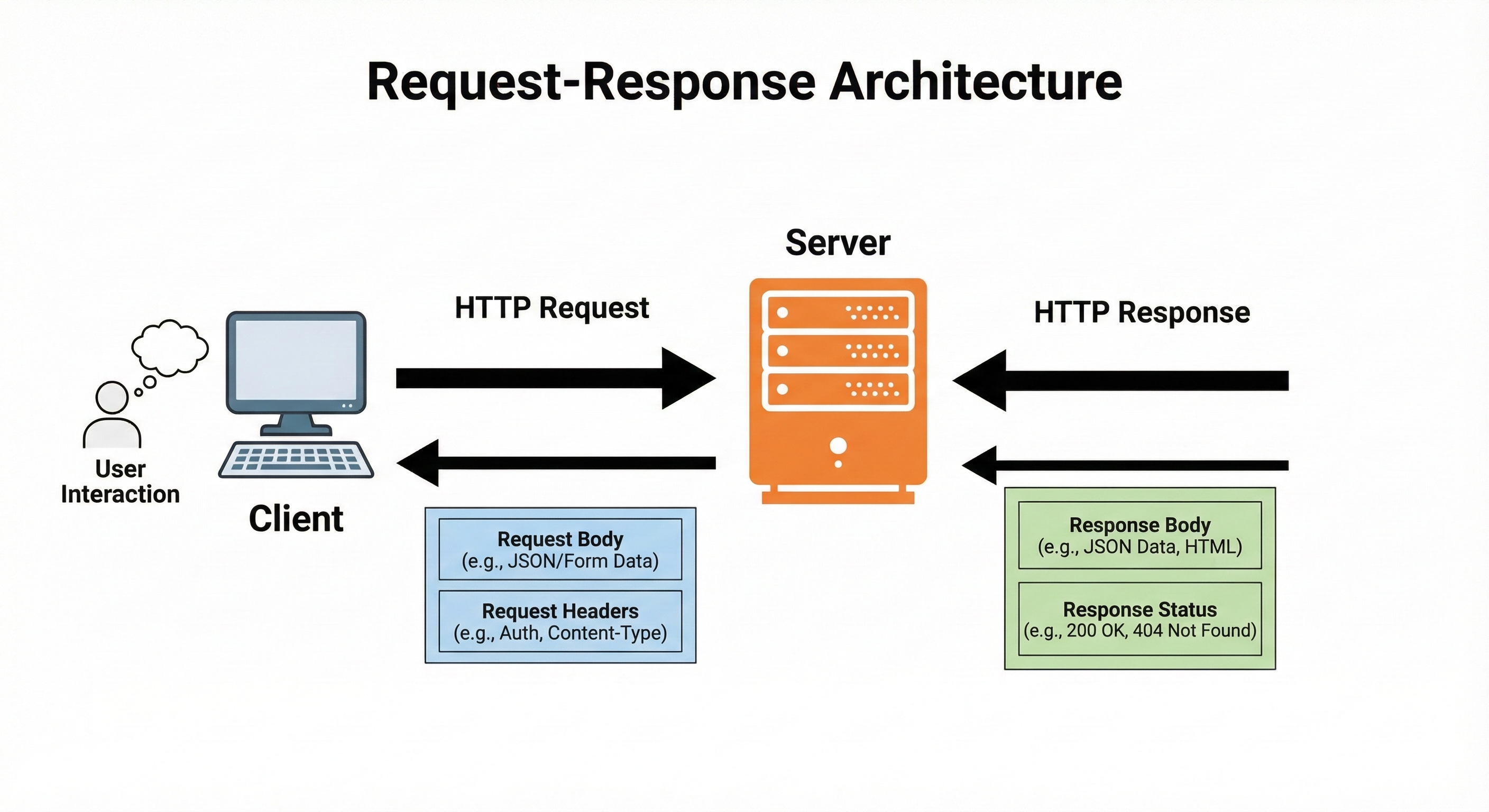
For a system design candidate, it is crucial to understand that APIs decouple the client from the server.
The client does not need to know how the server calculates the data, only where to ask for it.
Step 1: Locate an API
The first step in the integration process is Discovery.
Before writing code, a developer must identify an external service that fulfills the specific requirements of their application. This phase involves technical evaluation rather than just a simple search.
Evaluating Technical Suitability
There are thousands of public APIs available, but they are not all suitable for production use.
When browsing API directories or marketplaces, a developer must evaluate the service based on several system design criteria:
Latency: How fast does the API respond? In a large-scale architecture, slow external calls can bottleneck the entire system.
Uptime/Reliability: Does the provider guarantee availability? If the API goes down, the dependent application often breaks.
Data Freshness: How often is the underlying data updated?
Protocol Support: Does the API use REST, GraphQL, or SOAP? This guide focuses on REST (Representational State Transfer) as it is the industry standard for web APIs.
Where to Locate Services
Developers typically locate these services through:
API Marketplaces: Platforms that aggregate various APIs, offering a unified dashboard for billing and analytics.
Official Developer Portals: Major technology companies maintain extensive developer sites hosting their public API specifications.
Open Source Repositories: Community-maintained lists on version control platforms often categorize free-to-use APIs for practice and educational purposes.
Step 2: Go through the API Documentation
The most common mistake made by junior developers is attempting to use an API by guessing the URL structure. This approach rarely works.
An API is a strict interface; it does not tolerate ambiguity. The documentation is the technical specification that defines exactly how the interface behaves.
Anatomy of an Endpoint
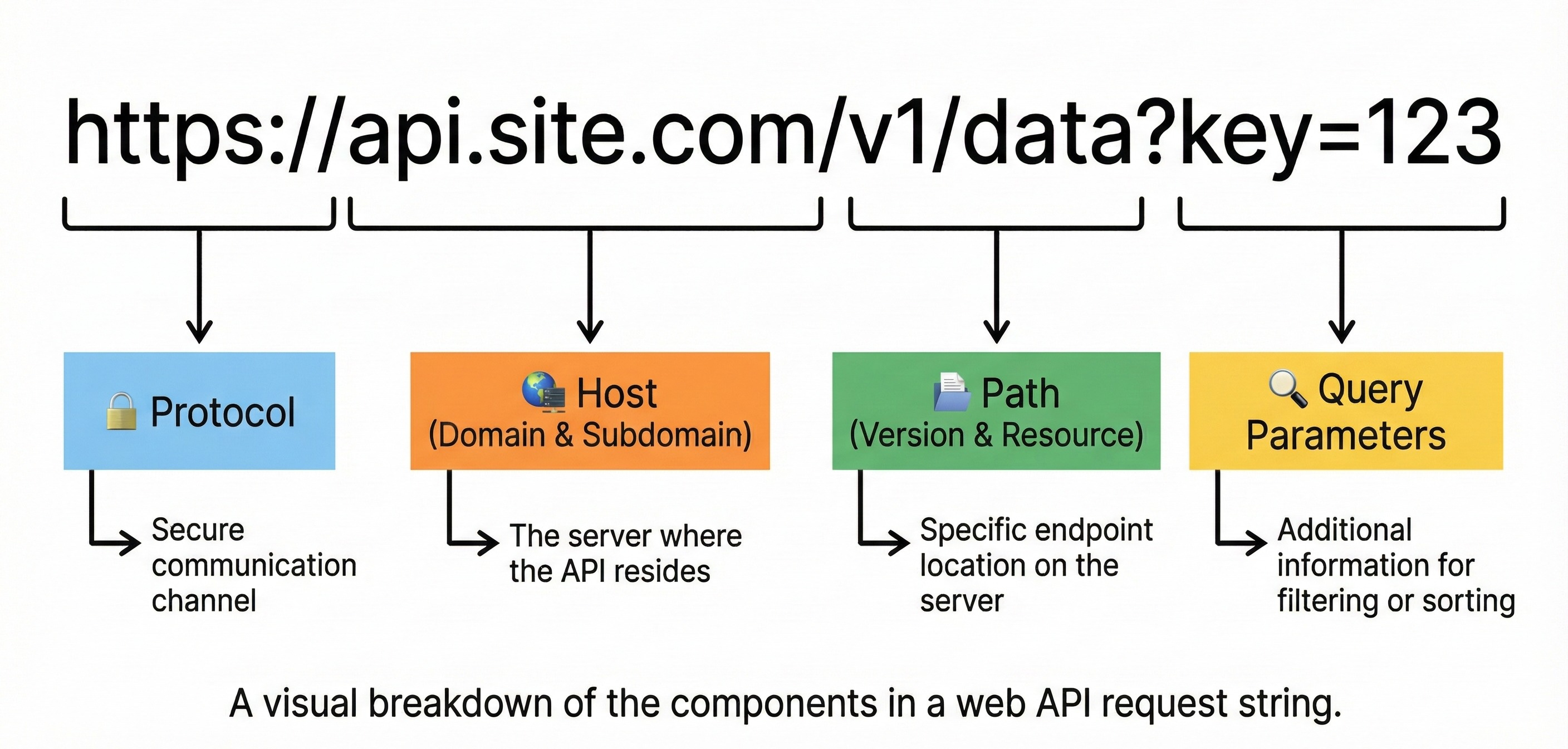
The documentation will define the Endpoint. This is the specific URL path that corresponds to a resource.
Base URL: The root address of the server (e.g., https://api.provider.com).
Path: The specific route to the data (e.g.,
/v1/users).Query Strings: Modifications to the request usually added after a question mark (e.g.,
?limit=10).
HTTP Methods
The documentation specifies which HTTP Method must be used. Using the wrong method will result in an error, even if the URL is correct.
GET: Requests a representation of the specified resource. Requests using GET should only retrieve data.
POST: Submits an entity to the specified resource, often causing a change in state or side effects on the server.
Keep reading with a 7-day free trial
Subscribe to System Design Nuggets to keep reading this post and get 7 days of free access to the full post archives.