
How to Design Google Docs in 45 Mins
A step-by-step system design interview guide to building a real-time collaborative editor with Operational Transformation and WebSockets.


Here is a detailed system design for Google Docs.
1. Problem Definition and scope
We are designing a cloud-based, real-time collaborative document editor.
The core challenge is allowing multiple users to edit the same text file simultaneously, ensuring everyone sees the same content eventually without data loss or conflicts.
Main User Groups: Document creators, editors, and read-only viewers.
Main Actions: Creating documents, typing text (insert/delete), and viewing changes from others in real-time.
Scope:
In Scope: The real-time editing engine (concurrency control), document storage, history/versioning, and cursor presence.
Out of Scope: Google Drive folder management, complex rich text formatting (tables, pagination), offline conflict resolution, and commenting systems.
2. Clarify functional requirements
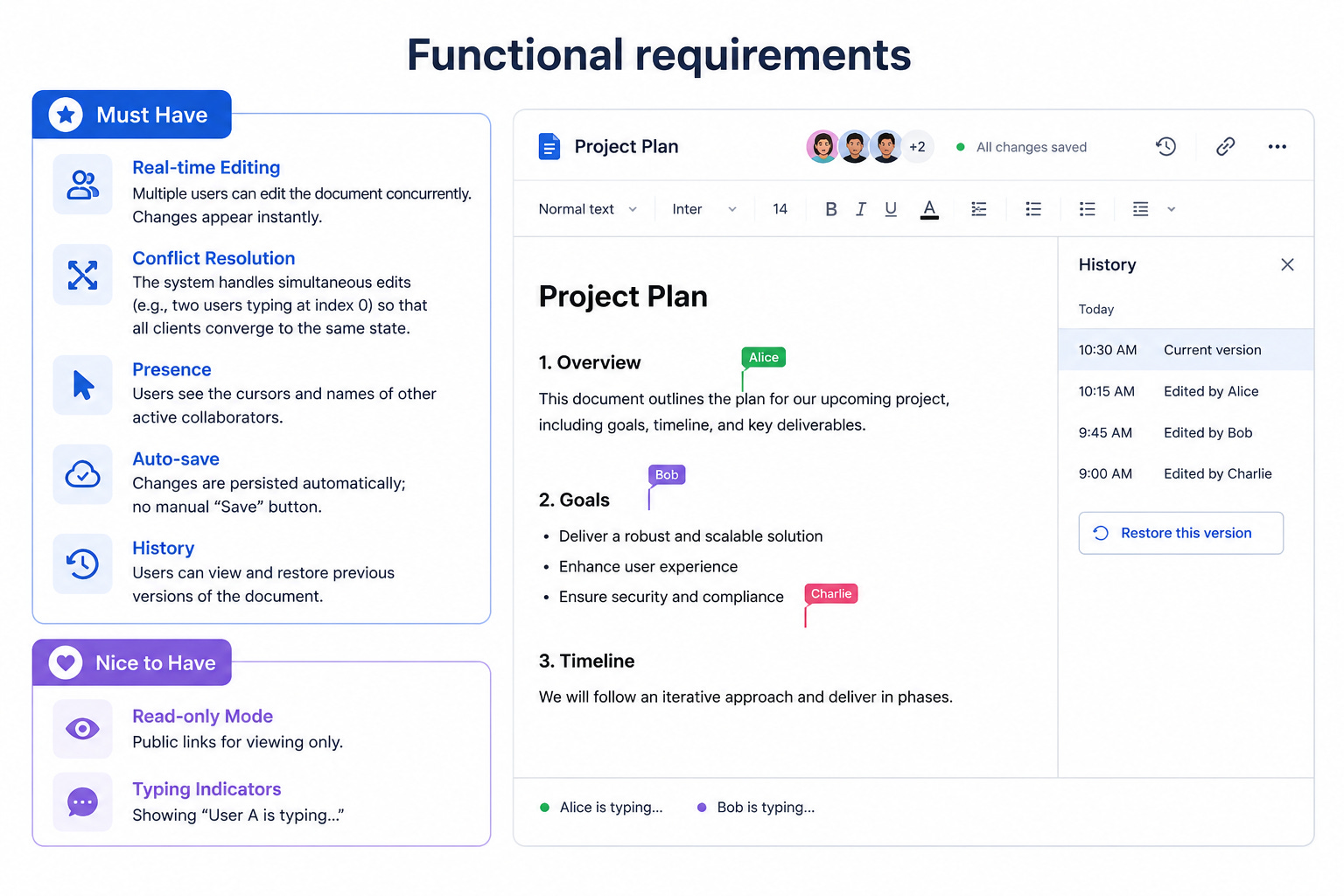
Must Have
Real-time Editing: Multiple users can edit the document concurrently. Changes appear instantly.
Conflict Resolution: The system handles simultaneous edits (e.g., two users typing at index 0) so that all clients converge to the same state.
Presence: Users see the cursors and names of other active collaborators.
Auto-save: Changes are persisted automatically; no manual “Save” button.
History: Users can view and restore previous versions of the document.
Nice to Have
Read-only Mode: Public links for viewing only.
Typing Indicators: Showing “User A is typing...”
3. Clarify non-functional requirements
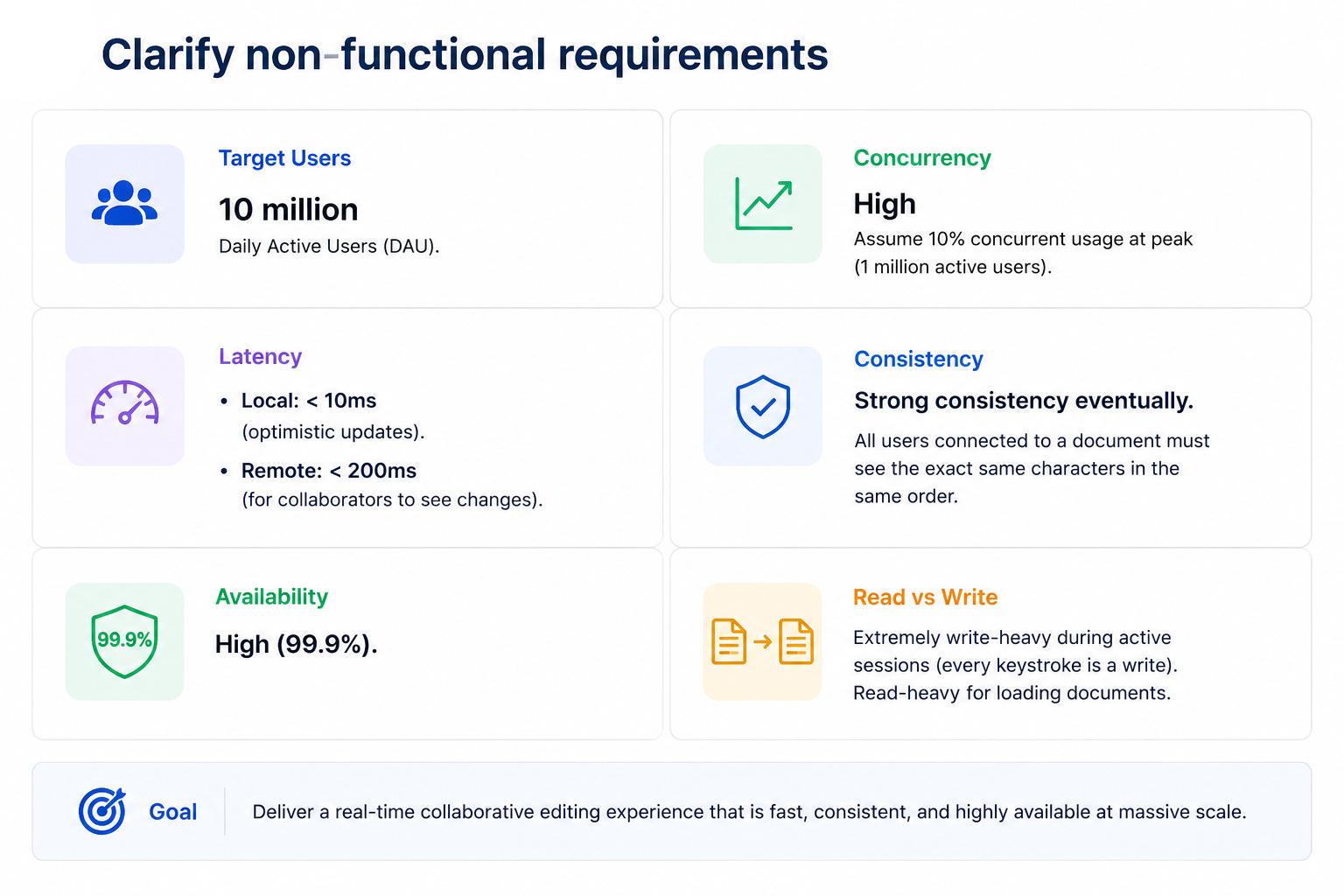
Target Users: 10 million Daily Active Users (DAU).
Concurrency: High. Assume 10% concurrent usage at peak (1 million active users).
Latency:
Local: < 10ms (optimistic updates).
Remote: < 200ms (for collaborators to see changes).
Consistency: Strong consistency eventually. All users connected to a document must see the exact same characters in the same order.
Availability: High (99.9%).
Read vs Write: Extremely write-heavy during active sessions (every keystroke is a write). Read-heavy for loading documents.
4. Back of the envelope estimates
Traffic Estimate:
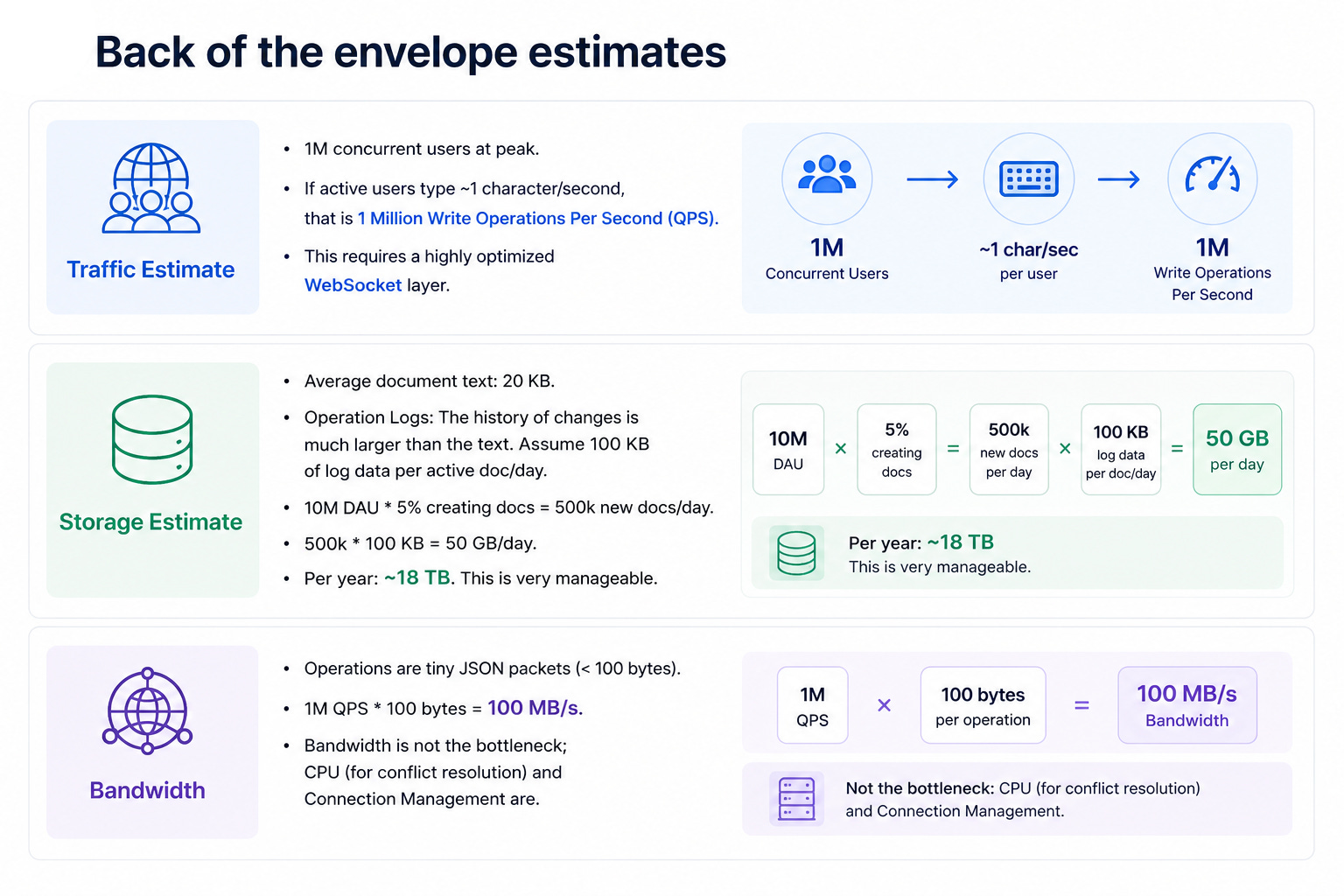
1M concurrent users at peak.
If active users type ~1 character/second, that is 1 Million Write Operations Per Second (QPS).
This requires a highly optimized WebSocket layer.
Storage Estimate:
Average document text: 20 KB.
Operation Logs: The history of changes is much larger than the text. Assume 100 KB of log data per active doc/day.
10M DAU * 5% creating docs = 500k new docs/day.
500k * 100 KB = 50 GB/day.
Per year: ~18 TB. This is very manageable.
Bandwidth:
Operations are tiny JSON packets (< 100 bytes).
1M QPS * 100 bytes = 100 MB/s. Bandwidth is not the bottleneck; CPU (for conflict resolution) and Connection Management are.
5. API design
We use REST for document management and WebSockets for the high-frequency editing session.
REST API (Management)
POST /api/v1/documents
Request: { “title”: “My Doc”, “owner_id”: “u123” }
Response: { “doc_id”: “d555”, “created_at”: “...” }
GET /api/v1/documents/{doc_id}
Response: { “doc_id”: “d555”, “snapshot”: “Full text content...”, “version”: 105 }
Note: Used to load the document state before connecting to the socket.
WebSocket API (Real-time Session)
CONNECT /ws/documents/{doc_id}
Establishes a persistent bi-directional connection.
Client -> Server:
edit_op: { “rev”: 105, “op”: “insert”, “pos”: 10, “char”: “a” }
cursor: { “pos”: 11, “user”: “Alice” }
Server -> Client:
remote_op: { “rev”: 106, “op”: “insert”, “pos”: 10, “char”: “a”, “user”: “Bob” }
ack: { “rev”: 106 } (Confirms the server processed the edit).
6. High level architecture
We need a stateful architecture for the editing engine because conflict resolution (Operational Transformation) relies on a strictly ordered sequence of operations.
Client -> Load Balancer -> Collaboration Server -> Queue -> Database
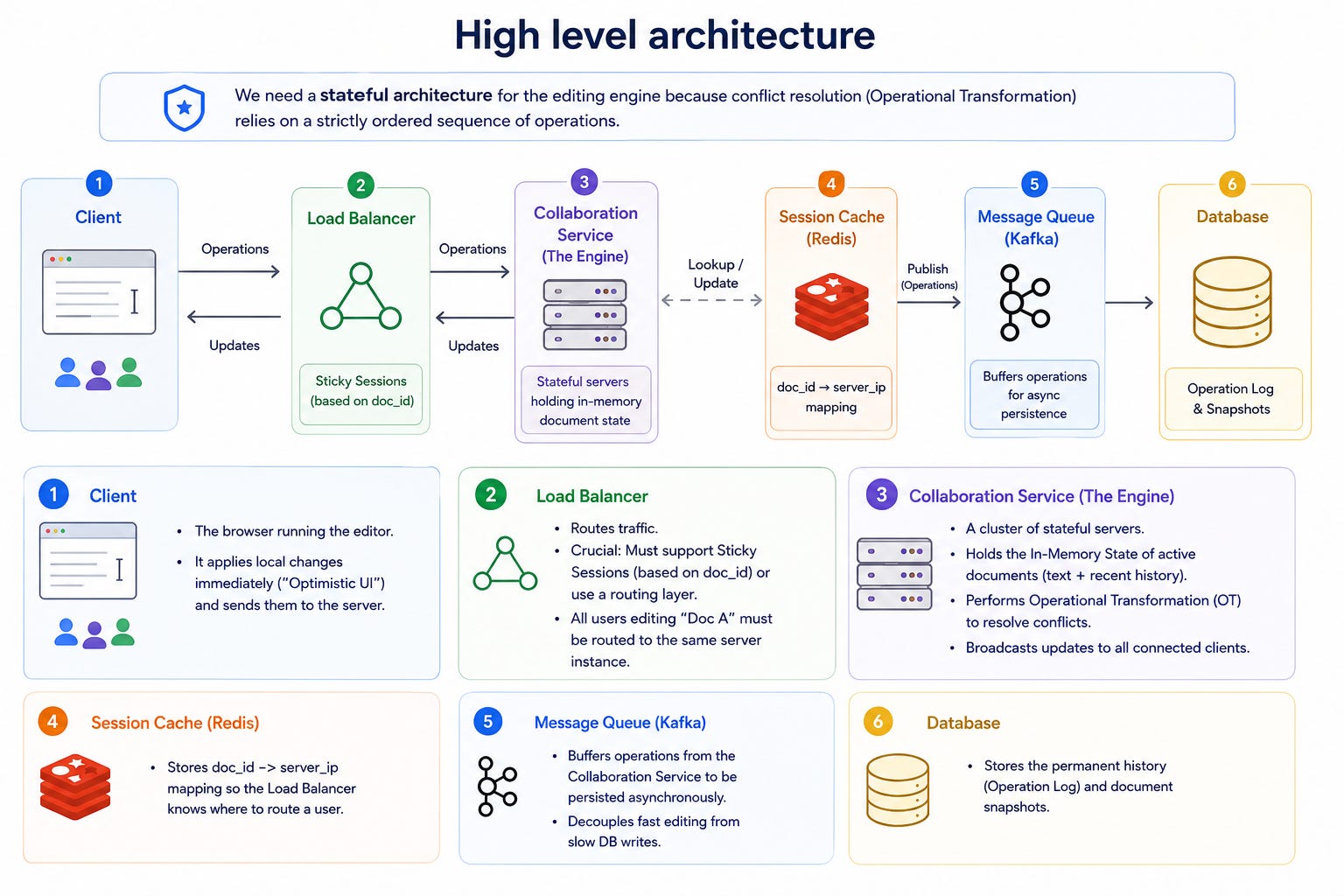
Client: The browser running the editor. It applies local changes immediately (”Optimistic UI”) and sends them to the server.
Load Balancer: Routes traffic.
Crucial: Must support Sticky Sessions (based on doc_id) or use a routing layer. All users editing “Doc A” must be routed to the same server instance.
Collaboration Service (The Engine): A cluster of stateful servers.
Holds the In-Memory State of active documents (text + recent history).
Performs Operational Transformation (OT) to resolve conflicts.
Broadcasts updates to all connected clients.
Session Cache (Redis): Stores doc_id -> server_ip mapping so the Load Balancer knows where to route a user.
Message Queue (Kafka): Buffers operations from the Collaboration Service to be persisted asynchronously. Decouples fast editing from slow DB writes.
Database: Stores the permanent history (Operation Log) and document snapshots.
7. Data model
We use a NoSQL Database (like DynamoDB or Cassandra) because it handles high write throughput for append-only logs and scales horizontally.
Table 1: Operations_Log
Stores every single edit ever made. This is the Source of Truth.
doc_id (Partition Key)
version (Sort Key) - e.g., 101, 102, 103...
op_data (JSON) - e.g., {”op”: “ins”, “pos”: 5, “val”: “h”}
user_id
timestamp
Table 2: Document_Snapshots
Stores the full text periodically (e.g., every 100 ops) to speed up loading.
doc_id (Partition Key)
version (Sort Key)
content (Blob/Text)
Why Snapshots?
When a user opens a doc with 50,000 edits, we load the latest snapshot (Rev 49,900) and replay only the last 100 ops, rather than replaying 50,000 ops from scratch.
8. Core flows end to end
In a standard web app, a “save” is a simple database update. In a real-time collaborative editor, the logic is far more complex because the “Source of Truth” moves from the database to the active server memory during the session.
We will visualize the system through four critical flows:
Document Loading: How we efficiently reconstruct the document state.