
HTTP/1.1 vs HTTP/2 vs HTTP/3. What Changed and Why It Matters
A clear guide to how HTTP evolved from HTTP/1.1 to HTTP/2 and HTTP/3. Learn multiplexing, header compression, TCP vs QUIC over UDP, head-of-line blocking, faster handshakes, and why HTTP/3 helps on mobile and lossy networks.

Imagine you are at your favorite coffee shop during the morning rush.
There is only one cashier.
The person in front of you decides to order a complicated, custom latte, then realizes they forgot their wallet, and then spends five minutes counting exact change.
You just want a black coffee. But you are stuck waiting because the “connection” (the cashier) is blocked by the request ahead of you.
This is exactly how the internet used to work.
For a long time, the web struggled with this specific bottleneck. We built faster computers and laid fiber optic cables, but the language browsers used to talk to servers (HTTP) had design flaws that slowed everything down.
In this post, we are going to break down the three major versions of the Hypertext Transfer Protocol: HTTP/1.1, HTTP/2, and the new kid on the block, HTTP/3.
Part 1: The Foundation – How Computers Talk (TCP and Reliability)
Before we can compare the versions of HTTP, we have to understand the roads they drive on. In system design, you often hear about the “OSI Model” or the “TCP/IP Stack.”
Think of HTTP (Hypertext Transfer Protocol) as the language applications speak. It is like English or Spanish. It defines the words “GET”, “POST”, and “DELETE”.
Think of the Transport Layer as the method of delivery. It is the truck that carries the message. For most of history, HTTP has ridden on a truck called TCP (Transmission Control Protocol).
The Reliable Courier: TCP
TCP is the reliable courier of the digital world. It is obsessive about order and completeness. When you send a file via TCP, the protocol makes a strict promise to you.
First, it guarantees Completeness. Every single byte you send will arrive at the destination. If a packet gets lost in the wires or dropped by a busy router, TCP notices the gap. It asks the sender to re-transmit that specific chunk.
Second, it guarantees Order. If you send three packets—A, B, and C—TCP ensures the application reads them as A, B, and C. If packet B takes a detour and arrives after packet C, TCP forces the computer to wait. It holds packet C in a “buffer” (a waiting room) until packet B shows up.
This reliability is fantastic for file transfers. If you are downloading a zip file or a software update, you absolutely need this precision. You cannot have the middle of the file arrive before the beginning. You cannot miss a single byte, or the program will crash.
The Cost of Reliability: Latency
However, this reliability comes at a steep price: Latency.
TCP is a chatty protocol. Before you can send a single byte of actual data (like “Get me the homepage”), your computer and the server must engage in a formal introduction. This is known as the Three-Way Handshake.
It works like this:
SYN (Synchronize): Your computer sends a packet saying, “Hello, I would like to set up a connection. My sequence number is X.”
SYN-ACK (Synchronize-Acknowledge): The server replies, “I hear you. I am ready to talk. My sequence number is Y.”
ACK (Acknowledge): Your computer replies, “Great, I received your confirmation. Let’s begin.”
Only after this back-and-forth is complete can you send your HTTP request.
In system design, we measure this delay in Round Trip Times (RTT). A connection takes 1.5 RTT just to open the door. If the server is in New York and you are in Sydney, that “hello” process alone might take 200 or 300 milliseconds. That is a noticeable pause before the user sees anything.
The Alternative: UDP (The Fire-and-Forget Launcher)
The alternative to the careful TCP courier is UDP (User Datagram Protocol).
UDP is the “honey badger” of protocols. It does not care. It fires packets at the destination and immediately moves on to the next one.
Did the packet arrive? UDP doesn’t know.
Did they arrive in the right order? UDP doesn’t care.
Because it skips the handshakes, the error-checking, and the retransmission logic, UDP is incredibly fast and lightweight.
For decades, we used UDP only for things like live video streaming or Voice over IP (VoIP). In a live Zoom call, if a packet of audio is lost, there is no point in resending it. By the time it arrives, the conversation has moved on. It is better to have a millisecond of silence (a glitch) than to pause the whole call to wait for history to be replayed.
Why does this matter for HTTP? For 30 years, the web strictly used TCP because we needed reliability. You cannot render a webpage if half the HTML is missing.
But as we will see later in this report, HTTP/3 makes a radical, controversial decision. It abandons the reliable TCP courier in favor of the chaotic UDP launcher. Understanding why we would trust our banking data and emails to an “unreliable” protocol is the key to mastering modern system design. It requires us to rethink what reliability actually means.
Part 2: HTTP/1.1 – The Old Workhorse
We begin our journey with HTTP/1.1. Released in 1997, this version was the standard for the web for over 15 years. If you inspect the network traffic of many legacy enterprise applications today, you will likely still see HTTP/1.1 in action.
The Architecture: One Request, One Response
HTTP/1.1 is a text-based protocol. It is human-readable.
The fundamental design of HTTP/1.1 is sequential. It follows a strict request-response model.
The client opens a TCP connection.
The client sends a request (e.g., “Get me index.html”).
The client waits.
The server processes the request and sends the response.
Only when the response is fully received can the client send the next request.
The Problem: Application Layer Head-of-Line Blocking
This brings us back to our coffee shop example.
In HTTP/1.1, if a web browser needs to fetch three files—style.css, script.js, and logo.png—it essentially has to queue them up. It sends the request for style.css first.
The browser cannot ask for script.js until style.css has completely finished downloading.
Imagine style.css is a very large file. Or imagine the server is struggling to generate it (perhaps it is doing a complex database query). The requests for script.js and logo.png are stuck waiting in line. They are “blocked” by the “head” of the line.
Even if script.js is a tiny, 1KB file that the server could serve instantly, it doesn’t matter. The protocol does not allow the Ferrari (the small file) to pass the tractor (the large file) on this single-lane road.
This is Head-of-Line Blocking at the Application Layer. It was the single biggest bottleneck of the early web.
The Band-Aid Fixes: How We Survived the 2000s
Developers are creative problem solvers. To get around this “one-at-a-time” limitation without changing the underlying protocol, the industry invented several “hacks.”
In a System Design Interview, you might hear these referred to as optimizations.
Today, in the era of HTTP/2 and HTTP/3, many of these are actually considered anti-patterns. They can now hurt performance rather than help it.
But you need to know them to understand the history.
Hack 1: Domain Sharding
Browsers realized that if one connection is blocked, the solution is to open more connections. However, to prevent overwhelming servers, browsers enforce a limit on the number of simultaneous TCP connections to a single domain.
Historically, this limit was 2. Today, it is usually 6.
If you have 50 images to download, having 6 lines at the coffee shop is better than 1, but it is still not enough.
So, developers tricked the browsers. We started hosting our assets on different subdomains.
www.example.com(Main HTML)img1.example.com(Images 1-10)img2.example.com(Images 11-20)static.example.com(CSS and JS)
By using different names, the browser treated them as different servers. It would open 6 connections to img1 and another 6 connections to img2. This allowed us to download more files in parallel.
The Downside: Opening a TCP connection is expensive. Remember the 3-Way Handshake? Doing that 18 times takes a lot of CPU power and adds significant latency startup time. It also puts a massive strain on the server’s memory, as it has to maintain state for all these open sockets.
Hack 2: Image Sprites
Another way to avoid waiting in line is to make fewer orders.
Instead of asking for 50 tiny icons (Facebook “Like” button, Twitter bird, Menu icon), developers glued them all together into one giant image file called a “Sprite Sheet.”
The browser would make just one request for icons.png. Then, using CSS, we would crop and display only the tiny slice of the image needed for each button.
The Downside: This was a nightmare to maintain. If you wanted to change one icon, you had to regenerate the whole sheet and update your CSS coordinates. Furthermore, it is inefficient for caching.
If you change one pixel in the Twitter bird, the user has to re-download the Facebook icon and Menu icon too, because they are in the same file.
Hack 3: Inlining (Data URIs)
For small files, we sometimes stopped making requests altogether.
We would take the raw data of a small image or a CSS file, encode it in Base64 text, and paste it directly into the HTML file.
The Downside: This makes the initial HTML file huge. It delays the “First Contentful Paint” (the moment the user sees something). It also breaks caching completely. You cannot cache the image separately from the page.
HTTP/1.1 was a robust protocol, but it was inefficient. It forced us to treat every resource like a separate conversation, requiring constant handshaking and waiting.
As web pages grew from simple text documents to 2MB media-rich applications, HTTP/1.1 became the bottleneck choking the internet.
Part 3: HTTP/2 – The Binary Revolution
By 2015, the web was in desperate need of an upgrade.
Google had been experimenting with a protocol called SPDY (pronounced “Speedy”), which proved that we could fix these issues.
This experiment became the blueprint for HTTP/2.
The goal of HTTP/2 was simple but ambitious: Fix Head-of-Line Blocking without changing the semantics of HTTP.
This is a crucial distinction.
The methods you use as a developer—GET, POST, PUT, DELETE—did not change.
The status codes—200 OK, 404 Not Found—did not change.
The headers—Content-Type, Cookie—did not change.
What changed was how these messages were packaged and put onto the wire.
The Core Concept: Binary Framing
HTTP/1.1 sends plain text.
HTTP/2 sends binary data.
HTTP/2 introduces a new layer called the Binary Framing Layer.
It sits between your application code and the TCP network. It takes your standard HTTP request and chops it up into tiny, binary chunks called frames.
There are different types of frames:
HEADERS Frame: This contains the metadata (Host, User-Agent, Status Code).
DATA Frame: This contains the payload (the actual HTML, the image bytes, the JSON response).
Because computers can parse binary data much faster than they can parse text, this instantly improved efficiency. It is less prone to errors (like whitespace issues) and more compact.
But the real power of frames is that they allow for the killer feature of HTTP/2: Multiplexing.
Multiplexing: The Multi-Lane Superhighway
Remember the single-lane bridge of HTTP/1.1? HTTP/2 turns that bridge into a futuristic, multi-lane superhighway.
With Multiplexing, the browser can send requests for style.css, script.js, and logo.png simultaneously over a single TCP connection.
It works by mixing the frames on the wire.
The browser assigns a “Stream ID” to every request.
Stream 1:
style.cssStream 2:
script.jsStream 3:
logo.png
It then puts the frames on the wire in whatever order is most efficient.
Visualization:
HTTP/1.1 Stream:
... (wait)...HTTP/2 Stream:
[Img-Chunk1]
The server receives this mixed stream of frames. It looks at the Stream IDs and reassembles them into the separate requests.
It can then process the tiny script.js request immediately and send the response frames back, even if it is still churning out the bytes for the large style.css request.
The Ferrari can finally pass the tractor.
System Design Implication: This feature killed the need for Domain Sharding. In HTTP/2, it is actually better to use a single connection. Opening multiple connections (sharding) defeats the prioritization logic of the protocol and reduces the efficiency of compression.
In a modern System Design Interview, if you suggest Domain Sharding for an HTTP/2 system, you might lose points.
HPACK: Compressing the Conversation
In HTTP/1.1, every single request sends a set of headers. These headers are often identical.
User-Agent: Mozilla/5.0...Accept: text/html...Cookie: session_id=xyz...
Cookies, in particular, can be large. Sending these same strings thousands of times back and forth is a massive waste of bandwidth.
HTTP/2 introduced HPACK, a compression algorithm specifically designed for headers.
How it works: Both the client and the server maintain a “lookup table” (a dynamic dictionary).
Request 1: The client sends
User-Agent: Chrome. The protocol sends the full string, but both sides verify it and note: “Okay, let’s call this entry Index #1.”Request 2: The client wants to send
User-Agent: Chromeagain. Instead of sending the string, it just sends “Index #1”.
The server looks up Index #1 in its table, sees “User-Agent: Chrome”, and reconstructs the header.
This massive reduction in overhead saves significant bandwidth, especially for mobile users on limited data plans where every byte counts. It also reduces latency, as the request size is smaller and gets onto the wire faster.
Part 4: The Hidden Flaw – TCP Head-of-Line Blocking
HTTP/2 was a massive improvement. It solved the application layer blocking. It made the web faster. But it introduced a new, invisible problem.
By moving everything to a single TCP connection, HTTP/2 put all its eggs in one basket.
We need to revisit our “Reliable Courier” (TCP).
Remember that TCP guarantees order.
If packet #1 is missing, packet #2 cannot be processed.
In HTTP/1.1, we had 6 parallel TCP connections.
If one connection dropped a packet, the other 5 kept working. The page might look a bit glitchy, but it would mostly load.
In HTTP/2, we have one connection carrying 100 different streams (images, scripts, CSS).
Scenario: You are loading 10 images multiplexed on one connection.
The Glitch: One single TCP packet gets lost in the network. Maybe you walked behind a concrete wall and your Wi-Fi signal dipped.
The Result: TCP stops everything.
The Operating System’s TCP stack sees a gap in the data. It pauses the entire connection. It waits for the lost packet to be re-transmitted.
Even though the packets for Image #5, Image #6, and Script #7 have arrived perfectly fine, they are sitting in the TCP buffer.
The OS will not give them to the browser because Packet #1 is missing.
TCP enforces strict ordering for the whole chain, not realizing that the chain is made of independent, unrelated items.
This is TCP Head-of-Line Blocking.
In poor network conditions (high packet loss), HTTP/2 can actually perform worse than HTTP/1.1. On a stable fiber connection, HTTP/2 is king.
But on a flaky 4G connection in a crowded train station, the single-connection architecture becomes a liability.
This bottleneck is why the engineers realized they couldn’t just patch HTTP again. They needed to replace the transport layer itself.
Part 5: HTTP/3 and the QUIC Revolution
We fixed the application layer.
To fix the transport layer, we had to do the unthinkable: Ditch TCP.
HTTP/3 is built on top of a new protocol called QUIC (Quick UDP Internet Connections). And QUIC is built on top of UDP.
We said earlier that UDP is unreliable.
It loses packets. It has no order. It is the “honey badger.”
How can we build the secure, reliable web on top of chaos?
The Secret: QUIC does not accept the chaos. It rebuilds the reliability features of TCP (ordering, retransmission, congestion control) on top of UDP, but it does so in a smarter, more modern way.
It moves the “courier” logic out of the Operating System kernel and into the user space (the application).
Feature 1: True Independence (Solving TCP Blocking)
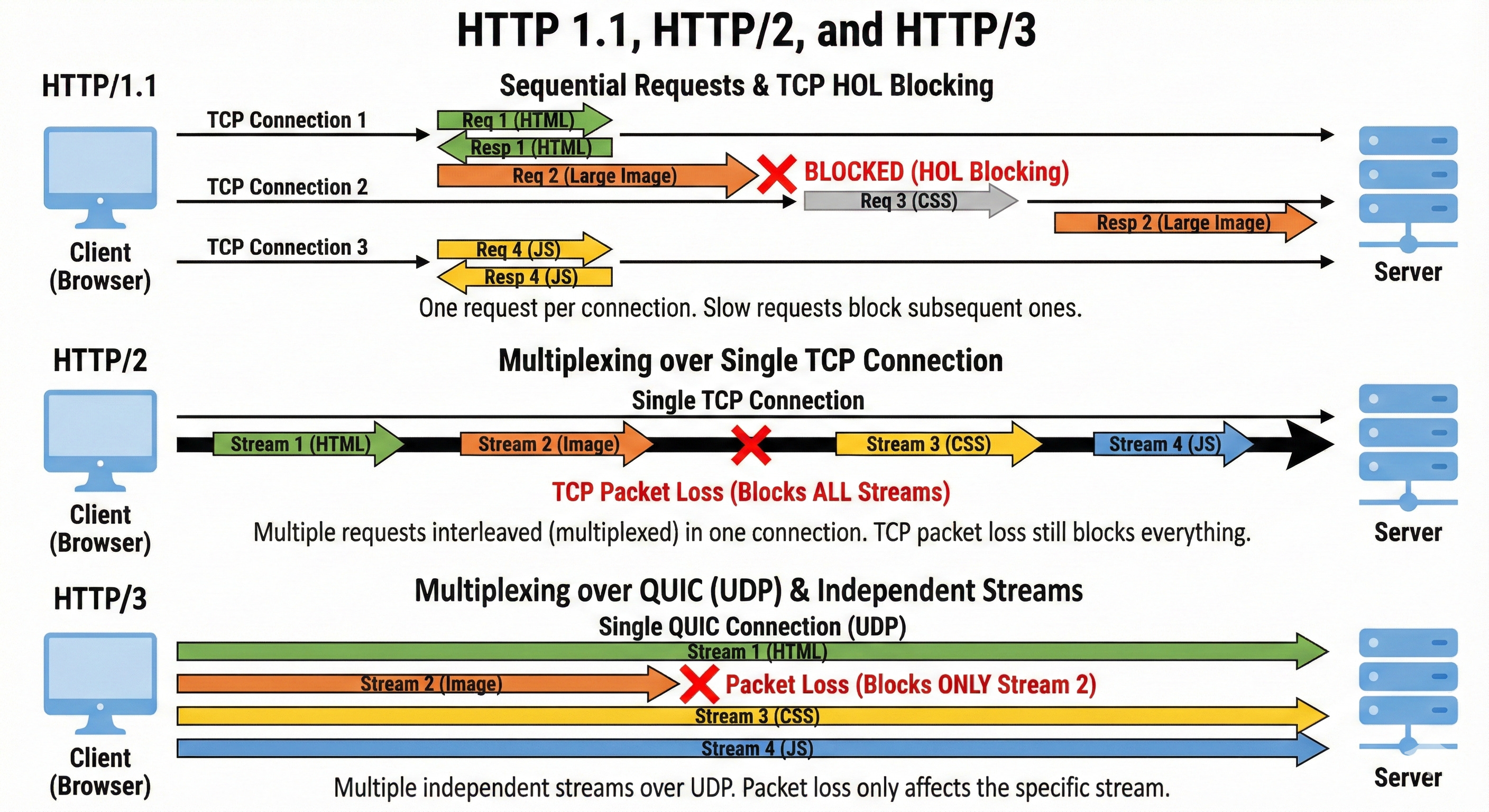
The killer feature of HTTP/3 is independent streams at the transport layer.
In HTTP/2, the TCP connection was one big, dumb pipe. It didn’t know that the data inside it belonged to different images.
In HTTP/3 (QUIC), the transport protocol is “stream-aware.” Every frame has a stream ID that the transport layer understands.
Scenario: You are downloading image1.png (Stream A) and image2.png (Stream B).
A packet for
image1.pngis lost.HTTP/2 (TCP): Everything stops. The courier halts the truck.
HTTP/3 (QUIC): The protocol notices the gap in Stream A. It pauses Stream A to wait for the retransmission. But, it lets Stream B continue immediately.
image2.png keeps downloading and renders on your screen.
The rest of the page loads. Only the specific image with the lost packet is delayed.
This effectively eliminates Head-of-Line Blocking entirely.
On lossy networks, this results in vastly smoother page loads and fewer “buffering” stalls. Statistics from YouTube show that this reduces video buffering by over 15% for users on mobile networks.
Feature 2: Faster Handshakes (0-RTT)
We mentioned earlier that TCP requires a “3-way handshake” before sending data. On top of that, we usually need TLS (Transport Layer Security) to encrypt the connection (HTTPS), which adds another handshake.
HTTP/1.1 & HTTP/2: TCP Handshake + TLS Handshake = 2 to 3 Round Trips before data flows.
QUIC merges these steps.
Because QUIC was designed with security from day one (you cannot run QUIC without encryption), it combines the transport handshake and the encryption handshake into a single packet exchange.
HTTP/3: 1 Round Trip to connect and secure.
Even better, if you have visited a site before, QUIC supports 0-RTT (Zero Round Trip Time). The browser can send the first HTTP request (encrypted) inside the very first packet of the handshake. It starts talking immediately.
Impact: For a user in London accessing a server in San Francisco, saving 2 round trips can shave 300ms off the load time instantly. That is a perceptible difference in “snappiness”.
Feature 3: Connection Migration (The “Walking Out the Door” Problem)
Have you ever been on a Wi-Fi call, walked out of your house to your car, and had the call drop as your phone switched to 4G/LTE?
This happens because TCP connections are identified by a 4-tuple:
Source IP Address
Source Port
Destination IP Address
Destination Port
When you switch from Wi-Fi to 4G, your Source IP Address changes. The server sees a packet from a new IP and says, “I don’t know who you are.”
The connection breaks.
Your phone has to perform a new handshake and restart the download.
QUIC solves this with Connection IDs (CID).
Instead of relying on the IP address to identify the user, QUIC assigns a unique ID to the connection (e.g., ID #5599).
If your phone switches networks, it sends a packet from the new IP saying, “Hey, I am still Connection ID #5599. Here is the next packet.”
The server checks the ID, updates its records, and keeps the stream flowing without interruption. This is a massive improvement for the “mobile-first” world we live in.
Part 6: Challenges and The “UDP Blockade”
If HTTP/3 is so much better, why isn’t it everywhere yet?
Why does my browser still show HTTP/2 sometimes?
1. The Middlebox Problem (Ossification)
The internet is full of “Middleboxes” (corporate firewalls, NAT routers, and security gateways).
Many of these older devices were configured years ago to trust TCP (Port 80 and 443) and block or throttle everything else.
Since HTTP/3 uses UDP, some strict corporate firewalls think it is “suspicious.” They might mistake a high-speed UDP stream for a Denial of Service attack or a torrent download, and they block it.
The Solution: Happy Eyeballs Browsers use an algorithm called “Happy Eyeballs” (RFC 8305). When you visit a site like Google.com, your browser actually attempts to connect via HTTP/3 (UDP) and HTTP/2 (TCP) simultaneously (or with a very slight delay).
Whichever handshake completes first “wins” and is used for the session. If the UDP packet is blocked by a firewall, the TCP connection succeeds, and the user never knows the difference. This ensures reliability but slows down the “exclusive” adoption of H3.
2. CPU Overhead
TCP is so old and ubiquitous that it is baked into the silicon of your computer’s network card. It is “hardware accelerated.” The CPU doesn’t have to do much work to process TCP packets; the network card handles it.
QUIC is new. It runs in “User Space” (software). This means your main CPU has to do the heavy lifting of encrypting, decrypting, and acknowledging every packet.
Early benchmarks showed HTTP/3 using 2-3x more CPU power than HTTP/2 on servers.
For massive companies like Cloudflare or Google, this translates to millions of dollars in extra electricity and hardware costs.
However, modern optimizations and newer hardware are rapidly closing this gap, making H3 viable for everyone.
Conclusion and Future Outlook
The evolution of HTTP is a story of adaptation.
HTTP/1.1 was built for a text-based internet of simple documents. It was reliable but inefficient.
HTTP/2 patched the cracks. It introduced multiplexing to support the media-rich web of the 2010s, but it was still tethered to the aging TCP protocol.
HTTP/3 completely rebuilds the foundation. It embraces the chaos of UDP to survive the mobile, always-moving, unreliable networks of the 2020s.
As a system designer, your job isn’t just to choose the “newest” thing. It is to understand the trade-offs.
You choose HTTP/3 not because it is trendy, but because you understand that your mobile users in rural areas are losing TCP packets, and only QUIC can save their user experience.
The internet will only get faster.
But for now, you are armed with the knowledge to understand exactly why that loading spinner is spinning and more importantly, how to make it stop.
Key Takeaways for your Interview
Blocking is the Enemy: HTTP/1 blocked at the application layer. HTTP/2 blocked at the TCP layer. HTTP/3 solves both by making streams independent.
Context is King: On a fast, wired fiber connection, HTTP/2 and HTTP/3 perform almost identically. The magic of H3 only shines when the network gets messy (packet loss).
Security is Standard: We have moved from “optional” encryption to “mandatory” encryption with TLS 1.3 baked directly into the transport layer of HTTP/3.
Connection Migration: Remember the “4-Tuple” vs “Connection ID” difference. It is a favorite question for interviewers asking about mobile reliability.