
Design TicketMaster (Ticket Booking System) in 45 Minutes
Discover the 14-step technical architecture behind building a highly scalable ticket booking platform that handles massive traffic seamlessly.

Here is a detailed, step-by-step system design for Ticketmaster.
1. Restate the problem and pick the scope
We are designing a large-scale ticketing platform like Ticketmaster. The system allows users to browse upcoming live events, view venue seating charts, and purchase tickets securely.
The main user groups are event organizers (who list events) and ticket buyers (who purchase seats). The most critical action ticket buyers care about is successfully securing seats for highly anticipated events without the system crashing or double booking their selection.
Because this is a massive system, we will focus strictly on the customer booking flow: browsing events, viewing seat maps, temporarily reserving seats, and completing the purchase.
We will explicitly exclude event creation, admin dashboards, dynamic pricing algorithms, and the secondary ticket resale market.
2. Clarify functional requirements
Must have:
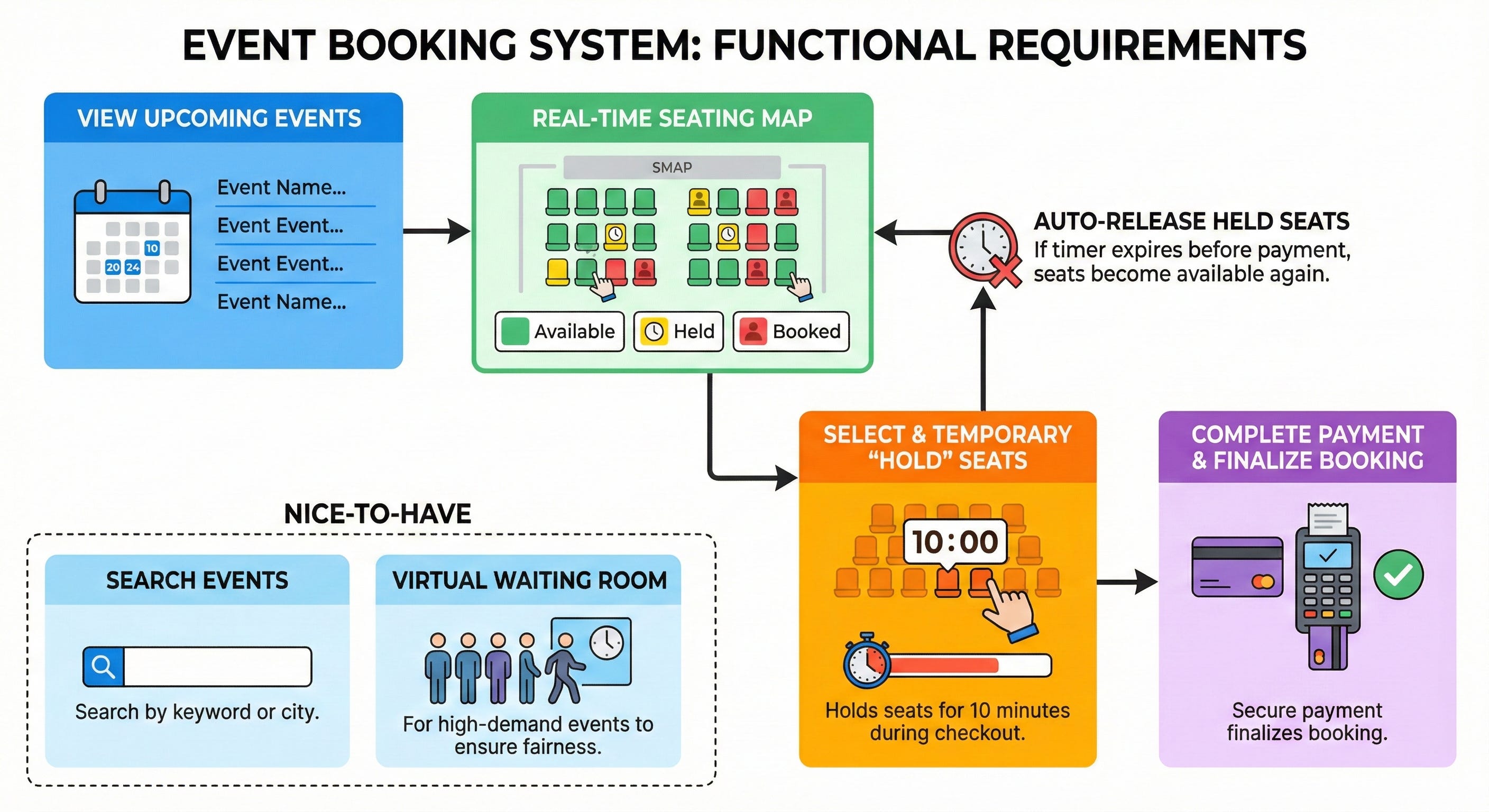
User can view a list of upcoming events.
User can view a seating map showing available, held, and booked seats for an event in real time.
User can select seats and place a temporary “hold” on them (for example, 10 minutes) while they check out.
User can complete payment for their held seats to finalize the booking.
System must automatically release held seats if the 10 minute timer expires before payment is completed.
Nice to have:
User can search for events by keyword or city.
A “virtual waiting room” for highly anticipated events to ensure fairness and prevent system crashes.
3. Clarify non-functional requirements
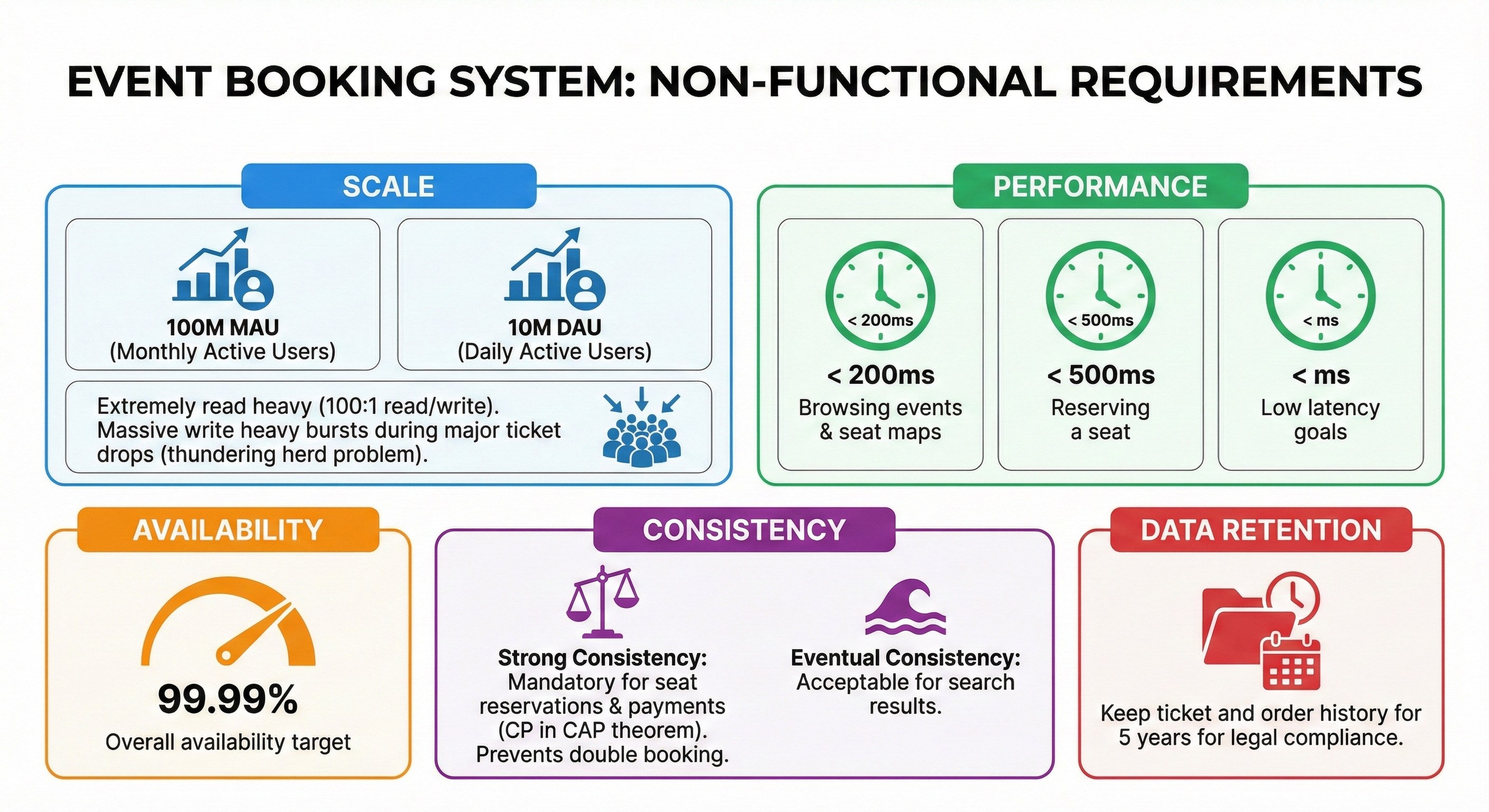
Target users: 100 million Monthly Active Users (MAU), 10 million Daily Active Users (DAU).
Read and write pattern: Extremely read-heavy under normal conditions (roughly a 100:1 read-to-write ratio). However, during major concert ticket drops, the system experiences massive, localized write-heavy bursts (the thundering herd problem).
Latency goals: < 200ms for browsing events and loading seat maps. < 500ms for reserving a seat.
Availability targets: 99.99% overall availability.
Consistency preference: Strong consistency is absolutely mandatory for seat reservations and payments to prevent double booking. We favor Consistency over Availability (CP in the CAP theorem) during checkout. Eventual consistency is acceptable for search results.
Data retention: Keep ticket and order history for 5 years for legal compliance.
4. Back-of-the-envelope estimates
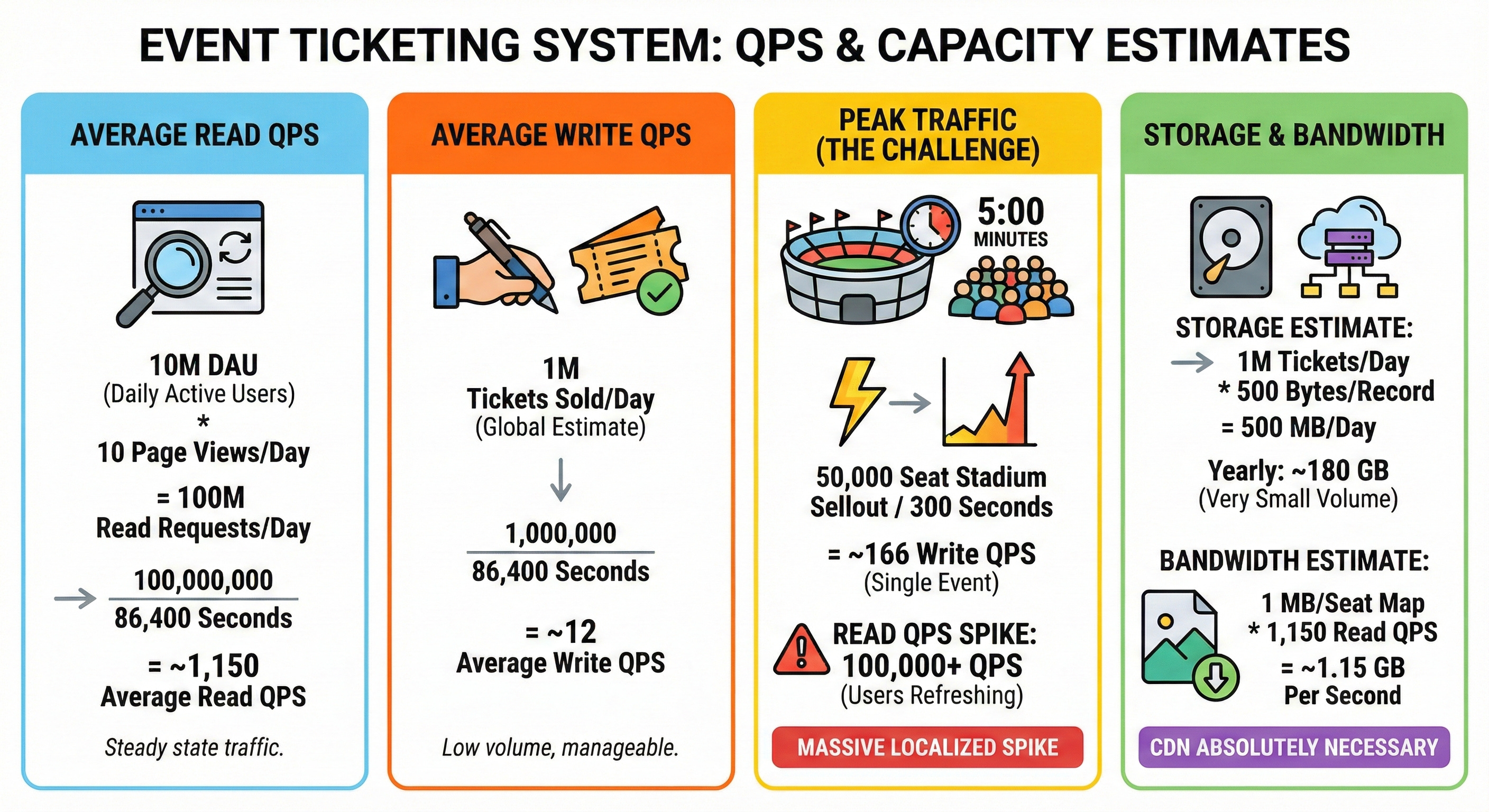
Estimate average read QPS: 10 million DAU * 10 page views per day = 100 million read requests per day.
100,000,000 / 86,400 seconds = ~1,150 average read QPS.
Estimate average write QPS: Assume 1 million tickets are sold globally per day.
1,000,000 / 86,400 seconds = ~12 average write QPS.
Estimate peak traffic versus average: A 50,000 seat stadium might sell out in 5 minutes during a highly anticipated drop.
50,000 / 300 seconds = ~166 write QPS focused entirely on a single event. Read traffic (users refreshing) can easily hit 100,000+ QPS. Handling this massive localized spike is the real challenge.
Estimate needed storage: 1 million tickets per day * 500 bytes per ticket record = 500 MB per day.
Over a year, this is roughly 180 GB. Storage volume is very small; the real challenge is concurrent write operations.
Estimate bandwidth: Venue seating maps are heavy visual assets (for example, 1 MB per image).
1,150 average read QPS * 1 MB = ~1.15 GB per second. A Content Delivery Network (CDN) is absolutely necessary to handle this bandwidth.
5. API design
We will use a RESTful API for our core flows over HTTPS.
Search Events
GET /v1/events?keyword={keyword}&city={city}Response body: List of
{ event_id, name, date, venue_name, thumbnail_url }.Status codes: 200 OK.
View Seats
GET /v1/events/{event_id}/seatsResponse body: List of
{ seat_id, row, number, status, price }.Status codes: 200 OK, 404 Not Found.
Reserve Seats (The Hold)
POST /v1/reservationsRequest parameters:
{ event_id: "e123", seat_ids: ["s1", "s2"] }Response body:
{ reservation_id: "r999", expires_at: "2026-05-01T20:10:00Z" }Error cases: 409 Conflict (Seats already taken), 400 Bad Request.
Confirm Booking
POST /v1/bookingsRequest parameters:
{ reservation_id: "r999", payment_token: "tok_xyz", idempotency_key: "uuid" }Response body:
{ booking_id: "b111", status: "CONFIRMED" }Error cases: 400 Bad Request (Reservation expired), 402 Payment Required (Card declined).
6. High-level architecture
Here is the step-by-step path a request takes from the user to our data stores:
Client -> CDN / WAF -> Load Balancer -> Virtual Waiting Room -> API Gateway -> App Servers -> Cache -> Database -> Message Queue
Clients (web, mobile): The frontend interfaces used by ticket buyers.
CDN and WAF: The Content Delivery Network serves heavy static assets instantly. The Web Application Firewall blocks malicious bot traffic.
Load Balancer: Distributes incoming traffic evenly across our backend servers.
Virtual Waiting Room: A specialized reverse proxy layer that buffers traffic during massive spikes, letting a manageable number of users into the active site.
API Gateway: Routes incoming requests, handles authentication, and enforces rate limits.
Keep reading with a 7-day free trial
Subscribe to System Design Nuggets to keep reading this post and get 7 days of free access to the full post archives.