
Demystifying Proxy Servers for Beginners
This guide explains proxy servers: how they work as an intermediary, why they’re used for anonymity and speed, and how forward vs reverse proxies differ.


Ever wonder how you can browse the web anonymously or access blocked content?
Often, the answer lies in proxy servers.
Proxy servers act as intermediaries between your device and the websites you visit, helping with everything from privacy to performance optimization.
But how exactly do they work?
In this blog, we’ll break down the basics of proxy servers, how they function, and the key differences between forward and reverse proxies.
What is a Proxy Server?
A proxy server is an intermediary between a client (like your computer) and the internet.
Instead of your computer contacting a website directly, the proxy acts as a middleman and handles the communication for you.
Think of it like sending a friend to ask a question on your behalf – the website answers your friend (the proxy), who then relays the answer back to you.
To the website, it looks like the request came from the proxy, not you.
This means your own identity (like your IP address) stays hidden, which is great for privacy.
In technical terms, a proxy server has its own IP address that it uses to fetch data on your behalf.
When you use a proxy, websites see the proxy’s IP as the source of the request, not yours.
That’s why proxies are often used to mask your IP and let you browse anonymously.
They can also filter out unwanted content or cache popular data to improve performance.
How Does a Proxy Server Work?
Let’s break down the process of using a proxy server step by step:
Your Request: You (the client) try to access a website or resource. Instead of contacting the site directly, your request is sent to the proxy server first (as configured in your browser or device).
Proxy Checks Cache: The proxy server checks if it already has a copy of the page or data you asked for in its local cache. If it finds it, the proxy immediately returns the cached result to you.
Proxy Forwards Request: If it’s not cached, the proxy forwards your request to the target website on your behalf, using its own IP address to fetch the data.
Website Responds to Proxy: The website responds to the proxy (thinking the proxy is the client) and sends back the content.
Proxy Sends Response to You: The proxy receives the website’s data and passes it back to you, completing the exchange.
Forward Proxy vs Reverse Proxy
Not all proxies are the same.
Two common types are forward proxies and reverse proxies – both act as intermediaries, but on opposite sides of the connection:
Forward Proxy (Client-Side)
Sits on the user’s side.
Organizations often use forward proxies so that all their employees’ web traffic goes through one gateway.
The forward proxy can then enforce rules (like blocking certain websites), cache frequently accessed content, and hide the internal network’s real IP addresses from the outside world.
If you’ve ever used a web-based proxy or set your browser to use a proxy server to bypass a restriction, you were using a forward proxy.
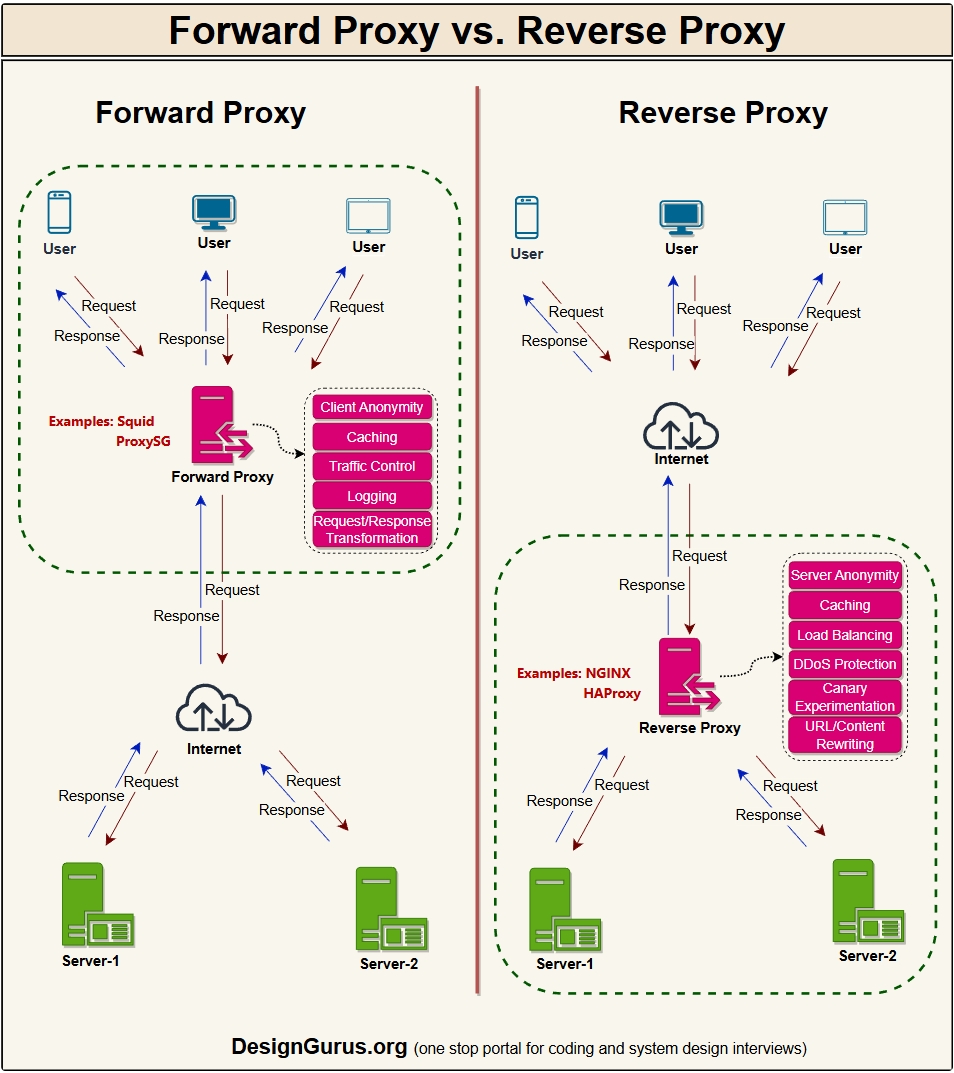
Reverse Proxy (Server-Side)
Sits on the server’s side, in front of one or more web servers.
Websites and cloud services use reverse proxies to handle incoming requests before they reach the servers.
The reverse proxy can distribute requests across multiple servers (load balancing), serve cached content for faster responses, and add security by shielding the real servers from direct exposure.
Many content delivery networks (CDNs) act as reverse proxies, caching content globally and protecting origin servers from attacks.
Being clear on the forward vs. reverse proxy distinction is important – it’s a common system design interview topic!
Why Use Proxy Servers?
Proxy servers might sound like extra hassle, but they provide many benefits for both everyday users and large systems:
Privacy and Anonymity: By masking your IP address, a proxy hides your identity and lets you browse anonymously. Want to visit a site without revealing your location? A proxy can make it look like you’re coming from a different region, helping you bypass geographic blocks.
Security and Filtering: Proxies add an extra layer of security. They can serve as firewalls or web filters, blocking access to known malicious sites or unwanted content. Because the proxy stands between your network and the internet, it also protects internal servers from direct attacks. Some proxies even enforce encryption or company browsing policies for safer internet use.
Caching and Performance: Proxies often cache copies of frequently requested web pages or files. If multiple users request the same resource, the proxy can retrieve it once and then serve everyone from its local copy. This reduces bandwidth usage and provides faster response times.
Load Balancing and Scalability: In large applications, reverse proxies help balance the load. By distributing incoming requests across multiple backend servers, a proxy prevents any one server from overloading. If one server goes down, the proxy redirects traffic to others, improving reliability.
These advantages explain why proxies are so common in networks today.
A well-placed proxy can boost privacy, improve performance, and enhance security all at once.
Wrapping Up
Proxy servers might work behind the scenes, but now you know they’re the internet’s helpful middlemen – fetching data on your behalf, caching content, filtering traffic, and protecting your systems to keep things smoother and safer.
From a forward proxy helping you browse privately to a reverse proxy enabling websites to serve millions, proxies are integral to modern system design.
This overview has demystified how proxy servers work.
The next time you hear “proxy server,” you’ll know it’s just a smart go-between that keeps our internet more private, efficient, and secure!
For a detailed overview of system design concepts, check out Grokking the System Design Interview.