
TCP vs. UDP vs. gRPC: Choosing the Right Protocol for Your Architecture
Stop guessing how data moves. Master essential network protocols, including TCP vs. UDP, HTTP/3, WebSockets, and gRPC, and learn exactly which one to choose for your next system design interview.

When you write a function, you know exactly how data flows from one variable to another. It happens inside the memory of a single machine.
But modern software rarely lives in isolation.
Your code usually needs to talk to a database, an API, or a user’s browser located halfway across the world.
This creates a massive engineering challenge.
You are sending electrical signals or light pulses through cables, routers, and switches. Without a strict set of rules, this data would arrive as a corrupted mess.
One computer might send data too fast for the receiver to handle. Another might send data in the wrong order.
This is where Network Protocols come in.
A protocol is simply a standard set of rules that defines how computers communicate. It dictates the format of the data, how to start a conversation, how to end it, and what to do when things go wrong.
For a software engineer, understanding these protocols is not just academic trivia. It is a requirement for debugging production issues and designing scalable systems. If you do not understand how these rules work, you cannot build efficient applications.
In this guide, we will look under the hood of the internet.
We will explore the mechanisms that ensure data integrity, speed, and security. We will focus on the technical reality of how these systems operate.
The Transport Layer: The Foundation
Before we talk about web pages or file transfers, we must look at the transport layer. This layer is responsible for getting data from one application to another.
Almost everything else we discuss will be built on top of one of these two giants: TCP or UDP.
TCP (Transmission Control Protocol)
TCP is the most common transport protocol on the internet. It is designed with one primary goal, which is reliability.
When you send data via TCP, the protocol guarantees that the receiver gets every single byte you sent. It also guarantees that the data arrives in the exact order it was sent. If a packet of data is lost in transit, TCP detects the loss and retransmits it automatically.
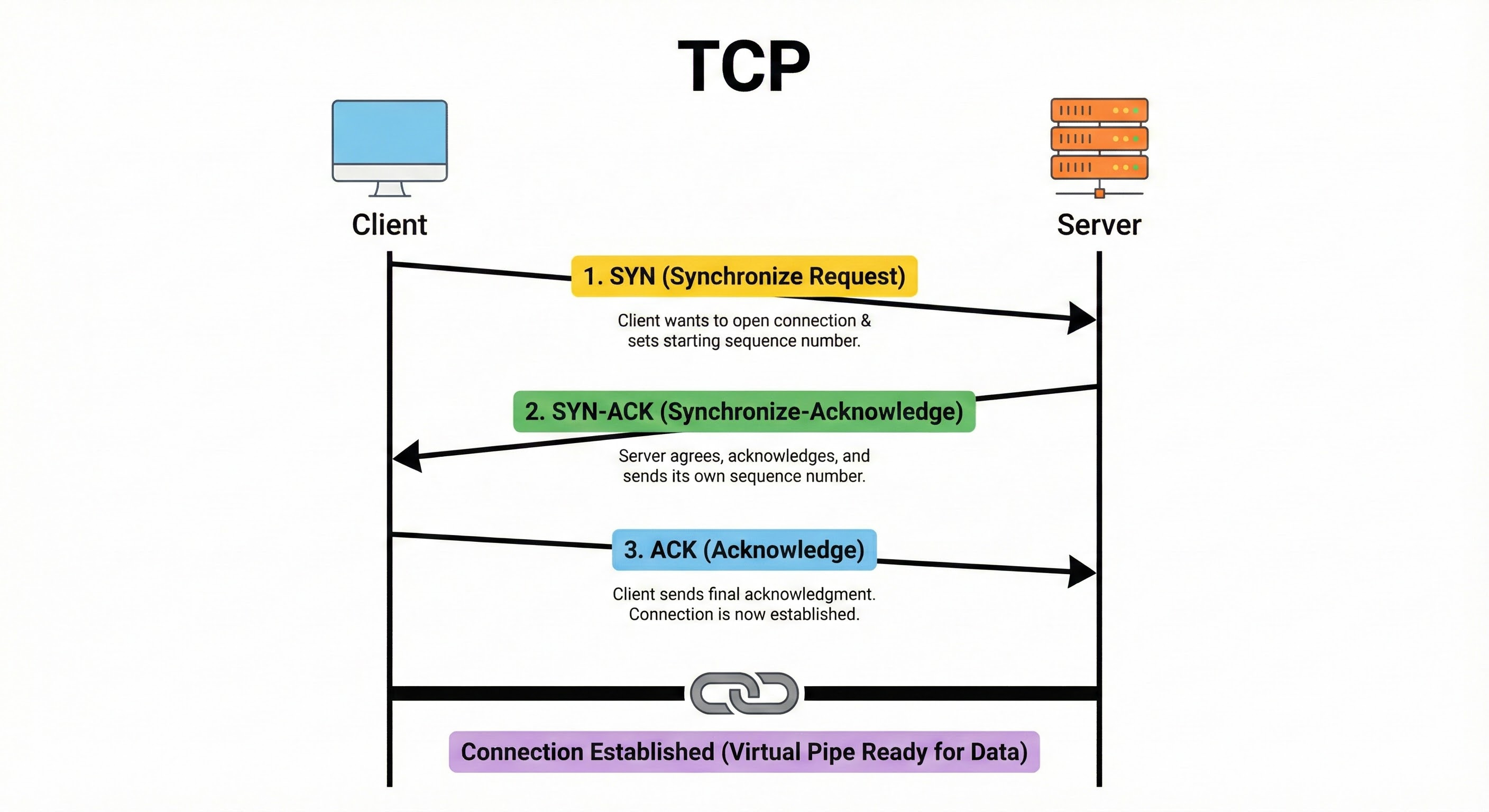
How it works: TCP creates a connection between the client and the server before any data is exchanged. This process is called the Three-Way Handshake.
SYN: The client sends a packet with a “synchronize” flag. This tells the server that the client wants to open a connection and sets a starting sequence number.
SYN-ACK: The server receives the message and replies with a “synchronize-acknowledge” packet. It agrees to the connection and sends its own sequence number.
ACK: The client sends a final “acknowledge” packet back to the server.
Once this is done, a virtual pipe is established.
TCP also uses Flow Control and Congestion Control. The receiver tells the sender how much data it can handle at once. If the sender tries to push too much data, TCP slows down the transmission. This prevents the receiver from being overwhelmed.
Why use it: You use TCP when accuracy matters more than speed. If you are sending a database query, an email, or a webpage, you cannot afford to lose a single character.
UDP (User Datagram Protocol)
UDP is the opposite of TCP. It is often referred to as a “connectionless” protocol. It prioritizes speed and efficiency over reliability.
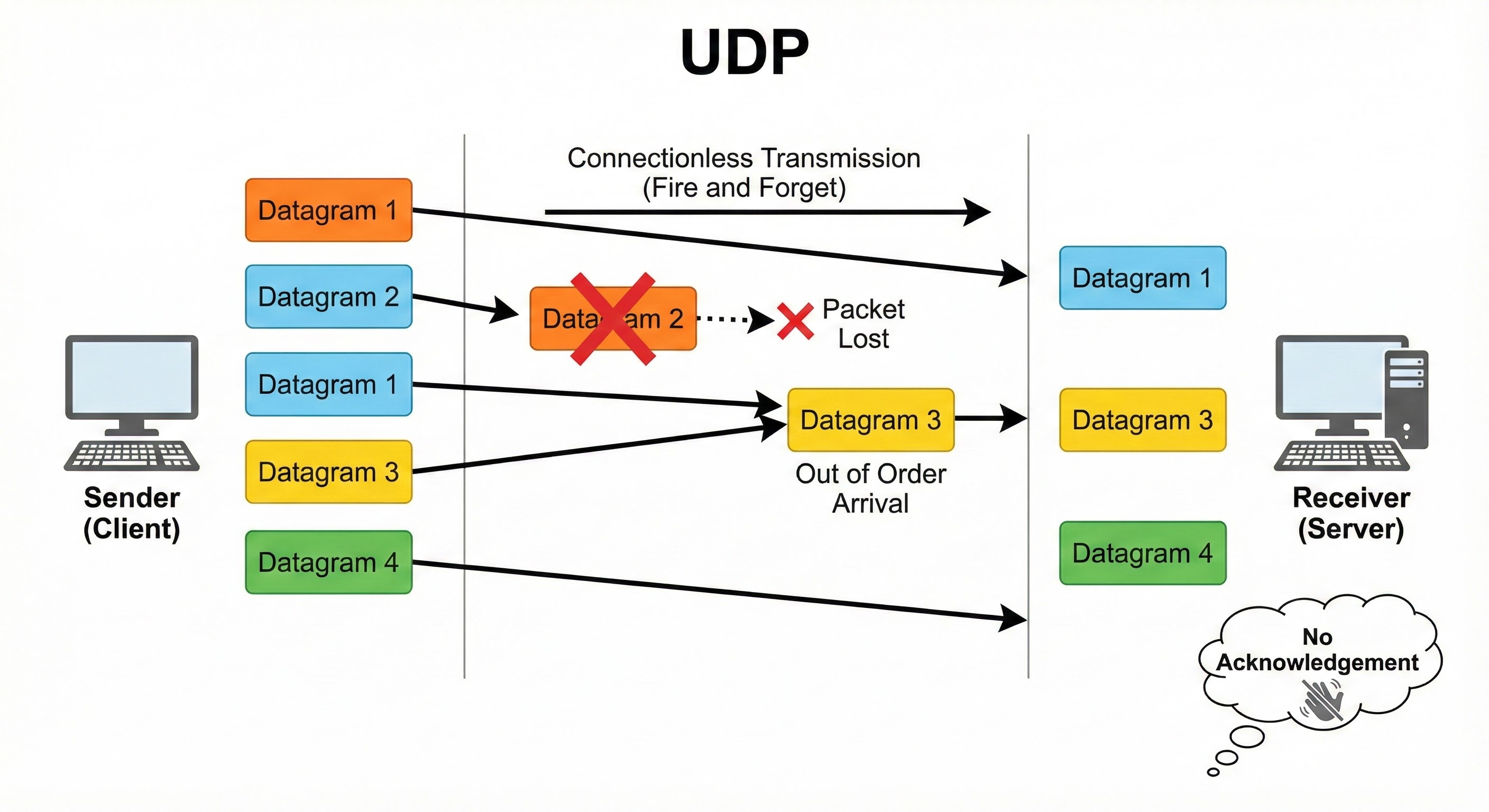
UDP does not perform a handshake. It does not number the packets to ensure they are in order. It does not check if the data arrived safely. It simply sends the data out and hopes for the best.
How it works: The sender packages data into “datagrams” and puts them onto the network immediately. There is no setup delay. There is no overhead for tracking acknowledgments.
If a packet is dropped by a router along the way, it is gone forever. UDP will not try to send it again.
If packets arrive out of order (packet 5 arrives before packet 4), UDP passes them to the application exactly as they arrived.
Why use it: You use UDP when speed is critical and a little data loss is acceptable. This is standard in video streaming or online gaming.
If you drop a single frame of video in a live stream, it is better to just skip it and show the current frame rather than stopping the video to wait for the old frame to arrive.
The Application Layer: The Web and Beyond
While TCP and UDP handle the movement of raw data, the Application Layer defines what that data actually means. These are the protocols you will likely interact with directly in your code.
HTTP (Hypertext Transfer Protocol)
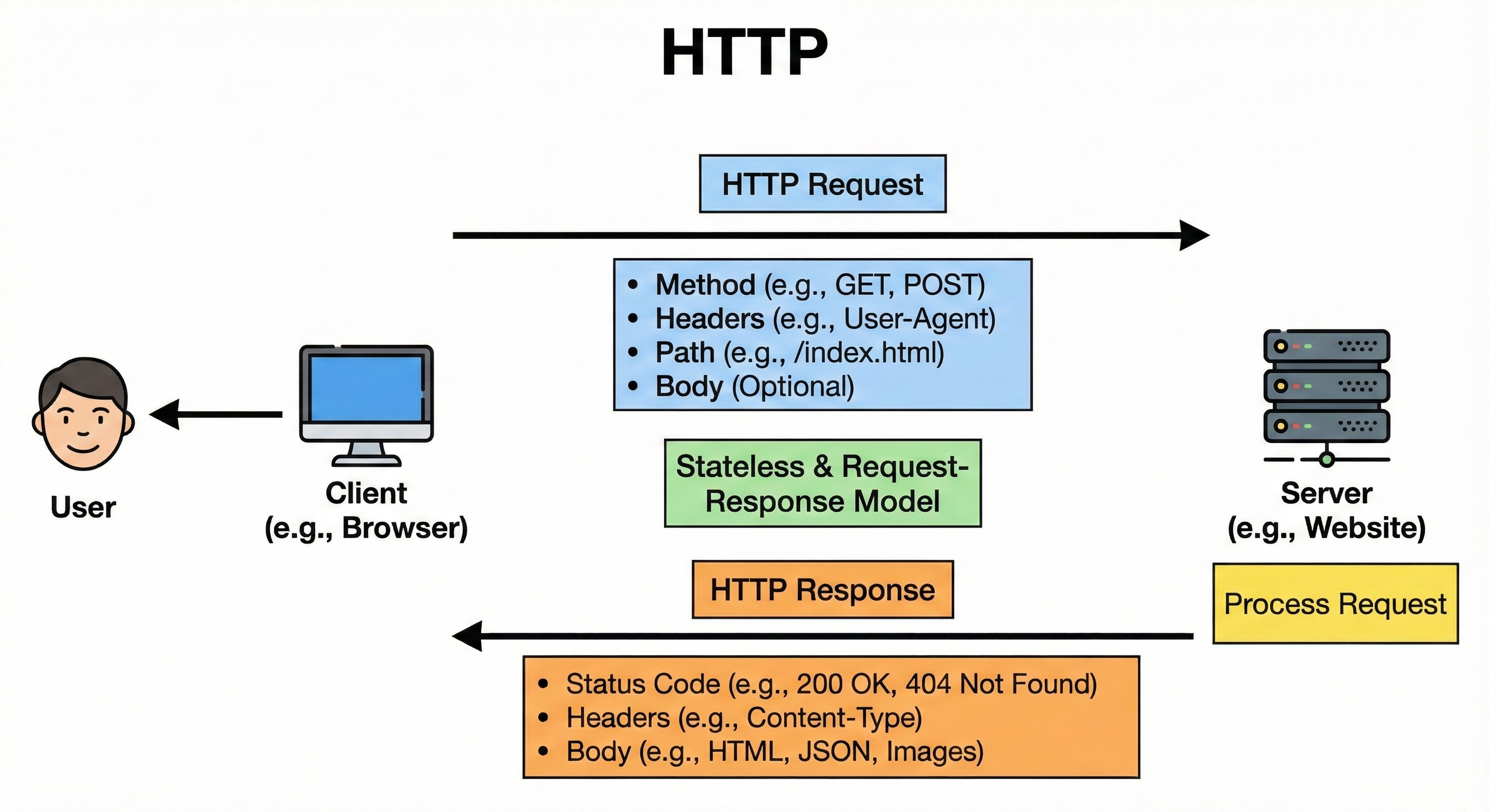
HTTP is the standard protocol for the web. It operates on a Request-Response model. The client (like a web browser) sends a request, and the server sends back a response.
How it works: HTTP is text-based (mostly). A request contains a “method” telling the server what to do. Common methods include:
GET: Retrieve data.
POST: Submit new data.
PUT: Update existing data.
DELETE: Remove data.
Along with the method, the client sends Headers. These are key-value pairs that provide metadata, such as the type of content being sent or authentication tokens.
The server replies with a Status Code to indicate success or failure. You have likely seen 200 OK (success) or 404 Not Found (resource missing).
HTTP Versions matter:
HTTP/1.1: This version processes one request at a time per connection. This can lead to “head-of-line blocking,” where one slow image load delays the rest of the website.
HTTP/2: This introduced Multiplexing. It allows multiple requests and responses to be sent simultaneously over a single TCP connection. It splits data into binary frames and interleaves them.
HTTP/3: This is the newest standard. It abandons TCP entirely and runs over QUIC (which is built on UDP). It solves connection blocking issues at the transport level to make the web much faster on unreliable networks.
WebSocket
HTTP is great, but it is unidirectional. The client must always initiate the conversation.
If the server has new data, it has to wait for the client to ask for it. This is inefficient for real-time applications like chat apps or stock tickers.
WebSocket solves this by providing a full-duplex communication channel.
How it works: The connection starts as a standard HTTP request. The client sends a request with a special header asking to “upgrade” the connection. If the server agrees, the protocol switches from HTTP to WebSocket.
Once established, the connection remains open. Both the client and the server can send data to each other at any time. There is no need to send headers with every message, which reduces the data size significantly.
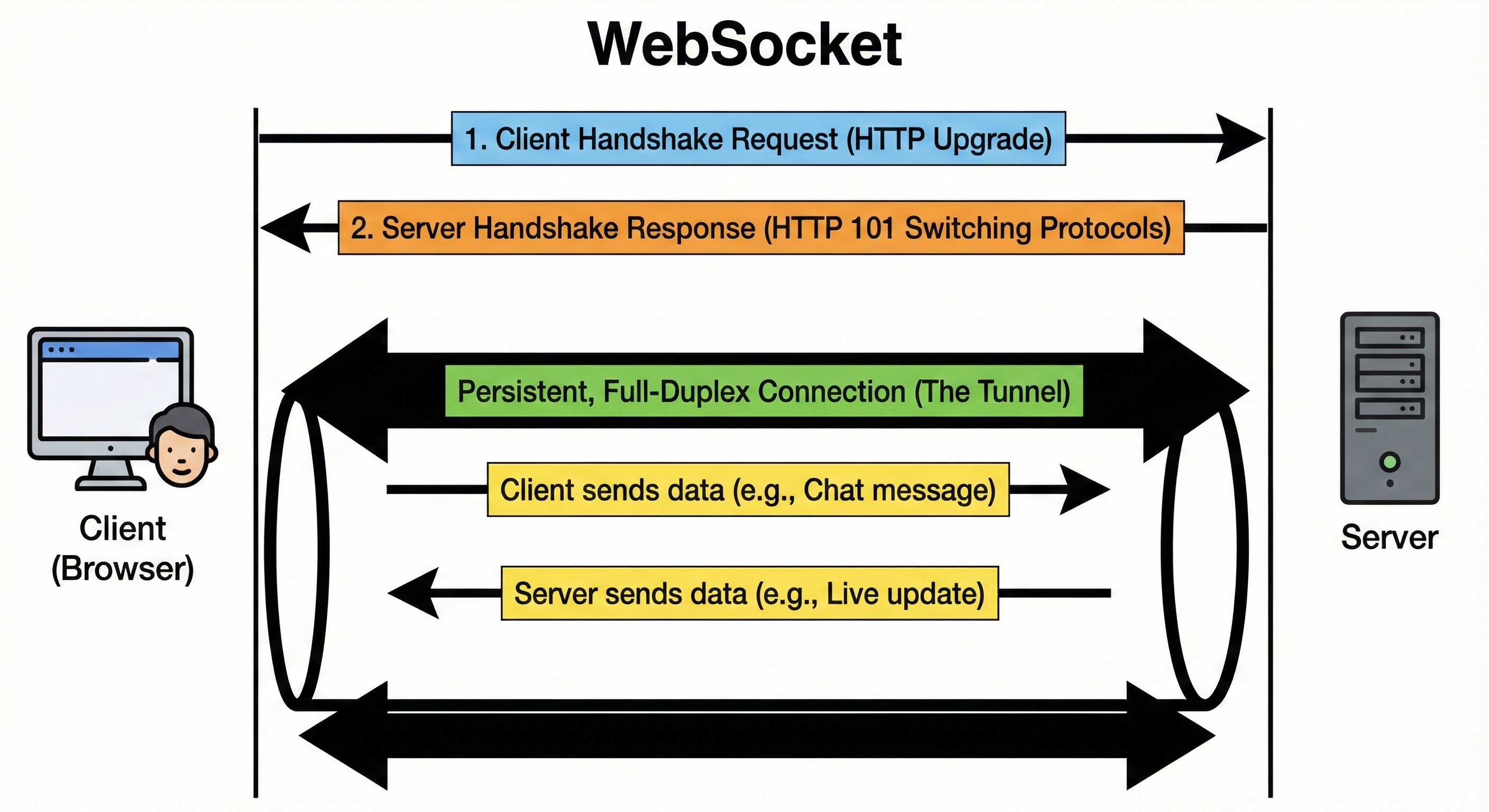
Why use it: Use WebSockets when you need low-latency, two-way communication. It keeps a persistent connection alive, removing the overhead of constantly opening and closing HTTP connections.
