
16 Load Balancing Related Concepts Every Software Engineer Must Know
Master system design with this deep dive into 16 load balancing essentials. This blog explains L4 vs L7, Failover, and more with clear examples.

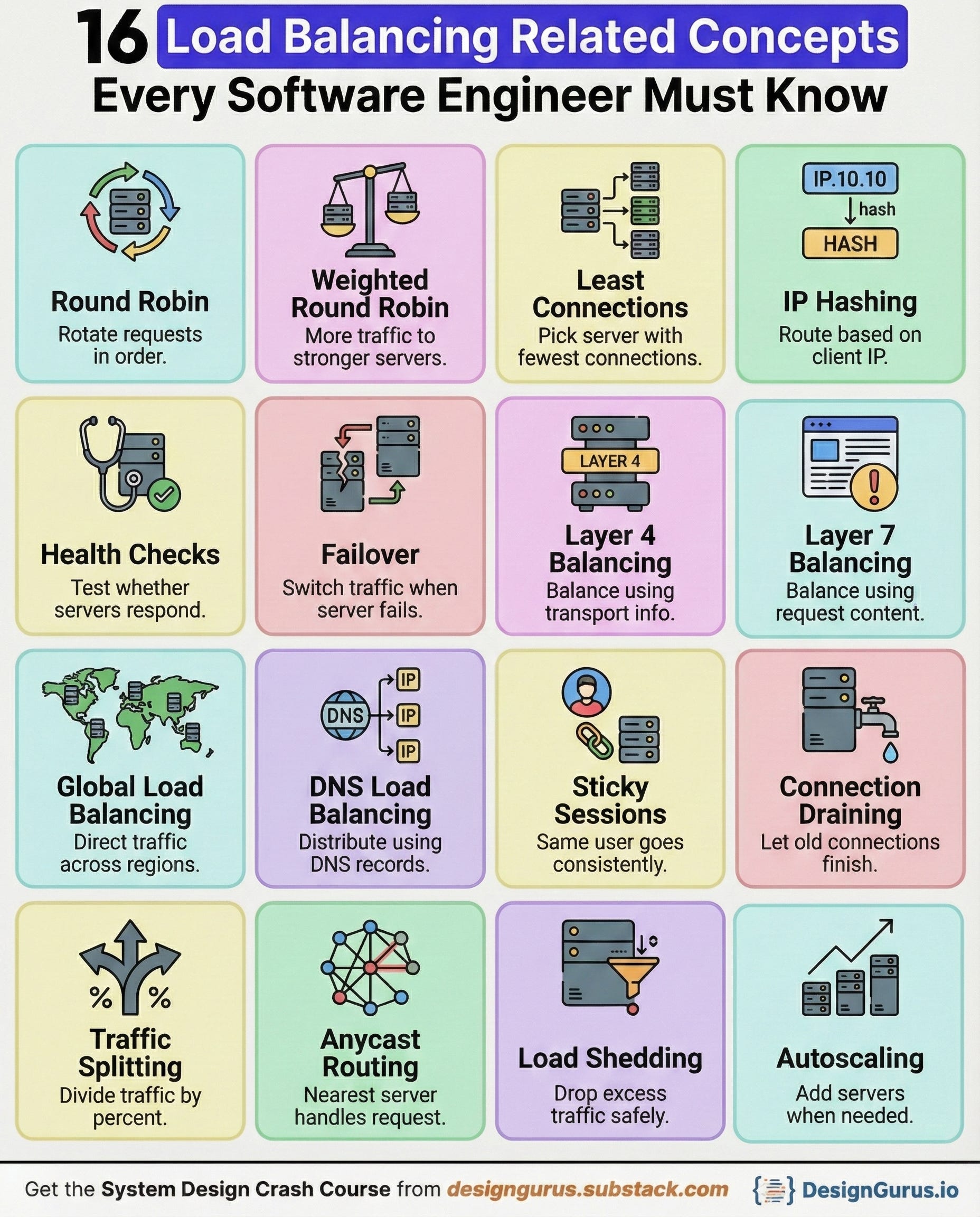
Load balancing is one of the foundations of scalable backend systems.
As soon as multiple users start hitting your service simultaneously, you need a way to distribute traffic across servers so nothing slows down or crashes.
It looks complex when you see giant diagrams of servers, proxies, and regions, but the core ideas behind it are surprisingly simple.
Once you understand these concepts, you can explain most distributed system designs confidently in interviews and build more reliable backend systems.
Below are sixteen load-balancing concepts every software engineer should know.
1. Round Robin
Round Robin is the simplest and most deterministic algorithm for traffic distribution.
It does not consider the current load, specification, or health of the destination servers.
The load balancer maintains a list of available servers and forwards requests sequentially (A, then B, then C) before looping back to the beginning.
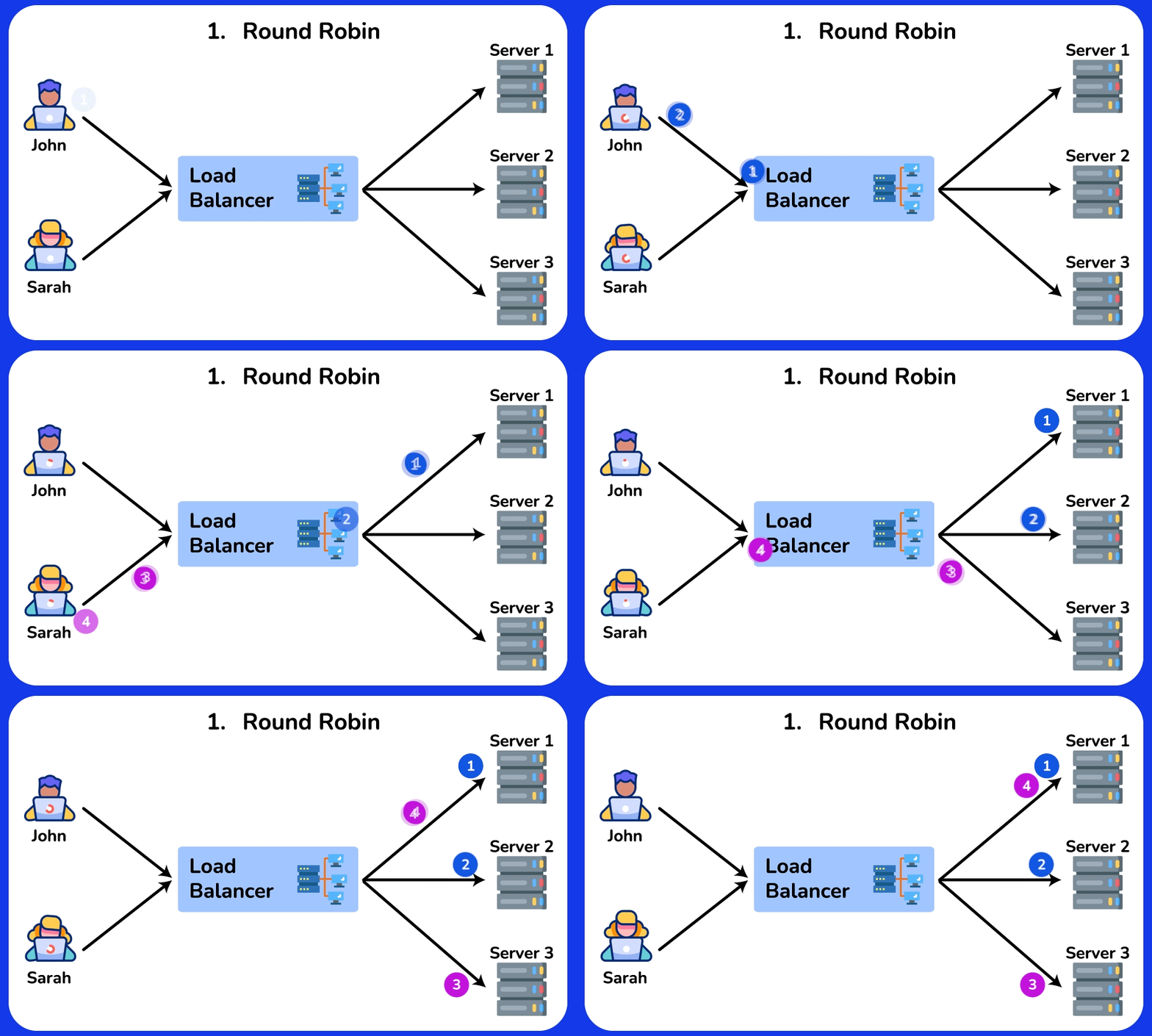
It is computationally cheap and easy to implement, making it ideal for stateless services where the request processing time is roughly uniform across all requests.
Example
Imagine a casino dealer dealing cards to a table of 5 players.
The dealer gives the first card to Player 1, the second to Player 2, and so on, until Player 5 gets a card. Then, the dealer immediately loops back to Player 1.
The dealer doesn’t care if Player 1 is holding a sandwich or if Player 3 is asleep; the rotation is strict and blind.
This works perfectly if every player takes the exact same amount of time to pick up their card.
2. Weighted Round Robin
This is an evolution of Round Robin designed to handle heterogeneous server environments (where machines have different specs).
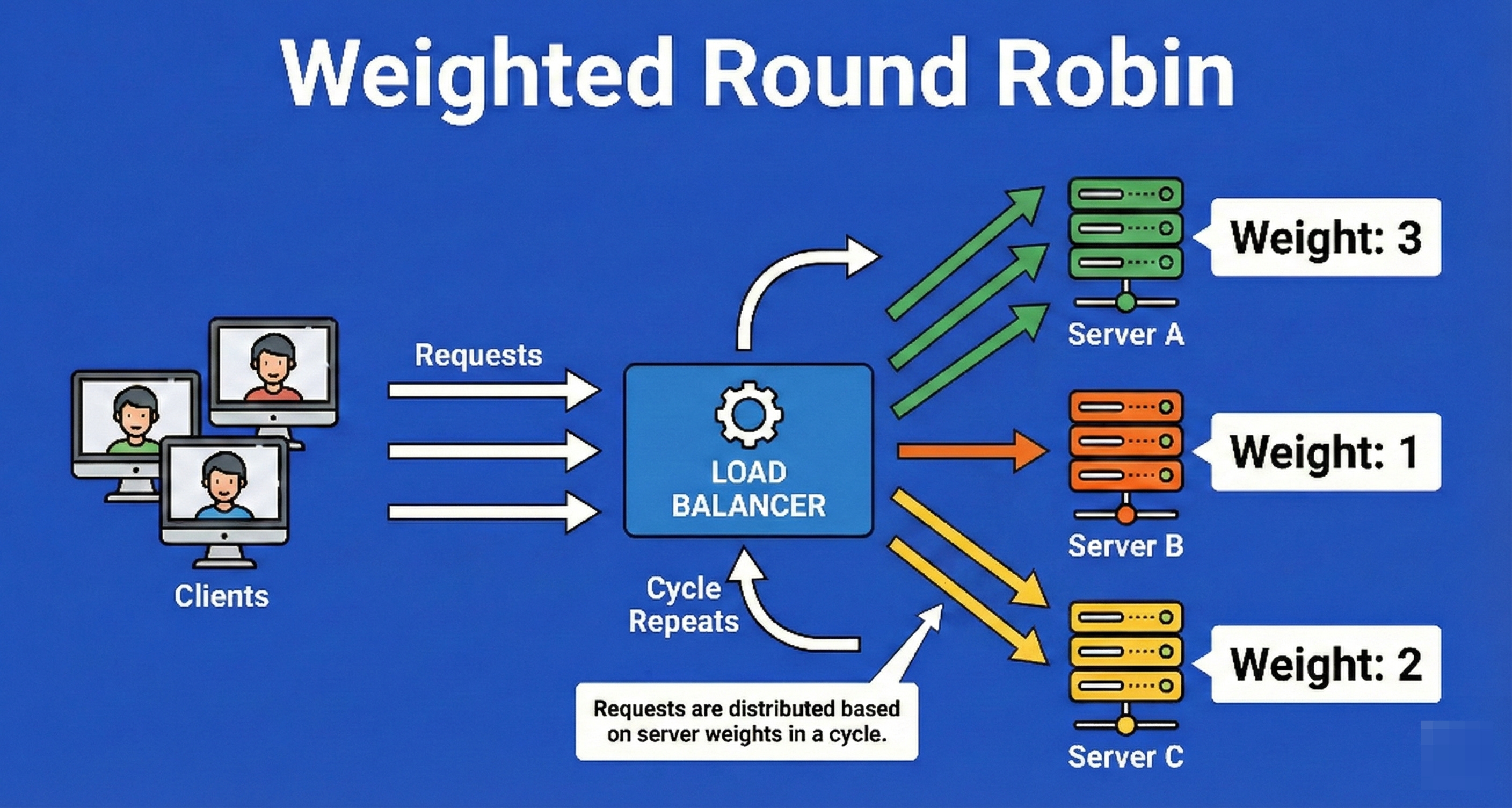
Each server is assigned a numerical “weight” integer representing its processing capacity.
The load balancer distributes requests proportional to these weights.
If Server A is twice as powerful as Server B, Server A is assigned a weight of 2, and Server B a weight of 1, ensuring Server A receives roughly 66% of the traffic while Server B receives 33%.
Example
Think of a moving company with two employees: “The Hulk” (a bodybuilder) and “Stan” (a regular guy).
The manager (Load Balancer) assigns weights to them based on strength.
For every box Stan carries, the manager puts two boxes on The Hulk’s back.
They are still rotating turns taking boxes from the truck, but the distribution is skewed to ensure Stan doesn’t collapse from exhaustion while The Hulk is barely breaking a sweat.
3. Least Connections
This is a dynamic algorithm that adapts to real-time server load.
The load balancer tracks the count of open connections for each server in its pool.
When a new request arrives, it is routed to the server with the lowest number of active connections.
This is critical in environments where request processing times vary wildly (e.g., one user is uploading a 1GB file while another is sending a 1KB text message).
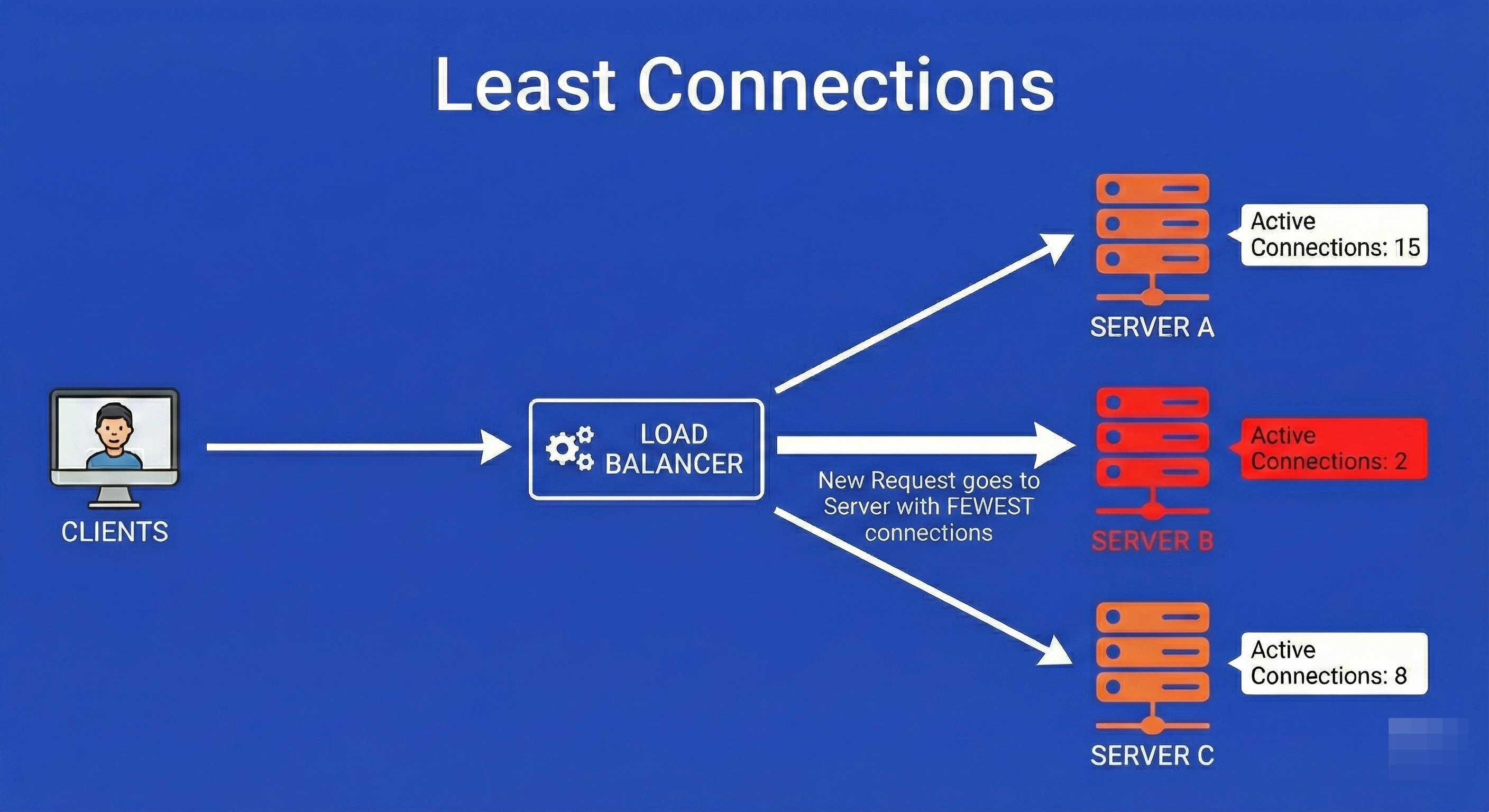
It prevents a server from getting bogged down by a few “heavy” requests.
Example
Picture a grocery store with several checkout lanes.
Lane 1 has a single customer, but that customer has a cart overflowing with 300 items.
Lane 2 has three customers, but they each only have a loaf of bread.
A “Round Robin” manager would send you to Lane 1 because it’s “next.”
A “Least Connections” manager sees that Lane 1 is actually busy for a long time, so they guide you to Lane 2, despite it having more people, because the total “load” is lighter and you will get through faster.
4. IP Hashing
IP Hashing provides a form of persistence without maintaining state tables.
The load balancer takes the client’s IP address and runs it through a mathematical hashing function (like MD5 or MurmurHash) to generate a numerical key.
This key is then mapped to a specific server.
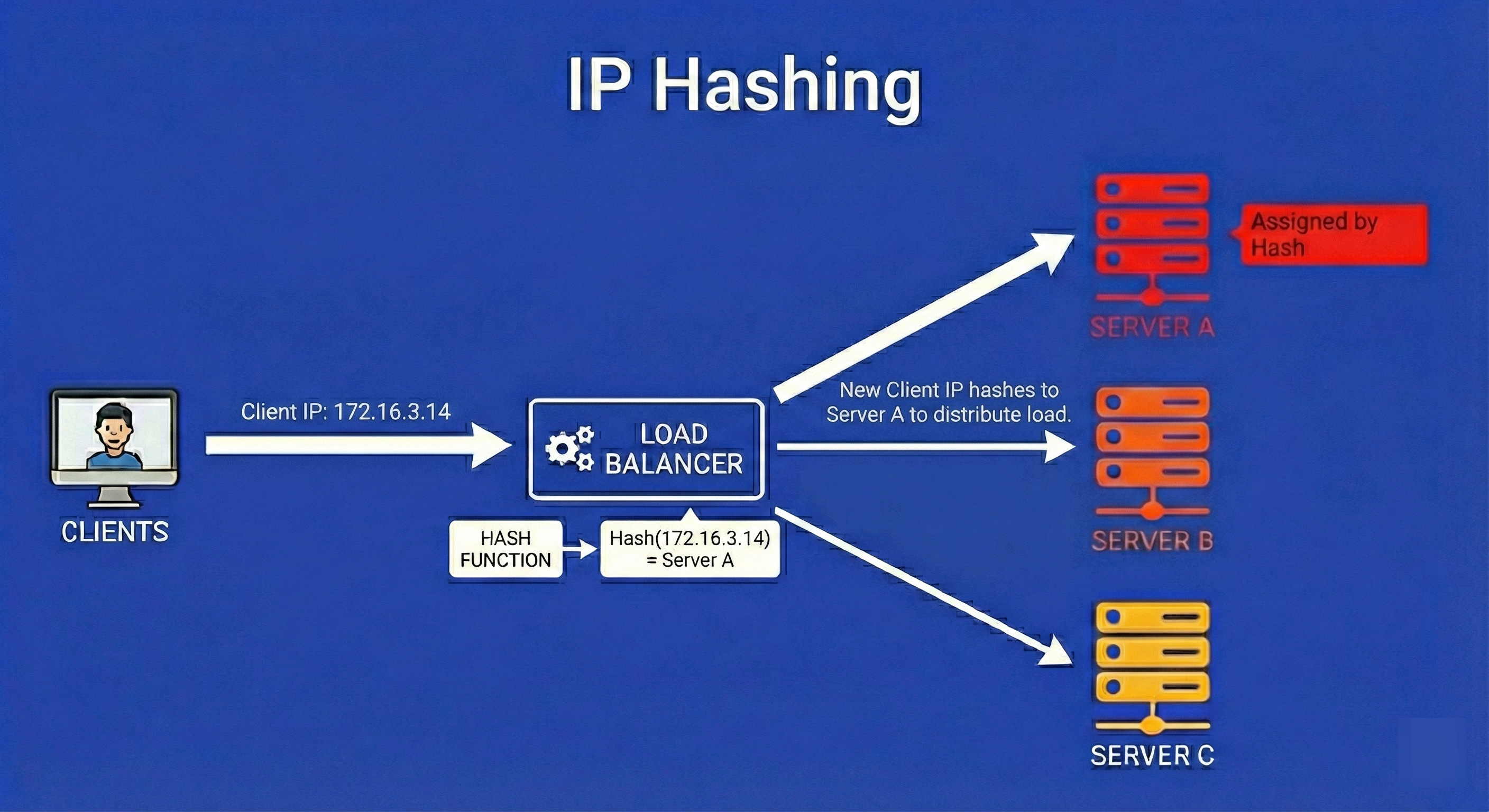
The mathematical guarantee is that as long as the client’s IP address remains constant, the hash function will always yield the same result, routing the user to the exact same server every single time.
Example
Imagine a large wedding reception where guests are assigned tables based on a rule: “Take the last digit of your phone number. If it’s 0-4, sit at Table A. If it’s 5-9, sit at Table B.”
If your phone number ends in 3, you will mathematically always be sent to Table A.
You don’t need a hostess to remember your face; the rule (the hash) ensures you end up at the same seat every time you enter the room.
5. Health Checks
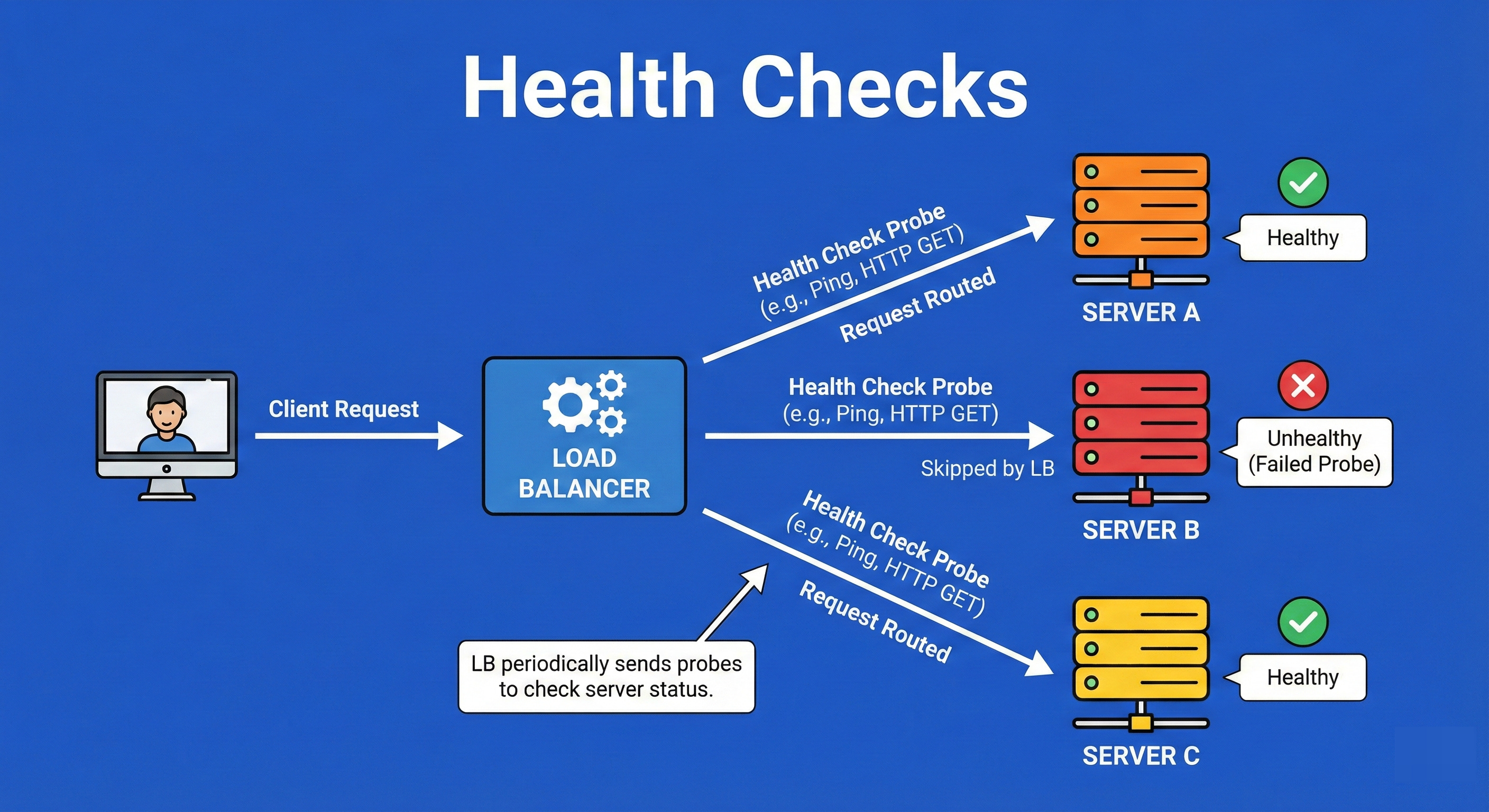
Health checks are the “heartbeat” monitoring system of high availability.
The load balancer sends periodic, active probes (pings, HTTP GET requests, or TCP handshakes) to every server at a set interval (e.g., every 5 seconds).
If a server fails to respond with the expected status code (like HTTP 200 OK) within a timeout period, or fails multiple consecutive checks, the load balancer marks it as “unhealthy” and removes it from the rotation pool to prevent users from hitting a dead end.
Example
Consider a team of deep-sea divers connected by radio to a boat on the surface.
Every 30 seconds, the boat captain asks, “Diver 1, are you okay?”
If Diver 1 replies “Yes,” they stay in the rotation for tasks.
If Diver 1 stops replying or replies with “I have a problem”, the captain immediately stops sending tasks to Diver 1 and prepares a rescue, ensuring no work is assigned to a diver who cannot complete it.
6. Failover
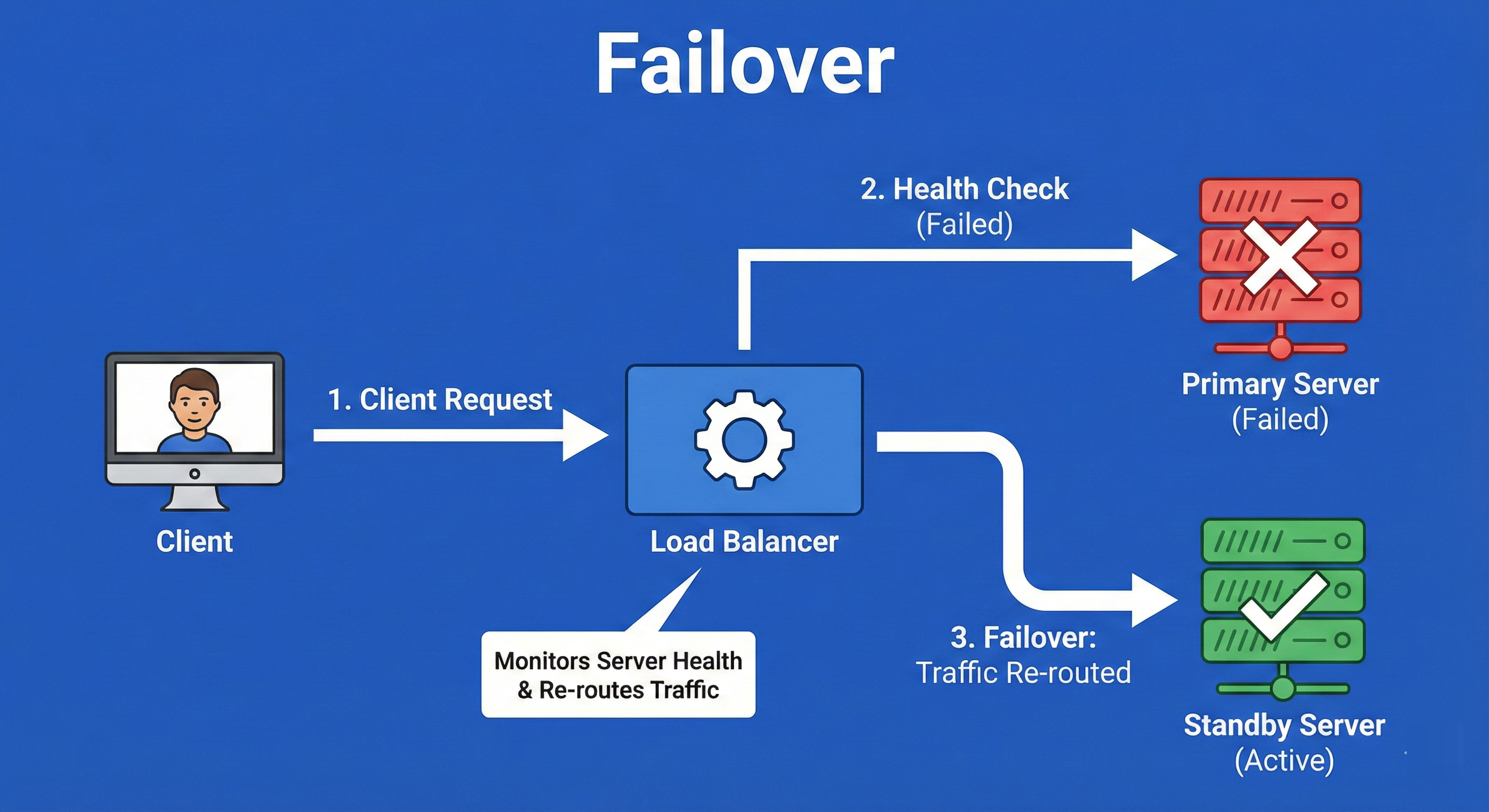
Failover is the operational procedure that is triggered when Health Checks fail.
It is the mechanism of switching traffic from a failed primary component (like a server or an entire database) to a standby backup component.
This can be “Active-Passive” (the backup sits idle until needed) or “Active-Active” (both are running, and one takes the other’s load).
The goal is to achieve fault tolerance so the end-user experiences zero downtime even when hardware physically breaks.
Example
Think of a generator in a hospital.
The main power grid is the “Primary.”
The generator is the “Standby.”
As long as the grid works, the generator sits silent.
The moment the grid fails (a blackout), an automatic switch triggers the generator to kick in immediately.
The lights might flicker for a millisecond, but the surgery continues without interruption. This automatic switch is the failover process.
7. Layer 4 Balancing (Transport Layer)
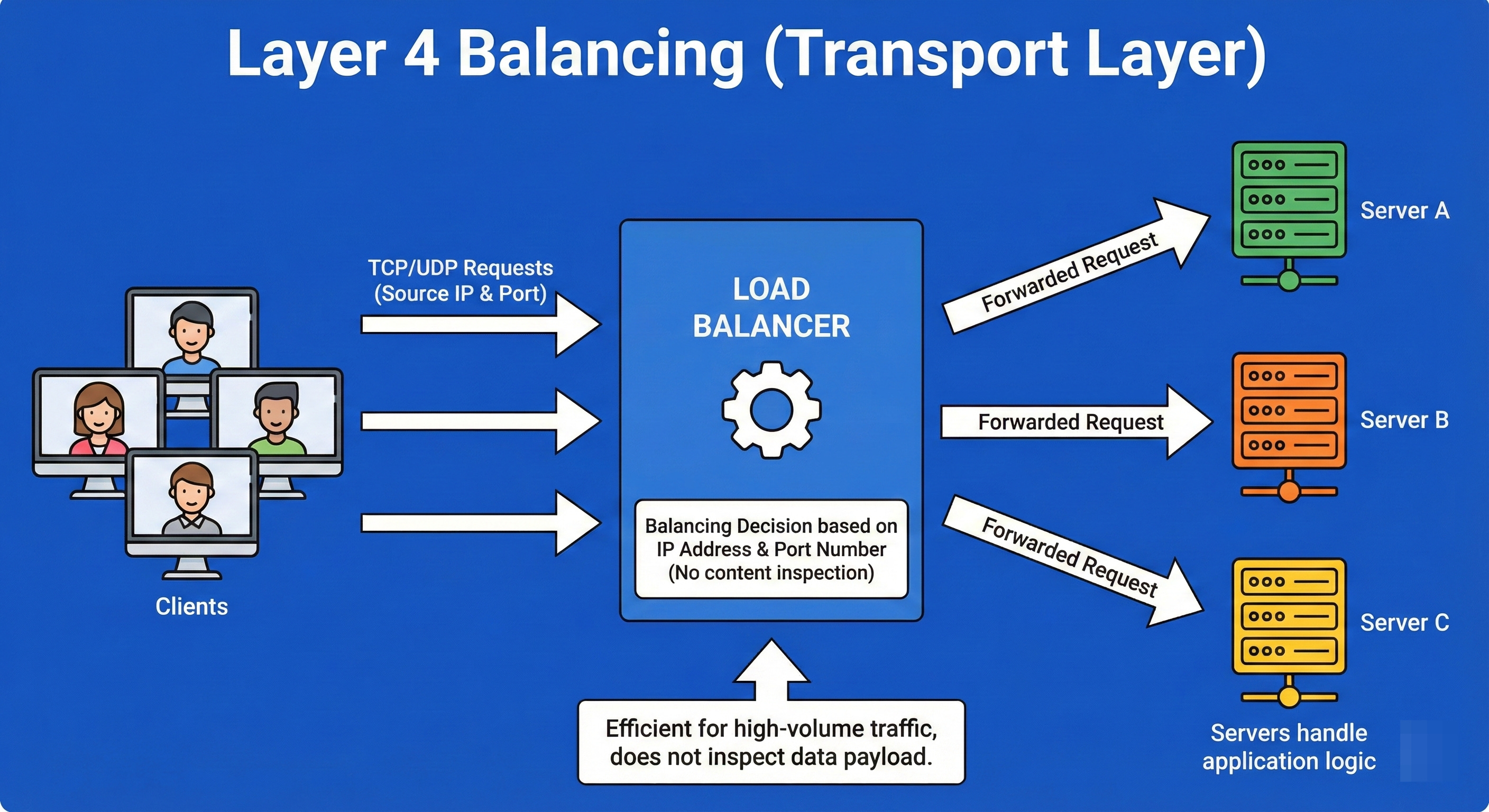
Layer 4 Load Balancing operates at the Transport Layer of the OSI model.
It makes routing decisions based strictly on simple networking information: IP address and TCP/UDP ports. It does not inspect the actual content of the data packets (it doesn’t know if the traffic is a video, a website, or an email).
Because it doesn’t need to decrypt or inspect the payload, L4 balancing is exceptionally fast and can handle millions of requests per second with low CPU usage.
Example
Imagine a mail sorting facility.
The sorters (Layer 4 Balancers) look only at the zip code written on the envelope.
They sort mail into bins for “New York,” “Chicago,” or “LA.” They do not open the envelope to see if the letter inside is written in English or Spanish, or if it’s a bill or a love letter.
They are purely routing based on the “address” on the outside of the package.
8. Layer 7 Balancing (Application Layer)
Layer 7 Load Balancing operates at the Application Layer.
It is CPU-intensive because it terminates the connection, decrypts the traffic, and inspects the actual content (HTTP headers, cookies, URL paths, message data).
This allows for smart routing decisions, such as sending all requests for /images/ to an image server and all requests for /billing/ to a high-security transaction server.
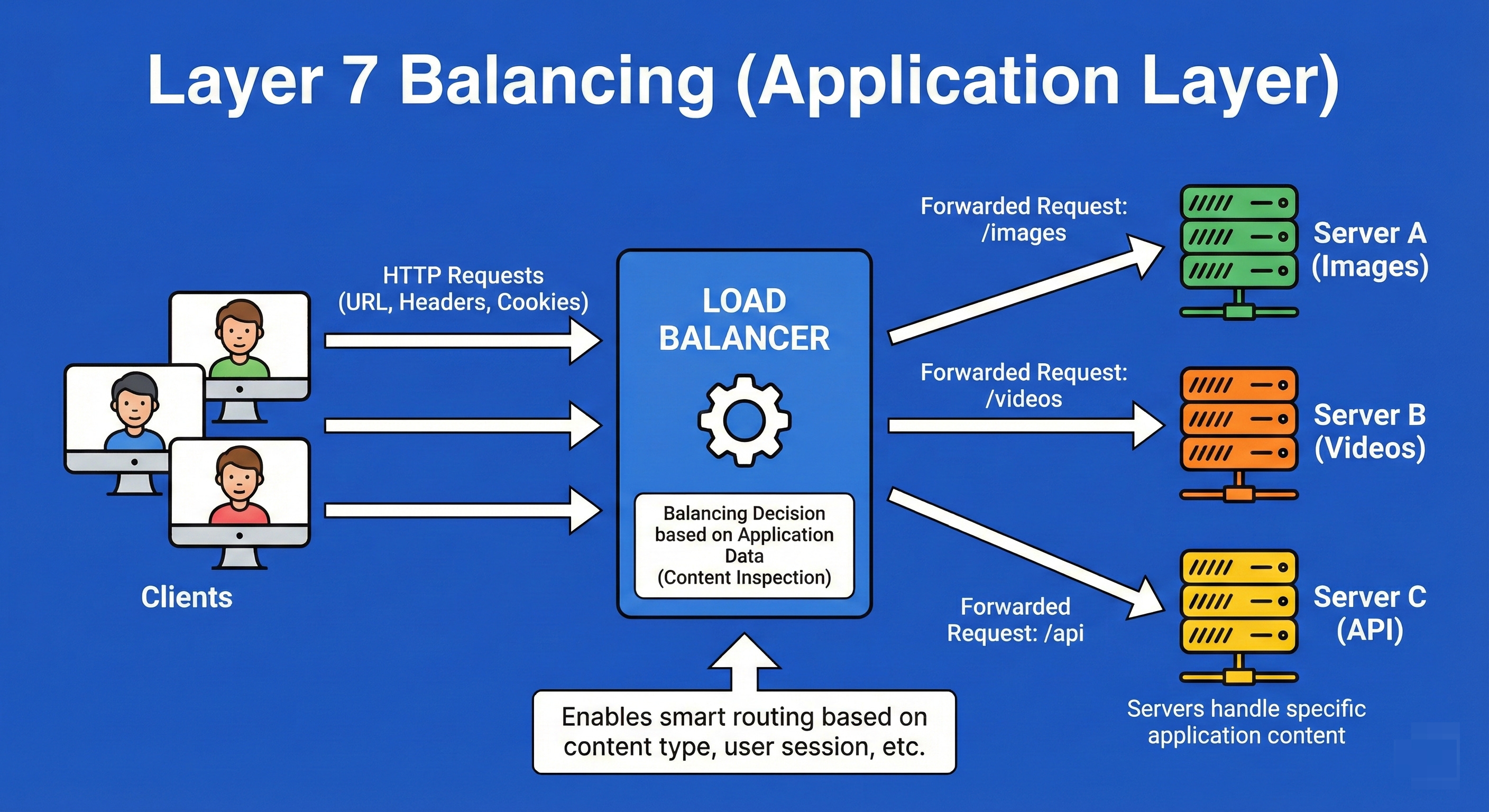
It enables features like rate limiting, authentication, and content-based routing.
Example
Imagine a sophisticated corporate receptionist.
Unlike the mail sorter, this receptionist opens the mail (decrypts it) and reads it.
If the letter is a complaint, she walks it to the Customer Service department.
If the letter is an invoice, she walks it to Accounting. She is making routing decisions based on the meaning and context of the request, not just the address on the envelope.
9. Global Server Load Balancing (GSLB)
GSLB extends load balancing beyond a single data center to a worldwide scale.
It uses DNS and Geo-IP intelligence to route a user’s request to the data center that is geographically closest to them or has the lowest latency.
GSLB is also the primary mechanism for Disaster Recovery; if an entire data center in Virginia goes offline due to a hurricane, GSLB automatically redirects North American traffic to the next closest data center, perhaps in Ohio or Oregon.
Example
You are a global logistics manager for a shipping company.
You have warehouses in London, New York, and Tokyo.
When a customer in France places an order, you don’t ship the item from Tokyo; you ship it from London because it is closest.
However, if the London warehouse burns down, you automatically route that French order to New York.
GSLB is the intelligence that decides which warehouse handles the order based on location and availability.
10. DNS Load Balancing
This is the earliest point of load balancing, occurring at the client side before a request is even sent.
When a client looks up a domain name (like google.com), the DNS server returns a list of multiple IP addresses rather than just one.
The DNS server can rotate the order of these IPs (Round Robin DNS) so that different users connect to different servers.
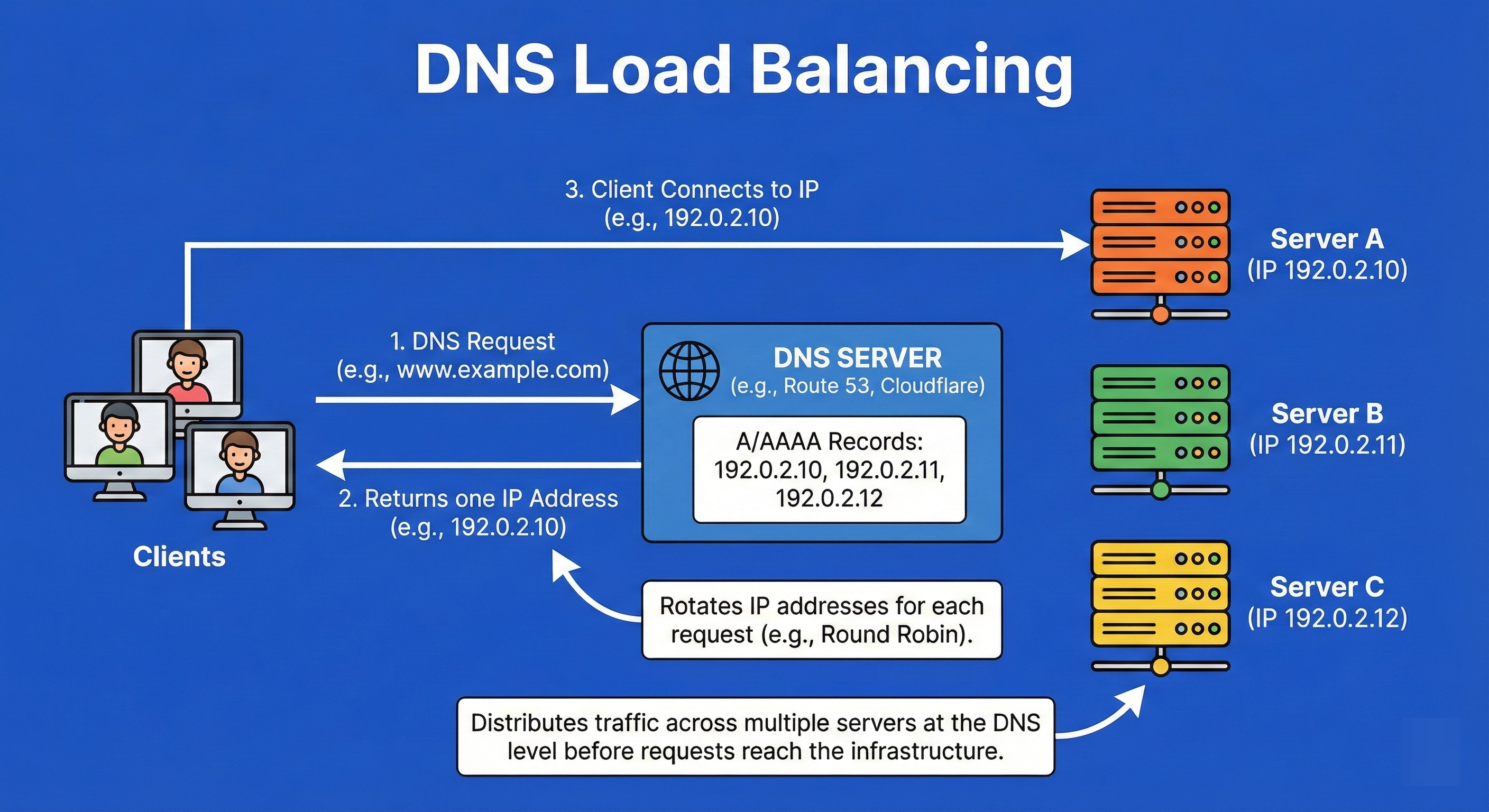
While simple, it has drawbacks: clients often cache DNS responses, meaning they might keep trying a dead IP even after it has been removed from the list.
Example
Imagine a phone book listing for a popular pizza chain.
Instead of one phone number, the listing shows five different numbers for the same branch.
When thousands of people look up “Pizza,” the phone book publisher prints the first number differently for every 100 books.
One group calls line 1, the next group calls line 2. The load is distributed, but if Line 1 gets cut, people with the old phone book will still try to call it.
11. Sticky Sessions (Session Affinity)
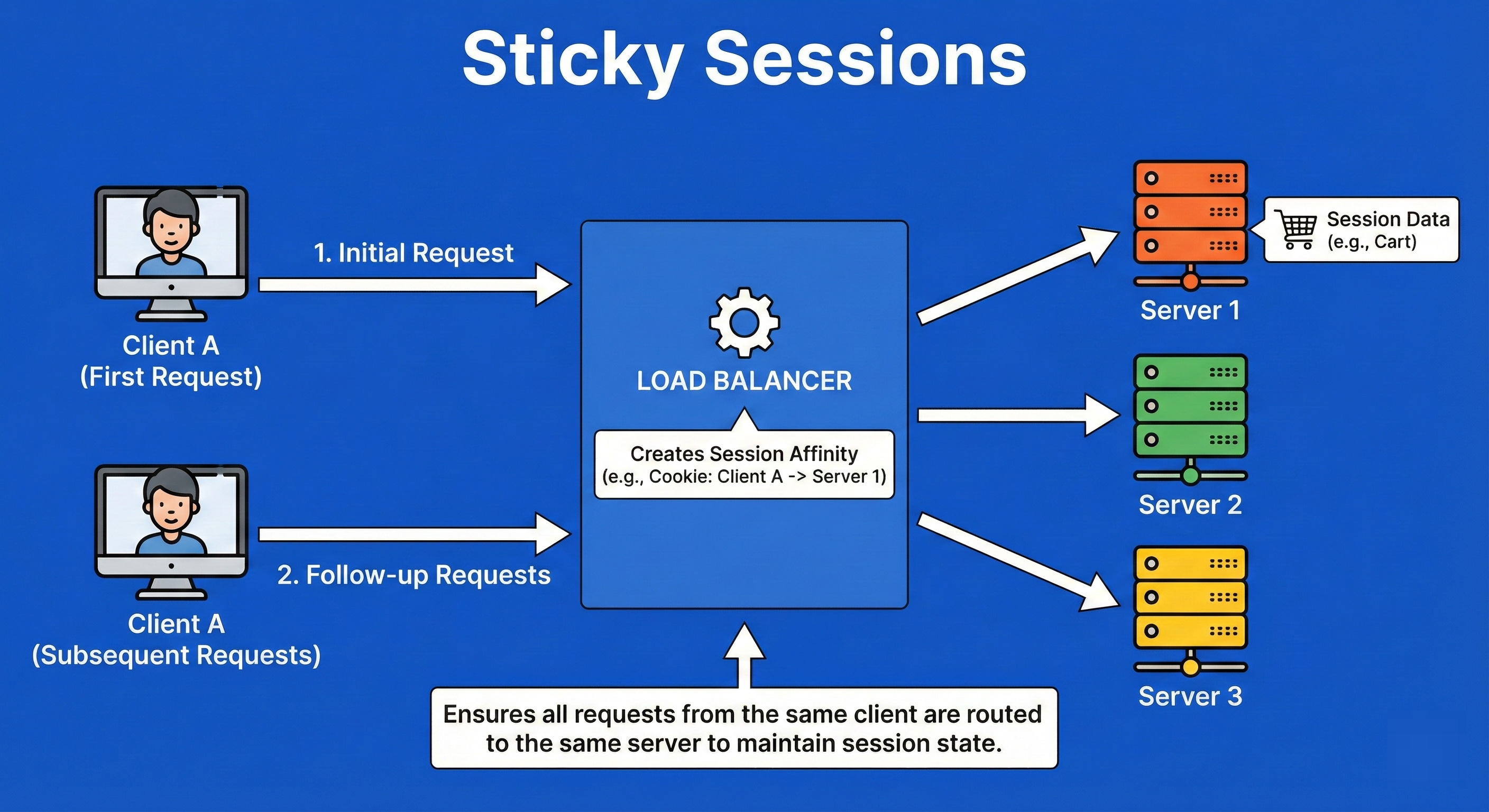
Sticky Sessions ensure that a client is bound to the same backend server for the duration of their interaction (session).
This is achieved by the load balancer injecting a special cookie or tracking the IP.
It is often required for legacy applications that store session state (like a shopping cart or login details) locally on the server’s RAM rather than in a shared database (like Redis).
If the user were switched to a different server, their shopping cart would suddenly disappear.
Example
Imagine you are at a bar and you start a “tab” with a bartender named Dave. Dave keeps your credit card and knows you’ve had two drinks.
If you go to order a third drink, you must go back to Dave.
If you went to a different bartender, Sarah, she wouldn’t know you have an open tab and would ask for your card again.
You are “stuck” to Dave for the duration of your night to maintain the state of your transaction.
12. Connection Draining
Connection Draining is a graceful maintenance protocol.
When a server needs to be shut down for updates or scaling in, the load balancer puts it into a “draining” state.
In this state, the balancer stops sending new requests to that server but keeps the connection open for existing requests to complete naturally.
It waits for a set timeout (e.g., 60 seconds) or until all active requests clear, ensuring no user is abruptly disconnected mid-transaction.
Example
Think of a store manager announcing, “The store is closing in 15 minutes.”
The security guard stands at the door and stops new customers from entering (stops new connections).
However, the customers already inside are not kicked out immediately; they are allowed to finish their shopping and pay.
Only when the last customer leaves does the manager turn off the lights and lock the door.
13. Traffic Splitting (Canary/Blue-Green)
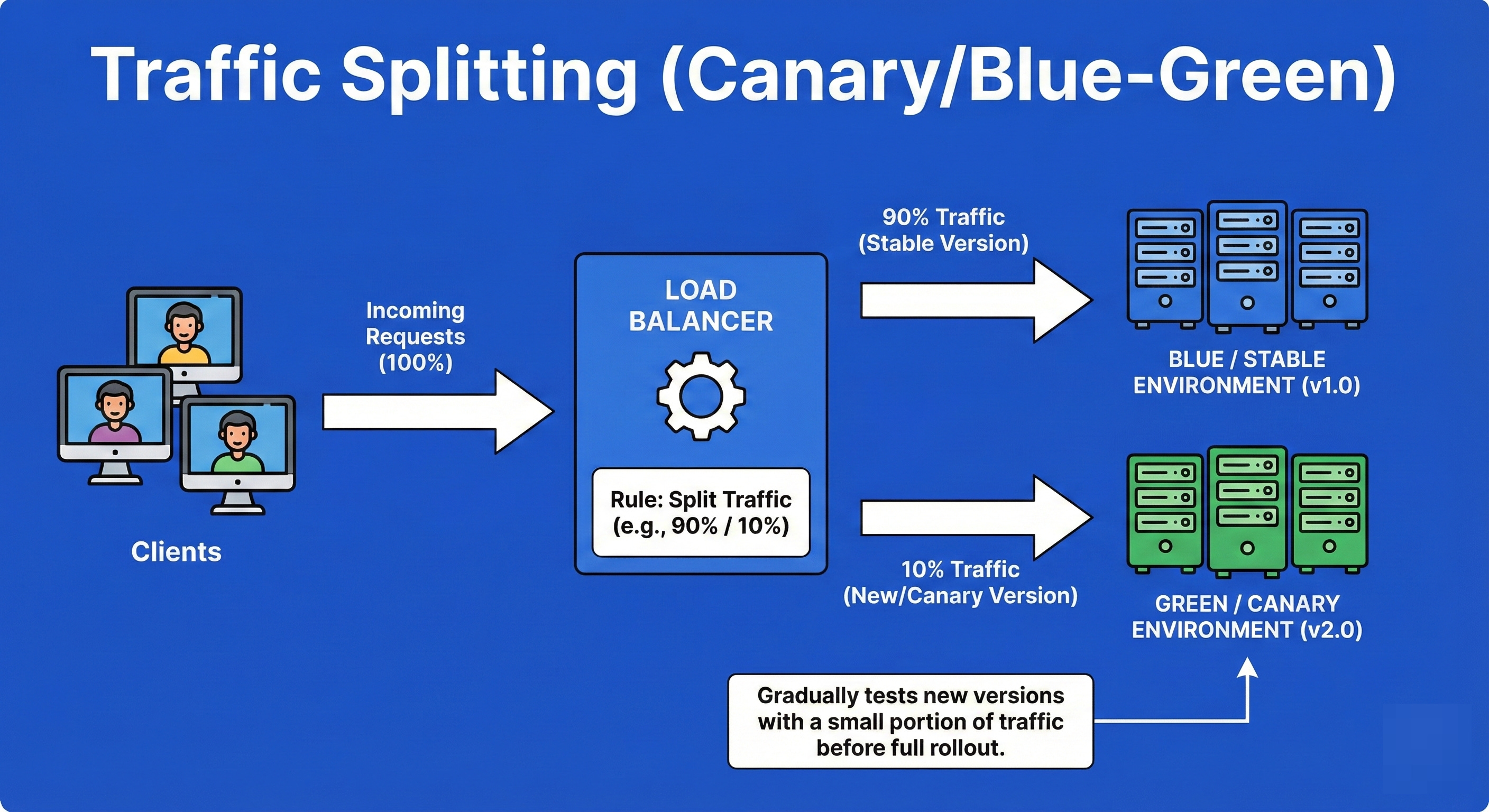
Traffic splitting is a deployment strategy used to reduce the risk of releasing new software.
The load balancer is configured to send a specific percentage of traffic (e.g., 5%) to a new version of the application (Canary) while the remaining 95% goes to the stable version.
This allows engineers to monitor the new version for errors in a production environment with real users.
If the 5% experience bugs, the traffic is instantly reverted; if it’s stable, the percentage is gradually increased to 100%.
Example
Imagine a city water department wants to add a new chemical to clean the water.
They don’t dump it into the entire city’s supply immediately.
They route the treated water to just one small neighborhood first.
They monitor that neighborhood for complaints or health issues.
If everyone is fine, they expand it to the next neighborhood.
If people complain, they shut off that pipe immediately, saving the rest of the city from the bad water.
14. Anycast Routing
Anycast is a network addressing and routing methodology where a single IP address is shared by multiple servers in different physical locations across the globe.
Using the Border Gateway Protocol (BGP), the network itself calculates the shortest “topological” path for a user.
When a user sends a request to the Anycast IP, the network routers automatically direct them to the nearest available server.
It provides low latency and automatic failover without needing complex DNS tricks.
Example
Think of the emergency number “911.”
“911” is not a specific phone on a specific desk. It is a universal code.
When you dial it in New York, the telephone network routes you to a New York dispatch center.
If you dial the exact same number in Chicago, the network routes you to a Chicago center.
You don’t need to know where the server is; the network finds the one closest to you automatically.
15. Load Shedding
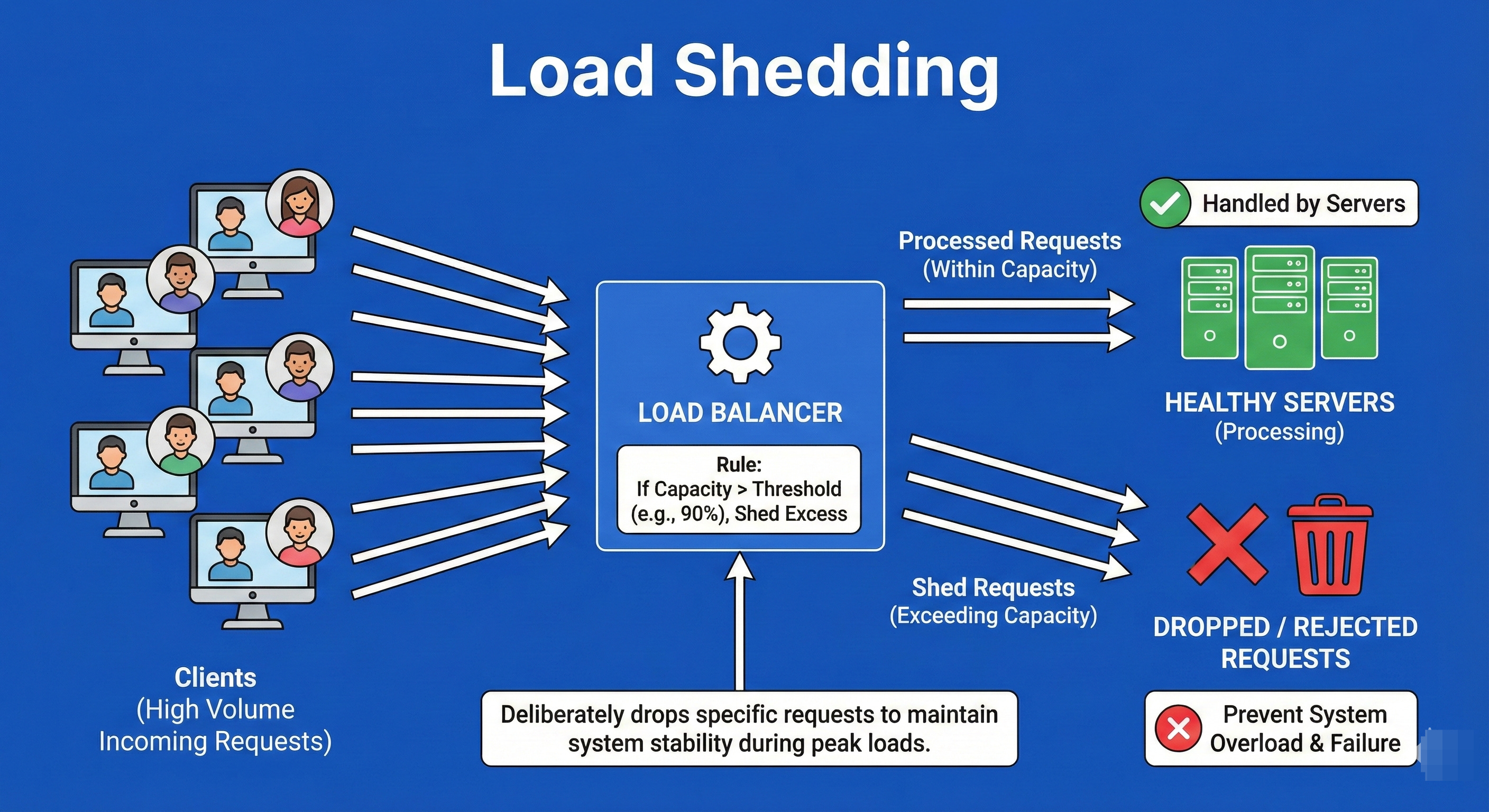
Load Shedding is a defense mechanism used when a system is approaching critical failure due to overload.
Instead of trying to process every request and crashing the entire system (causing a total outage), the load balancer or application intentionally drops (rejects) low-priority traffic or a percentage of traffic.
This sacrifice preserves the system’s availability for the remaining users.
It is better to serve 80% of users perfectly than to serve 100% of users with a crashed system.
Example
Imagine a sinking ship with a lifeboat that holds 20 people.
There are 30 people trying to get on.
If you let all 30 on, the boat sinks, and everyone dies.
The harsh but necessary decision is to deny entry to 10 people (shed load) so that the boat stays afloat and saves the 20 people inside.
In software, we drop excess requests to keep the CPU from hitting 100% and freezing.
16. Autoscaling
Autoscaling is the automation of infrastructure capacity. It links the load balancer with the cloud provider’s resource manager.
When traffic metrics (CPU usage, memory, request count) cross a defined threshold (e.g., CPU > 70%), the system automatically provisions and boots up new servers to handle the load.
Conversely, when traffic drops (e.g., at night), it terminates the extra servers to save costs.
It ensures the system is always “right-sized” for the current demand.
Example
Think of a dynamic lane assignment on a highway.
During rush hour (high load), the city opens up the shoulder lane and reverses express lanes to allow more cars to flow (scaling out).
At 2:00 AM, when the road is empty, they close those extra lanes and stop staffing the toll booths (scaling in) to save on electricity and personnel costs.
Final Thoughts
You’ve now completed a deep dive into the 16 essential concepts that define modern distributed system architecture.
Understanding these mechanisms—from the simplicity of Round Robin to the geo-intelligence of Anycast Routing—is what separates a coder from a System Architect.
For Interviews: Being able to articulate the difference between Layer 4 and Layer 7 balancing, or knowing when to use Sticky Sessions versus demanding a stateless architecture, shows your maturity as an engineer.
For Real-World Systems: When your application is under unexpected load, having mechanisms like Load Shedding and Autoscaling configured correctly is the difference between surviving a traffic spike and a catastrophic failure.
Your Next Step
Remember, theoretical knowledge is just the foundation. The real learning comes from applying these concepts. As you move forward in system design, always ask yourself:
How would I distribute traffic here? Which algorithm best handles this specific latency profile? How do I ensure failover is instantaneous?
Keep practicing, keep questioning, and start drawing.