
16 Caching Related Concepts Every Software Engineer Must Know
Master the caching essentials that power modern systems. This guide explains sixteen key concepts in a clear, easy way with real examples to deepen your understanding.

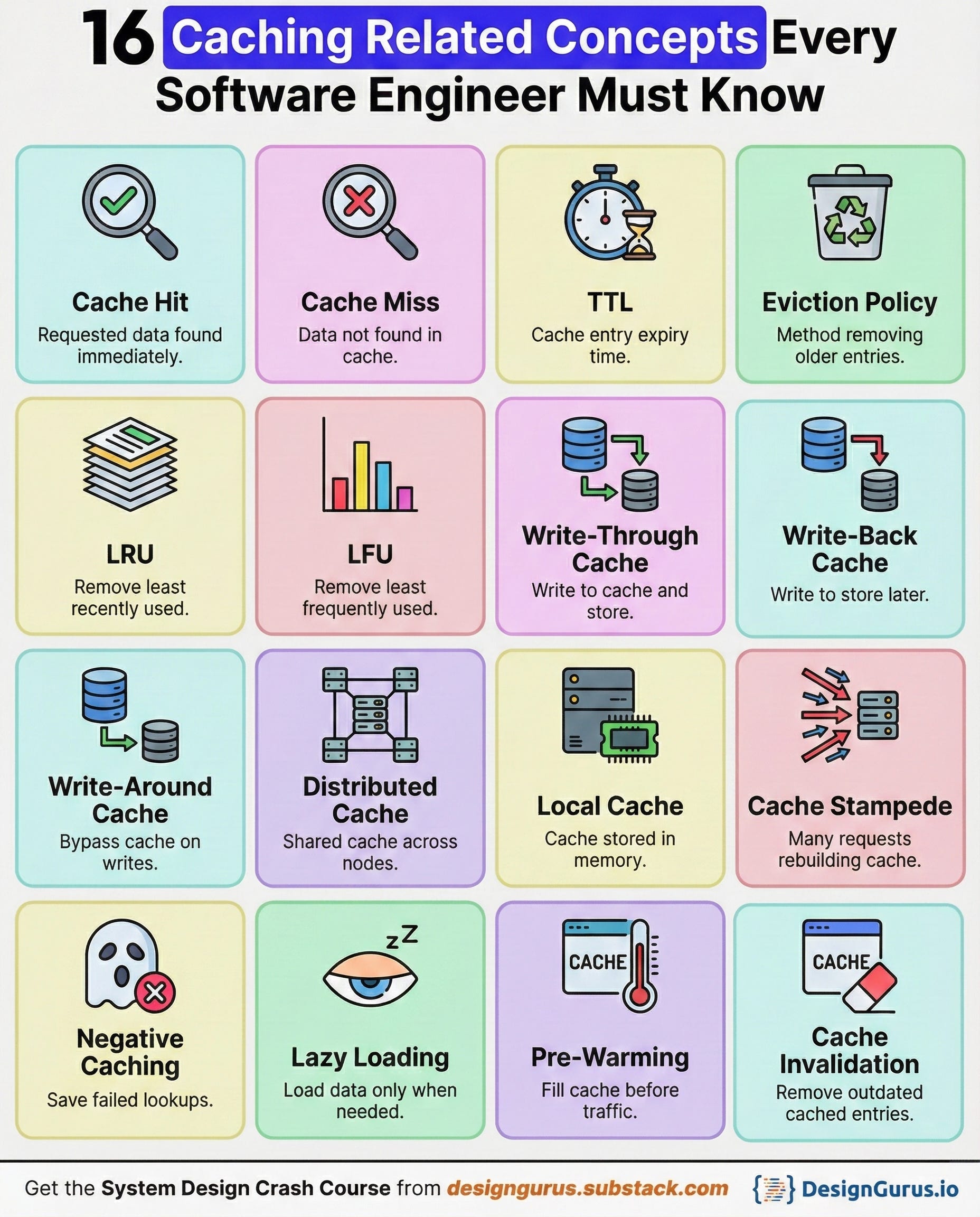
Caching is one of those topics that looks simple on the surface but quickly becomes one of the biggest sources of performance wins and production headaches.
A well-designed cache can make your system feel lightning fast.
Whereas a poorly designed one can cause stale data, unexpected spikes, and failures you never saw coming.
If you want to grow as a backend or system design engineer, you must understand how caching truly works.
Below are sixteen concepts that power every caching layer, so you can apply them confidently in your designs and interviews.
1. Cache Hit
A cache hit happens when the requested data is already in the cache, so the system returns it instantly.
Instead of going all the way to a database or external API, the app reads from this fast memory store. This usually means microsecond or millisecond-level latency instead of much slower queries.
High hit rates usually mean your caching strategy is solid.
Cache hits are the goal of every caching system, and engineers tune TTLs and data patterns to improve them.

Example
Imagine a social app where a user profile is requested hundreds of times per minute.
The first request may read the profile from the database and store it in Redis. After that, most profile reads become cache hits and return instantly.
You need the database only when the entry expires or is evicted.
2. Cache Miss
A cache miss happens when the requested data is not available in the cache.
In that case, the application has to fetch the data from the original source, such as a database, file store, or external service.
This path is slower and more expensive than a cache hit.
After fetching the data, the app usually writes it into the cache so that future requests can be faster.
Too many cache misses often mean your cache is not sized or configured well, or the TTL is too short.
Example
A user opens a product page that no one has visited in days.
The product details are no longer in the cache, so the app queries the database. It then stores the fresh product data in the cache so the next visitor to that page gets a fast response.
Until it is evicted or expired, that product should now result in cache hits.
3. TTL
TTL, or time to live, is the duration that a cache entry is considered valid before it expires automatically.
Once the TTL passes, the cache treats that entry as missing and forces a refresh from the source.
TTL protects your system from serving stale data forever, especially when underlying information changes frequently.
However, choosing a TTL value is always a trade-off between freshness and performance.
Very short TTL values lead to many misses and more load on the database, while very long TTL values risk users seeing outdated data.
Example
A news website might cache the homepage for 30 seconds because headlines update often.
A product catalog page could use a TTL of 10 minutes because prices and descriptions change less frequently.
By tuning TTL per use case, the site stays responsive without feeling out of date.
4. Eviction Policy
An eviction policy decides which entries to remove when the cache runs out of space.
Since cache memory is limited, you cannot keep everything forever.
The policy tries to keep the most valuable items while discarding less useful ones.
Different workloads benefit from different policies based on access patterns.
If you choose the wrong policy, you may evict data that is still very hot and hurt your hit rate.
Example
Imagine a cache that can hold data for only 10 thousand users.
When the 10 thousand first user is added and a new user arrives, the cache must evict someone.
An LRU policy might remove the user who has not logged in for months.
An LFU policy might remove a user who logged in only once, even if it was more recent. The policy you pick shapes which users enjoy faster responses.
5. LRU
LRU stands for Least Recently Used and is one of the most common eviction strategies.
The idea is simple: when the cache is full and you need space, you evict the entry that has not been accessed for the longest time.
This works well when recently accessed data is more likely to be accessed again in the near future.
LRU naturally adapts to changing access patterns, as recently used keys stay in memory and cold keys drift toward eviction.
However, it can still be tricked by one time spikes in traffic that push out genuinely useful items.
Example
A content site uses LRU for its article cache.
When a viral article appears, it gets accessed constantly and stays in the cache.
Old evergreen articles that few people read slowly fall out as newer content arrives.
Users mostly see fast responses on active content, while cold content can tolerate a slower fetch.
6. LFU
LFU stands for Least Frequently Used and focuses on how often an item is accessed instead of how recently.
Each cache entry keeps a count of how many times it has been read.
When the cache needs space, it evicts the entries with the lowest access counts.
LFU is useful when there are clear hot items that should stay cached even if they are temporarily quiet. It favors long term popularity over short term bursts.
The downside is that it can be more complex to implement and adapt to sudden shifts in popularity.
Example
A music streaming app uses LFU to cache song metadata and album covers.
A classic song that has been played millions of times over months will stay in the cache even if it was not played in the last hour.
A random new track played once is a better candidate for eviction when the cache fills up.
7. Write Through Cache
Write through caching means that every time you write data, you update both the cache and the underlying database in one step.
Reads can then safely use the cache because it always has the latest version.
This strategy keeps your data consistent between cache and store, which makes reasoning about correctness easier.
The cost is that writes are slower, since they must touch two systems before they are considered complete.
Write through is a good fit when correctness is more important than write latency.

Example
In a profile service, when a user changes their display name, the service writes the new name to the database and the cache in the same operation.
Any subsequent read of that profile, whether it hits the cache or the database, sees the updated name.
There is no window where the cache has stale data after a write.
8. Write Back Cache
Write back caching (often called write behind) writes changes to the cache first and defers writing to the database.
The cache collects updates and flushes them to the database later in the background or in batches.
This reduces write latency for users and can lower the load on the database by grouping many small writes into fewer larger ones.
However, it introduces risk, because if the cache fails before flushing, recent writes can be lost.
It also complicates recovery and consistency, since the database may temporarily lag behind.

Example
A high-traffic analytics system records counters for page views in a cache.
Each hit only updates a counter in memory, which is extremely fast.
Every few seconds, a background job aggregates and writes these counters to the database.
Dashboards use the cached values for near real-time views while the database gets periodic batched updates.
9. Write Around Cache
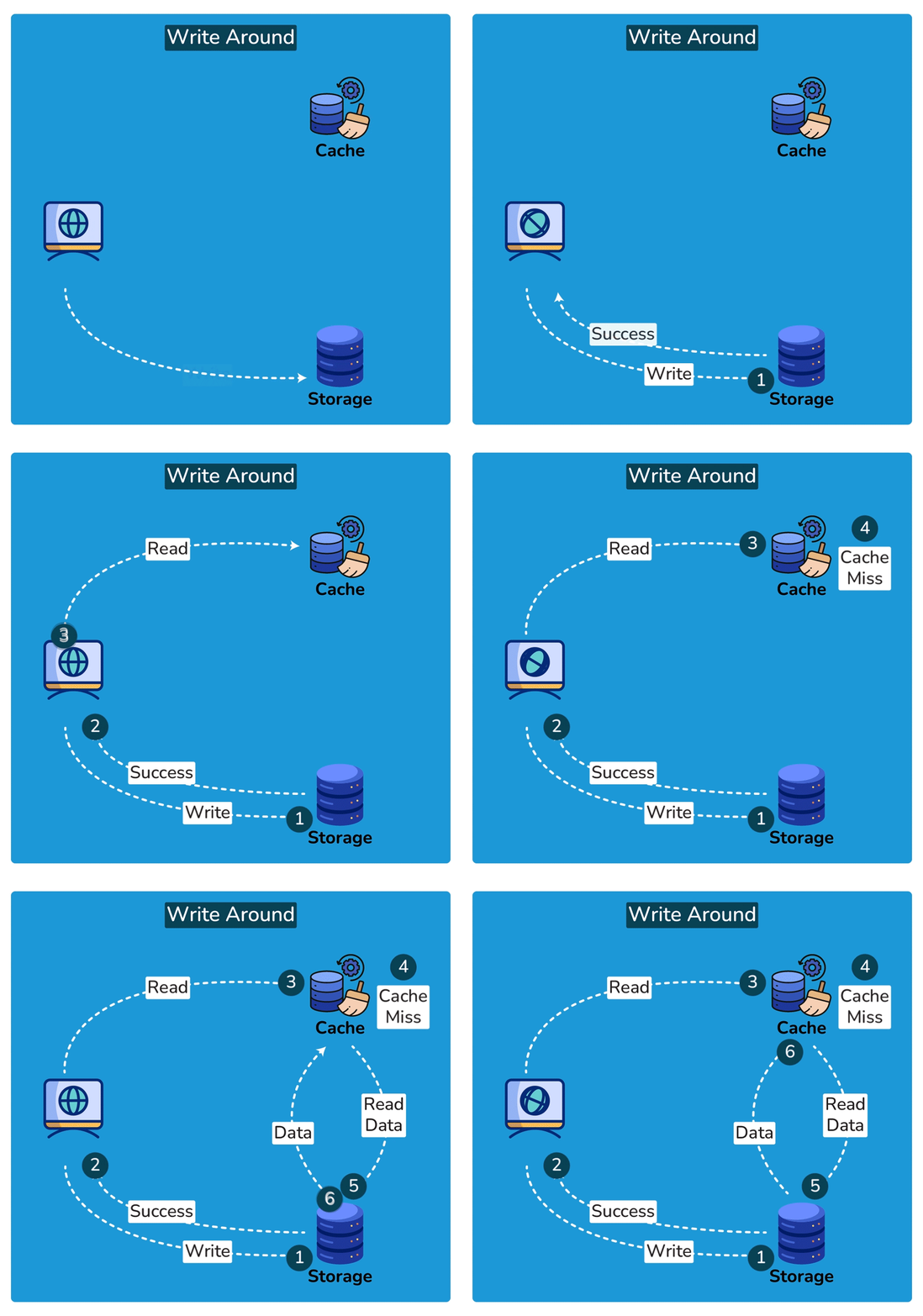
Write around caching sends writes directly to the database and usually does not put new or updated data into the cache immediately.
Reads still check the cache first and only hit the database on a miss.
This pattern avoids filling the cache with data that might never be read again, especially in write-heavy workloads.
It works well when many writes are not followed by reads in the short term.
The trade-off is that the first read after a write will be a miss, so some requests pay the slower path.
Example
A system that imports thousands of historical records uploads them straight into the database without touching the cache.
Months later, when a user searches for a specific record, the first read will miss the cache, load the row, and then store it.
Only data that users actually read is kept in the cache, which makes better use of limited memory.
10. Distributed Cache
A distributed cache is spread across multiple servers and shared by many application instances.
Instead of each app node having its own isolated cache, they all talk to a cluster such as Redis or Memcached.
This helps keep data consistent across nodes and avoids duplication of the same entries in many separate caches. It also allows the cache itself to scale horizontally as traffic grows.
You can add more cache nodes to increase capacity and throughput.
Example
An e-commerce site has dozens of application servers behind a load balancer.
All servers connect to the same Redis cluster to cache product details and inventory status.
When one server updates the cache for a product, all other servers immediately benefit from that fresh entry. This keeps behavior consistent regardless of which server handles a request.
11. Local Cache
A local cache is stored directly in the memory of an application process or instance. It is incredibly fast because there is no network hop to reach it.
Local caches are great for small hot datasets such as configuration, permissions, or user specific data on a single node.
The problem is that each instance has its own copy, so they can easily become inconsistent with each other or with the database.
You also waste memory if many instances store the same entries.
Example
A Java service uses a local in memory cache for feature flags that rarely change.
When a request arrives, it checks the local map to see whether a feature is enabled, which takes microseconds.
If a flag is updated centrally, a background job or push mechanism refreshes the local caches.
For very read heavy, low change data this can be a big performance win.
12. Cache Stampede
A cache stampede happens when many requests try to rebuild the same missing or expired cache entry at the same time.
When a popular key expires, hundreds or thousands of requests can suddenly hit the database together, causing a spike in load.
Instead of one slow rebuild, you get a thundering herd of expensive operations.
If the backend cannot handle the burst, it can lead to timeouts and cascading failures.
Good designs add protection so that only one request recomputes the value while others wait or get a temporary response.

Example
A news homepage cache expires at exactly midnight.
Millions of users open the app in the following seconds and all see a cache miss.
Every request tries to query the database to build the homepage, which overloads the system.
A better design would use techniques like request coalescing, jittered TTL, or soft expiration to avoid the stampede.
13. Negative Caching
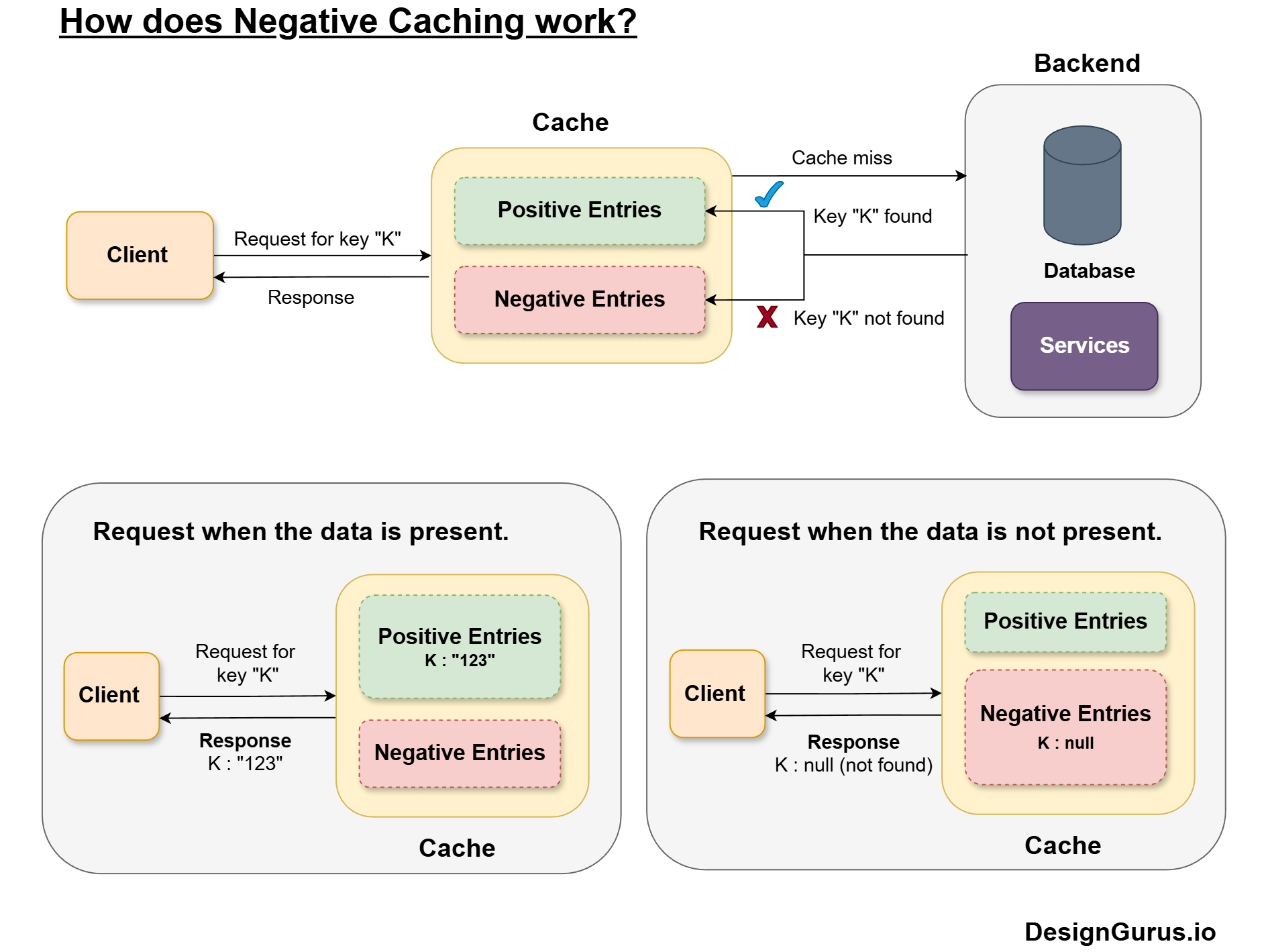
Negative caching stores the result of a failed lookup, such as a missing record or a 404.
Instead of hitting the database again and again for the same missing thing, the system remembers that it does not exist for a short time.
This reduces unnecessary load and smooths traffic spikes, especially for invalid identifiers or spammy clients.
Negative entries usually have shorter TTLs, because the situation might change later.
Used carefully, this pattern improves performance without affecting correctness.
Example
An API receives repeated requests for a user with ID 99999 that does not exist.
Without negative caching, every request queries the database and returns not found.
With negative caching, the first request queries the database and stores a special not found marker in the cache for 60 seconds.
All further requests in that window hit the cache and get an immediate not found response with no database trips.
14. Lazy Loading
Lazy loading means that you only load data into the cache when it is actually requested.
On a cache miss, the system fetches the data from the source, puts it into the cache, and returns it to the caller.
You do not try to pre fill the cache with everything upfront. This keeps the cache focused on real usage and avoids wasting memory on unused entries.
It is simple to implement and works well when access patterns are unpredictable.
The cost is that the first request for any key will always be slower.
Example
A dashboard service caches analytics widgets using lazy loading.
When a user opens their dashboard for the first time, each widget query misses the cache and fetches from the analytics store.
Those results are then cached.
The next time the user opens the dashboard, most widgets hit the cache and load much faster.
15. Pre-Warming
Pre-warming, or cache warming, means proactively loading entries into the cache before users ask for them.
This avoids cold start delays during known traffic spikes or launches. It is particularly helpful when certain keys are highly predictable, such as top products, trending posts, or homepages.
Pre-warming can be done by background jobs that call your own APIs or populate caches directly.
The risk is that you might waste memory or warm data that does not get used, so it should be targeted.
Example
Before a big sale event, an online store runs a job that preloads the top 1000 products into the cache, including prices, images, and stock levels.
When the sale starts and traffic surges, most requests for those popular items hit a warm cache.
Customers see fast pages from the first second instead of waiting for the cache to build under load.
16. Cache Invalidation
Cache invalidation is the process of removing or updating cached entries when the underlying data changes.
Without proper invalidation, users keep seeing stale values even after a successful update.
This is why people joke that cache invalidation is one of the hardest problems in computer science.
You must decide when to invalidate, which keys to touch, and how to do it efficiently without breaking consistency.
Common strategies include deleting keys on write, using versioned keys, or relying on short TTLs to limit staleness.
Example
A blog platform caches article pages keyed by article ID.
When an author edits their post, the service updates the database and also deletes the corresponding cache key.
The next reader request will miss the cache, rebuild the page from the latest content, and store a fresh version.
This keeps readers in sync with the latest edits while still benefiting from caching.
Conclusion
Caching is not just about speeding things up a little. It shapes how your system behaves under load, how fresh your data feels, and how painful failures can be.
Once you understand concepts like TTL, eviction policies, write strategies, stampedes, and invalidation, you can design caches that are both fast and safe.
In interviews, these ideas help you talk about trade-offs clearly rather than hand-waving with phrases.
In real life, they help you avoid those mysterious bugs that show up in production but not in your tests.
Master these sixteen concepts, and you will be far more confident whenever caching shows up in a system design.