
12 Database Diagrams Every Engineer Should Memorize
The Twelve Core Database Diagrams Every Engineer Should Be Able to Draw From Memory, Covering Sharding, Replication, Transaction Isolation, Indexing, and Data Models


Databases sit at the center of almost every system.
They store the data, protect it, and serve it back when needed.
Yet many engineers treat databases as a black box. They know how to write a query, but they cannot explain how the data is split across machines, how copies stay in sync, or what happens when two people change the same row at the same time.
This gap shows up clearly in system design interviews and in real production work.
When the conversation turns to scaling a database, handling failures, or speeding up reads, the engineer who can picture the underlying patterns has a huge advantage.
The one who cannot picture them tends to freeze or give vague answers.
The best way to truly understand databases is to think in diagrams.
A clear mental picture of how data is sharded, replicated, indexed, and modeled makes every database decision easier. These diagrams are not just for interviews. They guide real choices about cost, speed, reliability, and correctness.
This guide covers twelve database diagrams that, together, explain how modern databases actually work. Each one is explained in plain language. For each diagram, there is a short description of what it is, when to use it, and the single most important idea it captures.
The goal is to make these patterns simple enough to draw from memory.
A Quick Word on Sharding and Replication
Two words appear throughout this guide, so it helps to define them early.
Sharding means splitting a large dataset across multiple machines so no single machine holds everything. Each machine holds a piece of the data, called a shard.
Sharding helps a database handle more data and more traffic than one machine could manage alone.
Replication means keeping copies of the same data on multiple machines.
Replication helps a database survive failures and serve more read traffic, because any copy can answer a read request.
Sharding is about splitting data.
Replication is about copying data. Many real systems use both at the same time.
Category 1: Sharding Patterns
Diagram 1: Range-Based Sharding
Data is split across shards based on ranges of a key, such as A to M on one shard and N to Z on another. It makes range queries fast but risks hot spots when most activity falls into a single range.
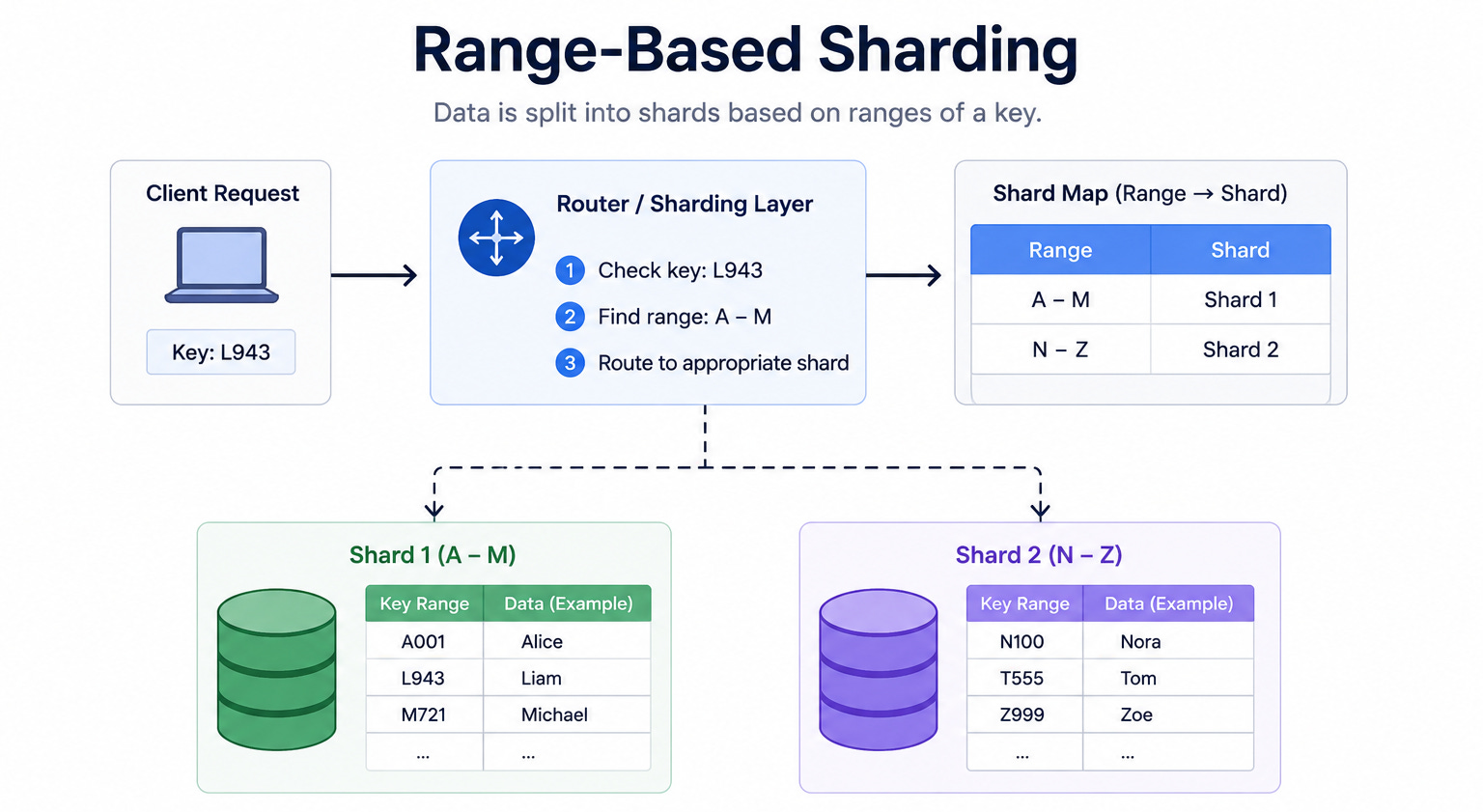
For example, records with keys starting from A to M go to one shard, and records from N to Z go to another.
The database keeps a simple map of which range lives on which shard. When a request comes in, the database checks the key, finds the matching range, and routes the request to the right shard.
When to use it: Range-based sharding fits well when the application often asks for data in ranges, such as all records between two dates or all names in a section of the alphabet.
The key insight: Range sharding makes range queries fast because related data sits together on the same shard. The danger is uneven load. If most activity falls into one range, that shard becomes a hot spot while the others sit idle.
Diagram 2: Hash-Based Sharding
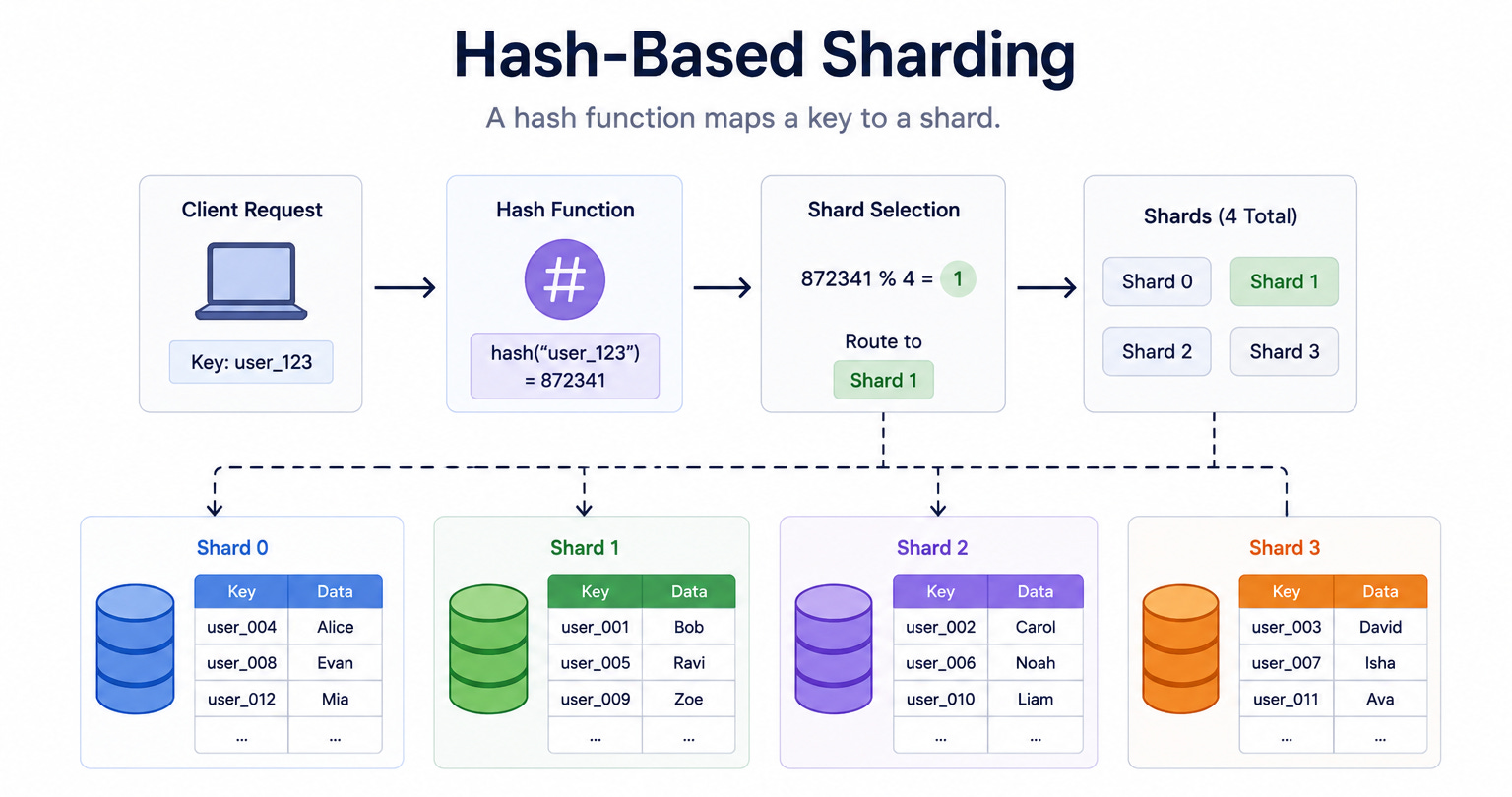
This diagram shows data spread across shards using a hash function.
A hash function is a small piece of logic that turns a key into a number. The database takes that number and uses it to decide which shard stores the record. Because the hash spreads keys evenly, the data ends up balanced across all shards.
It removes hot spots but makes range queries slow because related records get scattered.
When to use it: Hash-based sharding fits well when even distribution matters more than range queries, such as storing user profiles or session data.
The key insight: Hash sharding solves the hot spot problem by scattering data evenly across all shards. The cost is that range queries become slow, because related records are now scattered across many machines instead of sitting together.
Diagram 3: Geo-Based Sharding
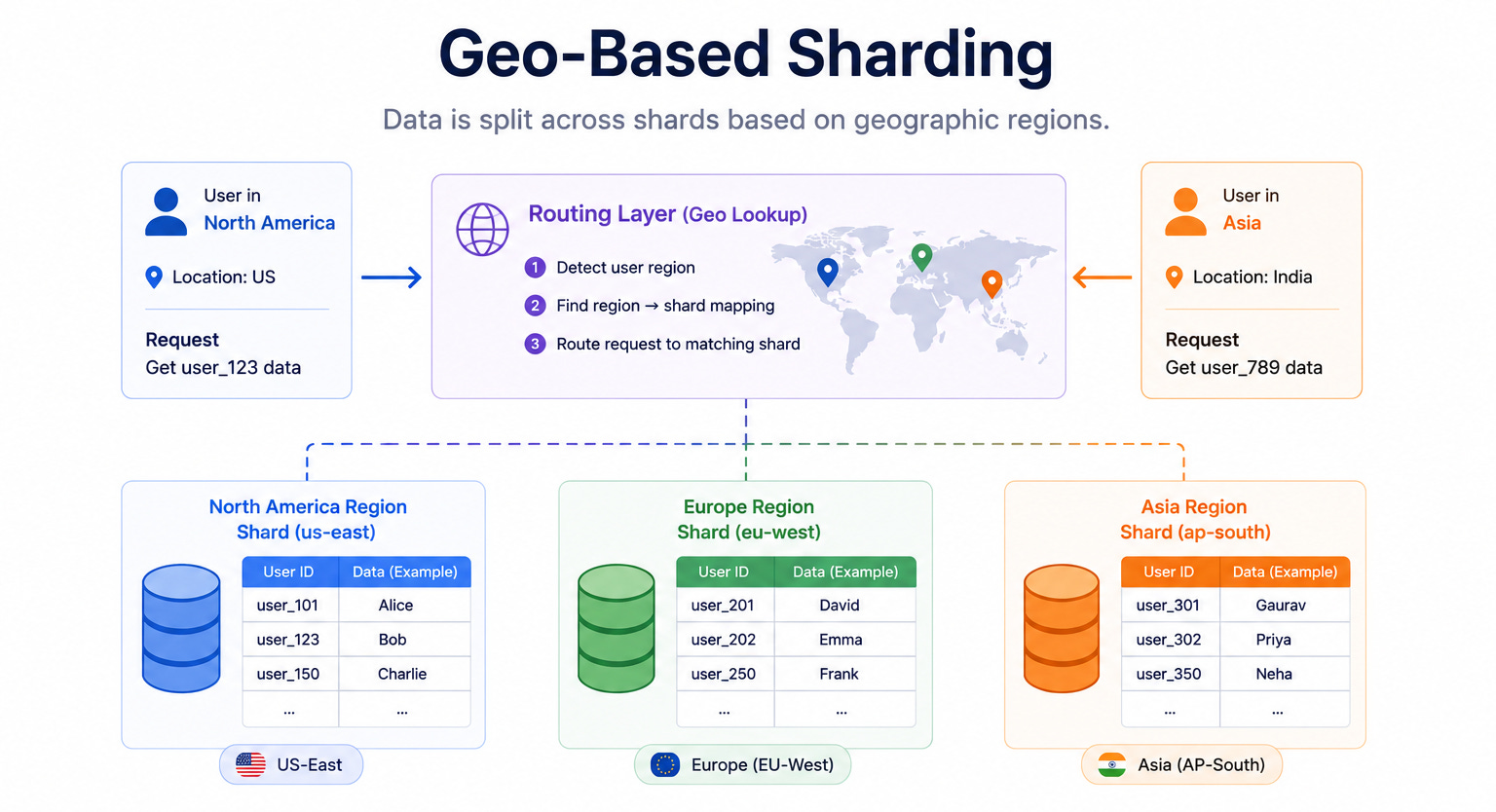
This diagram shows data split across shards based on geographic region. Records belonging to users in one region live on shards in that region, and records for another region live on shards there.
The database routes each request to the shard that matches the user’s location.
It keeps data close to users for low latency and data residency, but load can become uneven when some regions are far more active.
When to use it: Geo-based sharding fits global applications where users are spread across the world and low latency matters, or where laws require data to stay within a certain country.
The key insight: Geo sharding keeps data close to the users who need it, which lowers latency and helps meet data residency rules. The downside is uneven load, because some regions are far more active than others, which can leave certain shards overloaded.
Diagram 4: Directory-Based Sharding
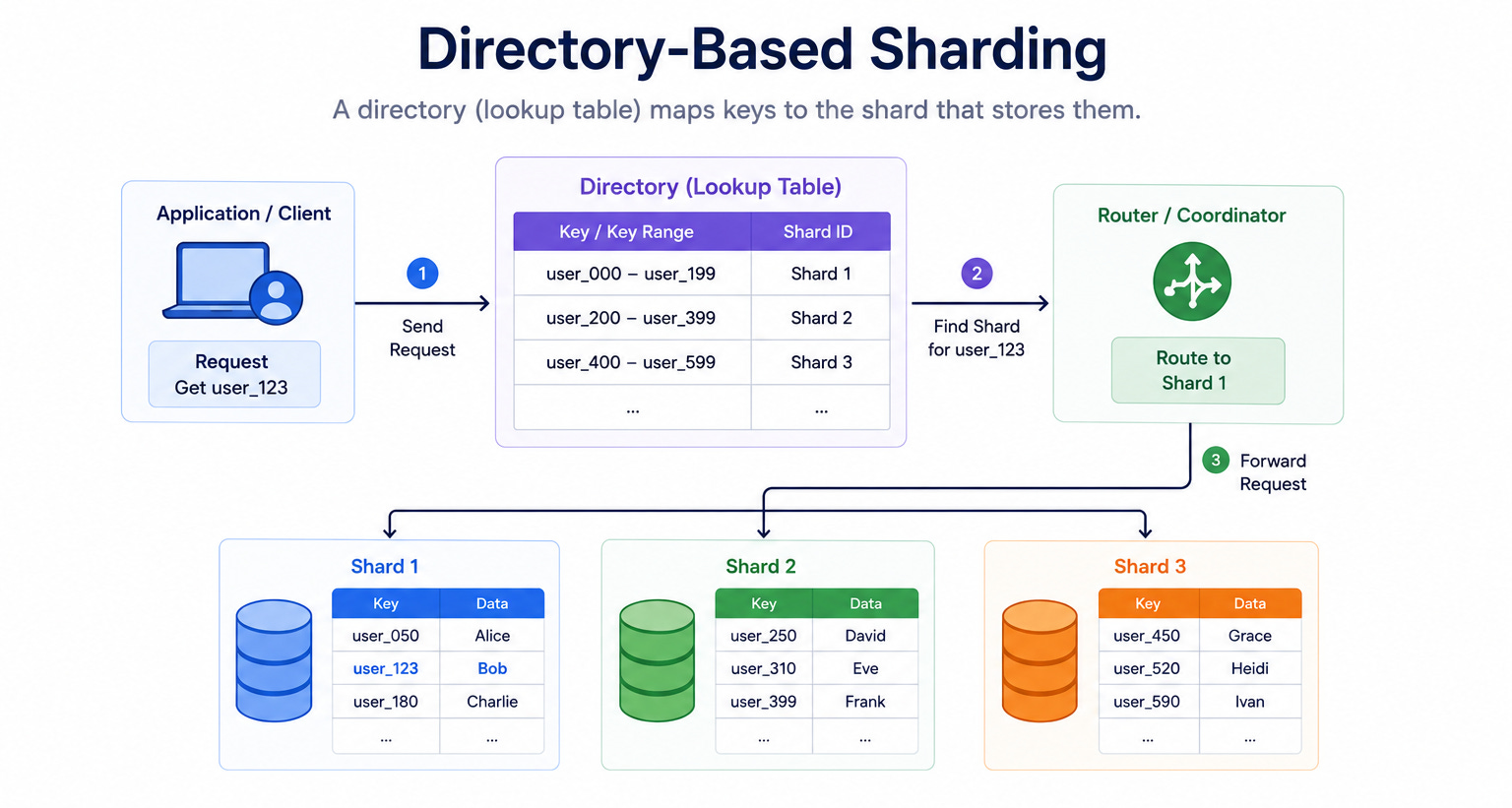
This diagram shows a lookup table, called a directory, that sits between the application and the shards.
The directory holds a mapping that says exactly which shard stores each key or group of keys. When a request arrives, the database first checks the directory to find the right shard, then sends the request there.
When to use it: Directory-based sharding fits situations that need flexibility, such as when shards must be rebalanced often or when the mapping rules change over time.
The key insight: The directory gives complete control over where data lives, which makes moving data between shards much easier. The trade-off is that the directory becomes an extra step on every request and a single point of failure if it is not made reliable.
Category 2: Replication Topologies
Diagram 5: Leader-Follower Replication
This diagram shows one machine acting as the leader and several others acting as followers.
The leader is the only machine that accepts writes. After every write, the leader copies the change to the followers.
The followers hold copies of the data and answer read requests, which spreads the read load across many machines.
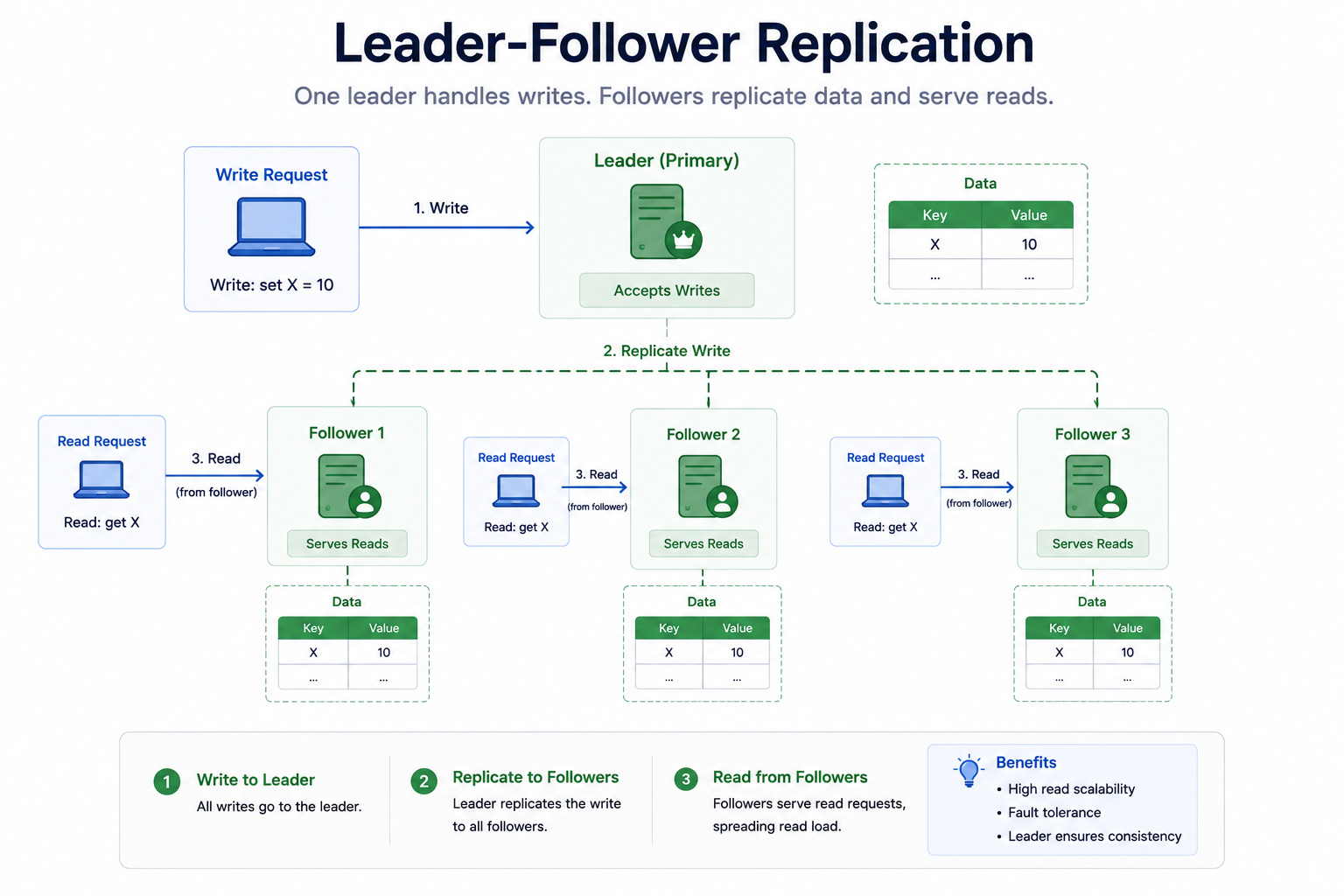
When to use it: Leader-follower replication is the most common starting point for scaling reads. It fits read-heavy systems where most traffic is people viewing data rather than changing it.
The key insight: This setup scales reads easily by adding more followers, but it does not scale writes because every write still goes through one leader. There is also a small delay, called replication lag, between when the leader gets a write and when the followers receive it.
Diagram 6: Multi-Leader Replication
This diagram shows multiple machines acting as leaders at the same time. Each leader accepts writes and then shares those writes with the other leaders.