
12 Caching Patterns Every Engineer Should Know: From Cache-Aside to Bloom Filters
From L1 to the CDN, the Essential Caching Diagrams That Separate Engineers Who Truly Understand Performance From Those Who Guess


What This Blog Will Cover
Read and write caching patterns
Cache layers and eviction policies
Stampede problem and its fix
Consistent hashing and cache topology
Bloom filters and HTTP headers
Caching is one of the most powerful ways to make a system fast.
A cache stores copies of frequently used data in a place that is quick to reach, so the system does not have to repeat slow work over and over. Almost every fast application in the world relies on caching somewhere in its design.
Yet caching is also one of the most misunderstood topics in engineering.
Many engineers know that caching makes things faster, but they cannot explain how a cache stays in sync with the database, what happens when a popular item expires, or how a cache spreads data across many machines.
This gap shows up in system design interviews and in real production incidents, where a poorly designed cache can cause more problems than it solves.
The best way to understand caching is to think in patterns. Each caching pattern solves a specific problem and comes with its own trade-offs.
Once these patterns are clear, caching stops feeling like guesswork and starts feeling like a set of reliable tools.
The engineer who can picture each pattern knows exactly which one to reach for in any situation.
This guide covers twelve caching patterns that, together, explain how modern caching really works. Each one is explained in plain language.
For every pattern, there is a short description of what it is, when to use it, and the single most important idea it captures.
The goal is to make these patterns simple enough to draw from memory.
A Quick Word on How Caches Work
Two ideas appear throughout this guide, so it helps to define them early.
A cache hit happens when the data a request needs is already in the cache, so the system returns it quickly.
A cache miss happens when the data is not in the cache, so the system must fetch it from the slower source, usually a database, and often store a copy for next time.
The whole goal of caching is to turn as many requests as possible into cache hits.
The patterns below are different ways to do that while keeping the data correct and the system reliable.
Category 1: Read and Write Flow Patterns
Diagram 1: Cache-Aside
This diagram shows the application checking the cache before going to the database.
If the data is in the cache, it is returned right away.
If it is not, the application reads from the database, stores a copy in the cache, and then returns it. The application itself manages what goes into the cache.
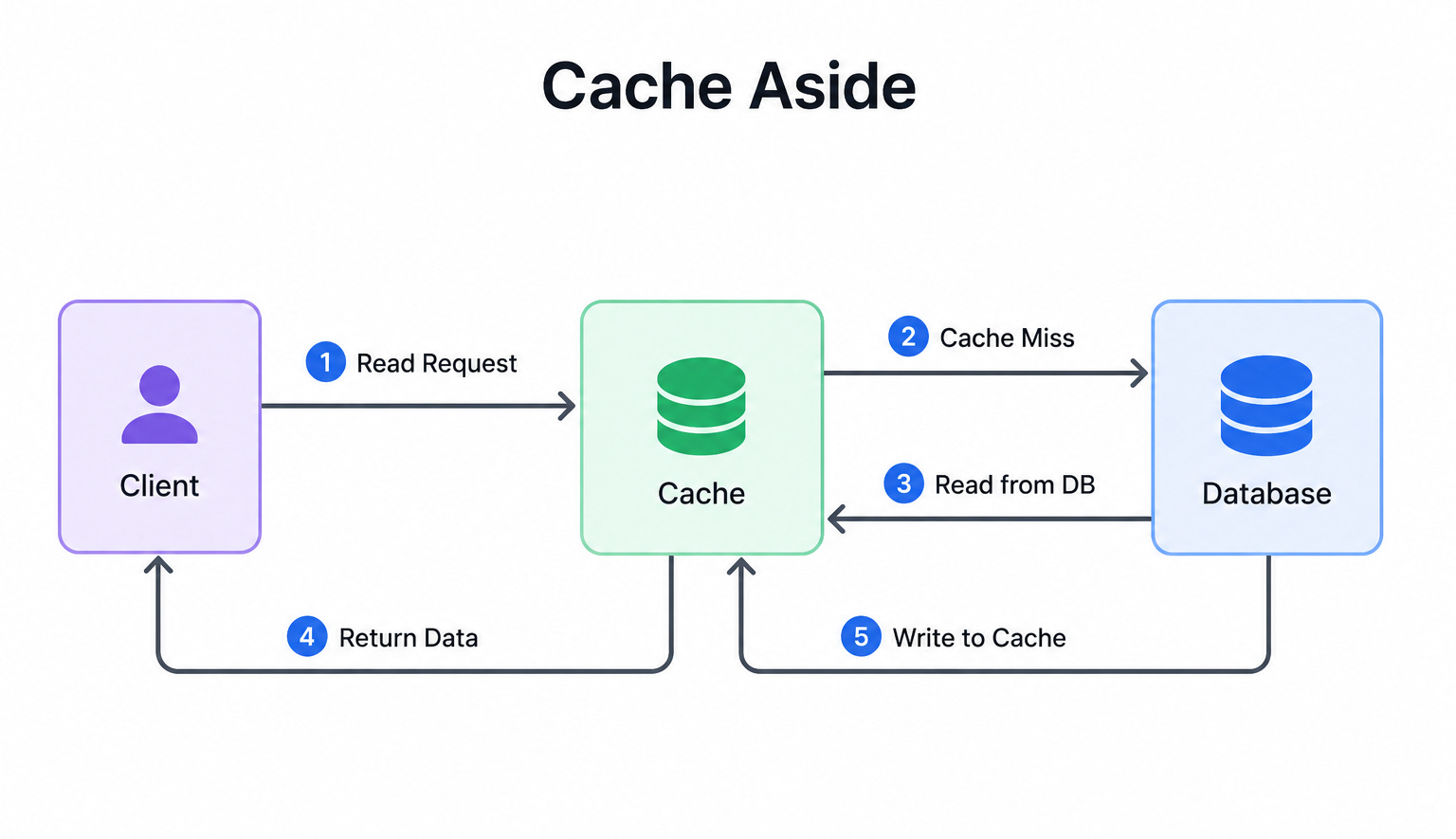
When to use it: Cache-aside fits read-heavy systems where the same data is requested many times, such as user profiles or product details.
The key insight: The cache fills up only with data that is actually requested, which keeps it efficient. The trade-off is that the first request for any item is always a miss and therefore slow, and the cache can become stale if the database is updated without clearing the matching cache entry.
Diagram 2: Write-Through
This diagram shows the cache sitting directly in the write path.
When the application writes data, it writes to the cache and the database at the same time. Both are updated together before the write is considered complete. This keeps the cache and the database in sync at all times.
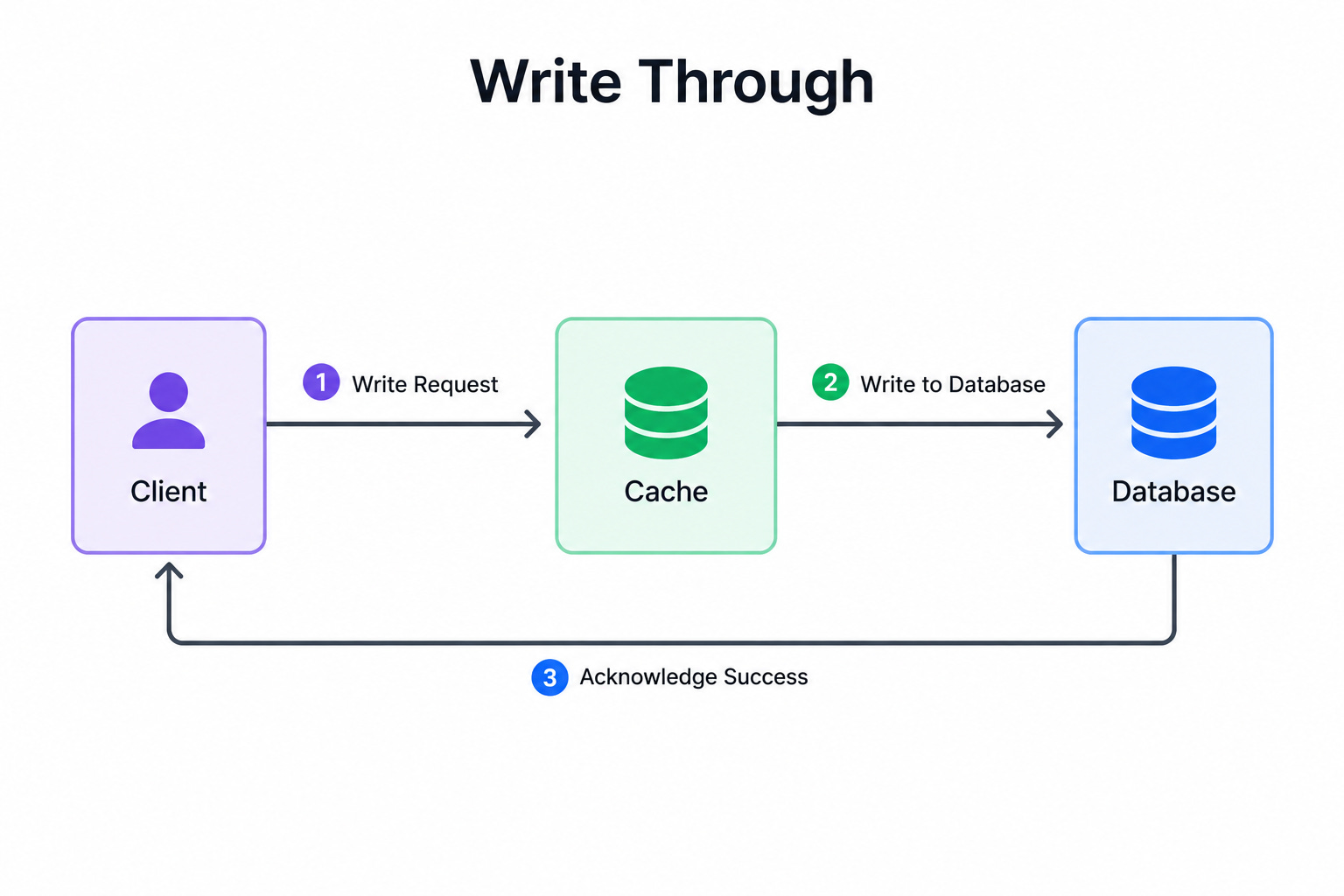
When to use it: Write-through fits systems where reads must always return fresh data and stale values cannot be tolerated.
The key insight: Write-through guarantees the cache and database always match, which makes reads both fast and correct. The cost is slower writes, because every write must update two places instead of one.
Diagram 3: Write-Behind
This diagram shows the application writing only to the cache and getting an immediate response.
The cache then writes the data to the database later, often in batches, in the background.
The database catches up shortly after the write, not at the exact moment of the write.
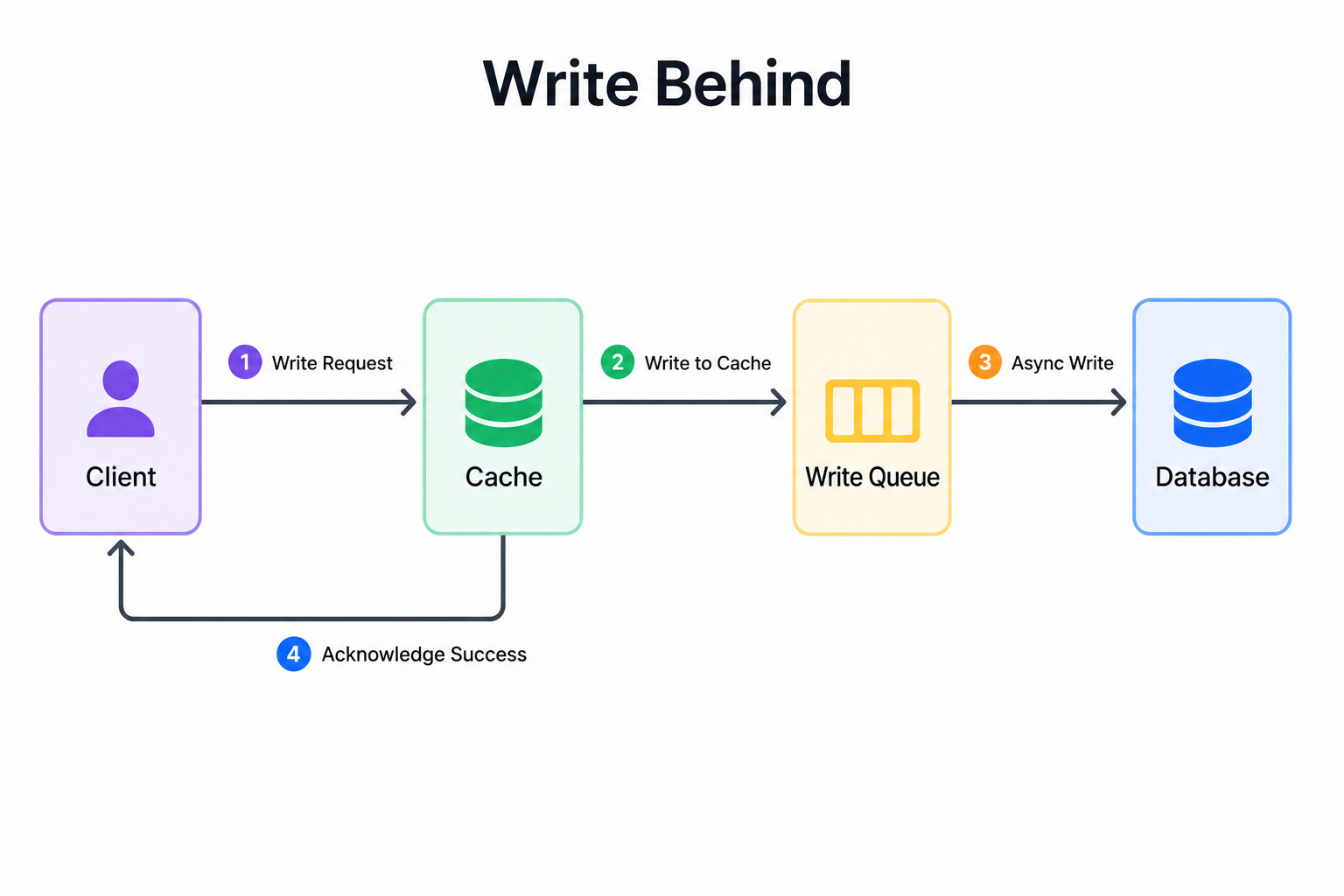
When to use it: Write-behind fits write-heavy systems that need very fast write responses and can tolerate a short delay before data reaches the database.
The key insight: Write-behind makes writes extremely fast because the slow database write happens later and out of the request path. The danger is data loss. If the cache crashes before flushing its data to the database, those writes disappear.
Diagram 4: Refresh-Ahead
This diagram shows the cache refreshing popular items before they expire.
Instead of waiting for an item to expire and cause a slow miss, the cache predicts which items will be needed soon and reloads them in advance. This keeps hot data fresh and ready before any request arrives.
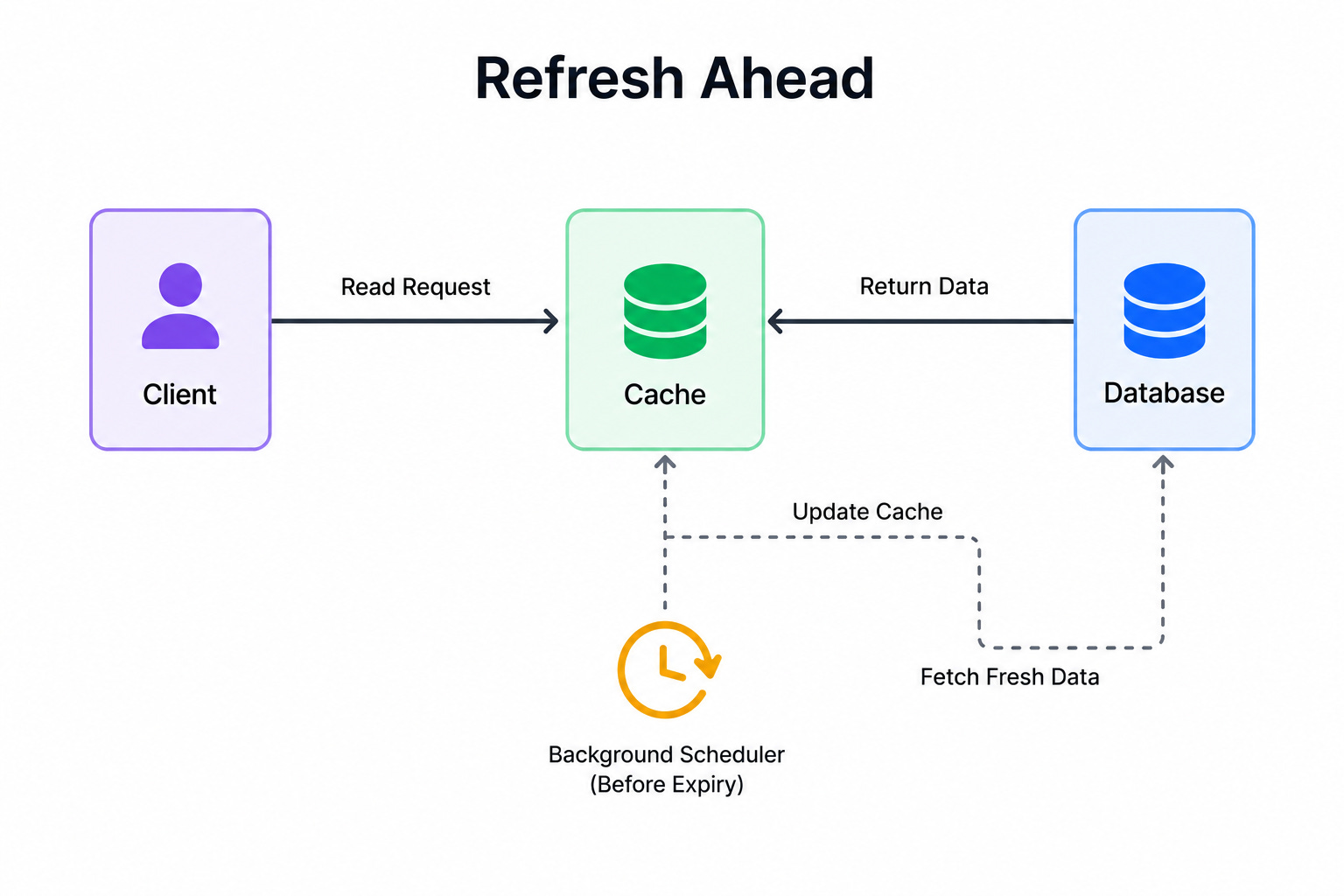
When to use it: Refresh-ahead fits systems with predictable hot data that is accessed constantly, where even a single slow miss on a popular item is unwanted.
The key insight: Refresh-ahead hides the cost of misses by reloading data before anyone asks for it, keeping latency low for popular items. The trade-off is wasted work when the prediction is wrong and the system refreshes data that no one ends up needing.
Category 2: Cache Layers and Eviction
Diagram 5: Cache Hierarchy From L1 to CDN
This diagram shows the layers of caching that data can pass through, from closest to the processor out to the edge of the network.
The innermost layers are tiny and extremely fast, such as the cache inside the processor. Moving outward, there is the in-process memory cache, then a shared distributed cache like a dedicated cache server, and finally a content delivery network that stores copies near users around the world.
When to use it: This diagram is useful when designing a system that needs speed at multiple levels, or when explaining where a particular cache fits in the bigger picture.
The key insight: Each layer outward is larger but slower than the one before it. The closer a cache sits to where the data is used, the faster it is, but the less it can hold. A good design serves as much traffic as possible from the closest layer that makes sense.
Diagram 6: Cache Stampede
This diagram shows what happens when a popular cached item expires and many requests arrive at the same moment. Because the item is gone from the cache, every one of those requests misses and rushes to the database at once to rebuild the same value.
The database is suddenly hit by a flood of identical, expensive queries.
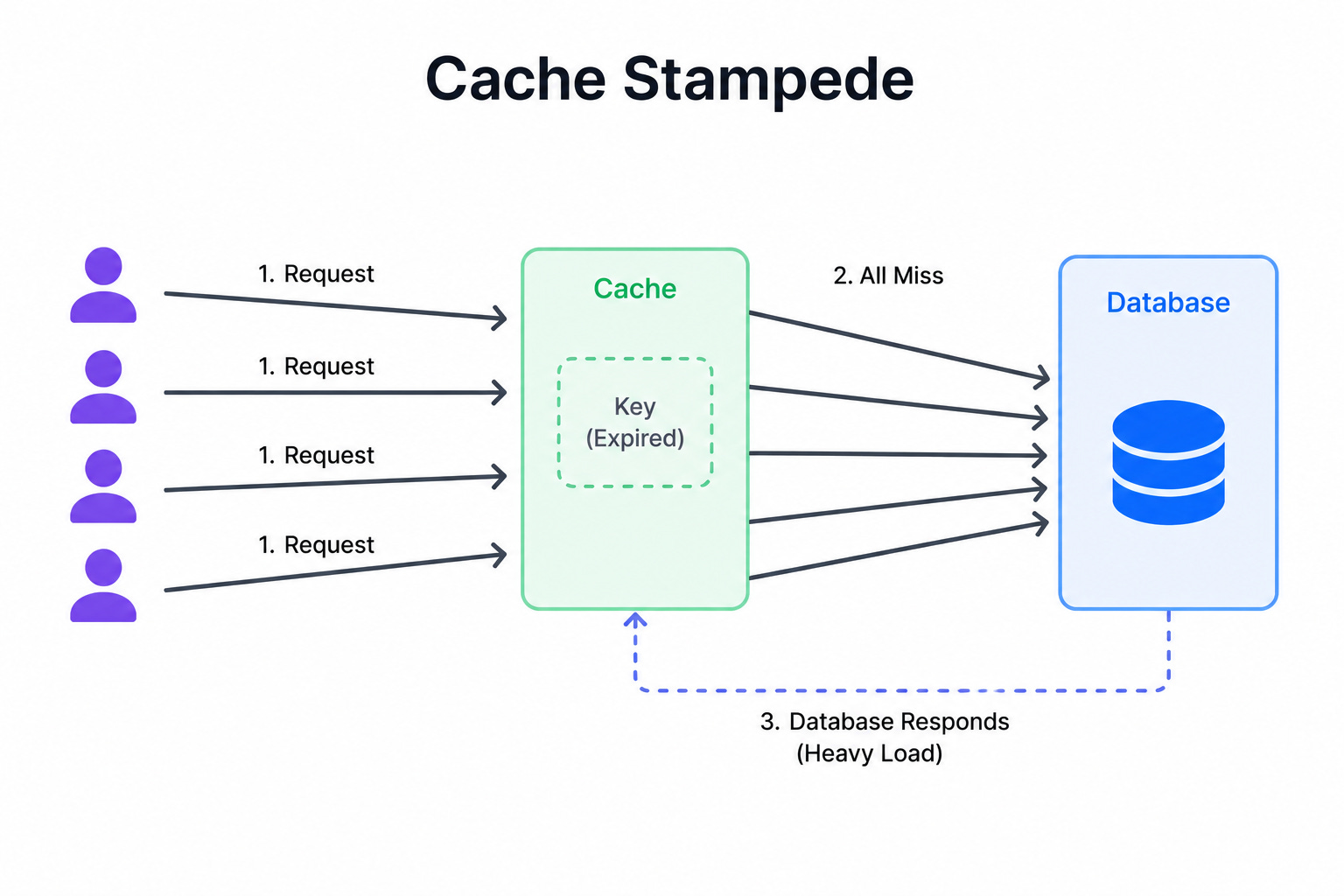
When to use it: This diagram is useful when discussing what happens under heavy load, especially around popular items with expiration times.